
JavaFX Convenience Methods
The JavaFX allows us to use various convenience methods to handle events on various nodes in JavaFX applications. The convenience methods provides us easy and effective way to add any event handler like MouseEvent, KeyEvent, ActionEvent on different JavaFX application nodes. Setters methods are generally used to apply various properties on nodes to handle various events using event handler properties. The convenience methods helps us to automatically register handlers with particular components to receive specific event handlers.
Convenience methods in JavaFX to support Event Handling.
- onKeyPressed: This is KeyEvent handler type property. It is assigned by the user to particular function, when the node encounters action of key pressed.
- onKeyReleased: This is KeyEvent handler type property. It is assigned by the user to particular function, when the node encounters action of key released.
- onKeyTyped: This is KeyEvent handler type property. It is assigned by the user to particular function, when the node encounters action of key typed.
- onMouseClicked: This is MouseEvent handler type property. It is assigned by the user to particular function, when the node encounters action of mouse clicking.
- onMouseDragged: This is MouseEvent handler type property. It is assigned by the user to particular function, when the node encounters action of mouse dragging.
- onMouseEntered: This is MouseEvent handler type property. It is assigned by the user to particular function, when the mouse enters the scope of the node.
- onMouseExited: This is MouseEvent handler type property. It is assigned by the user to particular function, when the mouse exits the scope of the node.
- onMouseMoved: This is MouseEvent handler type property. It is assigned by the user to particular function, when the mouse moves within the node without pressing any button.
- onMousePressed: This is MouseEvent handler type property. It is assigned by the user to particular function, when the node encounters action of mouse pressing.
- onMouseReleased: This is MouseEvent handler type property. It is assigned by the user to particular function, when the node encounters action of mouse releasing.
- onRotate: This is RotateEvent handler type property. It is assigned by the user to particular function, when the node encounters action of rotation on particular node.
- onRotationStarted: This is RotateEvent handler type property. It is assigned by the user to particular function, when the node encounters action of starting rotation on particular node.
- onRotationFinished: This is RotateEvent handler type property. It is assigned by the user to particular function, when the node encounters action of finishing rotation on particular node.
- onScroll: This is ScrollEvent handler type property. It is assigned by the user to particular function, when the node encounters action of scrolling on particular node.
The above properties used with setters helps to handle various events hence they are called as convenience methods, for e.g.
JavaFX Convenience Method
Example:
import javafx.animation.TranslateTransition;
import javafx.application.Application;
import javafx.event.EventHandler;
import javafx.scene.Group;
import javafx.scene.Scene;
import javafx.scene.control.Button;
import javafx.scene.input.MouseEvent;
import javafx.scene.paint.Color;
import javafx.scene.shape.Circle;
import javafx.stage.Stage;
import javafx.util.Duration;
public class EventUI extends Application{
@Override
public void start(Stage primaryStage) throws Exception {

    Circle c = new Circle(100,100,50);
    c.setFill(Color.RED);
    c.setStroke(Color.BLACK);

    Button btn = new Button("Move");
    btn.setTranslateX(145);
    btn.setTranslateY(220);

    Button btn1 = new Button("Stop");
    btn1.setTranslateX(195);
    btn1.setTranslateY(220);

    TranslateTransition trans = new TranslateTransition();
    trans.setAutoReverse(true);
    trans.setByX(200);
    trans.setCycleCount(100);
    trans.setDuration(Duration.millis(500));
    trans.setNode(c);

    EventHandler<MouseEvent> handler = new EventHandler<MouseEvent>() {

        @Override
        public void handle(MouseEvent event) {
            // TODO Auto-generated method stub

            if(event.getSource()==btn)
            {
            trans.play();
            }
            if(event.getSource()==btn1)
            {
                trans.pause();
            }
            event.consume();
        }

    };

    btn.setOnMouseClicked(handler);
    btn1.setOnMouseClicked(handler);

    Group root = new Group();
    root.getChildren().addAll(c,btn,btn1);
    Scene scene = new Scene(root,420,300);
    primaryStage.setScene(scene);
    primaryStage.setTitle("Javafx Convinience methods example");
    primaryStage.show();
}
public static void main(String[] args) {
    launch(args);
}
}
Output:
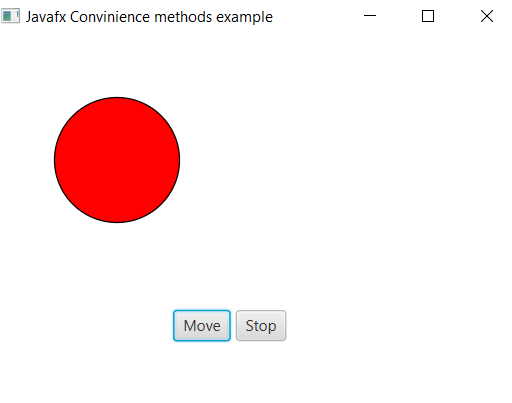
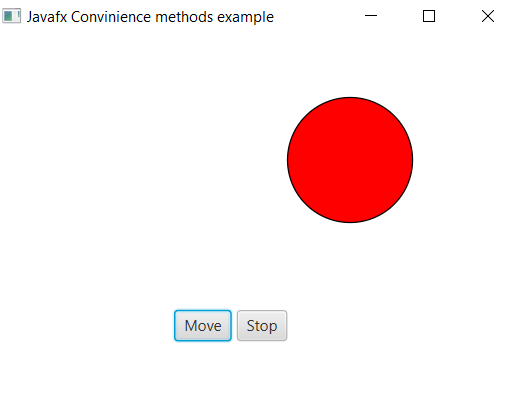
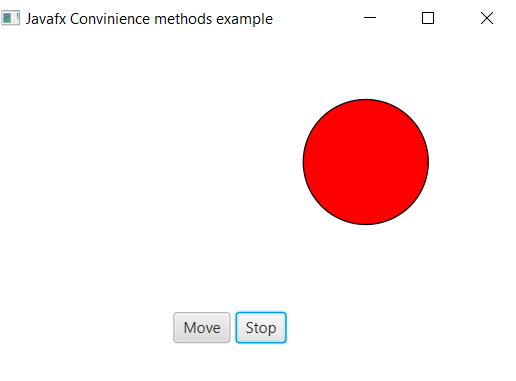
Explanation:
In order to create the event on any given components in JavaFX using convenience method, we have to import all the required libraries. Then we have created one class named EventUI extending the Application class. Also, we have to override the start method to provide implementation details. This method creates an object of Stage as primaryStage. For the container to hold various components with the event handlers, a Group object is created which is then passed to the Scene class object.
The circle is created using the constructor. Then the properties are set using the setters method. Two buttons are created one to move and one to stop the moving circle. The setOnMouseClicked() convenience method I used to register the event.
The stage is prepared, the title is set and the show() method is called to display output. In order to run the application, the launch(args) method is called in the main() method. In output Frame like container is displayed with title “ Javafx Convinience methods example”. Also, it displays circle which will move when move button clicked and stop when stop button pressed.