JavaFX HyperLink
In the JavaFX application, in order to access and use webpages, hyperlinks are used. In HTML anchor tags are used in the same way in JavaFX hyperlinks are used. To use hyperlinks in JavaFX, javafx.scene.control.HyperLink class is used. All the necessary methods required for dealing with a hyperlink are available in JavaFX.
JavaFX HyperLink:
Example:
import javafx.application.Application;
import javafx.scene.Scene;
import javafx.scene.control.Hyperlink;
import javafx.scene.layout.StackPane;
import javafx.stage.Stage;


public class HyperLinkUI extends Application {


    @Override
    public void start(Stage primaryStage) throws Exception
    {
        Hyperlink hpl = new Hyperlink("https://www.wikipedia.org");
        StackPane pane = new StackPane();
        pane.getChildren().add(hpl);
        Scene scn=new Scene(pane,600,400);
        primaryStage.setScene(scn);
        primaryStage.setTitle(" JavaFX Hyperlink Example");
        primaryStage.show();
        }
    public static void main(String[] args) {
        Application.launch(args);
    }
}
Output:
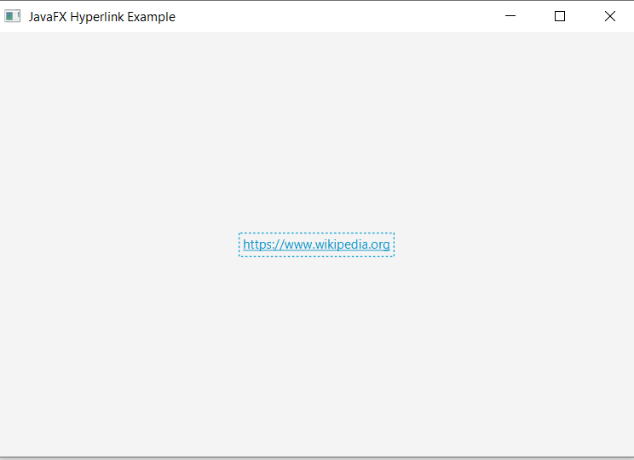
In order to create the HyperLink in JavaFX, we have to import all the required libraries such as javafx.application.Application, javafx.scene.Scene, javafx.stage.Stage, javafx.scene.control.HyperLink, javafx.scene.layout.StackPane.
Then we have created one class named HyperLinkUI extending the Application class. Also, we have to override the start method to provide implementation details. This method creates an object of Stage as primaryStage. For the container to hold hyperlink, a StackPane object is created which is then passed to the Scene class object.
The HyperLink is created with its constructor having a link passed in it.
The stage is prepared, the title is set and the show() method is called to display output. In order to run the application, launch(args) method is called in the main() method. In output Frame like container is displayed with the title, “ JavaFX HyperLink Example ”. Also, it displays HyperLink for the Wikipedia website.
JavaFX HyperLink Action:
Example:
import javafx.application.Application;
import javafx.scene.Scene;
import javafx.scene.control.Hyperlink;
import javafx.scene.layout.StackPane;
import javafx.stage.Stage;


public class HyperLinkUI extends Application {


    @Override
    public void start(Stage primaryStage) throws Exception
    {
    Hyperlink hpl = new Hyperlink("http://www.google.com");
        StackPane pane = new StackPane();
        hpl.setOnAction(e -> System.out.println(" Google Chrome link is Clicked by the user "));
        pane.getChildren().add(hpl);
        Scene scn=new Scene(pane,600,400);
        primaryStage.setScene(scn);
        primaryStage.setTitle(" JavaFX Hyperlink Example");
        primaryStage.show();
        }
    public static void main(String[] args) {
        Application.launch(args);
    }
}
Output:
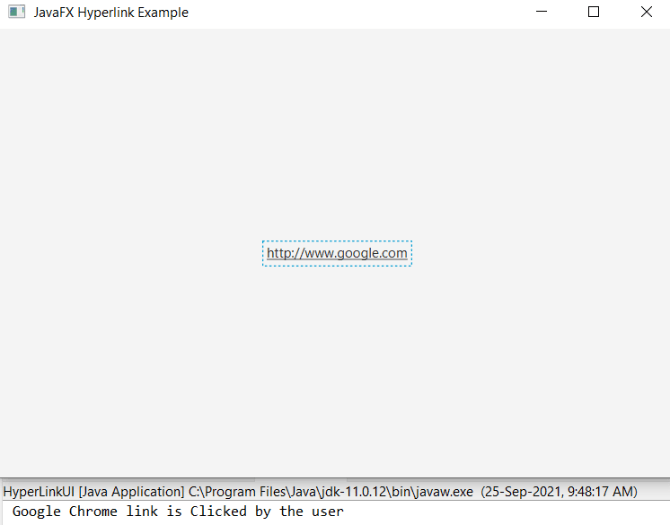
In order to create the HyperLink and action on it in JavaFX, we have to import all the required libraries such as javafx.application.Application, javafx.scene.Scene, javafx.stage.Stage, javafx.scene.control.HyperLink, javafx.scene.layout.StackPane.
Then we have created one class named HyperLinkUI extending the Application class. Also, we have to override the start method to provide implementation details. This method creates an object of Stage as primaryStage. For the container to hold HyperLink, a StackPane object is created which is then passed to the Scene class object.
The HyperLink is created with its constructor and link passed in it. Also, the action is set on it using the setOnAction() method which will show the Google Chrome link is Clicked by the user when the www.google.com link in the container is clicked.
The stage is prepared, the title is set and the show() method is called to display output. In order to run the application, the launch(args) method is called in the main() method. In output Frame like container is displayed with the title, "JavaFX Hyperlink Example ”. Also, it displays HyperLink for google. After clicking on that HyperLink the output is displayed in the console saying the Google Chrome link is Clicked by the user.
JavaFX Graphics HyperLink :
Example:
import java.io.FileInputStream;
import javafx.application.Application;
import javafx.scene.Scene;
import javafx.scene.control.Hyperlink;
import javafx.scene.image.Image;
import javafx.scene.image.ImageView;
import javafx.scene.layout.StackPane;
import javafx.stage.Stage;


public class HyperLinkUI extends Application {


    @Override
    public void start(Stage primaryStage) throws Exception
    {
    Hyperlink hpl = new Hyperlink();
        hpl.setOnAction(e -> System.out.println("Hyperlink with Home icon clicked"));
        FileInputStream file = new FileInputStream("home.jpg");
        Image newimg = new Image(file);
        ImageView newview=new ImageView(newimg);
        hpl.setGraphic(newview);
        StackPane pane = new StackPane();
        pane.getChildren().add(hpl);
        Scene scene = new Scene(pane,600,400);
        primaryStage.setScene(scene);
        primaryStage.setTitle("JavaFx Icon Hyperlink Example");
        primaryStage.show();
        }
    public static void main(String[] args) {
        Application.launch(args);
    }
}
Output:
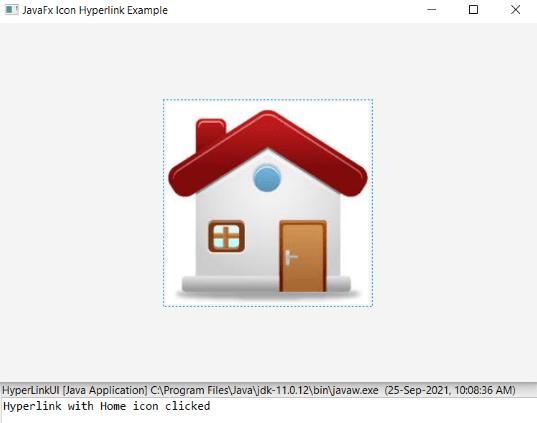
In order to create the Graphics HyperLink and action on it in JavaFX, we have to import all the required libraries such as javafx.application.Application, javafx.scene.Scene, javafx.stage.Stage, javafx.scene.control.HyperLink, javafx.scene.layout.StackPane, java.io.FileInputStream, import javafx.scene.image.Image, and javafx.scene.image.ImageView.
Then we have created one class named HyperLinkUI extending the Application class. Also, we have to override the start method to provide implementation details. This method creates an object of Stage as primaryStage. For the container to hold HyperLink with Home Icon, a StackPane object is created which is then passed to the Scene class object.
The HyperLink is created with its constructor. Also, the action is set on it using the setOnAction() method which will show Hyperlink with Home icon clicked, when Home Icon link in the container is clicked.
The stage is prepared, the title is set and the show() method is called to display output. In order to run the application, the launch(args) method is called in the main() method. In output Frame like container is displayed with the title, "JavaFX Icon Hyperlink Example ”. Also, it displays HyperLink with Home Icon. After clicking on that HyperLink the output is displayed in the console saying Hyperlink with Home icon clicked.