JavaFX Scatter Chart
In the JavaFX application, in order to create Scatter Chart, the ScatterChart class is used. The Scatter Chart allows us to plot data along the x and y axis of the plane. All methods needed for this purpose are present in the javafx.scene.chart.ScatterChart class.
The constructor of the Scatter Chart:
1. ScatterChart(Axis x, Axis y):
It is used to create the scatter Chart with specified x and y-axis.
2. ScatterChart(Axis x, Axis y, ObseravableList newlist):
It is used to create a scatter Chart with specified x, y-axis, and specified new data.
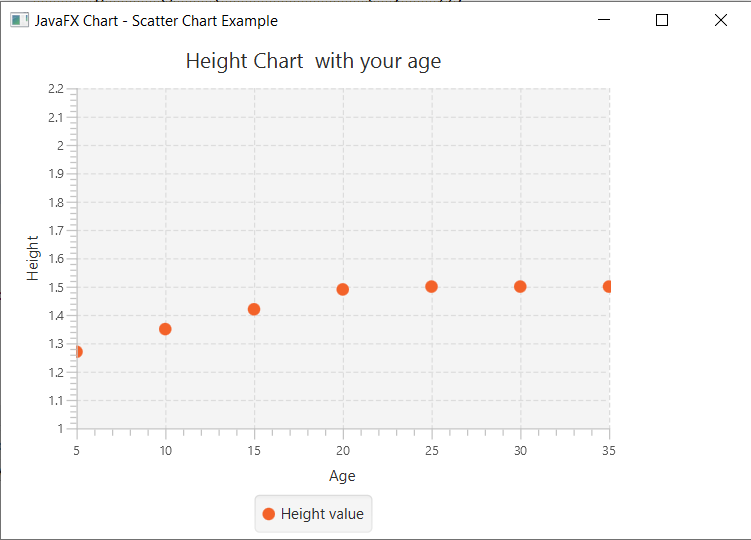
Charts in JavaFX applications- Scatter Chart showing Age-Height relation:
Example:
import javafx.application.Application;
import javafx.scene.Group;
import javafx.scene.Scene;
import javafx.scene.chart.NumberAxis;
import javafx.scene.chart.ScatterChart;
import javafx.scene.chart.XYChart;
import javafx.stage.Stage;


public class SliderUI extends Application {


    @Override
    public void start(Stage primaryStage) throws Exception
    {
      NumberAxis xaxis = new NumberAxis(5,35,5);
          NumberAxis yaxis = new NumberAxis(1,2.2,0.1);
          xaxis.setLabel("Age");
          yaxis.setLabel("Height");

          ScatterChart s = new ScatterChart(xaxis,yaxis);
          s.setTitle("Height Chart  with your age");

          XYChart.Series series = new XYChart.Series();
          series.setName("Height value");
          series.getData().add(new XYChart.Data(5,1.27));
          series.getData().add(new XYChart.Data(10,1.35));
          series.getData().add(new XYChart.Data(15,1.42));
          series.getData().add(new XYChart.Data(20,1.49));
          series.getData().add(new XYChart.Data(25,1.50));
          series.getData().add(new XYChart.Data(30,1.50));
          series.getData().add(new XYChart.Data(35,1.50));


          s.getData().add(series);

          Group root = new Group();
          root.getChildren().add(s);
          Scene scene = new Scene(root,600,400);
        primaryStage.setScene(scene);
        primaryStage.setTitle("JavaFX Chart - Scatter Chart Example");
        primaryStage.show();

    }

    public static void main(String[] args) {
        launch(args);
    }
}
Output:
In order to create the Scatter Chart in JavaFX, we have to import all the required libraries such as javafx.application.Application, javafx.scene.Group, javafx.scene.Scene, javafx.scene.chart.NumberAxis, javafx.scene.chart.ScatterChart, javafx.scene.chart.XYChart, javafx.stage.Stage.
Then we have created one class named SliderUI extending the Application class. Also, we have to override the start method to provide implementation details. This method creates an object of Stage as primaryStage. For the container to hold a Scatter Chart, a ScatterChart object is created which is then passed to the Scene class object.
Scatter Chart is created with the help of its constructor with the x axis and y axis passed in the constructor. XYSeries data is created and passed to the constructor.
The stage is prepared, the title is set and the show() method is called to display output. In order to run the application, the launch(args) method is invoked. In output Frame like container is displayed with the title, " JavaFX Chart – Scatter Chart Example". Also, it displays a scatter chart showing the age and height relationship.
Charts in JavaFX applications- Scatter Chart showing Population data:
Example:
import javafx.application.Application;
import javafx.collections.FXCollections;
import javafx.collections.ObservableList;
import javafx.scene.Group;
import javafx.scene.Scene;
import javafx.scene.chart.CategoryAxis;
import javafx.scene.chart.NumberAxis;
import javafx.scene.chart.ScatterChart;
import javafx.scene.chart.XYChart;
import javafx.stage.Stage;
import javafx.scene.chart.XYChart.Series;
import javafx.scene.layout.StackPane;


public class SliderUI extends Application {


    @Override
    public void start(Stage primaryStage) throws Exception
    {
    CategoryAxis newxAxis = new CategoryAxis();
         NumberAxis newyAxis = new NumberAxis();
         ScatterChart scatterChart = new ScatterChart(newxAxis, newyAxis);
         scatterChart.setData(getChartData());
         scatterChart.setTitle("Population");
         primaryStage.setTitle("Javafx Scatter Chart example");


         StackPane root = new StackPane();
         root.getChildren().add(scatterChart);
         primaryStage.setScene(new Scene(root, 600, 550));
         primaryStage.show();
     }


     private ObservableList<XYChart.Series<String, Double>> getChartData() {
       double xValue = 1.56;
       double yValue = 1.06;
       ObservableList<XYChart.Series<String, Double>> answer = FXCollections.observableArrayList();
       Series<String, Double> xSeries = new Series<String, Double>();
       Series<String, Double> ySeries = new Series<String, Double>();
       xSeries.setName("X");

       for (int i = 2001; i < 2011; i++) {
           xSeries.getData().add(new XYChart.Data(Integer.toString(i), xValue));
           xValue = xValue + Math.random() - .5;
           ySeries.getData().add(new XYChart.Data(Integer.toString(i), yValue));
           yValue = yValue + Math.random() - .5;
       }
       answer.addAll(xSeries, ySeries);
       return answer;
     }


    public static void main(String[] args) {
        launch(args);
    }
}
Output:
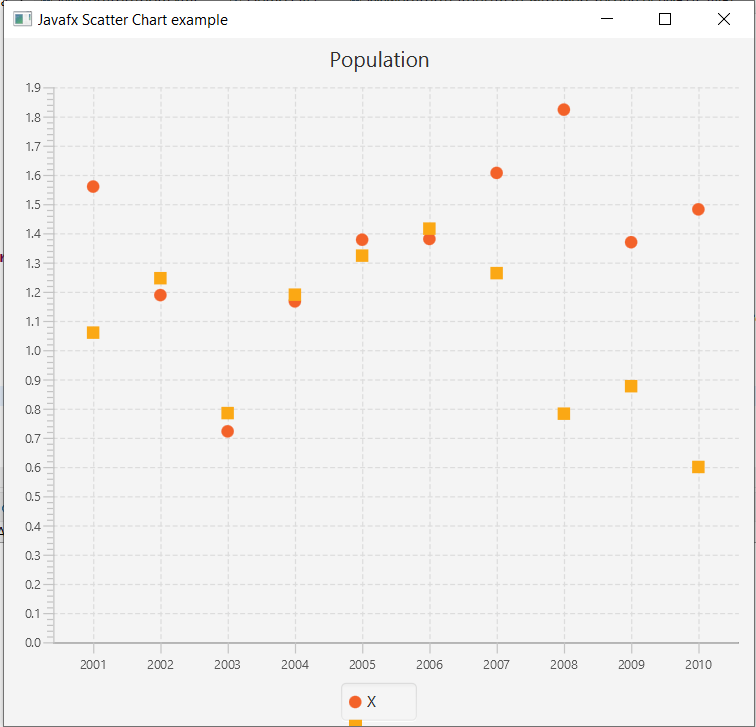
In order to create the Scatter Chart in JavaFX, we have to import all the required libraries such as javafx.application.Application, javafx.collections.FXCollections, javafx.collections.ObservableList, javafx.scene.Group, javafx.scene.Scene, javafx.scene.chart.CategoryAxis, javafx.scene.chart.NumberAxis, javafx.scene.chart.ScatterChart, javafx.scene.chart.XYChart, javafx.stage.Stage, javafx.scene.chart.XYChart.Series, javafx.scene.layout.StackPane.
Then we have created one class named SliderUI extending the Application class. Also, we have to override the start method to provide implementation details. This method creates an object of Stage as primaryStage. For the container to hold a Population Scatter Chart, a ScatterChart object is created which is then passed to the Scene class object.
Scatter Chart is created with the help of its constructor with the x axis and y axis passed in the constructor. XYSeries data is created and passed to the constructor.
The stage is prepared, the title is set and the show() method is called to display output. In order to run the application, the launch(args) method is invoked. In output Frame like container is displayed with the title, " JavaFX Chart – Scatter Chart Example". Also, it displays a scatter chart showing the population among the x and y axis.