
×

JavaFX Area Chart

In the JavaFX application, in order to create Area Chart, the AreaChart class is used. The Area Chart allows us to plot data along the XY plane. All methods needed for this purpose are present in the javafx.scene.chart.AreaChart class. JavaFX Area Chart is generally used to represent quantitative data. This chart is used to plot the area from given points. The Line Chart only joins the data point but the Area Chart highlights the area covered under the given points.

The constructor of the Area Chart:

1. AreaChart(Axis x, Axis y):

It is used to create the Area Chart with specified x and y-axis.

2. AreaChart(Axis x, Axis y, ObseravableList newlist):

It is used to create Area Chart with specified x, y-axis, and specified new data.

Property of the Area Chart:

1. createSymbols:

This property is the Boolean property when it is set to true it shows that the symbols can be created for given data items for those symbols nodes are not given. setCreateSymbols(Boolean value) method is used to set this property.

Charts in JavaFX applications- Area Chart showing rainfall along different months:

Example:

import javafx.application.Application;
import javafx.scene.Group;
import javafx.scene.Scene;
import javafx.scene.chart.AreaChart;
import javafx.scene.chart.CategoryAxis;
import javafx.scene.chart.NumberAxis;
import javafx.scene.chart.XYChart;
import javafx.stage.Stage;


public class ChartUI extends Application 
{  


    @Override  
    public void start( Stage primaryStage ) throws Exception 
    {  
       CategoryAxis newxAxis = new CategoryAxis();  
           
          //defining the y Axis 
          NumberAxis newyAxis = new NumberAxis(100, 3000, 1500); 
          newyAxis.setLabel(" Rainfall ");  
          
          //Creating the Area chart 
          AreaChart<String, Number> areaChart = new AreaChart( newxAxis, newyAxis );
          areaChart.setTitle(" Average rainfall during  months ");        
             
          //Prepare XYChart.Series objects by setting data  
          XYChart.Series series1 = new XYChart.Series();  
          series1.setName(" Months "); 
          series1.getData().add(new XYChart.Data(" Jan ", 500)); 
          series1.getData().add(new XYChart.Data(" Feb ", 500)); 
          series1.getData().add(new XYChart.Data(" March ", 300)); 
          series1.getData().add(new XYChart.Data(" April " , 500)); 
          series1.getData().add(new XYChart.Data(" May ", 400));
          series1.getData().add(new XYChart.Data(" June ", 1000));  
          series1.getData().add(new XYChart.Data(" July ", 2200)); 
          series1.getData().add(new XYChart.Data(" August ", 3000)); 
          series1.getData().add(new XYChart.Data(" Sept ", 2000)); 
         
                    
          areaChart.getData().addAll(series1); 
             
          //Creating a Group object  
          Group root = new Group( areaChart ); 
             
          //Creating a scene object 
          Scene scene = new Scene( root, 600, 400 );  
        primaryStage.setScene(scene);  
        primaryStage.setTitle(" JavaFX Chart - Area Chart Example ");  
        primaryStage.show();  
          
    }  
      
    public static void main(String[] args) {  
        launch(args);  
    }  
}

Output:

In order to create the Area Chart in JavaFX, we have to import all the required libraries such as javafx.application.Application, javafx.scene.Group, javafx.scene.Scene, javafx.scene.chart.AreaChart, javafx.scene.chart.CategoryAxis, javafx.scene.chart.NumberAxis, javafx.scene.chart.XYChart, javafx.stage.Stage.

Then we have created one class named ChartUI extending the Application class. Also, we have to override the start method to provide implementation details. This method creates an object of Stage as primaryStage. For the container to hold an Area Chart, an AreaChart object is created which is then passed to the Scene class object.

Area Chart is created with the help of its constructor with the x axis and y axis passed n the constructor. XYSeries data is created and passed to the constructor.

The stage is prepared, the title is set and the show() method is called to display output. In order to run the application, the launch(args) method is invoked. In output Frame like container is displayed with the title, " JavaFX Chart – Area Chart Example". Also, it displays an area chart showing the rainfall along different months.
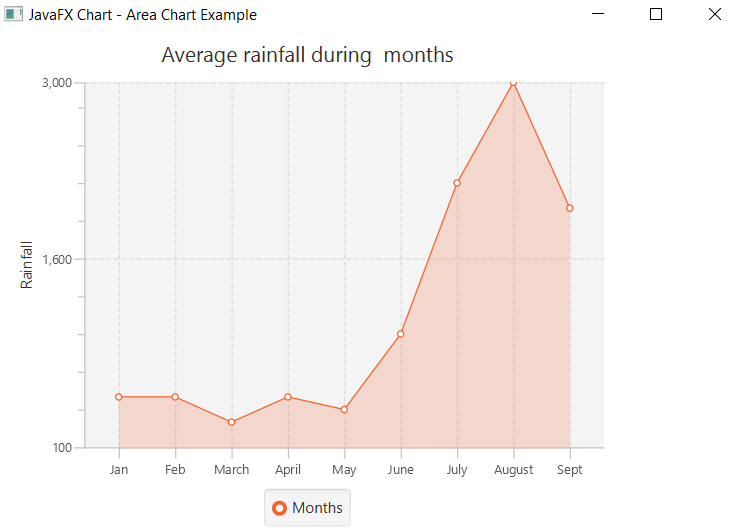
Charts in JavaFX applications- Area Chart

Related Topics

JavaFX Light Spot

In the JavaFX application, in order to apply various Light Spot effect from a single source, we use this class. It has the ability to apply light from all the...

4 minutes read.

JavaFX Bubble Chart

In the JavaFX application, in order to create Bubble Chart, the BubbleChart class is used. The Bubble Chart allows us to plot three dimensional data. All methods needed for this...

4 minutes read.

JavaFX Stroke Transition

In the JavaFX application, in order to generate the stroke transition, we have to apply stroke transition on any particular shape. It has the ability to give different color strokes...

4 minutes read.

JavaFX Glow

In the JavaFX application, in order to apply various glow effect, we use Glow class. It has the ability to glow the colors of the shape. All methods needed for...

4 minutes read.

JavaFX Inline Styles

In the JavaFX application, in order to apply various Inline css effect we will use the various css classes available in the JavaFX. It is used to apply the various...

4 minutes read.

JavaFX HBox

In the JavaFX application, in order to set HBox as a layout, the HBox class is used. The HBox layout allows us to arrange the components in one row. All...

3 minutes read.

JavaFX Box

In the JavaFX application, in order to draw a Box, the Box class is used. The Box allows us to form 3D shape having rectangular faces. All methods needed for...

4 minutes read.

JavaFX Motion Blur

In the JavaFX application, in order to apply various Motion blur effect, we use Motion Blur class. It has the ability to apply the Motion blur effect on the given...

4 minutes read.

JavaFX Arc

In the JavaFX application, in order to draw an arc, the Arc class is used. The Arc allows us to join any points in the space. All methods needed for...

5 minutes read.

JavaFX Translate Transition

In the JavaFX application, in order to generate the translate transition, we have to apply translate transition on any particular shape. It has the ability to translate the shape along...

3 minutes read.

JavaFX Ellipse

In the JavaFX application, in order to draw an Ellipse, the Ellipse class is used. The Ellipse allows us to join any points in the space to draw the unique...

7 minutes read.

JavaFX Gaussian Blur

In the JavaFX application, in order to apply various Gaussian blur effect, we use GaussianBlur class. It has the ability to apply blur effect on the given object. All methods...

4 minutes read.

JavaFX Scale Transition

In the JavaFX application, in order to generate the scale transition, we have to apply scale transition on any particular shape. It has the ability to scale the shape along...

4 minutes read.

JavaFX Area Chart

In the JavaFX application, in order to create Area Chart, the AreaChart class is used. The Area Chart allows us to plot data along the XY plane. All methods needed...

3 minutes read.

JavaFX Rotate Transition

In the JavaFX application, in order to generate the rotate transition, we have to apply rotation transition on any particular shape. It has the ability to rotate the shape along...

4 minutes read.

JavaFX Cylinder

In the JavaFX application, in order to draw a Cylinder, the Cylinder class is used. The Cylinder allows us to form a 3D shape having rectangular faces and a straight...

4 minutes read.

JavaFX BorderPane

In the JavaFX application, in order to set Border Pane as a layout, the BorderPane class is used. The BorderPane layout allows us to arrange the components in the left,...

4 minutes read.

JavaFX Tutorial

Introduction of JavaFX: The most popular applications called Rich Internet Application are build using the JavaFX. This application can run across many platforms. Various devices such as mobile, computers, and tablets...

4 minutes read.

JavaFX Translation

In the JavaFX application, in order to apply various Translate effect, we use this class. It has the ability to Translate the given object according to the specified parameter. All...

4 minutes read.

JavaFX Scatter Chart

In the JavaFX application, in order to create Scatter Chart, the ScatterChart class is used. The Scatter Chart allows us to plot data along the x and y axis of...

4 minutes read.