JavaFX Gradient Color
In the JavaFX application, in order to draw any shape, we are using classes present in the javafx.scene.shape package. We can fill the gradient colors in these shapes using the setFill() method. The setFill() method has a gradient object passed in it. CycleMethod argument allows to set whether cycles are allowed or not.
Filling the Gradient color by specifying No cycle in JavaFX:
Example:
import javafx.application.Application;
import javafx.scene.Group;
import javafx.scene.Scene;
import javafx.stage.Stage;
import javafx.scene.paint.*;
import javafx.scene.shape.*;


public class ColorUI extends Application {


    @Override
    public void start(Stage primaryStage) throws Exception
    {
    Stop[] newstop = {new Stop(0.5, Color.RED),
                 new Stop(0.5, Color.GREEN),
                 new Stop(1, Color.BLUE)};


          LinearGradient newgradient = new LinearGradient(0, 0,
                    1, 0, true, CycleMethod.NO_CYCLE, newstop);


     Rectangle newrect = new Rectangle();
newrect.setX(80);
newrect.setY(80);
newrect.setWidth(200);
newrect.setHeight(200);
newrect.setFill(newgradient);


         Group box = new Group();
         box.getChildren().addAll(newrect);


         box.getChildren().addAll();
         Scene scene = new Scene(box,600,400);

           primaryStage.setScene(scene);
           primaryStage.setTitle(" JavaFX 2D shapes - Setting Linear Gradient with no cycle ");
           primaryStage.show();
        }
    public static void main(String[] args) {
        Application.launch(args);
    }
}
Output:
In order to create the Rectangle shape and fill gradient color in it in JavaFX, we have to import all the required libraries such as javafx.application.Application, javafx.stage.Stage, javafx.scene.Scene, javafx.scene.Group, javafx.scene.paint.*, javafx.scene.shape.*, javafx.scene.shape.Rectangle.
Then we have created one class named ColorUI extending the Application class. Also, we have to override the start method to provide implementation details. This method creates an object of Stage as primaryStage. For the container to hold a Gradient Colored Rectangle with no cycles, a Group object is created which is then passed to the Scene class object.
The rectangle is created with the help of an empty constructor and X, Y, Width, and Height is set using setters and the setFill() method is used to set the gradient color of the Rectangle. Linear Gradient constructor is called with values and Cycle method value specified in it. This object is then passed in the setFill() method.
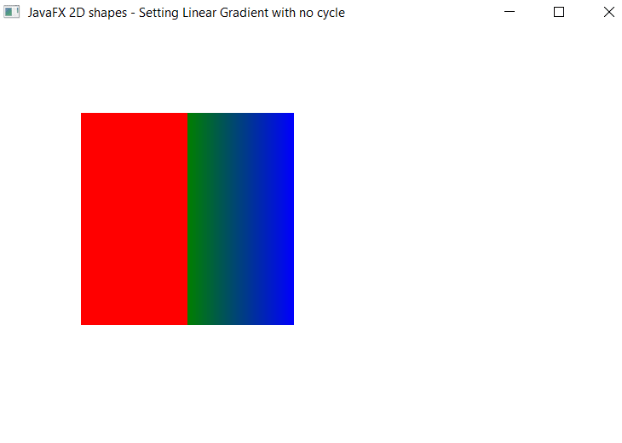
The stage is prepared, the title is set and the show() method is called to display output. In order to run the application, the launch(args) method is called in the main() method. In output Frame like container is displayed with the title, " JavaFX 2D shapes - Setting Linear Gradient with no cycle”. Also, it displays a rectangle with defined x, y coordinates, and width, height with gradient color filled in it, and no cycles for the specified gradient.
Filling the Gradient color by specifying cycle in JavaFX:
Example:
import javafx.application.Application;
import javafx.scene.Group;
import javafx.scene.Scene;
import javafx.stage.Stage;
import javafx.scene.paint.*;
import javafx.scene.shape.*;


public class ColorUI extends Application {


    @Override
    public void start(Stage primaryStage) throws Exception
    {
    Stop[] newstop = {new Stop(0, Color.RED), new Stop(0.5,
                Color.GREEN), new Stop(1, Color.BLUE)};


   LinearGradient newgradient = new LinearGradient(0, 0,
                   35, 0, false, CycleMethod.REFLECT, newstop);


     Rectangle newrect = new Rectangle();
newrect.setX(80);
newrect.setY(80);
newrect.setWidth(200);
newrect.setHeight(200);
newrect.setFill(newgradient);


         Group box = new Group();
         box.getChildren().addAll(newrect);


         box.getChildren().addAll();
         Scene scene = new Scene(box,600,400);

           primaryStage.setScene(scene);
           primaryStage.setTitle(" JavaFX 2D shapes - Setting Linear Gradient with cycle Example");
           primaryStage.show();
        }
    public static void main(String[] args) {
        Application.launch(args);
    }
}
Output:
In order to create the Rectangle shape and fill gradient color in it with cycles in JavaFX, we have to import all the required libraries such as javafx.application.Application, javafx.stage.Stage, javafx.scene.Scene, javafx.scene.Group, javafx.scene.paint.*, javafx.scene.shape.*, javafx.scene.shape.Rectangle.
Then we have created one class named ColorUI extending the Application class. Also, we have to override the start method to provide implementation details. This method creates an object of Stage as primaryStage. For the container to hold a Gradient Colored Rectangle with cycles, a Group object is created which is then passed to the Scene class object.
The rectangle is created with the help of an empty constructor and X, Y, Width, and Height is set using setters and the setFill() method is used to set the gradient color of the Rectangle. Linear Gradient constructor is called with values and Cycle method as REFLECT in it. This object is then passed in the setFill() method.
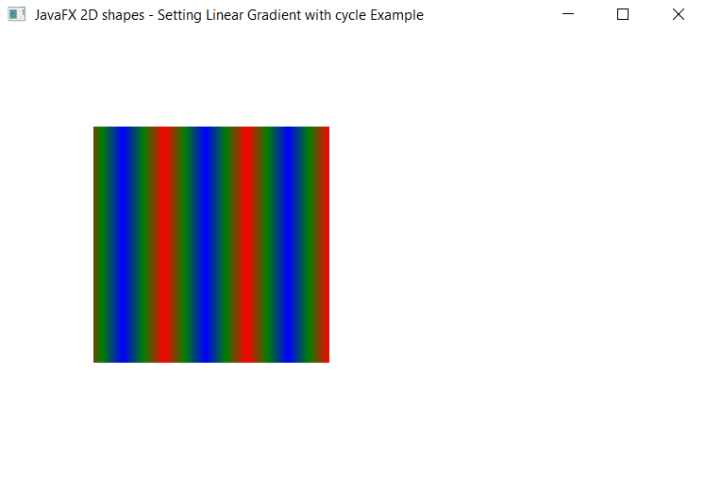
The stage is prepared, the title is set and the show() method is called to display output. In order to run the application, the launch(args) method is called in the main() method. In output Frame like container is displayed with the title, " JavaFX 2D shapes - Setting Linear Gradient with cycle Example”. Also, it displays a rectangle with defined x, y coordinates, and width, height with gradient color filled in it, and reflected cycles for the specified gradient.
Filling the Radial Gradient color by specifying No cycle in JavaFX:
Example:
import javafx.application.Application;
import javafx.scene.Group;
import javafx.scene.Scene;
import javafx.stage.Stage;
import javafx.scene.paint.*;
import javafx.scene.shape.*;


public class ColorUI extends Application {


    @Override
    public void start(Stage primaryStage) throws Exception
    {
    RadialGradient newgradient = new RadialGradient(0, .1,  100, 100, 200, false,  CycleMethod.NO_CYCLE,
                new Stop(0, Color.RED),
                new Stop(1, Color.GREEN));

     Rectangle newrect = new Rectangle();
newrect.setX(80);
newrect.setY(80);
newrect.setWidth(200);
newrect.setHeight(200);
newrect.setFill(newgradient);


         Group box = new Group();
         box.getChildren().addAll(newrect);


         box.getChildren().addAll();
         Scene scene = new Scene(box,600,400);

           primaryStage.setScene(scene);
           primaryStage.setTitle(" JavaFX 2D shapes - Setting Radial Gradient with no cycle Example");
           primaryStage.show();
        }


    public static void main(String[] args)
   {
        Application.launch(args);
    }
}
Output:
In order to create the Rectangle shape and fill radial gradient color in it in JavaFX, we have to import all the required libraries such as javafx.application.Application, javafx.stage.Stage, javafx.scene.Scene, javafx.scene.Group, javafx.scene.paint.*, javafx.scene.shape.*, javafx.scene.shape.Rectangle.
Then we have created one class named ColorUI extending the Application class. Also, we have to override the start method to provide implementation details. This method creates an object of Stage as primaryStage. For the container to hold a Radial Gradient Colored Rectangle with no cycles, a Group object is created which is then passed to the Scene class object.
The rectangle is created with the help of an empty constructor and X, Y, Width, and Height is set using setters and the setFill() method is used to set the gradient color of the Rectangle. Radial Gradient constructor is called with values and Cycle method value specified in it. This object is then passed in the setFill() method.
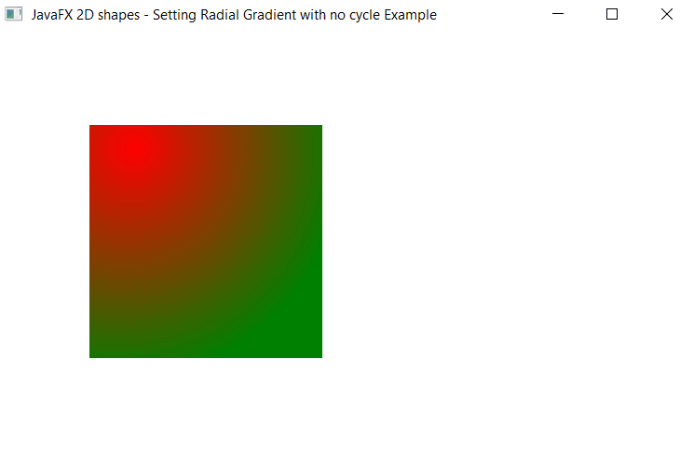
The stage is prepared, the title is set and the show() method is called to display output. In order to run the application, the launch(args) method is called in the main() method. In output Frame like container is displayed with the title, "JavaFX 2D shapes - Setting Radial Gradient with no cycle Example”. Also, it displays a rectangle with defined x, y coordinates, and width, height with radial gradient color filled in it, and no cycles for the specified gradient.
Filling the Semitransparent Gradient color in JavaFX:
Example:
import javafx.application.Application;
import javafx.scene.Group;
import javafx.scene.Scene;
import javafx.stage.Stage;
import javafx.scene.paint.*;
import javafx.scene.shape.*;


public class ColorUI extends Application {


    @Override
    public void start(Stage primaryStage) throws Exception
    {
    LinearGradient newgradient = new LinearGradient(0,0,0,1,true,
                CycleMethod.NO_CYCLE,
                new Stop(0.1f, Color.rgb(25, 80, 240, .4)),
                new Stop(1.0f, Color.rgb(100, 100, 100, .5)));


     Rectangle newrect = new Rectangle();
newrect.setX(80);
newrect.setY(80);
newrect.setWidth(200);
newrect.setHeight(200);
newrect.setFill(newgradient);


         Group box = new Group();
         box.getChildren().addAll(newrect);


         box.getChildren().addAll();
         Scene scene = new Scene(box,600,400);

           primaryStage.setScene(scene);
           primaryStage.setTitle(" JavaFX 2D shapes - Setting semitransperant Gradient Example");
           primaryStage.show();
        }
    public static void main(String[] args) {
        Application.launch(args);
    }
}
Output:
In order to create the Rectangle shape and fill semitransparent gradient color in it in JavaFX, we have to import all the required libraries such as javafx.application.Application, javafx.stage.Stage, javafx.scene.Scene, javafx.scene.Group, javafx.scene.paint.*, javafx.scene.shape.*, javafx.scene.shape.Rectangle.
Then we have created one class named ColorUI extending the Application class. Also, we have to override the start method to provide implementation details. This method creates an object of Stage as primaryStage. For the container to hold a semitransparent Gradient Colored Rectangle with no cycles, a Group object is created which is then passed to the Scene class object.
The rectangle is created with the help of an empty constructor and X, Y, Width, and Height is set using setters and the setFill() method is used to set the gradient color of the Rectangle. Linear Gradient constructor is called with values specified in it. This object is then passed in the setFill() method.
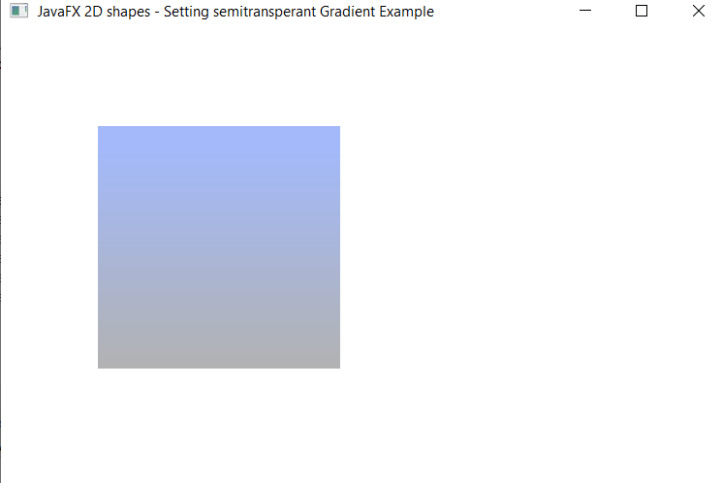
The stage is prepared, the title is set and the show() method is called to display output. In order to run the application, the launch(args) method is called in the main() method. In output Frame like container is displayed with the title, " JavaFX 2D shapes - Setting semitransperant Gradient Example”. Also, it displays a rectangle with defined x, y coordinates, and width, height with semitransperant gradient color filled in it.