
×

JavaFX Translate Transition

In the JavaFX application, in order to generate the translate transition, we have to apply translate transition on any particular shape. It has the ability to translate the shape along all three axis. All methods needed for this purpose are present in the javafx.animation.TranslateTransition class.

Constructor to create Translate Transition:

1. public TranslateTransition():

This empty constructor is used to create translate transition and properties can be set using setters.

2. public TranslateTransition( Duration time ):

This constructor is used to create a translate transition with a specified duration.

3. public TranslateTransition( Duration time, Node n ):

This constructor is used to create a translate transition with a specified duration and node.

Properties and corresponding methods to create Translate Transition:

1. byX

This property is of double type. It is used to represent the factor at which translate X stops and setByX() method is used to set it.

2. byY

This property is of double type. It is used to represent the factor at which translate Y stops and setByY() method is used to set it.

3. byZ

This property is of double type. It is used to represent the factor at which the translate Z stops and setByZ() method is used to set it.

4. fromX

This property is of double type. It is used to represent the start X factor and the setFromX() method is used to set it.

5. fromY

This property is of double type. It is used to represent the start Y factor and the setFromY() method is used to set it.

6. fromZ

This property is of double type. It is used to represent the start Z factor and the setFromZ() method is used to set it.

7. toX

This property is of double type. It is used to represent the stop X factor and the setToX() method is used to set it.

8. toY

This property is of double type. It is used to represent the stop Y factor and the setToY() method is used to set it.

9. toZ

This property is of double type. It is used to represent the stop Z factor and the setToZ() method is used to set it.

JavaFX Animation -Translate Transition

Example:

import javafx.animation.TranslateTransition;
import javafx.application.Application;
import javafx.scene.Group;
import javafx.scene.Scene;
import javafx.scene.paint.Color;
import javafx.scene.shape.Circle;
import javafx.stage.Stage;
import javafx.util.Duration;


public class SliderUI extends Application {  


    @Override  
    public void start(Stage primaryStage) throws Exception 
    { 
       Circle cir = new Circle(50,100,50);  
           
           cir.setFill(Color.BLUE);  
           cir.setStroke(Color.RED);  
             
           TranslateTransition translate = new TranslateTransition();  
             
           translate.setByX(500);  
             
           translate.setDuration(Duration.millis(7000));  
             
           translate.setCycleCount(500);  
             
           translate.setAutoReverse(true);  
             
           translate.setNode(cir);  
             
           translate.play();  
             
           Group root = new Group();  
           root.getChildren().addAll(cir);  
           Scene scene = new Scene(root,500,200);  
    primaryStage.setScene(scene);  
    primaryStage.setTitle("JavaFX Translate Transition example");  
    primaryStage.show();  
      
}  
      
    public static void main(String[] args) {  
        launch(args);  
    }  
}

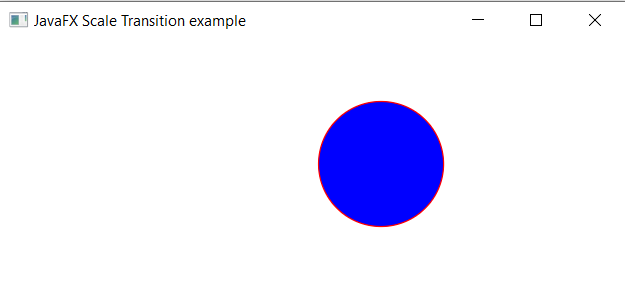
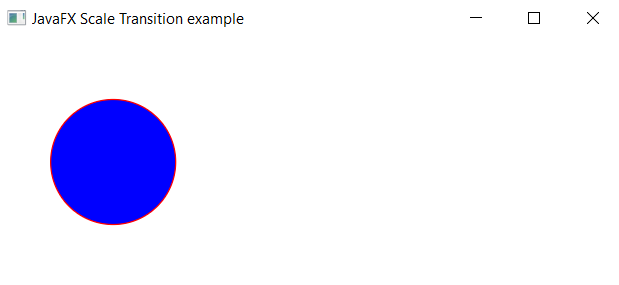
Output:

In order to create the Translate Transition in JavaFX, we have to import all the required libraries such as javafx.animation.TranslateTransition, javafx.application.Application, javafx.scene.Group, javafx.scene.Scene, javafx.scene.paint.Color, javafx.scene.shape.Circle, javafx.stage.Stage, javafx.util.Duration.

Then we have created one class named AnimationUI extending the Application class. Also, we have to override the start method to provide implementation details. This method creates an object of Stage as primaryStage. For the container to hold a translating circle, a Group object is created which is then passed to the Scene class object.

The circle is created with the help of the constructor and size parameters. Then the object of TranslateTransition is created and setters are used to set properties. Then it displays a circle which translates from one place to other.

The stage is prepared, the title is set and the show() method is called to display output. In order to run the application, the launch(args) method is called in the main() method. In output Frame like container is displayed with the title, " JavaFX Translate Transition example”. Also, it displays a circle filled with blue color translating in a given plane.
JavaFX Animation -Translate Transition JavaFX Animation -Translate Transition

Related Topics

JavaFX Label

The UI Control Label in a JavaFX is used to display the simple text. To use Label in JavaFX application javafx.scene.control.The label class is used. We can place Labels on...

3 minutes read.

JavaFX Pie Chart

In the JavaFX application, in order to create Pie Chart, the PieChart class is used. The Pie Chart allows us to plot data along with the sectors of the circle....

3 minutes read.

JavaFX Transformation

In the JavaFX application, in order to apply various transformation effects, we use Transform class. It has the ability to create the transformation on the given object. This transformation changes...

3 minutes read.

JavaFX Rotation

In the JavaFX application, in order to apply various rotation effects, we use this class. It has the ability to rotate the given object. It rotates the given node along...

3 minutes read.

JavaFX CheckBox

In the JavaFX application, to get the user information in the form of choices from the user, a form is created using checkboxes that allow the user to select two...

4 minutes read.

JavaFX Pause Transition

In the JavaFX application, in order to generate the pause transition, we have to apply pause transition on any particular shape. It has the ability to take a particular pause...

4 minutes read.

JavaFX Selectors

In the JavaFX application, in order to apply various css effect, we use the various css classes available in the JavaFX. This is generally used to enhance the appearance property...

4 minutes read.

JavaFX Fill Transition

In the JavaFX application, in order to generate the fill transition, we have to apply fill transition on any particular shape. It has the ability to fill the given shape...

4 minutes read.

JavaFX Glow

In the JavaFX application, in order to apply various glow effect, we use Glow class. It has the ability to glow the colors of the shape. All methods needed for...

4 minutes read.

JavaFX GridPane

In the JavaFX application, in order to set Grid Pane as a layout, the GridPane class is used. The GridPane layout allows us to arrange the components in the form...

4 minutes read.

JavaFX PasswordField

In the JavaFX application, to get the user information and password as input from the user, a form is created using textfields and password fields which allows the user to...

4 minutes read.

JavaFX Path Transition

In the JavaFX application, in order to generate the path transition, we have to apply path transition on any particular shape. It has the ability to traverse the given shape...

3 minutes read.

JavaFX Rectangle

In the JavaFX application, in order to draw a rectangle, the Rectangle class is used. The Rectangle allows us to join any four points with x and y coordinates in...

4 minutes read.

JavaFX Light Spot

In the JavaFX application, in order to apply various Light Spot effect from a single source, we use this class. It has the ability to apply light from all the...

4 minutes read.

JavaFX Sequential Transition

In the JavaFX application, in order to generate the sequential transition, we have to apply sequential transition on any particular shape. It has the ability to execute multiple transactions sequentially...

4 minutes read.

JavaFX Fade Transition

In the JavaFX application, in order to generate the fade transition, we have to apply fade transition on any particular shape. It has the ability to show the fading colors...

4 minutes read.

JavaFX Motion Blur

In the JavaFX application, in order to apply various Motion blur effect, we use Motion Blur class. It has the ability to apply the Motion blur effect on the given...

4 minutes read.

JavaFX Line Chart

In the JavaFX application, in order to create a Line Chart, LineChart class is used. The LineChart allows us to plot markers point according to the entities on number axes....

4 minutes read.

JavaFX File Chooser

In the JavaFX application, in order to open or save the file, FileChooser is used. It allows user to choose the file from system location and save it in a...

4 minutes read.

JavaFX Button Styling

 In the JavaFX application, we can apply CSS styling to buttons in various ways. We can change the size of the button as well as border colour, text colour can...

3 minutes read.