
×

CSS translate() Function

Translate() CSS function

This function in CSS is a CSS in-built function. It relocates the element in the horizontal direction or in the vertical direction. It can move the items from the current direction on the basis of given parameters.

Syntax:

transform: translate(tx)  
transform: translate(tx,ty)  

The above ty parameter is optional. When it is not described, its value will be estimated to be zero. We will discuss all the parameters as follows:

Parameters

tx: It depicts the length of the translation with the x-axis. This parameter will portray the translating vector’s abscissa (x-coordinate, horizontal). When we define translate(4), this function will be similar to the translate(4,0).

ty: It depicts the length of the translation with the y-axis. It has a default value, i.e., 0, applied if this parameter’s value is not specified.

Let’s discuss this function with some examples as follows:

Example:

In the following illustration, we will specify the parameter value tx only.

<!DOCTYPE html> 
<html> 
<head> 
<title> translate() CSS function </title> 
<style> 
.trans
{ 
transform: translate(200px); /*It will be equivalent to translate(200px,0)*/ 
} 
</style> 
</head> 
<body> 
<h2> Original Image </h2> 
<img src= "Flower1.jpg"> 
<h2> Translated Image </h2> 
<img class="trans" src= "Flower1.jpg"> 
</body> 
</html> 

Output:
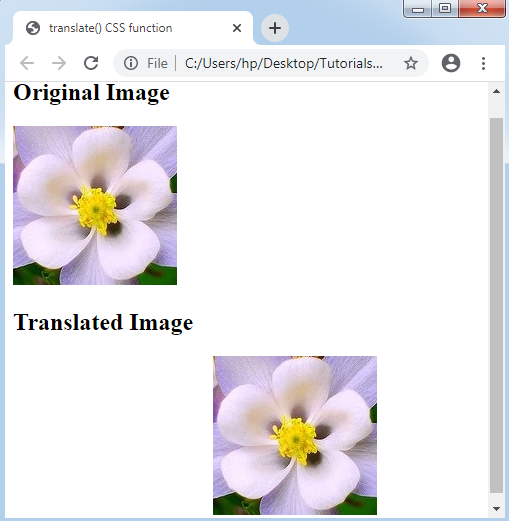
CSS translate() Function

Example:

<!DOCTYPE html> 
<html> 
<head> 
<title> translate() CSS function </title> 
<style> 
.trans
{ 
transform: translate(200px,100px);
} 
</style> 
</head> 
<body> 
<h2> Original Image </h2> 
<img src= "Flower1.jpg"> 
<h2> Translated Image </h2> 
<img class="trans" src= "Flower1.jpg"> 
</body> 
</html> 

Output:
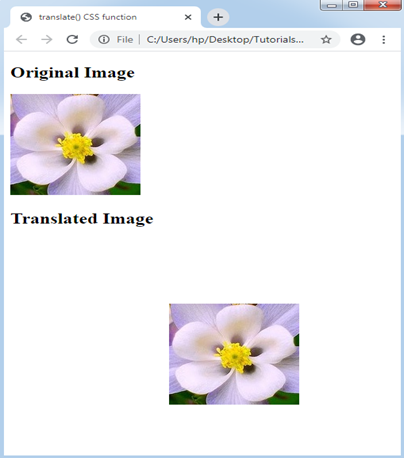
CSS translate() Function

Related Topics

CSS Text-stroke

Text-stroke Text-stroke CSS property inserts the stroke to any text and gives a decoration option to them also. It describes the stroke’s width and color for various text characters. It is...

2 minutes read.

Radial-gradient() CSS function

Radial-gradient() CSS function It defines a CSS in-built function, which produces a smooth transition among multiple colors. It is used to set any radial-gradient that is same as a background-image. This...

4 minutes read.

CSS Word-spacing

Word-spacing The work-spacing property of CSS is applied to manage the space among the words. We can decrease or increase the space among the words by the use of this property. It...

3 minutes read.

CSS Pagination

CSS Pagination The pagination in CSS is an advantageous approach for indexing of a website’s distinct pages over the homepage. When our site contains multiple pages, we must insert a few...

13 minutes read.

CSS Letter-spacing

CSS Letter-spacing: Letter-spacing attribute is applied to manage the space among all letters within the block or element of the text. This property sets the behavior of the spacing between...

2 minutes read.

CSS Math Functions

The CSS math functions permit numerical articulations. These CSS math functions can particularly be utilized in maybe unforeseen ways, for example, inside angles and shading the functions and in the...

3 minutes read.

How to get rid/remove of bullet pioints in CSS

We include a list of items on the web pages that were sometimes numbered and sometimes bulleted in various styles. In HTML, there are two kinds of lists: ordered and unordered...

3 minutes read.

CSS Box-shadow

CSS Box-shadow This property is referred to include effects as shadow-like around an element’s frame. Syntax box-shadow: h-offset v-offset blur spread color |inset|inherit|none; Property values Following are the various property values which can be used...

3 minutes read.

How to edit CSS in WordPress

Developing a new website or blog is a difficult undertaking. We want to create something that the consumers will adore, but we might not want the setting to take months and...

7 minutes read.

CSS Radio Button

Radio Button A radio button has been defined as an element of HTML. It can support us to take any input from the user. But it is challenging to design a...

4 minutes read.

CSS Page-break-inside Attribute

Page-break-inside Attribute As its name implies, the page-break-before property is applied to include page break inside any element, at the time of printing any document. It adds the page break before...

3 minutes read.

CSS: nth-selector

CSS nth selector can be used to match an element according to its position regardless of its parent’s type. Here, n can be any number, formula, or a keyword. These selectors...

2 minutes read.

CSS Checkbox style

CSS Checkbox style: It is an element of HTML, which is used to get input from various users. It is difficult to style any checkbox. However, some elements make it...

6 minutes read.

CSS Border

CSS Border: The border property of CSS allows us to define the style, color, width, and radius of the element’s border. It is applied to various elements to set-up the...

4 minutes read.

CSS Selector

CSS Selector: There are some selectors used in CSS, which allows us to choose the content we wish to style. Various selectors are considered as the separation of the set...

5 minutes read.

Difference between CSS Grid and CSS Flexbox

The way that information is arranged on a website reveals a lot about you or your company. Organizational abilities are just as important as having the right materials. The design...

3 minutes read.

CSS Variables

CSS Variables These variables of CSS are applied to add the custom property values to our various web-pages. The custom properties are often called as CSS variables or cascading variables. Various...

4 minutes read.

CSS Align

CSS Center Align Elements CSS center align is used to create align by using block element. You should specify margin: auto;properties. The element will take up the specified width and the remaining space....

2 minutes read.

CSS Color

CSS Colors: The CSS color property is used for setting the HTML element’s color. The color of the fonts and the color of the background can be set-up by using...

5 minutes read.

CSS Visibility

Visibility in CSS: This visibility property in CSS is employed to describe whether the components are visible or not. Note: An invisible component also grabs the space over the page. If...

2 minutes read.