
×

CSS Word-spacing

Word-spacing

The work-spacing property of CSS is applied to manage the space among the words. We can decrease or increase the space among the words by the use of this property.

It can modify the space among the words. This property is the same as the property letter-spacing. Rather than describing the space among the single character, it depicts the space among the words within the text’s piece.

Any large negative or positive value of word-spacing will create any word unreadable. When we use any larger positive value, it can cause the word’s view like any series of individual and unconnected words. A larger negative value can overlap multiple words to one another, which enables any word unrecognizable.

Syntax:

word-spacing: normal | length | initial | inherit;  

Property Values

normal: This value is used as a default value. It depicts any normal space (2.5em) among the words. This value describes the space, i.e., specified by a browser.

length: It describes any extra space among various words in the context of length (cm, em, px, pt, etc.). This value allows negative values.

initial: The initial property value sets the word spacing property to the default value.

inherit: This value is used to acquire the value from the parent component.

Let’s understand the concept with the help of two examples.

Example:1

<!DOCTYPE html>
<html>
<head>
<title> The word-spacing Property </title>
<style>
body
{
text-align: center;
}
#space
{
word-spacing: 40px;
}
p
{
color: green;
font-weight: bold;
font-size: 20px;
}
</style>
</head>
<body>  
<h1> CSS word-spacing Property </h1>  
<div> 
<h2> word-spacing: normal; </h2>  
<p>  
Welcome to this Page </p>  
</div> 
<div> 
<h2> word-spacing: 40px; </h2>  
<p id= "space"> Welcome to this Page </p>  
</div> 
</body>  
</html>

Output:
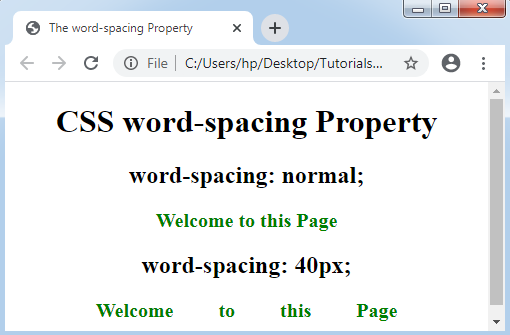
CSS Word-spacing

Example:2

<!DOCTYPE html>
<html>
<head>
<title> The word-spacing Property </title>
<style>
body
{
text-align: center;
}
#space
{
word-spacing: 2cm;
}
#space1
{
word-spacing: -50px;
}
#space2
{
word-spacing: initial;
}
p
{
color: green;
font-weight: bold;
font-size: 20px;
}
</style>
</head>
<body>  
<h1> CSS word-spacing Property </h1>  
<div> 
<h2> word-spacing: 2cm; </h2>  
<p id= "space">  
Welcome to this Page
</p>  
</div> 
<div> 
<h2> word-spacing: -50px; </h2>  
<p id= "space1">
Welcome to this Page
</p> 
<div> 
<h2> word-spacing: initial; </h2>  
<p id= "space2">  
Welcome to this Page
</p>  
</div>  
</div> 
</body>  
</html>

Output:
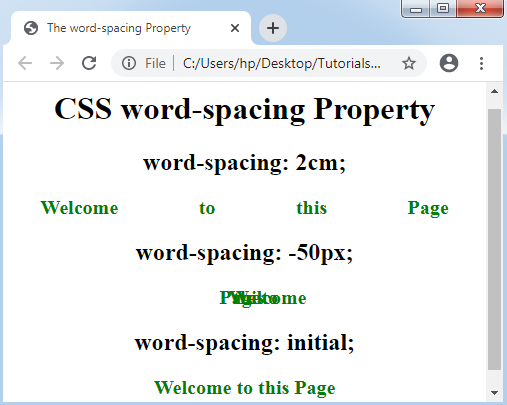
CSS Word-spacing

Related Topics

Cascading Style Sheet

CSS refers to the Cascading Style Sheet. CSS is a form of a programming language. In other words, CSS is a language of the style sheet that is utilised for...

7 minutes read.

Difference between HTML and CSS

HTML HTML stands for HyperText Markup Language and is used to create web pages and websites and web applications, which means we can create static web pages. Html is a scripting...

3 minutes read.

CSS Comments

CSS Comments: Generally, comments in CSS are used to describe our code. Further, it will provide support to many users who are concerned with the code. Somewhat, these are ignored...

2 minutes read.

CSS Line Height

CSS Line Height: This property in CSS can be used to describe the line box’s minimal height inside the element. It sets-up the distinction among two lines in our content. It...

3 minutes read.

How to create blinking text using CSS

The blinking effect is used in HTML and CSS to take the attraction towards a particular word or section. If you need such a blinking effect, we need to take...

2 minutes read.

CSS Clip

CSS Clip The Clip property in CSS describes the element’s visible area. It applies over the elements which are absolutely positioned (position: absolute ;). Generally, it is used when an image...

2 minutes read.

CSS translate() Function

Translate() CSS function This function in CSS is a CSS in-built function. It relocates the element in the horizontal direction or in the vertical direction. It can move the items from...

2 minutes read.

CSS Justify Content

Justify Content: These properties are applied for the alignment of items of a flexible box container if any item does not cover every available space over the main-axis, i.e., horizontally....

4 minutes read.

CSS Superscript and Subscript

Superscript and Subscript To specify the superscript and the subscript text, HTML provides us two tags that are <sup> and <sub>. The superscript content looks in the shorter font and half...

2 minutes read.

CSS Introduction

CSS stands for Cascading Style Sheet. It is a design language which is used to design the web pages. It was developed by Håkon Wium Lie on October 10, 1994. It provides...

1 minute read.

CSS Images

Images in CSS: Images are a critical part of a web application. It includes various types of images in the web application that cannot be recommended. However, it is essential...

4 minutes read.

CSS Navigation bar

CSS Navigation bar: A navigation system or navigation bar comes upon GUI that can help many visitors to access the information. A Navigation bar is a UI component on the...

11 minutes read.

CSS Background

CSS Background The properties of CSS background are applied to describe the effects of background on the element. Here are five properties of background that affects various elements of HTML: Background-colorBackground-imageBackground-repeatBackground-attachment Background-position Background-color The color of the background...

7 minutes read.

CSS Flex-Box

Introduction The flex-box property of CSS stands for Flexible Box Layout Module. It is specifically used to design a flexible responsive layout. Flex-box is a one dimensional layout model, i.e. it works...

6 minutes read.

CSS Padding

CSS Padding: The padding property in CSS is addressed to describe the space among the element border and the element content.This property is quite different from the margin property of...

2 minutes read.

How to change the font in CSS

How to change the font in CSS? Professionals can't deny typefaces — how users organize and style text — if we want to completely customize the website's design. One may wish...

4 minutes read.

CSS Functions

CSS functions are used for different CSS properties. Every front-end developer should have knowledge of all CSS functions. It makes the coding easier. FunctionsExplanationattr().It returns the value of an attribute of...

5 minutes read.

What is a CSS File?

What is a CSS File and How to use it in Html? CSS: - CSS stands for Cascading Style Sheet. CSS is a file of style sheets that describe the presentation of...

4 minutes read.

Untitled Reusable Block

  ...

1 minute read.

CSS Inline

What is CSS? CSS is an acronym for Cascading Style Sheets. CSS is the language that we use to style an HTML document. It specifies how HTML components should appear. CSS...

4 minutes read.