
Ionic Grid
The Ionic grid is a very powerful mobile-first flexbox system for building the custom layouts. It is a CSS feature supported by all devices that ionic supports. The Ionic grid is composed of three types of units, which are a grid, rows, and columns. It permits the user to choose as many rows and columns according to their needs. The columns will expand to fill their row, and it will automatically resize the columns. Ionic grid is based on the 12 column layout with the different breakpoints based on the size of the screen. By using the SaSS, you can fully customize the number of columns and breakpoints.
Grid Rows
The Ionic grid rows are the horizontal components that contain different numbers of columns. Ionic grid row ensures that the columns are positioned properly.
Grid Column
The columns of the Ionic grid are cellular components that go into a row. All of a grid's content will go inside the column.
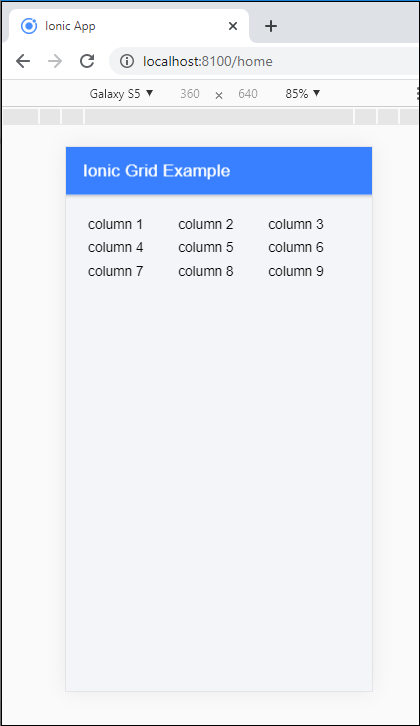
Example: This example explains how you can use the grid rows and columns inside the ionic application.
Home.page.html
<ion-header>
   <ion-toolbar color="primary">
     <ion-title>
       Ionic Grid Example
     </ion-title>
   </ion-toolbar>
 </ion-header>
 <ion-content class="ion-padding" color="light">
   <ion-grid>
     <ion-row>
       <ion-col>column 1</ion-col>
       <ion-col>column 2</ion-col>
       <ion-col>column 3</ion-col>
     </ion-row>
     <ion-row>
       <ion-col>column 4</ion-col>
       <ion-col>column 5</ion-col>
       <ion-col>column 6</ion-col>
     </ion-row>
     <ion-row>
       <ion-col>column 7</ion-col>
       <ion-col>column 8</ion-col>
       <ion-col>column 9</ion-col>
     </ion-row>
   </ion-grid>
 </ion-content>
Output: After executing this code, you will get the output, as shown below:
Reordering
There are two types of attributes which can be used to reorder the grid columns, which are as follows:
- Offset Columns
- Push and Pull
Offset Columns
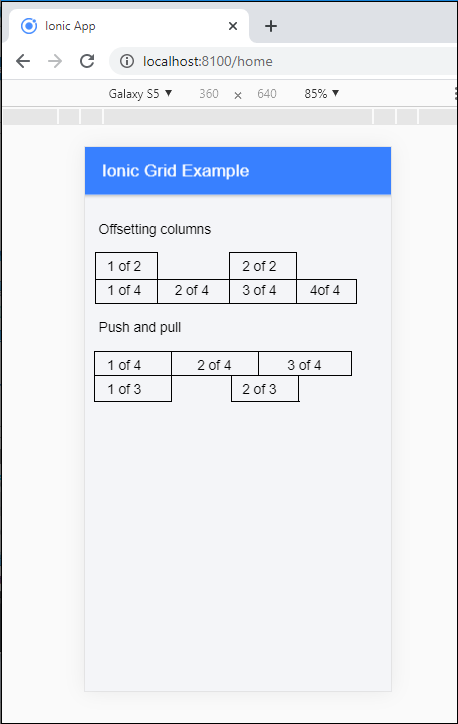
It is used to move the columns to the right side by adding the offset-col number property. These properties increase the margin column by specifying the number of the columns. Offset columns can be added based on the screen breakpoints.
Push and Pull
Push and Pull is used to reorder the columns by adding the push-col number and pull-col number attributes. Push and Pull properties adjust the left and right of the column by the specified column. It can also be added to the screen breakpoints.
Example: This example explains how you can use the offset columns and push and pull in the ionic application.
Home.page.html
<ion-header>
   <ion-toolbar color="primary">
     <ion-title>
       Ionic Grid Example
     </ion-title>
   </ion-toolbar>
 </ion-header>
 <ion-content class="ion-padding" color="light">
     <p>
     Offsetting columns
   </p>
   <ion-grid>
     <ion-row>
       <ion-col>
         <div>1 of 2</div>
       </ion-col>
       <ion-col offset-4>
         <div>2 of 2</div>
       </ion-col>
     </ion-row>
     <ion-row>
       <ion-col offset-4>
         <div>1 of 4</div>
       </ion-col>
       <ion-col>
         <div>2 of 4</div>
       </ion-col>
       <ion-col>
         <div>3 of 4</div>
       </ion-col>
       <ion-col>
         <div>4of 4</div>
       </ion-col>
     </ion-row>
   </ion-grid>
   <p>
     Push and pull
   </p>
   <ion-grid>
     <ion-row>
       <ion-col col-9 push-3>
         <div>1 of 4</div>
       </ion-col>
       <ion-col col-3 pull-9>
         <div>2 of 4</div>
       </ion-col>
       <ion-col col-6 pull-9>
         <div>3 of 4</div>
       </ion-col>
     </ion-row>
     <ion-row>
       <ion-col col-6 push-3>
         <div>1 of 3</div>
       </ion-col>
       <ion-col col-9 push-3>
         <div>2 of 3</div>
       </ion-col>
     </ion-row>
   </ion-grid>
 </ion-content>
Output: After executing this code, you will get the output, as shown below:
Alignment
There are two types of column alignment in the ionic grid, which are as follows:
- Vertical Alignment
- Horizontal Alignment
Vertical Alignment
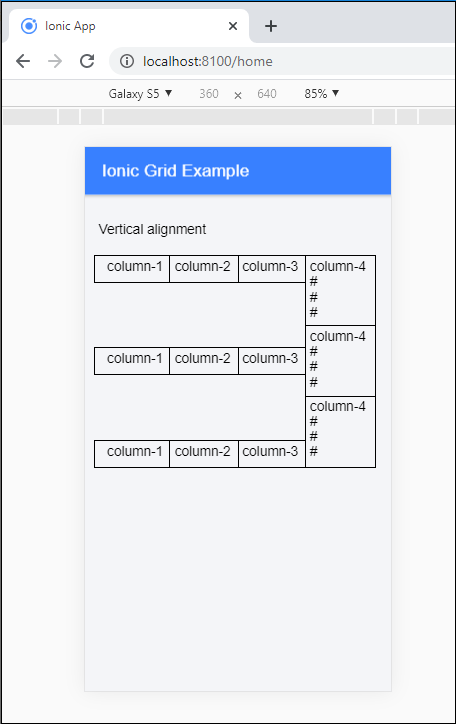
The Ionic grid system permits multiple ways to align the content vertically. It aligned the column within a row by adding the different types of attributes to the row. The different types of attribute are as follows:
- ion-align-item-start
- ion-align-item-center
- ion-align-item-end
Example: This example explains how you can use the vertical alignment in the ionic grid.
Home.page.html
<ion-header>
   <ion-toolbar color="primary">
     <ion-title>
       Ionic Grid Example
     </ion-title>
   </ion-toolbar>
 </ion-header>
 <ion-content class="ion-padding" color="light">
   <p>
     Vertical alignment
   </p>
   <ion-grid>
     <ion-row align-items-start>
       <ion-col>
         <div>column-1</div>
       </ion-col>
       <ion-col>
         <div>column-2</div>
       </ion-col>
       <ion-col>
         <div>column-3</div>
       </ion-col>
       <ion-col>
         <div>column-4<br>#<br>#<br>#</div>
       </ion-col>
     </ion-row>
     <ion-row align-items-center>
       <ion-col>
         <div>column-1</div>
       </ion-col>
       <ion-col>
         <div>column-2</div>
       </ion-col>
       <ion-col>
         <div>column-3</div>
       </ion-col>
       <ion-col>
         <div>column-4<br>#<br>#<br>#</div>
       </ion-col>
     </ion-row>
     <ion-row align-items-end>
       <ion-col>
         <div>column-1</div>
       </ion-col>
       <ion-col>
         <div>column-2</div>
       </ion-col>
       <ion-col>
         <div>column-3</div>
       </ion-col>
       <ion-col>
         <div>column-4<br>#<br>#<br>#</div>
       </ion-col>
     </ion-row>
   </ion-grid>
   </ion-content>
Output: After executing this code, you will get the output, as shown below:
Horizontal Alignment
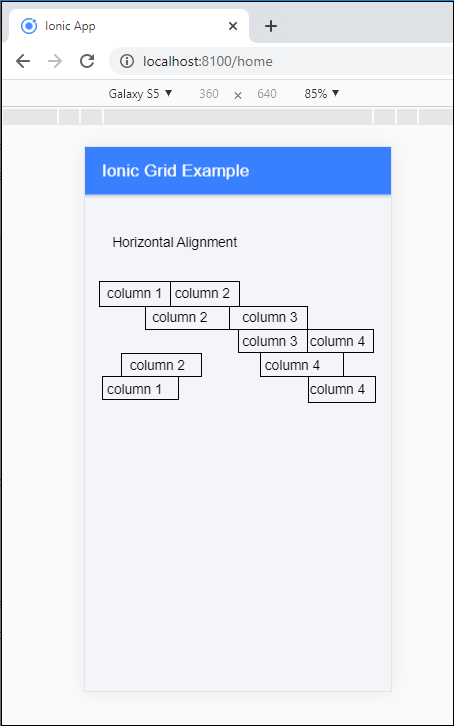
The Ionic grid system permits multiple ways to align the content horizontally. It aligned the columns inside of a row by adding the different types of attributes to the row. The different types of attributes are as follows:
- ion-justify-content-start
- ion-justify-content-center
- ion-justify-content-end
- ion-justify-content-around
- ion-justify-content-between
Example: This example explains how you can use the horizontal alignment in the ionic grid.
Home.page.html
<ion-header>
   <ion-toolbar color="primary">
     <ion-title>
       Ionic Grid Example
     </ion-title>
   </ion-toolbar>
 </ion-header>
 <ion-content class="ion-padding" color="light">
   <p padding>
     Horizontal Alignment
   </p>
   <ion-grid>
     <ion-row class="ion-justify-content-start">
       <ion-col size="3">
         <div>column 1</div>
       </ion-col>
       <ion-col size="3">
         <div>column 2</div>
       </ion-col>
     </ion-row>
     <ion-row class="ion-justify-content-center">
       <ion-col size="4">
         <div>column 2</div>
       </ion-col>
       <ion-col size="4">
         <div>column 3</div>
       </ion-col>
     </ion-row>
     <ion-row class="ion-justify-content-end">
       <ion-col size="3">
         <div>column 3</div>
       </ion-col>
       <ion-col size="3">
         <div>column 4</div>
       </ion-col>
     </ion-row>
     <ion-row class="ion-justify-content-around">
       <ion-col size="4">
         <div>column 2</div>
       </ion-col>
       <ion-col size="4">
         <div>column 4</div>
       </ion-col>
     </ion-row>
     <ion-row class="ion-justify-content-between">
       <ion-col size="3">           <div>column 1</div>
       </ion-col>
       <ion-col size="3">
         <div>column 4</div>
       </ion-col>
     </ion-row>
   </ion-grid>
 </ion-content>
Output: After executing this code, you will get the output, as shown below:
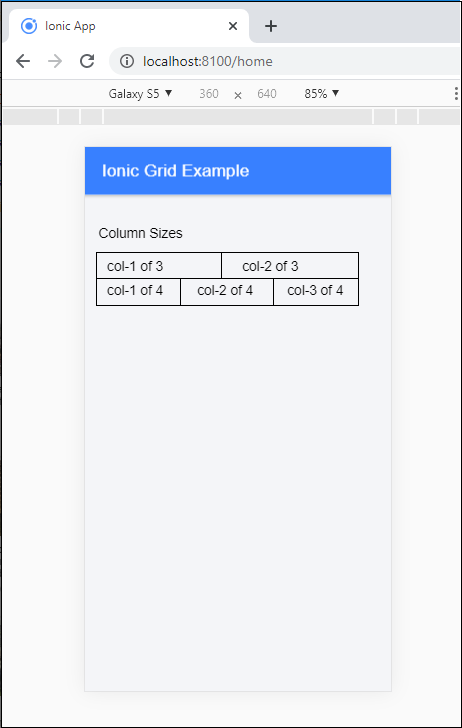
Column Sizes
If you don't want to leave the allocated column sizes automatically, you can select the size attribute to adjust the column size as needed. It will apply only to the specified columns.
Example: This example explains how you can set the column sizes in the ionic grid.
Home.page.html
<ion-header>
   <ion-toolbar color="primary">
     <ion-title>
       Ionic Grid Example
     </ion-title>
   </ion-toolbar>
 </ion-header>
 <ion-content class="ion-padding" color="light">
   <p>
     Column Sizes
   </p>
   <ion-grid>
     <ion-row>
       <ion-col>
         <div>col-1 of 3</div>
       </ion-col>
       <ion-col>
         <div>col-2 of 3</div>
       </ion-col>
     </ion-row>
     <ion-row>
       <ion-col>
         <div>col-1 of 4</div>
       </ion-col>
       <ion-col>
         <div>col-2 of 4</div>
       </ion-col>
       <ion-col>
         <div>col-3 of 4</div>
       </ion-col>
     </ion-row>
   </ion-grid>
 </ion-content>
Output: After executing this code, you will get the output, as shown below:
Grid Size
By default, ionic grid will take the 100% width of the screen. If you are required to set a maximum width based on the screen size, then you add the fixed attribute in the <ion-grid> Component. The below table shows the different types of grid sizes.
| Name | Value | Description |
| xs | auto | It does not set the grid width for the xs screens |
| md | 720px | It sets the grid width foe 720px when (min-width: 768px) |
| sm | 540px | It sets the grid width for 540px when (min-width: 576px) |
| lg | 960px | It sets the grid width for 960px when (min-width: 992px) |
| xl | 1140px | It sets the grid width for 1140px when (min-width: 1200px) |