×

Ionic-fab Button

Ionic-fab Button

The Ionic FABs (Floating Action Buttons) are standard material design compounds. It is a container element that contains one or more fab buttons. They are required to be placed in a fixed position, which means they don’t scroll with the content. Fab is necessary to have one main fab button. They are designed as a circle, which represents a promoted action. It can also contain a fab-list in the button. When you click on the main fab button, it shows many related activities. The fab container can contain various types of fab-list elements with different side values such as top, bottom, left, and right. If you want to have a button list at the top of the main button, then you should use side="top".

It represents the primary action in an ionic application. Fab is not only achieved through the use of a <ion-fab-button>Fab Button</ion-fab-button> component. It’s required to be wrapped with the <ion-fab> element to be fixed over the content. If you are not wrapped FAB Button with <ion-fab> component, then it will behave like a normal button and scrolling with the content. Fab buttons can accept all the colors, and it also has a default size and the mini size. The <ion-fab-button> component is used inside the <ion-fab> component.

Example: This example helps you to understand how you can use the <ion-fab-button> component in an ionic application. Here you can add the icons and use the different colors for these fab buttons.


  Ionic FAB Button 


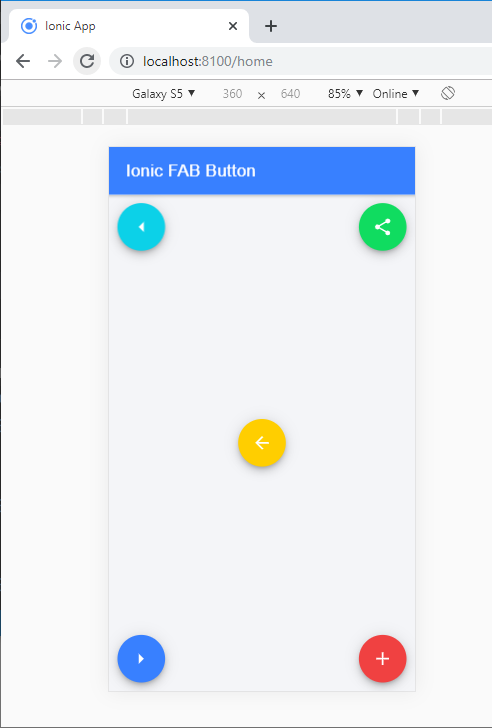
Output: After executing this code, you will get the output, which is shown below. Here, you can create the fab buttons in the ionic application at different positions such as top-starttop-endbottom-startbottom-end, and center position.

Ionic-fab Button

Ion-Fab-list

The ion-fab-list component is a container, which contains multiple fab buttons. This collection of fab buttons includes activities related to the main fab button, and it flung out when you click on the fab button. To determine on which side the button will appear, you can set the side property to 'start', 'end', 'top', and 'bottom'. The <ion-fab-list> component is used inside the <ion-fab-button>.

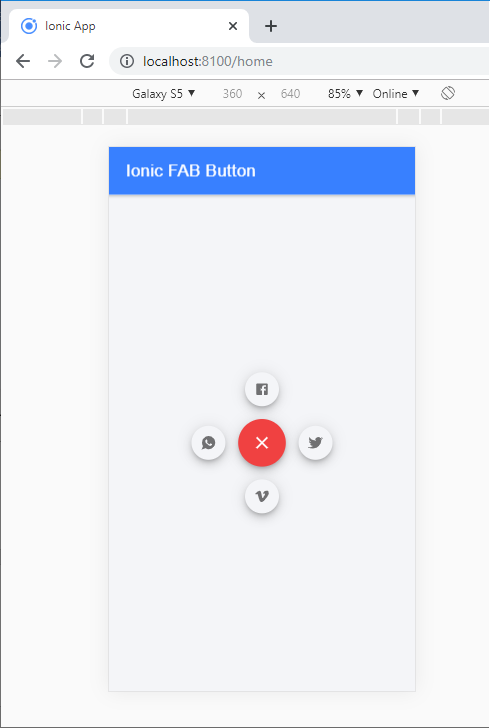
Example: This example helps you to understand how you can use the ion-fab-list component inside the ion-fab-button. Here, you are going to create a list of various types of fab buttons. The fab buttons have different kinds of icons like as: Share, Instagram, Facebook, Twitter, Whatsapp, Google, and many others. It contains the action related to the main fab button and flung out when you click on the main fab button.


  Ionic FAB Button 


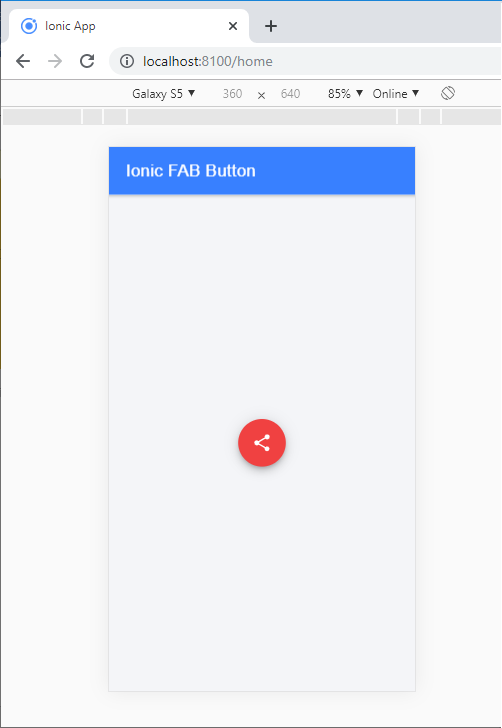
Output: After executing this code, you will get the output, as shown below.
Ion-Fab-list

When you click on the share button, you will get the below screen which shows many options.
Ion-Fab-list

Related Topics

Ionic Infinite Scroll

The infinite scroll permits you to perform an action when the user scrolls a particular content from the bottom or top of the page. When you display the large collection of data...

3 minutes read.

Ionic Date Time

Ionic Date Time The DateTime component is used to display an interface that makes it simple for users to select dates and times. Tapping on <ion-datetime> will display a slider up from the...

4 minutes read.

Ionic Actionsheet

Ionic Actionsheet The Action sheet is a dialog box that displays a group of options. It is shown on the top of the application content and must be dismissed manually before the user can resume...

3 minutes read.

Ionic Menu

The Ionic menu is the side-menu navigation that can be slide in from the side of the current view. By default, the menu slides in from the left side, but the side...

7 minutes read.

Ionic Grid

The Ionic grid is a very powerful mobile-first flexbox system for building the custom layouts. It is a CSS feature supported by all devices that ionic supports. The Ionic grid is composed of...

11 minutes read.

Ionic Popover

The Ionic popover is a small dialog box that displays at the top of the screen. It can be used for anything, but it is usually used for a button, an action,...

4 minutes read.

Ionic Cards

Ionic Cards: Ionic cards are a standard part of the user interface that acts as an entry point for more specific information. These are the best components for displaying information...

4 minutes read.

Ionic Checkbox

Ionic Checkbox Ionic Checkbox is nearly the same as a toggle. It can be placed in an ionic element or used as a separate checkbox. It is designed differently for every platform, such...

2 minutes read.

Ionic Buttons

Ionic Buttons There are different types of buttons in the Ionic framework. These buttons are subtly animated, enhancing the user experience when using the application. Buttons are a fundamental way of interacting and navigating...

4 minutes read.

Ionic progress bar

The ionic progress bar element is a horizontal progress bar used to visualize the progression of operation and activity. You can use the <ion-progress-bar> component to create a progress bar in the ionic...

4 minutes read.

History of Ionic

It is a complete open-source platform for hybrid mobile application development created by Ben Sperry, Max Lynch, and Adam Bradley of Drifty Co. in 2013. The first alpha version of the framework was...

2 minutes read.

Ionic vs PhoneGap

Ionic Vs PhoneGap Ionic and PhoneGap are both used to develop the mobile application. Both Frameworks are used in large enterprises by the developers. Here, we are going to compare the important differences between ionic...

3 minutes read.

Ionic vs Xamarin

Ionic vs Xamarin Ionic and Xamarin are both the most popular frameworks used to develop a hybrid mobile application. Both frameworks are used in large enterprises by the developers. Here, we will discuss the...

4 minutes read.

Ionic Toolbar

A toolbar is a general toolbar that can be used in an application such as a header, sub-header, footer, or even a sub-footer. Because the ion-toolbar is flexbox-dependent, no matter how many toolbars...

3 minutes read.

Difference between Ionic 4 and Ionic 3

The ionic framework is an open-source platform that is used to develop mobile applications. It is also used to build android applications, desktop applications, iOS, and web applications using web technologies like HTML,...

5 minutes read.

Ionic Toggle

The toggle is the same as the HTML checkbox entry, but it looks different and easier to use on a touchscreen device. It is an input component that holds the boolean value. Toggle...

2 minutes read.

Ionic Editors

Editors are software programs that permit the users to create and edit the text files. In the development field, editors are usually used to create the source code editors that includes many specific...

3 minutes read.

Ionic Geolocation

In today’s time, the mobile location plays an essential role in the mobile application. The Ionic Cordova geolocation plugin provides information about the location of the device, like as latitude and longitude. The...

5 minutes read.

Ionic Select

The Ion Selection component is similar to the HTML <select> element. However, the Ionic Selection component makes it easy for users to categorize and choose the preferred option or other options. You must...

3 minutes read.

Ionic Contents

Ionic Contents The content component provides an easy-to-use content area with some useful ways to control the scrollable region. There should be only one content in one view. Content, along with several other Ionic...

2 minutes read.