
×

Tailwind CSS Box Shadow

The Tailwind CSS Box Shadow class accepts a lot of value, and all of the properties are covered in class form. We may control the box-shadow of an element by using this class. We implement this in CSS by using the box-shadow CSS Shadow Effect attributes.

Box Shadow Classes

The various box shadow classes are as follows:

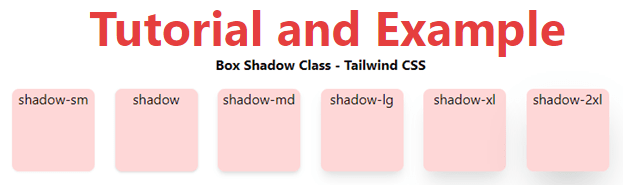
  • shadow-sm: This class is intended to make the box have a faded or small shadow effect.
  • shadow: This class is used to provide the box with a regular shadow effect.
  • shadow-md: The box md effects are created with this class.
  • shadow-lg: This class is used to create a large shadow effect for the box.
  • shadow-xl: This class creates an xl shadow effect for the box.
  • shadow-2xl: This class creates a 2xl shadow effect for the box.
  • shadow-inner: This class is used to create shadows on the box's inside.
  • shadow-none: The shadow effects are diluted using this class.

Syntax is:

<element class="shadow-{shadow-depth}">...</element>

Example

Code is as follows:

<!DOCTYPE html>
<head>
    <link href=
"https://unpkg.com/tailwindcss@^1.0/dist/tailwind.min.css"
        rel="stylesheet">
</head>
<body class="text-center mx-4 space-y-2">
    <h1 class="text-red-600 text-5xl font-bold">
        Tutorial and Example
    </h1>
    <b>Box Shadow Class - Tailwind CSS </b>
    <div class="grid grid-flow-col text-center p-2">
        <div class="shadow-sm w-24 h-24 bg-red-200
                    rounded-lg">shadow-sm
        </div>
        <div class="shadow w-24 h-24 bg-red-200
                    rounded-lg">shadow
        </div>
        <div class="shadow-md w-24 h-24 bg-red-200
                    rounded-lg">shadow-md
        </div>
        <div class="shadow-lg w-24 h-24 bg-red-200
                    rounded-lg">shadow-lg
        </div>
        <div class="shadow-xl w-24 h-24 bg-red-200
                    rounded-lg">shadow-xl
        </div>
        <div class="shadow-2xl w-24 h-24 bg-red-200
                    rounded-lg">shadow-2xl
        </div>
    </div>
</body>
</html>

Output:
Tailwind CSS Box Shadow

Related Topics

Tailwind CSS tutorial

Tailwind CSS can be utilized to make sites in the quickest and the least demanding way. Tailwind CSS is the most famous utility-first CSS structure on the planet for quickly...

4 minutes read.

Tailwind CSS Overflow

The overflow class acknowledges more than one value in Tailwind CSS. It is an option in contrast to the CSS Overflow property. This overflow is for controlling how element content...

9 minutes read.

Tailwind CSS Stroke

This class accepts a lot of value, and all of the properties are covered in class form. It's the stroke class that goes on top of the SVG element. Stroke...

2 minutes read.

Tailwind CSS Top / Right / Bottom / Left

In tailwind CSS, these classes take a variety of values and cover all of the characteristics in the class form. These are the CSS Top/Right/Bottom/Left properties' replacements. These classes are...

4 minutes read.

Tailwind CSS Grid Auto Flow

In tailwind CSS, this class accepts multiple values, and all of the properties are covered in class form. It is a CSS alternative. The grid-auto-flow property is used in Tailwind...

4 minutes read.

Tailwind CSS Grid Row Start / End

In tailwind CSS, this class takes several values. All of the attributes are covered in the form of a class. In CSS, it's an alternative to the grid-row attribute. It's...

4 minutes read.

Tailwind CSS Opacity

This class accepts a lot of value, and all of the properties are covered in class form. We can change the opacity of any element by using this class. The...

1 minute read.

Tailwind CSS Order

One of the best features of Tailwind CSS is the Order class, which allows us to order flex and grid objects according to our needs. There are several different order...

2 minutes read.

Tailwind CSS Place Items

This class accepts a wide range of values. It's a replacement for the CSS Place Items property. This class is used to manage how things are justified while still being...

4 minutes read.

Tailwind CSS Fill

The CSS Fill class accepts a lot of value, and all of the properties are covered in class form. It is a presentation attribute that controls how an SVG shape's...

1 minute read.

Tailwind CSS Box Shadow

The Tailwind CSS Box Shadow class accepts a lot of value, and all of the properties are covered in class form. We may control the box-shadow of an element by...

2 minutes read.

Tailwind CSS Object Fit

It acknowledges more than one value in tailwind CSS. Every one of its properties is covered as in class form. It is the option in contrast to the CSS object-fit...

4 minutes read.

Tailwind CSS Max-Width

In tailwind CSS, this class accepts a large number of values, and all of the properties are covered in class form. It's a replacement for the CSS max-width property. This...

3 minutes read.

Tailwind CSS Max-Height

This class accepts a large number of values, and all of the properties are covered in class form. It's a replacement for the CSS Max-Height attribute. It is used to...

3 minutes read.

Tailwind CSS Grid Auto Columns

The Grid Auto Columns class accepts multiple values, and all of the properties are covered in class form. It's a replacement for the CSS grid-auto-columns property. The size of the...

5 minutes read.

Tailwind CSS Z-index

The tailwind CSS framework is a CSS utility framework that provides classes for managing HTML content with CSS. Tailwind CSS simplifies our design process and makes it responsive across numerous...

4 minutes read.

Tailwind CSS Display

It acknowledges more than one worth in tailwind CSS. Every one of the properties is shrouded as in class structure. It is an option in contrast to the CSS display...

5 minutes read.

Tailwind CSS Justify Self

The class form goes over the various properties. It's a replacement for the CSS justify-self attribute. This class is used to describe the alignment of content’s position in a CSS...

4 minutes read.

Tailwind CSS Align Content

In Tailwind CSS, this class accepts a wide range of values. It's a replacement for the CSS Align Content feature. This class is used to modify the flex-wrap property's behavior....

5 minutes read.

Tailwind CSS Place Self

The tailwind CSS Place self class accepts a wide range of values. It's a replacement for the CSS Place Items property. This class is used to manage how a single...

4 minutes read.