
How to use React Context
React Context
React Context is used to pass the data through the component tree without passing the props down manually at the every level.
In React Application, the data is passed in a top-down approach via props. Sometimes it is not convenient for some props that are required for the many components of the React application. Context gives you a way to pass the values between the components without passing the prop by every level of the component tree.
How to use Context
There are two steps by which you can use the Context in the React Application:
- Set a context provider and define the data which you want to store.
- Whenever you required the data from the store, then use the context consumer.
When to use Context
Generally, Context is used for sharing the data, which considered 'global' for the react component tree and uses that data wherever required. The data can include the authenticated user name, theme, etc.
In the following example, we manually thread by a theme prop for styling the Button component.
class App extends React.Component {
render() {
return
In this code, the Toolbar function component takes the extra theme prop and passes it to ThemedButton. It will be inconvenient if each button in the application requires the theme because it would be required to pass by all components. But with the help of Context, you can avoid the passing of props for each component by intermediate elements.
You can understand it from the following example in which the Context passes the value in the component tree without threading it explicitly by every single component.
// Create a context for the current theme (with "light" as the default).
const ThemeContext = React.createContext('light');
class App extends React.Component {
render() {
// Use a Provider for passing the current theme to the below tree. Any component can read it.
// In this example, we're passing "dark" as the current value.
return (
);
}
}
// A component in the middle doesn't need to pass the theme explicitly.
function Toolbar(props) {
return (
React Context API
It is a component structure that allows you to share the data across all levels of the application. The Context API is mainly used to solve the prop drilling (also known as the 'Threading’) problem.
React.createContext
As its name implies, it is used for creating the context object. When React renders the component that subscribes to this context object, then it will read the value of current Context from the closest matching provider in the component tree.
Syntax:
const MyContext = React.createContext(defaultValue);
The defaultValue argument is used only when the component has not a matching provider in the component tree. It is helpful to test the components in isolation without wrapping them.
Context.Provider
Every Context object includes a provider react component that allows consuming the components for subscribing to the context changes. It is like a delivery service. When the consumer component requires something, then it can be easily found that within the Context and give it to where it is required.
Syntax:
It accepts the prop value and passes to consume the components that are descendants of this provider. A single provider can be connected to many consumers. Context providers can be nested to override the values deeper in the tree.
All of the consumers that are descendants of the provider will re-render if the provider’s ‘value’ prop changes.
Class.contextType
The contextType property on a class is used for assigning the context object, which is created by the React.createContext(). It allows you to consume the nearest current value of that context type by using this.context. It can be referenced in any of the component lifecycle methods, including render function.
Context.Consumer
It is a react component that subscribes to context changes. It allows you to subscribe to a context in a function component. It requires the function of a child. The function receives the value of the current Context and returns a react node. A consumer is used for requesting the data by the provider and manipulates the central data store when the provider allows it.
Syntax:
{value => /* render something which is based on the context value */}
The ‘value’ argument in the above syntax passed to the function will be equivalent to the value prop of the nearest provider for this Context in the component tree. If there is no provider for this Context, then the value argument will be equivalent to the defaultValue that has passed to createContext().
Context.displayName
The Context object accepts the displayName string property. The React DevTools uses this string for determining what to display for the Context.
For example:
const MyContext = React.createContext(/* some value */); MyContext.displayName = 'MyDisplayName';// It will display as a "MyDisplayName.Provider" in DevTools // It will display as a "MyDisplayName.Consumer" in DevTools
React Context API Example
Let us try to understand the React Context by using the following example:
First, create a new react app by using the following command:
npx create-react-app mycontextapi
Now, install the bootstrap CSS framework by using the following command:
npm install react-bootstrap bootstrap --save
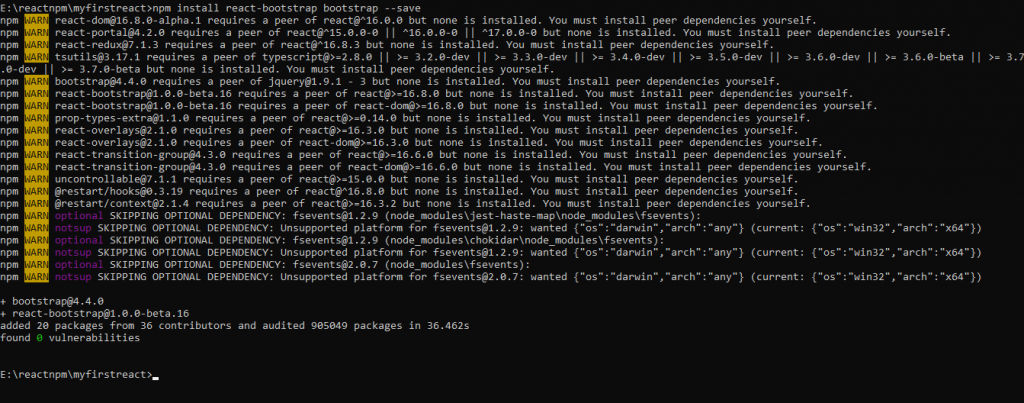
Add the following code in App.js file:
import React, { Component } from 'react';
import 'bootstrap/dist/css/bootstrap.min.css';
const ButtonContext = React.createContext('btn btn-darkyellow');
class App extends Component {
render() {
return (
);
}
}
function Button(props) {
return (
Hello World :) :)
In the above code, we have created the Context by using the React.createContext(), which returns the Context object. Then, we have created the wrapper component, which gives the provider component and further adds all the elements as the children from which we require to access the Context.
Output:
On executing the above code, the output will be:
