
×

React Portals

React Portals

React portals were introduced by React 16.0 in September 2017. It gives you a way to render the element outside of the component hierarchy, i.e., within a separate component.

Before React 16.0, it was hard to render the child component outside of their parent component hierarchy.

Syntax:

ReactDOM.createPortal(child, container)

The react portals syntax has included two arguments, in which the first argument is the child component, which could be a string or a fragment, and the second argument is a container, which is a DOM element.

Example before React v16

When you need to return the element by the render method of the component, then it is mounted as the new div in the DOM and also renders the child of the closest parent component.

render() { 
// React mounted a new div in the DOM and renders the child in it 
return ( 
{this.props.children}
); }

Example using portal

Sometimes, we require to insert the child component to a different location in the DOM. It means that react does not need to create the new div. It can be done by creating the react portal.

render() { 
return ReactDOM.createPortal( 
this.props.children, 
myNode, 
); 
} 

Features of React Portals

There are several features of the React portals that are as follows:

  • It uses React 16.0 and the official API to create the portals.
  • It transports the child component into the new React portal, which appends by the default to document body.
  • It also can target the user-specified DOM element.
  • It usually supports server-side rendering.
  • It supports the returning arrays (as no wrapper div required).
  • React portals do not have any dependencies.
  • It uses <Portal /> and <PortalWithState />; that's why there is not a compromise between convenience and flexibility.

When React Portal required?

React portals are commonly used in:

  • Tooltips
  • Modals
  • Widgets
  • Floating menus

Get Started with React Portal

Installation

You can install the React Portal by using the following command:

npm install react-portal --save
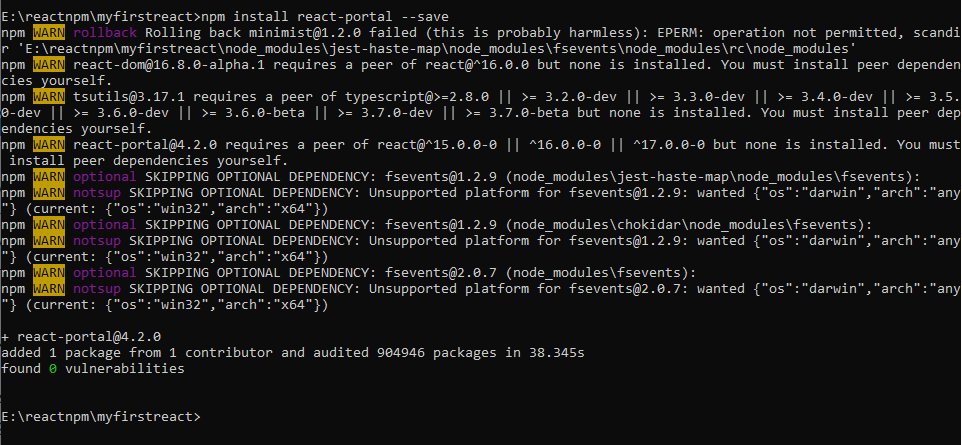
Get Started with React Portal

Explanation

Now, create your new react project by using the following command:

npx create-react-app reactapp
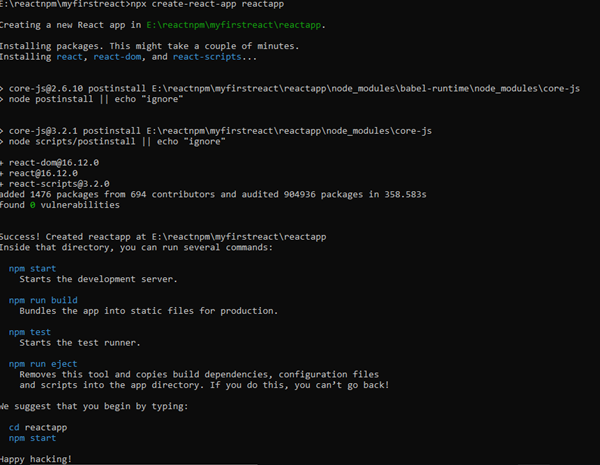
create your new react project by using npx create-react-app reactapp

Now, open your App.js file.

App.js

import React, {Component} from 'react'; 
import './App.css' 
import PortalExample from './PortalExample.js'; 
class App extends Component { 
render () { 
return ( 
); } } export default App;

Now, create a portal component and import it into your App.js file.

PortalExample.js

import React from 'react';
import ReactDOM from 'react-dom'; 
function PortalExample(){ 
return ReactDOM.createPortal( 

Example of Using the Portals

, document.getElementById('portal-root') ) } export default PortalExample;

Open your Index.html file and add <div id="portal-root"></div> element into it in order to access the child component outside the root node.

Index.html


React App


Output:

order to access the child component outside the root node.

Now, open your Inspect (ctrl + shift + I). In your inspect window, select the Elements section and click on the <div id="portal-root"></div> component. Here, you can see that each tag is under the ‘portal-root’ DOM node, instead of ‘root’ DOM node.

So, you can see how the react portals give the ability to break out of the root DOM tree.
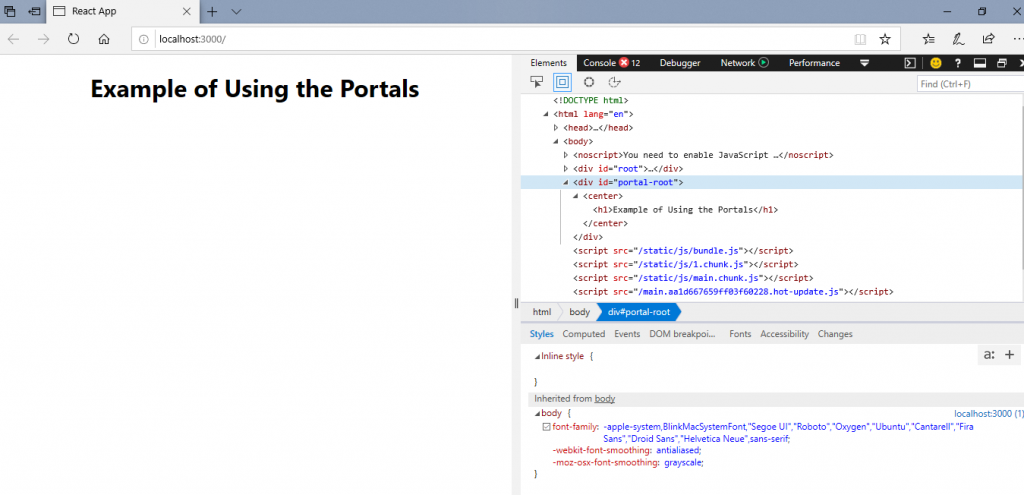
ability to break out of the root DOM tree.

Related Topics

React Error Boundaries

React Error Boundaries In the past, the errors of JavaScript within the components were used to corrupt the internal state of react and cause it to emit the cryptic errors on the next...

3 minutes read.

Difference Between React Flux and MVC

React Flux vs MVC MVC MVC is an acronym of 'Model View Controller.' It is the architectural pattern that is used to develop the user interface. It has three different logical components: The...

2 minutes read.

React Native vs ReactJS

Difference between React Native and ReactJS React Native React Native is also an open-source JavaScript framework that is used for the development of a mobile application for iOS Android and Windows. It...

6 minutes read.

Difference between Controlled and Uncontrolled component in ReactJs

Controlled Component In the controlled component, the input of the form element is handled by the component rather than the DOM. Controlled components have the functions that govern the data, which...

2 minutes read.

ReactJS Versions

ReactJS Versions The Complete set of release history of ReactJS is elaborated as follows. The complete set of full documentation of recent releases is on GitHub. S.noVersionRelease DateExplanation1.0.3.029/05/2013Initially released for public.2.0.4.029/07/2013Supporting comments...

4 minutes read.

React Lists

React Lists Lists are used for displaying the data in an ordered format and mainly used to display the menus on websites. The creating of lists in React is as similar...

2 minutes read.

React Redux

How to Use Redux with React Hooks It is an open-source library of JavaScript which is used for managing the application state. React uses the Redux to build the user interface....

5 minutes read.

React Flux

React Flux Introduction It is an application architecture that is internally used by Facebook to build the client-web application with react. It is useful when the project includes dynamic data, and...

2 minutes read.

React Portals

React Portals React portals were introduced by React 16.0 in September 2017. It gives you a way to render the element outside of the component hierarchy, i.e., within a separate component. Before React 16.0, it...

3 minutes read.

React Environment Setup Step by Step

React Environment Setup This section will provide you the information about how to set up an environment for the successful development of ReactJS application: Pre-Requisite for ReactJS NodeJS and NPMReact and React DOMWebpackBabel There are two...

5 minutes read.

React Map

React Map The map() is the standard function of JavaScript, which can be called at any array. The map() method is used for traversing and displaying a list of the similar objects of...

2 minutes read.

React Keys

React Keys A key can be defined as a unique identifier. In React, it is used for identifying the items that have changed, deleted, and updated from the lists. React Keys are helpful...

3 minutes read.

React State

React State The state is an updatable structure which is used for containing data or information about the component. The state in a component can be changed over time. The change...

3 minutes read.

React Table

React Table The table represents an arrangement that organizes the information in the form of rows and columns. The table is mainly used for storing and displaying the data within a structured format. Features of...

2 minutes read.

ReactJS Tutorial

ReactJS Introduction React Tutorial helps you to understand the basic and some advanced concepts of ReactJS. As of now, it is the essential front-end library that is developed by a...

3 minutes read.

React Animation

React Animation The animation is a procedure in which an image is manipulated to appear as a moving image. It is widely used to create an interactive web application. In React, we have to...

4 minutes read.

React Code Splitting

React Code Splitting React Code Splitting is the procedure of splitting the bundle files by which the files get easily loaded on the webpage. The react application bundles the files by using...

4 minutes read.

React Router

What is React Router? Routing is a process by which a user can direct to different pages based on their actions and requests. ReactJS router is generally used to develop single...

10 minutes read.

React Constructors

What is constructor? The constructor is a method that is used for initializing the state of the object in the class. It calls automatically during the creation of an object in...

4 minutes read.

React Components

React Components Former, the developers used to write more than thousands of lines of code to develop a single-page application. These applications follow the structure of traditional DOM, and it was very challenging to make...

2 minutes read.