
React Refs
React Refs
The word ‘Refs’ is an abbreviation of ‘References’ in React. It is as similar as Keys in React. Refs are a function in React which is used for accessing the DOM element and the React element. It is also an attribute that makes it possible for storing the reference to particular React elements or DOM nodes. It is used whenever we have to change the value of a child component, without using props.
Refs give you better functionality like we can use callbacks with them.
Creation of Refs
In React, we can create Refs by using React.createRef(). The ref is used for returning a reference to the element. The following example will help you to understand how we can create refs.
import React from 'react';
 class App extends React.Component {
  constructor(props) {
  super(props);
  this.referenceCalling = React.createRef(); // Method for creating Refs
  }
  render() {
  return <div ref={this.referenceCalling} />;
  }
 }
 export default App;
Accessing of Refs
In React, when the ref passes to an element within the render method, then a ref to the node is accessible by the current attribute of the ref.
const node = this.callRef.current;
The following examples show you the code without using refs and with refs.
Example:
Without Refs
import React from 'react';

class App extends React.Component {
  constructor() {
    super();
    this.state = {
      written: "",
    };
  }

  update(e) {
    this.setState({ written: e.target.value });
  }

  render() {
    return (
      <div>
        <h2>Without Using refs</h2>
        <label>
          <strong>Your Input:</strong>
        </label>
        <input
          type="text"
          placeholder="Write Something"
          onChange={(e) => this.update(e)}
        />
        <p>
          <strong>Your Output:</strong> {this.state.written}
        </p>
      </div>
    );
  }
}

export default App;
In the above code, we are using the target value of event e for getting the value of the text-field. After the compilation of the above code, you will get the following output.
Output:

With Refs
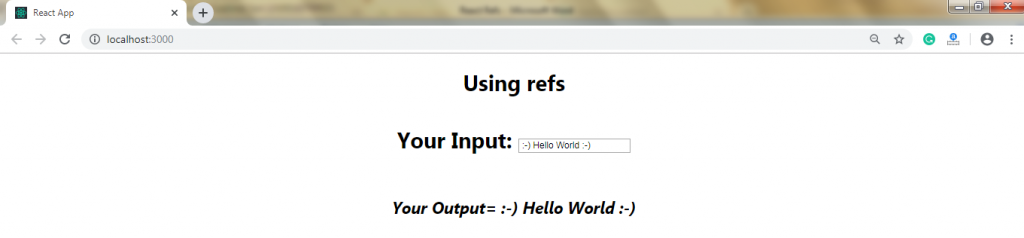
In this example, we are making use of refs. The code of this example is as follows:
import React from 'react';

class App extends React.Component {
  constructor() {
    super();
    this.state = { written: "" };
  }

  update(e) {
    this.setState({ written: this.refs.any.value });
  }

  render() {
    return (
      <div>
        <h2>Using refs</h2>

        <div>
          <label>Your Input:</label>
          <input
            type="text"
            ref="any"
            onChange={(e) => this.update(e)}
            placeholder="Write Something"
          />
        </div>

        <div>
          <h2>Your Output = {this.state.written}</h2>
        </div>
      </div>
    );
  }
}

export default App;
Output:
Callback Refs
In React, “callback refs “are the way of using refs. It provides you more control when the refs are set or unset. Rather than creating the refs by using the createRef() method, there is a way for creating the refs by passing a callback function in the ref attribute of the component.
For example:
this.callRefInput = (element) => {
  return element;
};
The callback function is used for storing the reference to the DOM node within an instance property and it can be accessed elsewhere.
We can access it by using this.callRefInput.value.
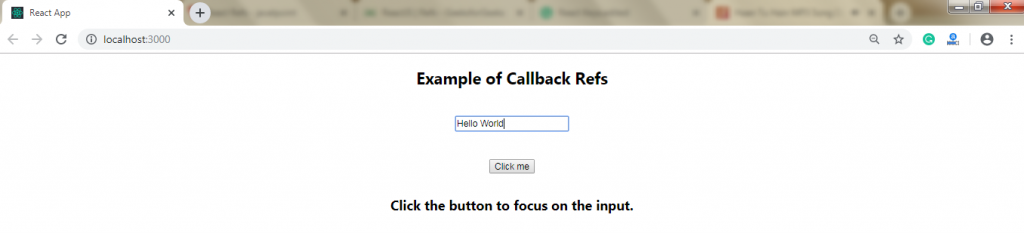
The following example will help you to understand the working of the callback refs.
Example:
import React, { Component } from 'react';
import { render } from 'react-dom';

class App extends React.Component {
  constructor(props) {
    super(props);
    this.input = null;

    // Setting a callback ref
    this.setInputRef = (element) => {
      this.input = element;
    };

    // Method to focus on the input element
    this.focusRefInput = () => {
      if (this.input) this.input.focus();
    };
  }

  componentDidMount() {
    // Autofocus the input on mount
    this.focusRefInput();
  }

  render() {
    return (
      <div>
        <h2>Example of Callback Refs</h2>
        <input
          type="text"
          ref={this.setInputRef}
          placeholder="This input will be auto-focused"
        />
        <button onClick={this.focusRefInput}>
          Click the button to focus on the input
        </button>
      </div>
    );
  }
}

export default App;
Output:
Add Ref to DOM elements
The following example will show you the adding of a ref for storing the reference to a React element or DOM node.
Example:
import React, { Component } from 'react';
import { render } from 'react-dom';

function UserInput(props) {
  const refInput = React.createRef();

  function click() {
    refInput.current.focus();
  }

  return (
    <div>
      <h2>Example of Adding Ref to Functional Component</h2>
      <input type="text" ref={refInput} placeholder="Focus me on click" />
      <button onClick={click}>Focus Input</button>
    </div>
  );
}

class App extends Component {
  constructor(props) {
    super(props);
    this.refInput = React.createRef();
  }

  focusInput = () => {
    this.refInput.current.focus();
  };

  render() {
    return (
      <div>
        <h2>Example of Adding Ref to Class Component</h2>
        <input type="text" ref={this.refInput} placeholder="Focus me on click" />
        <button onClick={this.focusInput}>Focus Input</button>
        <UserInput />
      </div>
    );
  }
}

export default App;
Output:

Add Ref to class components
In the following example, we add a ref for storing the reference to the class component.
Example:
import React, { Component } from 'react';
import { render } from 'react-dom';

function UserInput(props) {
  const refInput = React.createRef();

  function click() {
    refInput.current.focus();
  }

  return (
    <div>
      <h2>Example of Adding Ref to Class Component</h2>
      <input ref={refInput} type="text" placeholder="Enter text here" />
      <button onClick={click}>Focus Input</button>
    </div>
  );
}

class App extends React.Component {
  constructor(props) {
    super(props);
    this.refInput = React.createRef();
  }

  focusInput() {
    this.refInput.current.focus();
  }

  render() {
    return (
      <div>
        <h2>Ref Example</h2>
        <input ref={this.refInput} type="text" placeholder="Enter text here" />
        <button onClick={() => this.focusInput()}>Focus Input</button>
      </div>
    );
  }
}

export default App;
Output:

React With useRef()
It is introduced in the React Version 16.7 and its above version. It helps in the accessing of React Element or DOM node. It returns the object of ref whose .current property initializes to the passed argument. The returned object persists for the lifetime of the component.
Syntax:
const refContainer = useRef(initialValue);
Example:
In the following code, the useRef function is assigned to a variable, refInput, and then it will attach to an attribute which we want to reference.
function useRefExample() {
  const inputRef = useRef(null);

  const onButtonClick = () => {
    inputRef.current.focus();
  };

  return (
    <>
      <input ref={inputRef} type="text" placeholder="Type something here" />
      <button onClick={onButtonClick}>Submit</button>
    </>
  );
}
Refs Current Properties
There are some properties of the refs that are as follows:
- If we use ref attribute on a custom class component, then the object of ref receives the mounted instance of component as the current property.
- We cannot use the ref attribute as function components because they do not have instances.
When to use Refs
Refs are useful in the following cases:
- When we require DOM measurements such as managing focus, text selection, or media playback.
- Refs are used to trigger imperative animations.
- Refs are used in callbacks.
- It is used when we have to integrate with third-party DOM libraries.
When to not use Refs
- The use of refs should be avoided when it is done declaratively. For example, you are passing an isOpen prop instead of using open() and close() methods on a dialog component.
- The overuse of Refs should be avoided.