×

HTML Data Tag

HTML Data Tag: The HTML < data > tag is used to transmit its content to a machine-readable version. The data are presented in a particular format. It is useful because a script can process it, but this might not be the format we would like the users to use.

Let's consider a scenario:

Suppose we have to represent some numbers with letters (i.e., one, two, three, and so on) to our users, but we have a script that sorts the numbers in ascending or descending commands. So our script needs amounts in a format like 1, 2, and 3, and so on.

To solve the problem, < data > tag is used.

For users: write within tag < data>.... </data >.

For the script: use the attribute value.

<data value=”1”One</data>

HTML data tag attribute

There is only one required attribute. The Data tag also supports global attributes and event attributes.

AttributeDescription
ValueIt is a required attribute. It is used to provide content for the computer-readable version of the name.

HTML data tag example

<!DOCTYPE>
<html>
<body>
<ul>
<li><data value="101">Java Tutorial</data></li>
<li><data value="111">SQL tutorial</data></li>
<li><data value="121">HTML tutorial</data></li>
<li><data value="131">HTML Hadoop Tutorial</li>
</ul>
</body>
</html>

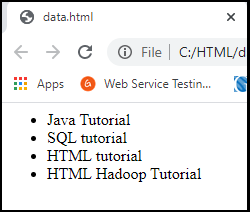
Output
HTML Data Tag

Supporting Browsers

ElementChromeIEFirefoxOperaSafari
<data>YesYesYesYesYes

HTML Datalist Tag

The HTML < datalist > tag is used to provide a complete auto function on the form element. It provides users with a list of predefined options for selecting data.

HTML5 includes the datalist tag.

The tag < datalist > should be used with the element < input >, which contains the attribute "list." The value of the "list" attribute is related to the Datalist Id.

Example

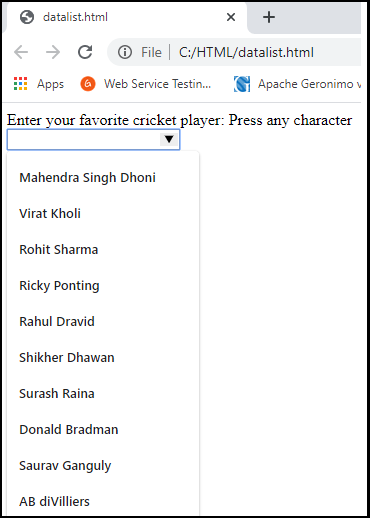
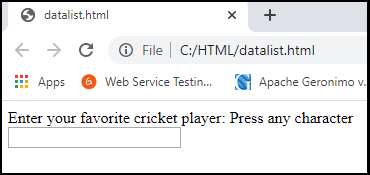
Let's look at the simple example of the data list tag HTML5. If you press A, a list of cricketers will appear, starting with A letter.

<!DOCTYPE>
<html>
<body>
<label>
 Enter your favorite cricket player: Press any character<br />
<input type="text" id="favCktPlayer" list="CktPlayers">
<datalist id="CktPlayers">
<option value="Mahendra Singh Dhoni ">
<option value="ViratKholi">
<option value="Rohit Sharma">
<option value="Ricky Ponting">
<option value="Rahul Dravid">
<option value="ShikherDhawan">
<option value="Surash Raina">
<option value="Donald Bradman">
<option value="SauravGanguly ">
<option value="AB diVilliers">
<option value="RavindraJadeja">
<option value="Adam Gilchrist">
</datalist>
</label>
</body>
</html>

Output
HTML Data Tag
HTML Data Tag

Supporting Browser

ElementChromeIEFirefoxOperaSafari
<datalist>YesYesYesYesYes

HTML Dialog tag

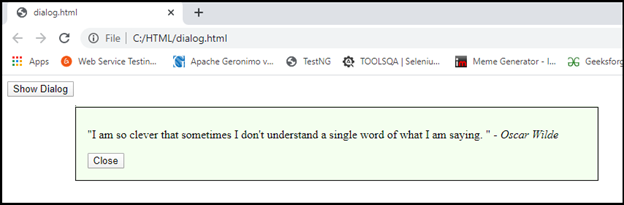
Log > tag is used to create a new web-page popup dialog. This tag is a dialog box or some interactive feature like a window. The < dialog > element uses the open boolean attribute that activates the component and makes it easier for the user to interact.

A new tag implemented in HTML5 is the HTML dialog.

HTML dialog tag example

<!DOCTYPE>
<html>
<body>
<div>
<dialog id="myFirstDialog" style="width:50%;background-color:#F4FFEF;border:1px dotted black;">
<p><q>I am so clever that sometimes I don't understand a single word of what I am saying.  
</q> - <cite>Oscar Wilde</cite></p>
<button id="hide">Close</button>
</dialog>
<button id="show">Show Dialog</button>
</div>
<!-- JavaScript to provide the "Show/Close" functionality -->
<script type="text/JavaScript">
(function() {   
var dialog = document.getElementById('myFirstDialog');   
document.getElementById('show').onclick = function() {   
dialog.show();   
    };   
document.getElementById('hide').onclick = function() {   
dialog.close();   
    };   
})();  
</script>
</body>
</html>

Output
HTML Data Tag

The HTML Dialog tag also supports HTML attributes for global and events.

Supporting Browsers

ElementChromeIEFirefoxOperaSafari
<dialog>YesYesYesYesYes

Related Topics

HTML Date

The input element in HTML has several attributes. One of its attributes is the type attribute which creates a calendar in an order that a user can select a date...

5 minutes read.

HTML Nested Table

HTML nested table refers to a table that is created inside another table. The table is in the form of rows and columns. From left to right are called horizontal rows,...

5 minutes read.

HTML Paragraphs

In html, there are some elements which starts with new line and one of them is paragraph. Which is said to be a block of text. In html <p> tag...

4 minutes read.

HTML <source> tag

For media attributes, such as <video> tag, <audio> tag, and <picture> tag, we use the <source> tag in html for adding such type of multiple media html elements in our...

4 minutes read.

HTML SVG

HTML SVG: SVG stands for Scalable Vector Graphics which defines the graphics for the web. It is a language for describing 2-D graphics in XML. Each drawn shape in SVG is...

1 minute read.

HTML City tag

HTML <City> tag HTML < cite > tag specifies a citation, a reference or title to a creative work, quoted content, books, websites, a research paper, a blog post, a painting,...

3 minutes read.

Responsive HTML5 and CSS3 Tutorial

Introduction to HTML5 Tutorial HTML5 is the latest and upgraded version of HTML. HTML is a hypertext markup language. Technically, it is not a programming language. It is a markup language. HTML...

17 minutes read.

HTML <video> Tag

The Video tag in HTML is used to play video on a media player on the web page. We can also insert an audio by the video tag, but audio...

6 minutes read.

HTML Data Tag

HTML Data Tag: The HTML < data > tag is used to transmit its content to a machine-readable version. The data are presented in a particular format. It is useful...

3 minutes read.

Html &lt;datalist >Tag

The autocomplete feature in HTML files is provided by the <datalist> tag. It can be used in conjunction with an input tag to enable users to quickly fill out form...

4 minutes read.

HTML <sub> tag

The sub element in HTML is used to describe one or more subscript texts. If The sub tag shows the text which is presented in a smaller font and below...

2 minutes read.

HTML <body> tag

HTML means Hyper Text Markup Language, which is most preferred for making Web pages. It explains how a Web page is put together. There are many different elements in HTML,...

3 minutes read.

Html &lt;Col> Tag

You can write the col tag inside the table tag after the thead, tbody, foot, and tr tags. You can also apply it after the caption tag (in which the...

4 minutes read.

Html &lt;center> Tag

The term HTML refers to Hyper Text Markup Language. The most widely used markup language for making web pages is HTML. A structure of web page is described in HTML....

3 minutes read.

HTML Headings

The titles and subtitles of our webpages are known as HTML headings. Let’s not talk about webpages but giving heading to almost everything like normal paragraphs, articles or let it...

2 minutes read.

HTML Text Format

Introduction HTML may format text in two different ways. The HTML tags define a text property to make it appear one way or another. A text element may also be formatted...

7 minutes read.

Font tag in HTML

HTML stands for Hypertext Mark-up Language and is used to create web pages and other information that can be later displayed in a web browser. It also consists of a...

4 minutes read.

HTML <svg> tag

SVG is used to determine the vector-based graphics in XML format. What is SVG? We utilize SVG tag to specify visuals for the website. The attribute of SVG in a HTML document...

2 minutes read.

What is a Container tag?

In HTML, there are different types of tags or say instructions which make the developer specify various elements in the document and make the browsers understand what to display. Tags in...

5 minutes read.

HTML Hide Element

The HTML hide element is used to hide the element. We place the hidden attribute inside those elements which we want to hide. The hidden attribute is a Boolean attribute. The...

3 minutes read.