
HTML Id Attribute
The HTML id attribute represents the unique identifier for an element of the HTML document. Each element has its unique identifier.
The id attribute is a global attribute that can be used by an HTML element. The value of the id attribute should be unique. The id attribute can be used to style webpages. It takes the value, which must be relevant and a unique identifier. CSS and JavaScript use the id attribute to perform the tasks meant for the unique id element.
Syntax:
<tag id="identifier" />
Examples of HTML id attribute:
Example 1: Id attribute on the body element
This example demonstrates the id attribute applied to the body element. We give the unique id to the body element. See the code below:
<!DOCTYPE html>
<html lang="en">
<head>
    <title> Id Attribute on Body Element </title>
    <style>
    #body-element{
        background-color: lightgreen;
    }
    </style>
</head>
<body id="body-element">
  <p> We are applying CSS to the body element using id attribute. </p>
</body>
</html>
Output:
As you can see in the output, the unique id is given to the body element which has been used to apply the background color in the body tag.

Example 2: Executing JavaScript function using the id attribute
This example shows the use of the id attribute to execute JavaScript. We are adding a script inside the body element.
<!DOCTYPE html>
<html>
<head>
    <title>Applying JavaScript to div element using Id Attribute</title>
    <style>
    #text {
        font-size: 50px;
        color: grey;
        font-weight: bold;
        margin-bottom: 30px;
    }
    </style>
</head>
<body>
    <div id="text"> TutorialAndExamples </div>
    <button onclick="changetext()"> Display Text Change </button>
    <script>
    function changetext() {
        document.getElementById("text").innerHTML =
        "Welcome to TutorialAndExample.";
        document.getElementById("text").style.color = "red";
    }
    </script>
</body>
</html>
Output:
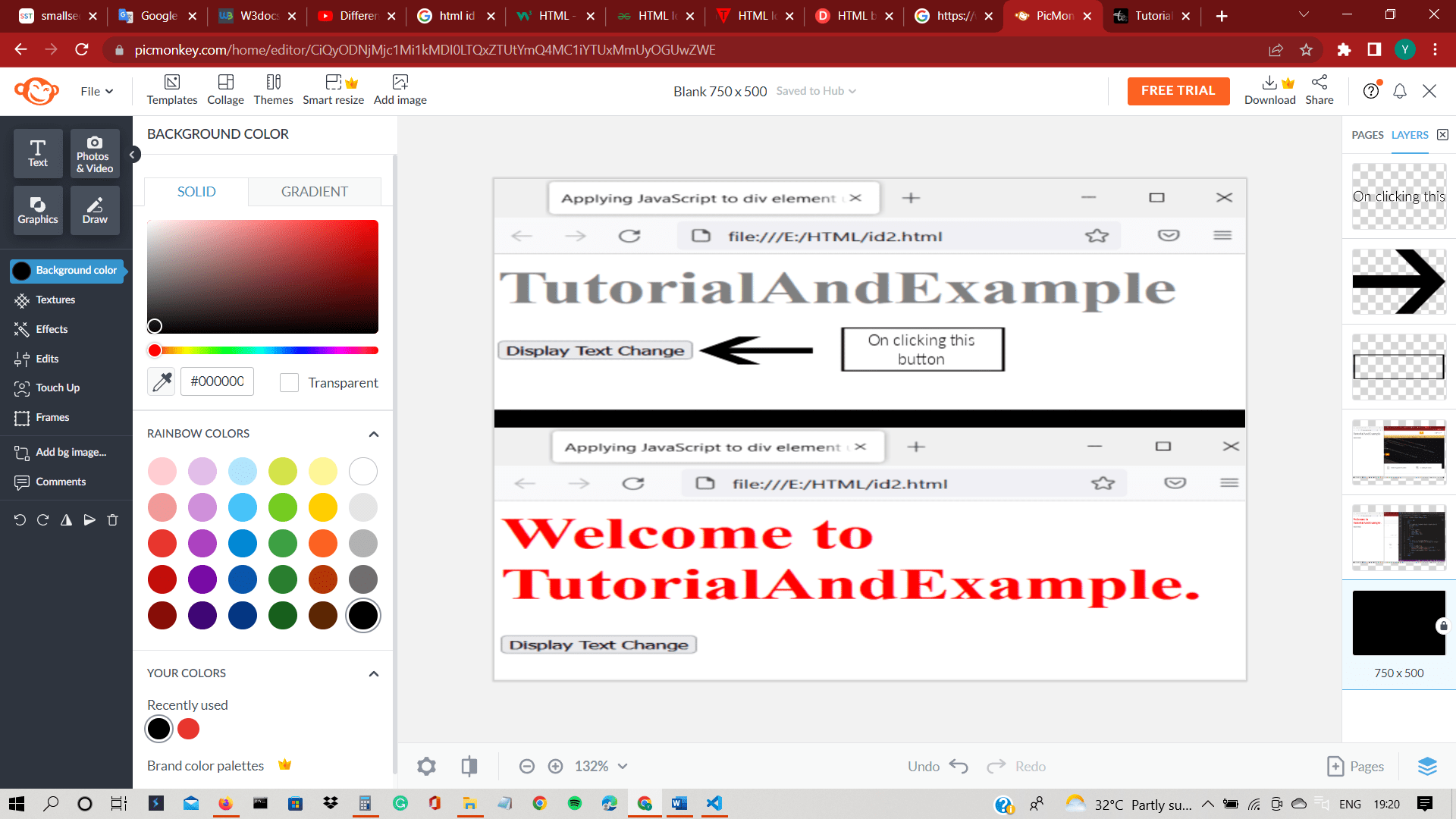
When you click on the display change button in the output, the JavaScript will change the text and the color of the text. The color of the text turns into red.
Example 3: Id attribute on <a> tag
In this example, <a> tag is used to link one web page to another. A unique id is provided to the <a> tag.
<!DOCTYPE html>
<html lang="en">
<head>
    <title> Id Attribute on anchor tag </title>
    <style>
    #google-link{
       color: rgb(41, 163, 41);
       font-weight: bold;
       font-size: 50px;
    }
    </style>
</head>
<body>
    <p> Below is a hyperlink. </p>
    <a id="google-link" target="_blank"
    href="https://www.google.com/"> Google </a>
</body>
</html>
Output:
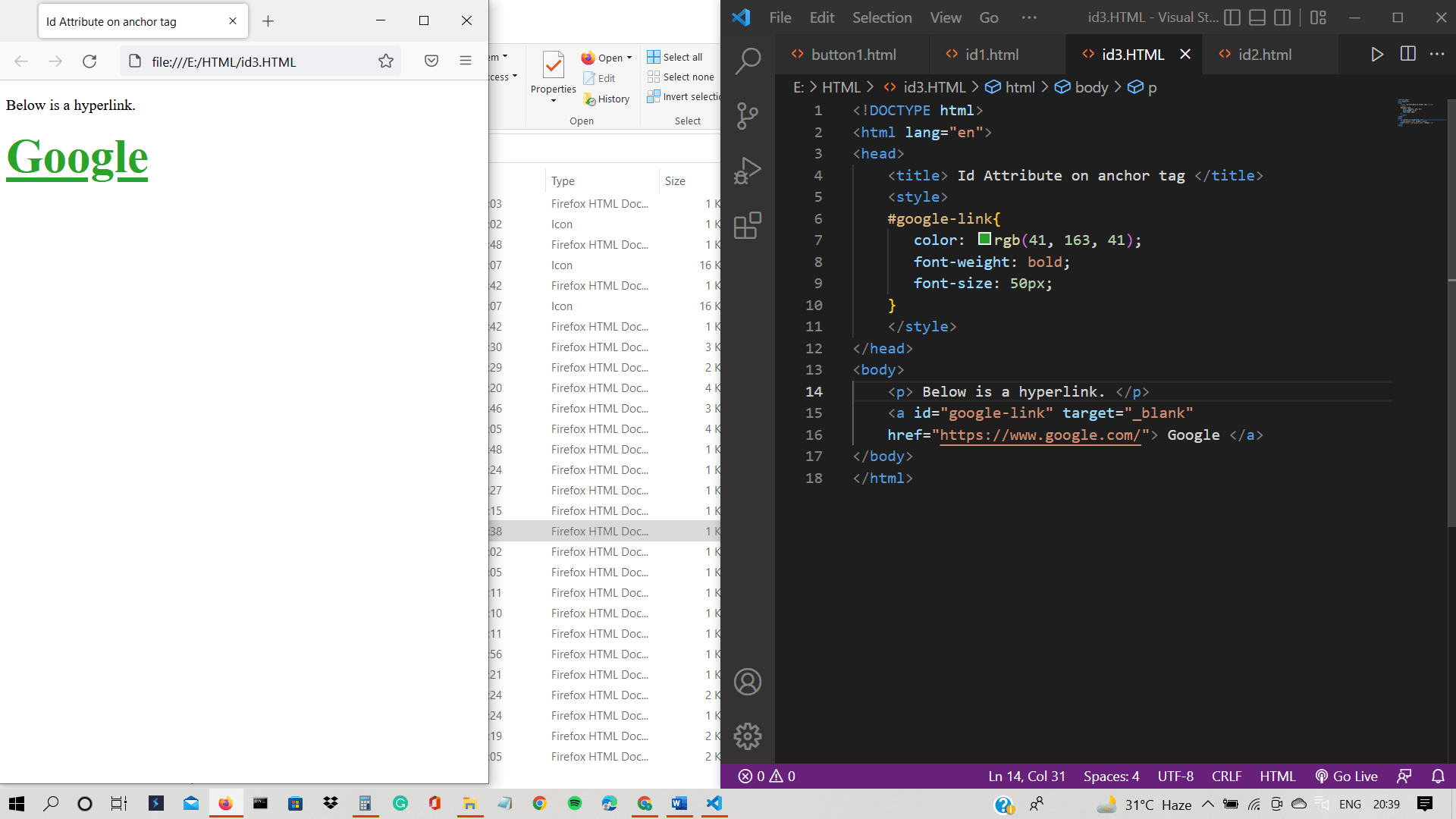
In the output, green text is a hyperlink that will take you to another web page.
Example 4: Id attribute on <abbr> tag
In this example, <abbr> tag is used to write a short form of words. A unique id is provided to the <abbr> tag.
<!DOCTYPE html>
<html lang="en">
<head>
    <title> Id Attribute on abbreviation element </title>
    <style>
    #isro-abbr{
       color: rgb(222, 112, 28);
    }
    </style>
</head>
<body>
    <p>
        Abbreviations are used to write words in short form. <br> <br>
        Indian Space Research Organization: <abbr id="isro-abbr" title="Indian Space Research Organization">ISRO</abbr>
     </p>
</body>
</html>
Output:
The output shows the abbreviation in orange color.

Example 5: Id attribute on <address> tag
We use the address tag to provide contact information. <Address> Tag is a specified unique identifier.
<!DOCTYPE html>
<html lang="en">
<head>
    <title> Id Attribute on abbreviation element </title>
    <style>
    #company-address{
       color: rgba(173, 178, 19, 0.694);
    }
    </style>
</head>
<body>
    <p>
        Usually, we write the company address in the footer.
    </p>
     <footer>
        <address id="company-address">
          Contact: <a href="techno@company.com"> Ronald Jackson </a>, @ronald_jackson
        </address>
      </footer>
</body>
</html>
Output:
With the help of a unique id, we have added CSS to the <address> tag.

Example 6: Id attribute on <article> tag
We use <article> tag to article in HTML document.
<!DOCTYPE html>
<html lang="en">
<head>
    <title> Id Attribute on article element </title>
    <style>
    #article{
       color: rgba(179, 251, 173, 0.694);
       background-color: black;
    }
    </style>
</head>
<body>
<article id="article">
    <h2> Article </h2>
    <p> When we need to write an article in HTML document, we use the article element. The article element tells the programmer and browser that this piece of text is an article. </p>
</article>
</body>
</html>
Output:
The output shows an article with a unique id to style the article element.

Example 7: Id attribute on <aside> tag
We have give a unique id to <aside> tag.
<!DOCTYPE html>
<html lang="en">
<head>
    <title> Id Attribute on aside element </title>
    <style>
    #programming{
        display:flex;
    }
    #languages-aside{
       margin: 60px;
       padding: 15px;
       border-left: 4px solid;
       color: rgb(11, 81, 135);
    }
    </style>
</head>
<body>
<div id="programming">
    <main>
        Programming languages:
        <ul>
          <li> Java </li>
          <li> C </li>
          <li> C++ </li>
          <li> Python </li>
          <li> JavaScript </li>
          <li> HTML </li>
          <li> CSS</li>
        </ul>
      </main>

      <aside id="languages-aside">
       <i> Learn programming languages from best institute. </i>
      </aside>
     </div>
</body>
</html>
Output:
The output shows the aside element in blue color.

Example 8: Id attribute on <bold> tag
We are using a unique id for the bold element.
<!DOCTYPE html>
<html lang="en">
<head>
    <title> Id Attribute on bold element </title>
    <style>


    </style>
</head>
<body>
<p> This is a <b id="bold-text"> bold </b> text. </p>
</body>
</html>
Output:
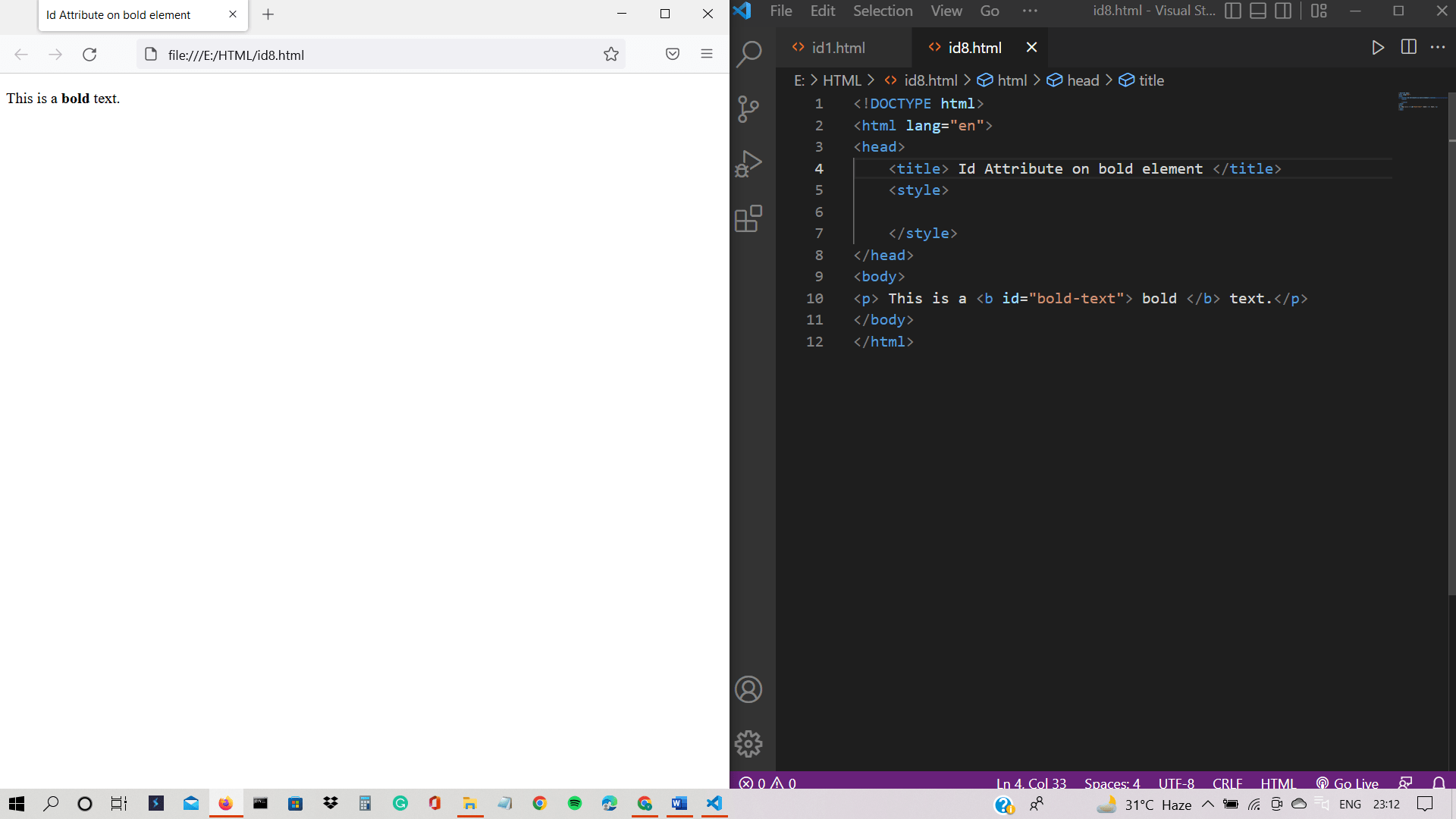
The output shows the bold text.
Example 9: Id attribute on <button> tag
This example displays the button element with its unique identifier.
<!DOCTYPE html>
<html lang="en">
<head>
    <title> Id Attribute on button element </title>
    <style>
#alert-button{
    color: red;
    background-color: yellow;
}
    </style>
</head>
<body>
    <button id="alert-button"
    onclick="alert('The request has been approved!');">Click here to approve</button>
</body>
</html>
Output:
The output shows the button with a yellow background and red text. If you click this button, then it will show an alert message.

Example 10: Id attribute on <form> tag
We are providing unique identifier to <form> tag.
<!DOCTYPE html>
<html lang="en">
<head>
    <title> Id Attribute on form element </title>
    <style>
#Shampoo-form{
    color: rgb(175, 29, 233);
    background-color: rgb(243, 243, 237);
}
    </style>
</head>
<form id="Shampoo-form" action="#">
    <fieldset>
      <legend> Shampoo Details </legend>

      <input type="text" placeholder="Company" name="Company"><br /><br />
      <input type="text" placeholder="Ingredients" name="Ingredients"><br /><br />
      <input type="text" placeholder="Price" name="Price"><br /><br />


      <button style="background-color: yellow; color: rgb(237, 109, 237);" type="submit">Submit</button>
    </fieldset>
  </form>
</body>
</html>
Output:
With the help of the id attribute, CSS is applied to the form element.

Example 11: Id attribute on <iframe> tag
The <iframe> tag embeds another web page in the current HTML page.
<!DOCTYPE html>
<html lang="en">
<head>
    <title> Id Attribute on Inline Frame Element </title>
    <style>
    #tutorial{
        height:650px;
        width:100%;
    }
    </style>
</head>
<body>
    <iframe id="tutorial" src="https://www.tutorialandexample.com/">
</iframe>
</body>
</html>
Output:
The output shows another web page in the current HTML page.

Example 12: Id attribute on <image> tag
We use <image> tag to insert images in the HTML document. We are giving unique id to <image> tag.
<!DOCTYPE html>
<html lang="en">
<head>
    <title> Id Attribute on Image Element </title>
    <style>
    #background{
        height: 200px;
        width:50%;
    }
    </style>
</head>
<body>
    <img id="background"
    src="background.jpg"
    alt="Background Image">
</body>
</html>
Output:
Using the id attribute, we have applied height and width to the <image> tag.

Example 13: Id attribute on <optgroup> tag
This example demonstrates the <optgroup> tag with a unique id.
<!DOCTYPE html>
<html lang="en">
<head>
    <title> Id Attribute on Optgroup Element </title>
    <style>
    #Indian-food{
        color: brown;
    }
    #Chinese-food{
        color: rgb(222, 62, 217)
    }
    </style>
</head>
<body>
    <select>
        <option value=""> Select food </option>
        <optgroup id="Indian-food" label="Indian">
          <option value="Chole Bhature"> Chole Bhature </option>
          <option value="Dosa"> Dosa </option>
          <option value="Idli"> Idli </option>
        </optgroup>
        <optgroup id="Chinese-food" label="Chinese">
            <option value="Chilly Potato"> Chilly Potato </option>
            <option value="Momos"> Momos </option>
            <option value="Noodles"> Noodles </option>
          </optgroup>
      </select>
</body>
</html>
Output:
The output shows the two groups which are created using the <optgroup> tag in the code. And, we have applied CSS to both groups using the id attribute.

Example 14: Id attribute on <q> tag
This example displays the inline quotation that has a unique id.
<!DOCTYPE html>
<html lang="en">
<head>
    <title> Id Attribute on Quotation Element  </title>
    <style>
    #quote{
        color: mediumvioletred;
    }
    </style>
</head>
<body>
    <p>
        <q id="quote">
            Talk to yourself once in a day, otherwise you may miss meeting an intelligent person in this world.
        </q><br />
        - Swami Vivekananda
      </p>
</body>
</html>
Output:
The output shows the quotation, and we use the id attribute to provide a style to the <q> tag.

Example 15: Id attribute on <span> tag
This example displays the span element, which has a unique identifier.
<!DOCTYPE html>
<html lang="en">
<head>
    <title> Id Attribute on Span Element </title>
    <style>
    #text-part{
        color: orange;
        background-color: rgb(51, 14, 172);
    }
    </style>
</head>
<body>
    <p>
        The span is an inline element. We use the span element to apply a style to <span id="text-part"> some part of the text </span> in a paragraph.
    </p>
</body>
</html>
Output:
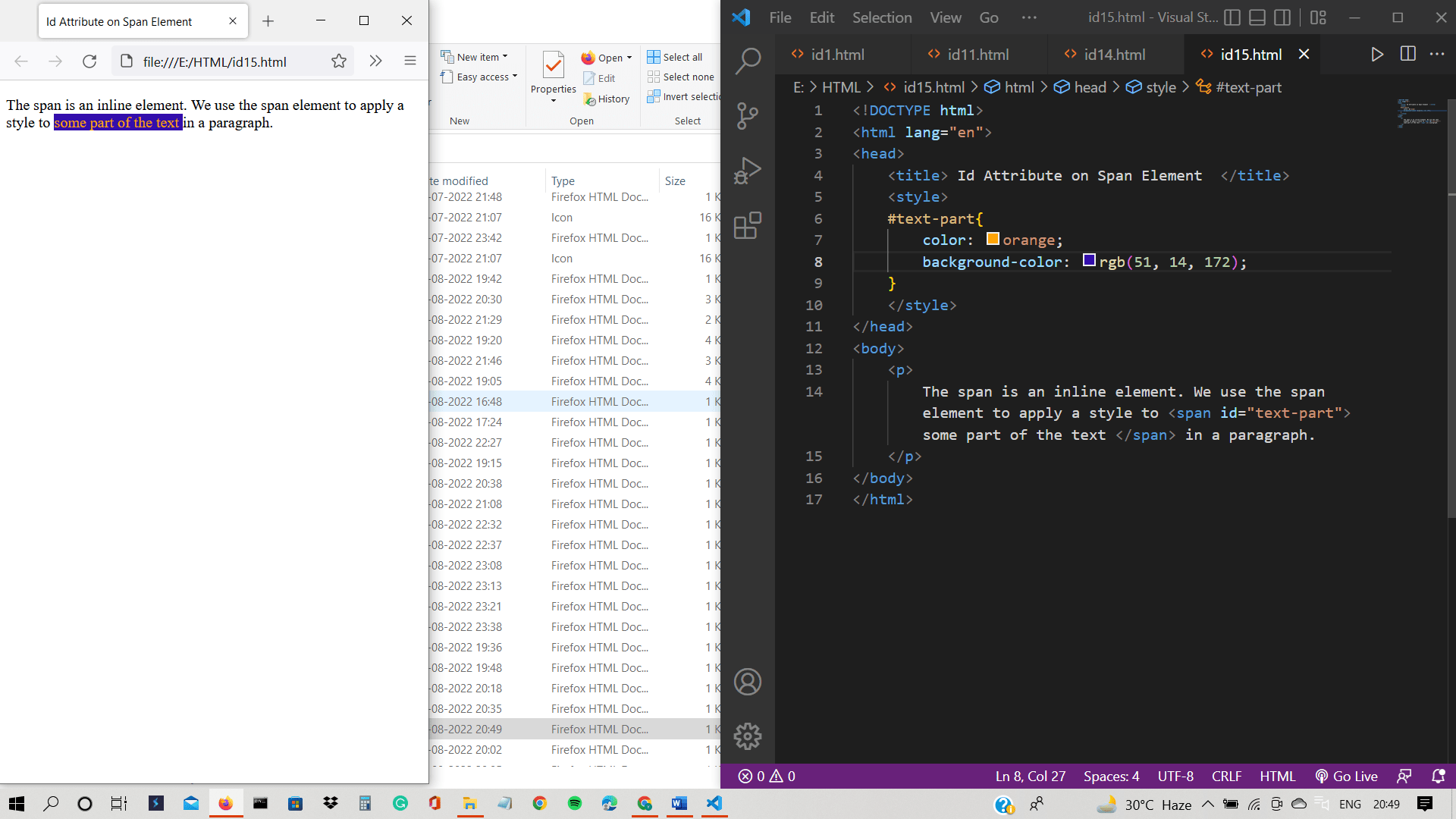
The output shows the span element on which we have implemented CSS using the unique id of the <span> tag.
Example 16: Id attribute on <table> tag
This example demonstrates the table, which has a unique identifier.
<!DOCTYPE html>
<html lang="en">
<head>
    <title> Id Attribute on Table Element  </title>
    <style>
    #table{
            border-collapse: collapse;
            width: 24px;0px;
    }
    th, td{padding: 5px; border: solid 1px rgb(131, 32, 32);
    }
    th{
        background-color: rgb(241, 142, 127);
    }
    </style>
</head>
<body>
    <table id="table">
        <tr>
          <th> Student name </th>
          <th> Subject </th>
          <th> Status </th>
        </tr>
        <tr>
          <td> Kristen </td>
          <td> English </td>
          <td> Pass </td>
        </tr>
        <tr>
          <td> Daniel</td>
          <td> Maths </td>
          <td> Pass </td>
        </tr>
      </table>
</body>
</html>
Output:
This output shows the table on which the style is applied using the id attribute.

Example 17: Id attribute on <table> tag
This example demonstrates the unordered list, which has its unique id.
<!DOCTYPE html>
<html lang="en">
<head>
    <title> Id Attribute on Unordered List Element </title>
    <style>
    #color{
        color: mediumvioletred;
        background-color: aquamarine;
    }
    </style>
</head>
<body>
    <div> <b> Colors: </b> </div>
    <ul id="color">
        <li> Red </li>
        <li> Yellow </li>
        <li> Blue </li>
        <li> Green </li>
        <li> Orange </li>
        <li> Pink </li>
        <li> Purple</li>
        <li> Black </li>
        <li> Grey </li>
        <li> Brown </li>
        <li> Violet </li>
    </ul>
</body>
</html>
Output:
The output shows the list of colors. We have applied the style to the list with the help of the id attribute.

Example 18: Id attribute on <table> tag
This example demonstrates the use of the id attribute on label and textarea elements. Both label and textarea have unique ids.
<!DOCTYPE html>
<html lang="en">
<head>
    <title> Id Attribute on label and textarea Element  </title>
    <style>
    #about{
        color: rgb(192, 75, 75);
        background-color: ;
    }
    #about-yourself{
        background-color: bisque;
    }
    </style>
</head>
<body>
    <label id="about" for="about yourself"> About Yourself </label><br/>
    <textarea id="about-yourself" rows="6" cols="50"
              placeholder="Write about yourself">
    </textarea>
</body>
</html>
Output:
The output shows the label and text area, which have their unique identifier. We have used the id attribute to apply the style.

Example 19: Id attribute on <section> tag
We use <section> tag to divide the content into sections and subsections. We are creating two sections with their unique identifiers.
<!DOCTYPE html>
<html lang="en">
<head>
    <title> Id Attribute on Section Element </title>
    <style>
    #section1{
        background-color: rgb(226, 193, 193);
    }
    #section2{
        background-color: rgb(232, 130, 130);
    }
    </style>
</head>
<body>
    <section id="section1">
        <h2> Section 1 </h2>
        <p>
            This is paragraph 1
        </p>
    </section>
    <section id="section2">
        <h2> Section 2 </h2>
        <p>
            This is paragraph 2
        </p>
    </section>
</body>
</html>
Output:
As you can see, there are two sections, and we have applied styles to them using the id attribute.

Example 20: Id attribute on <sub> and <sup> tag
We are providing unique ids to <sub> and <sup> tag.
<!DOCTYPE html>
<html lang="en">
<head>
    <title> Id Attribute on Subscript and Superscript Element </title>
    <style>
    #sub2{
        color: rgb(232, 130, 130);
    }
    #sup2{
        color: rgb(232, 130, 130);
    }
    </style>
</head>
<body>
<div>
    <h2> Subscript </h2>
    <p> The chemical formula of water is H<sub id="sub2">2</sub>O. </p>
</div>
<div>
    <h2> Superscript </h2>
    <p> This is an algebraic expression: <br> 2x<sup id="sup2">2</sup> + 4x </p>
</div>
</body>
</html>
Output:
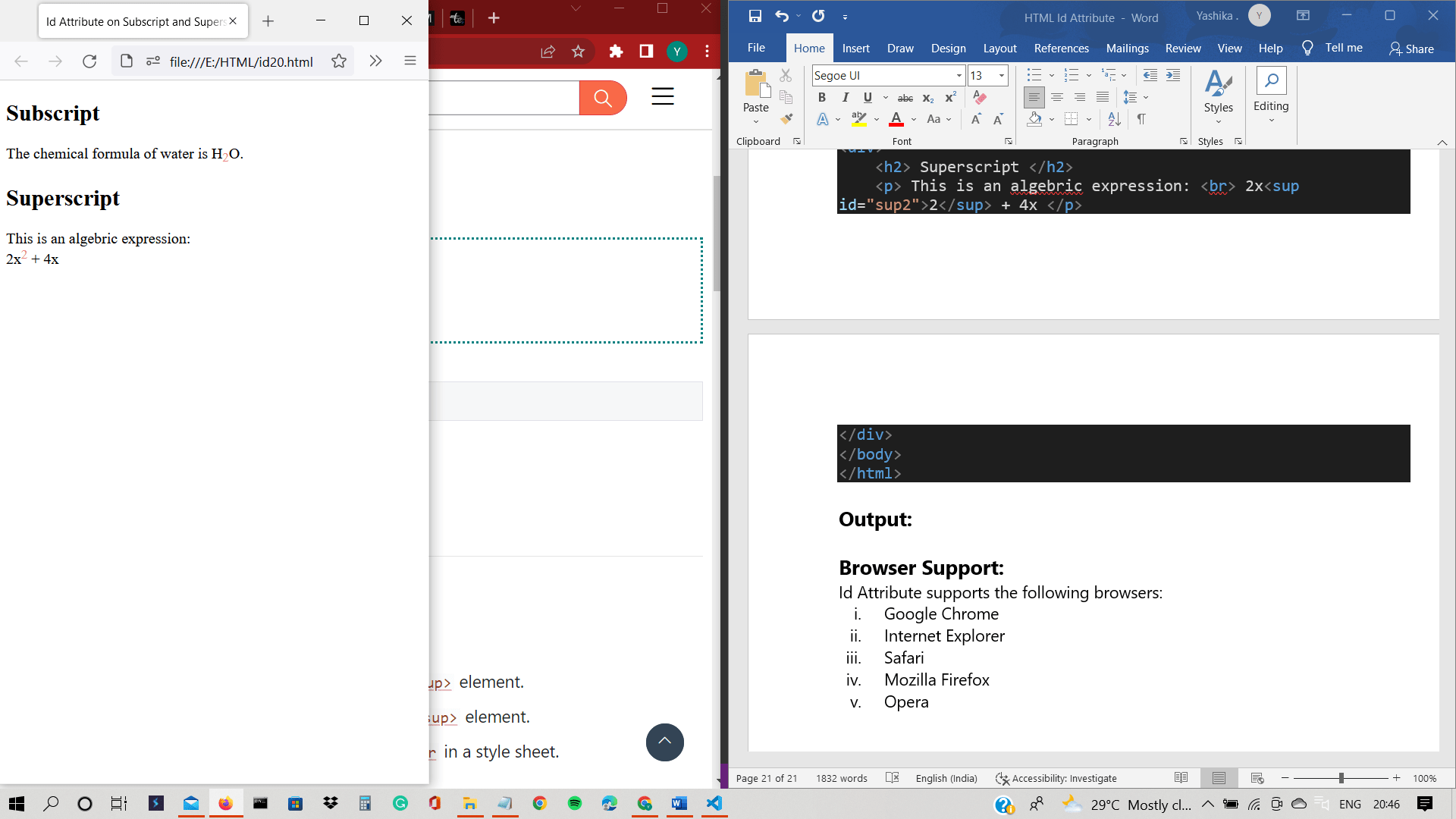
The output shows subscript and superscript elements.
In all the above examples of HTML elements, we have used the id attribute to provide the identifier to all the elements. We have provided the styles to the elements with the help of the id attribute.
We have executed JavaScript with the help of the id attribute. We can apply the id attribute to any HTML element.
Browser Support:
Id Attribute supports the following browsers:
- Google Chrome
- Internet Explorer
- Safari
- Mozilla Firefox
- Opera