
HTML Font Color
The HTML <font> tag has an attribute called color, which defines the color of the text. We use the color attribute inside the <font> tag to specify the color of the text.
Syntax:
<font color="color_name | rgb_number | hex_number | hsl_number">
Following are the ways to define the font color:
Color name:
We use the color name to define the color of the text in an HTML document. The color name represents the specific name of the HTML color. There are 140 standard color names that HTML supports. You can use any color which you want to show in your HTML document. For example, if you want to change the text's color to purple, then you have to set the color of the text to purple.
Syntax:
<font color="Color_name ">
RGB and RGBA number:
We use RGB and RGBA numbers to define the color of the text in an HTML document. The complete form of RGB is Red, Green, and Blue, and the full form of RGBA is Red, Green, and Blue with an Alpha, which defines opacity. We can create about 16 million different colors by combining red, green, and blue to form a color.
We can provide a color input value between 0 and 255, where 0 represents a color with minimum intensity and 255 represents a color with maximum intensity.
Syntax:
<font color="rgb(128,128,0)"
Hex number:
We use hex numbers to define the color of the text in an HTML document. The Hex color code is the same as the RGB code. The hex code means hexadecimal consisting of sixteen values. It contains the digits from 0 to 9 and letters from A to F. For example, #RRGGBB is the hex code, where the first two values represent red, the two middle values represent green, and the last two values represent blue. We combine these three values to make different colors in HTML. #808080 is an example of a hex code representing the color Grey.
The RGB code (0, 0, 0) has the hexadecimal code, #000000 which represents black. The RGB code (0, 0, 0) means low intensity, while the RGB code (255, 255, 255) has the hexadecimal code, #FFFFFF which represents white color, means high intensity.
Syntax:
<font color="#808080">
HSL and HSLA Values
We use HSL and HSLA values to define the color of the text in an HTML document. HSL stands for hue, saturation, and lightness. HSLA stands for hue, saturation, and lightness with an Alpha.
Hue represents degrees from 0 to 360, which means red, 120 means green, and 240 means blue.
Saturation defines the saturation of the color. 0% illustrates black and white defines Grey, and 100% represents the full color.
Lightness also represents the percentage. 0% represents black, and 100% represents white.
For example, hsl(0, 100%, 50%) represents the red color.
We use HSLA values for defining the opacity. In HSLA, A stands for Alpha whose range is from 0 to 1, i.e., we can set the decimal value of Alpha to an integer between 0 and 1 only.
Syntax:
<font color=" hsl(60, 100%, 50%)."
Examples of HTML Font Color
Example 1:
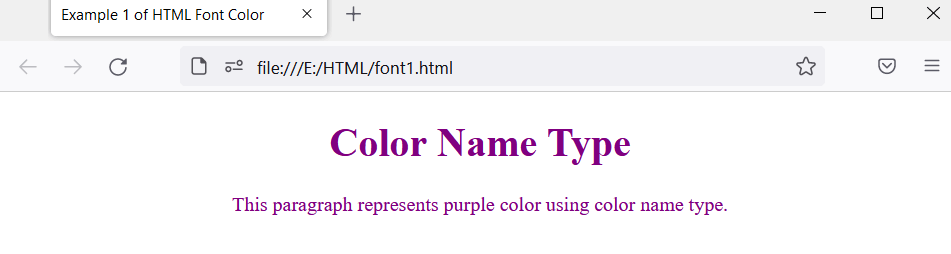
In this example, we are using the color name to set the color of the text.
<!DOCTYPE html>
<html>
<head>
    <title> Example 1 of HTML Font Color </title>
</head>
<body>
<font color="purple">
<center>
    <h1> Color Name Type </h1>
    <p> This paragraph represents purple color using the color name type. </p>
</center>
</font>
</body>
</html>
Output:
As you can see, the text color becomes purple.
Example 2:
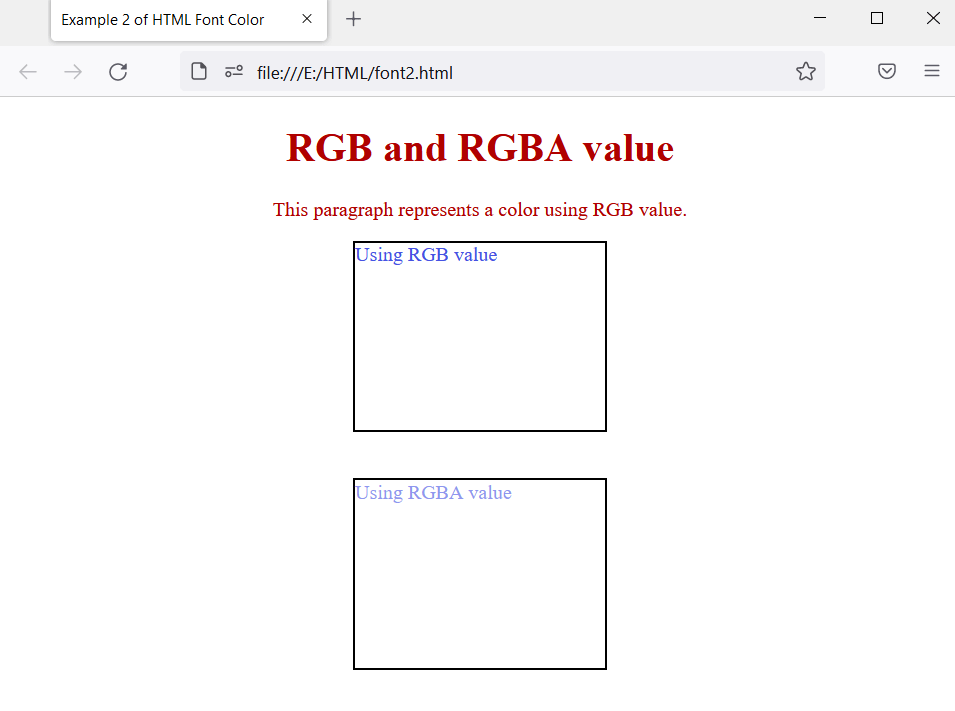
This example demonstrates the use of RGB and RGBA values. We are using a <font> element in which we will use the color attribute to give the color to the element. We will also use CSS code to provide color to the text.
<!DOCTYPE html>
<!DOCTYPE html>
<html>
<head>
    <title> Example 2 of HTML Font Color </title>
    <style>
        .value1{
            width: 200px;
            height: 150px;
            border: 2px solid black;
            color: rgb(69, 82, 226);
            margin: auto;
        }
        .value2{
            width: 200px;
            height: 150px;
            border: 2px solid black;
            color: rgb(69, 82, 226, 0.6);
            margin: auto;
        }
    </style>
</head>
<body>
<font color="rgb(0, 1, 0)">
<center>
    <h1> RGB and RGBA value </h1>
    <p> This paragraph represents a color using RGB value. </p>
</center>
<div class="value1"> Using RGB value </div> <br> <br>
<div class="value2"> Using RGBA value </div>
</body>
</html>
Output:
The output shows colored text. The heading and paragraph get the color using the color attribute inside the <font> tag. We have also used CSS to create two <div> tags with colored text.
As you can see, <div> with class value1 shows the blue text, whereas <div> with class value2 shows the same blue text, but the text color is lighter due to the RGBA value.
Example 3:
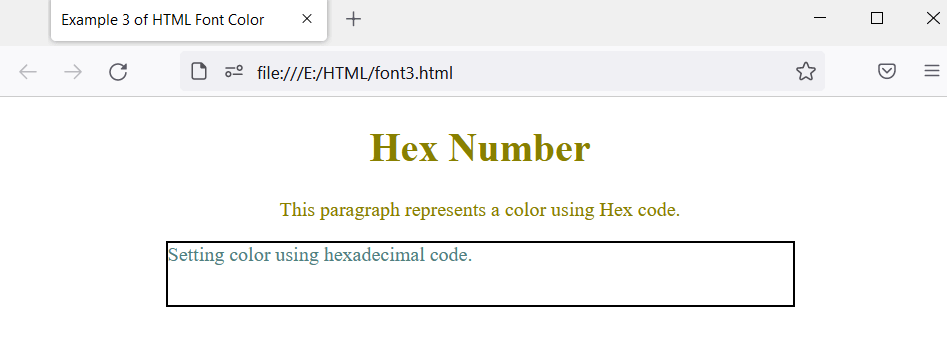
This example illustrates the use of hex numbers in the HTML document. We will also use CSS to provide text color to the element.
<!DOCTYPE html>
<html>
<head>
    <title> Example 3 of HTML Font Color </title>
    <style>
        .value{
            width: 500px;
            height: 50px;
            border: 2px solid black;
            color: #508080;
            margin: auto;
        }
    </style>
</head>
<body>
<font color="#888000">
<center>
    <h1> Hex Number </h1>
    <p> This paragraph represents a color using Hex code. </p>
</center>
</font>
<div class="value"> Setting color using hexadecimal code. </div>
</body>
</html>
The output shows the heading and paragraph with the text color. Using CSS, we will also style <div> tag.
Example 4:
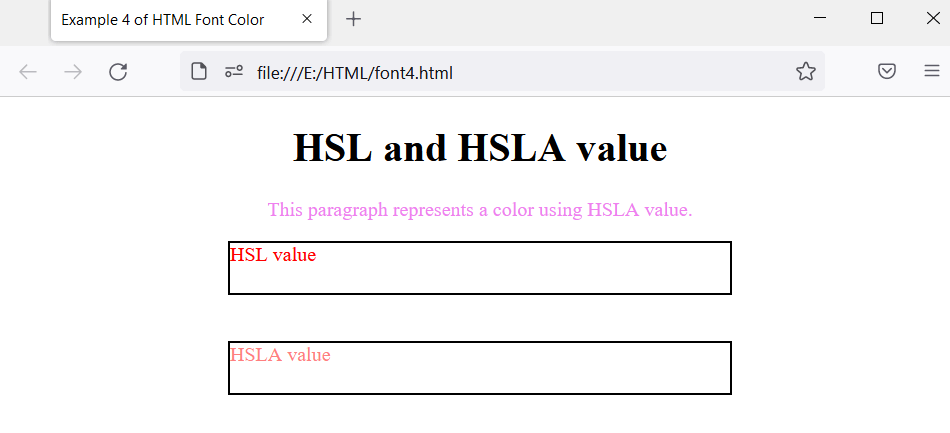
This example demonstrates the use of HSL and HSLA values.
<!DOCTYPE html>
<html>
<head>
    <title> Example 4 of HTML Font Color </title>
</head>
<body>
<font color="hsla(9, 100%, 64%, 1)">
<center>
    <h1> HSL and HSLA value </h1>
    <p> This paragraph represents a color using HSL value. </p>
</center>
</font>
</body>
</html>
Output:
The output shows a heading, paragraph, and two <div> elements. We will use the style as an attribute and define the property inside the element where we want to apply the color.
As you can see, the <p> tag has been given pink color using the style attribute. The <div> element shows the color applied using the HSL value. The other <div> element shows color applied using the HSLA value where A means Alpha which defines opacity. When we apply the HSLA value, the color of the text fades.
Example 5:
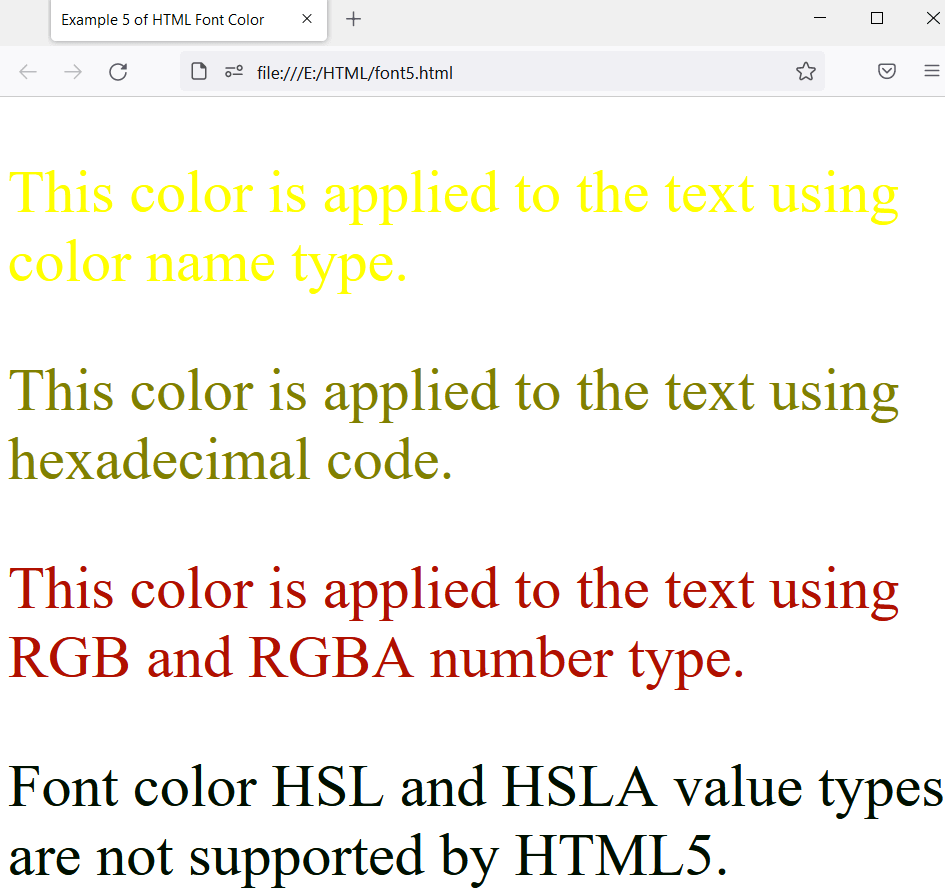
This example illustrates the different types of font color, which specifies the different colors of the text of the HTML document. We will use color names, hex numbers, RGB and RGBA numbers, and HSL and HSLA values.
<!DOCTYPE html>
<html>

<head>
    <title>
        Example 5 of HTML Font Color
    </title>
</head>

<body>
<div>
    <font size="15"
          color="yellow">
          <p> This color is applied to the text using color name type. </p>
    </font>
</div>
<div>
    <font size="15"
          color="#808000">
          <p> This color is applied to the text using hexadecimal code. </p>
    </font>
</div>
<div>
    <font size="15"
          color="rgb(0,1,0)">
          <p> This color is applied to the text using RGB and RGBA number type. </p>
    </font>
</div>
<div>
    <font size="15"
          color="hsl(0, 100%, 0%)">
          <p> Font color HSL and HSLA value types are not supported by HTML5. </p>
    </font>
</div>
</body>
</html>
Output:
The output shows the different colors which are applied using different color types.
Browser Support:
It supports the following browsers:
- Google Chrome
- Opera
- Mozilla Firefox
- Safari
- Internet Explorer