
×

HTML Form Action

The <form> tag has an attribute named action that contains a URL. The HTML action attribute defines the webpage URL on which you want to send the data after submitting the form, or you can redirect the user to the other page.

Examples of HTML Form Action:

Example 1:

This example creates a simple form with background color for making the web page attractive. After clicking the submit button, the data is sent, and the user is redirected to submit.html page, specfied in the action attribute.

<!DOCTYPE html>
<html>
  <title> Example 1 of Form Action Attribute </title>
<body bgcolor="cyan">


<h1> Example 1 of Form Action Attribute</h1>


<form action="submit1.html">
  <label for="Student Name"> Student Name: </label>
  <input type="text" id="Student Name" name=" Student Name"><br><br>
  <label for="email"> Email: </label>
  <input type="text" id="email" name="email"><br><br>
  <label for="age"> Age: </label>
  <input type="text" id="age" name="age"><br><br>
  <label for="Father's name"> Father's name:</label>
  <input type="text" id="Father's name" name="Father's name"><br><br>
  <label for="Mother's name"> Mother's name:</label>
  <input type="text" id="Mother's name" name="Mother's name"><br><br>
  <label for="University"> University:</label>
  <input type="text" id="University" name="University"><br><br>
  <label for="College"> College:</label>
  <input type="text" id="College" name="College"><br><br>
  <label for="Branch"> Branch:</label>
  <input type="text" id="Branch" name="Branch"><br><br>
  <label for="Hobby"> Hobby:</label>
  <input type="text" id="Hobby" name="Hobby"><br><br>
  <input type="submit" value="Submit">
</form>
</body>
</html>

Output:

The output screen has a form containing the student's name, email, age, father's name, mother's name, university, college, branch, hobby, and submit button.
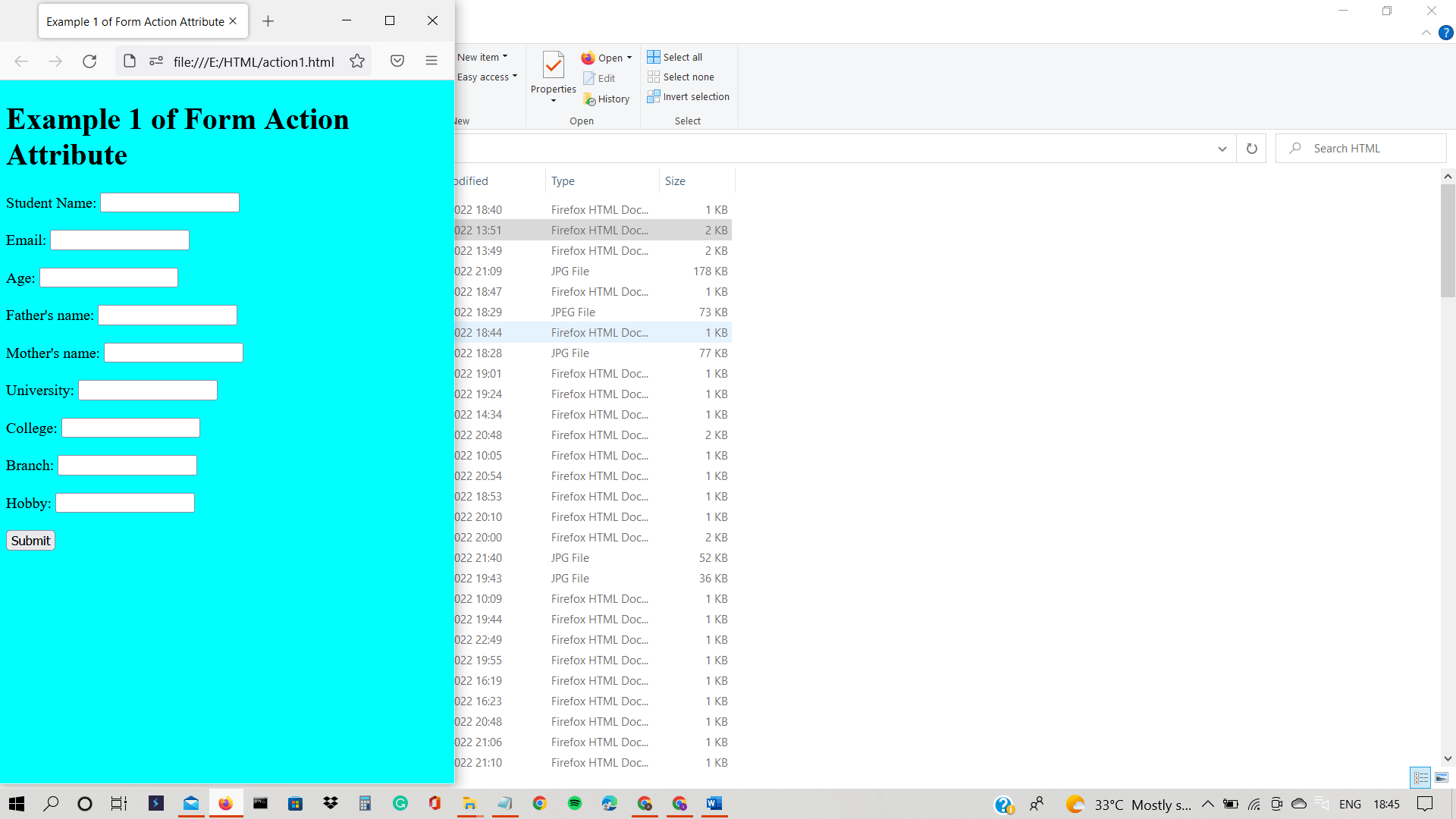
HTML Form Action

On submission of the form, the user is redirected to the submit.html page, as shown below:

HTML Form Action

Example 2:

This example demonstrates the use of the form action attribute in HTML.

<!DOCTYPE html>  
<html>  
<head>  
<title> Example 2 of Form Action Attribute </title>  
<meta name="viewport" content="width=device-width, initial-scale=1">  
<style>  
body{  
font-family: Calibri, monospace, 'Segoe UI';  
background-color: rgb(192, 241, 255);  
}  
.container {  
padding: 40px;  
background-color: rgb(232, 247, 166);  
}  
  
input[type=text] {  
  width: 100%;  
  padding: 12px;  
  margin: 6px 0 24px 0;  
  display: inline-block;  
  border: none;  
  background: #b4e0e1;  
}  
input[type=text]:focus {  
background-color: rgb(93, 215, 223);  
outline: none;  
}  
 div {  
         padding: 12px 0;           
}
.btn {  
  background-color: #e7a70f;  
  color: white;  
  padding: 15px 20px;  
  margin: 6px 0;  
  border: none;  
  cursor: pointer;  
  width: 100%;  
  opacity: 1;  
}  
.btn:hover {  
opacity: 0.8;  
}  
</style>  
</head>  
<body>  
<div class="container">  
<center> <h1> Registration Form </h1> </center>


<form action="submit2.html" method="post"> 


<div>
<label> Student Name </label>   
<input type="text" name="Student Name" placeholder= "Student Name" size="14" required />   


<label> Father's Name: </label>     
<input type="text" name="Father's Name" placeholder="Father's Name" size="14"required />   


<label> Mother's Name: </label>     
<input type="text" name="Mother's Name" placeholder="Mother's Name" size="14"required />   
 
<label>   
Gender :  
</label> <br>
<input type="radio" value="Male" name="gender" > Male   
<input type="radio" value="Female" name="gender"> Female   
<input type="radio" value="Other" name="gender"> Other  <br> <br>


<label>   
Date of Birth :  
</label>  
<input type="text" name="DOB" placeholder="DOB" size="10" required>


<label>   
Mobile No. :  
</label>  
<input type="text" name="Mobile No." placeholder="Mobile No." size="10" required>
<div>  
<button type="submit" class="btn"> Register </button>
</div>    
</form>   
</body>  
</html>

Output:

The below snapshot shows the registration form, which has input fields like first name, last name, father's name, mother's name, the radio button for gender selection, date of birth, mobile number, and a register button. The web page looks colourful due to the use of CSS (Cascading Style Sheets).

HTML Form Action

When you click on the registration button, data is sent to the action page, and the user is redirected to the web page contained in the action attribute, as shown below:

HTML Form Action

Browser Support:

It supports the browsers listed below:

  • Mozilla Firefox
  • Internet Explorer
  • Google Chrome
  • Safari
  • Opera

Related Topics

HTML Font Size

The HTML <font> tag uses the size attribute to specify the size of the text. We can set the size attribute’s value from 1 to 7. The default size of...

4 minutes read.

HTML Basic Tags

Heading Tags: This tag represents the document header. It is said to be a good practice if every document starts with Heading. Heading tags ranges from H1 to H6 i.e....

3 minutes read.

Most Commonly used Tags in HTML

In this tutorial, we'll look at the most popular HTML tags. We know HTML is a fundamental requirement for creating a website. As a result, it is essential to remember...

9 minutes read.

HTML5 Tags

HTML5 Tags A list of newly included tags is provided in HTML5. These HTML 5 tags (elements) provide a better structure for the document. This list shows description of all HTML...

3 minutes read.

HTML Search Box

The HTML search box is also known as the search bar. It is an input text field that is used to search the content. If the users want to explore...

7 minutes read.

HTML Nested Table

HTML nested table refers to a table that is created inside another table. The table is in the form of rows and columns. From left to right are called horizontal rows,...

5 minutes read.

HTML <script> Tag

For embedding a client -side script, we use script tag in html tag. This <script> tag can be used for containing scripting statements. It can also point another external script file...

2 minutes read.

How to add JavaScript to HTML

JavaScript is one of the most important languages today. It is a high-level, interpreted, lightweight programming language that makes web pages more interactive. It is a language of the web....

5 minutes read.

HTML Id Attribute

The HTML id attribute represents the unique identifier for an element of the HTML document. Each element has its unique identifier. The id attribute is a global attribute that can be...

12 minutes read.

HTML Tutorial

Introduction This HTML tutorial helps beginners and professionals to learn HTML easily. HTML is a widely used web technology for website development. It stands for Hyper Text Markup Language. It is mainly used to...

7 minutes read.

HTML <sub> tag

The sub element in HTML is used to describe one or more subscript texts. If The sub tag shows the text which is presented in a smaller font and below...

2 minutes read.

How to append HTML code to a div using JavaScript?

In HTML, we have a div tag which is used to create a box where we can put a lot of other tags. So it works like a container. So,...

4 minutes read.

HTML &lt;body> alink Attribute

HTML <body> alink Attribute What is HTML? The HTML or HyperText Markup Language is used to design web pages. The file extension name for HTML file is ".html". It was released in...

2 minutes read.

HTML <strike> tag

The HTML <strike> tag is used to specifies strikethrough text. The tag is deprecated now and <del> tag is used in HTML files instead of it. All the global and...

2 minutes read.

HTML Event Attributes

HTML Event Attributes If a browser responds to the user behavior, an event is called. For example, if we click on the submit button, a box of details will appear on...

4 minutes read.

HTML <br> tag

HTML is referred to as Hyper Text Markup Language, which is the most popular language for creating Web pages. HTML explains the construction of a Web page. It contains a...

4 minutes read.

HTML <select> tag

This tag helps in making the drop-down list on the web page. This is highly used in HTML forms for taking the input from user. You can use the id attribute...

3 minutes read.

HTML Layouts

HTML Layouts HTML templates provide a way for well-managed, well-structured responsive web pages to be organized. We could say that the HTML layout specifies how web pages can be set up....

4 minutes read.

How to insert image in HTML

An image (technically digital image) in HTML or even in general technical aspects is a binary representation of visual information. By visual information we mean, in the form of drawings/pictures,...

5 minutes read.

How to add Google Translate Button on your Webpage?

Google translator is a multi-language translator used for translating the webpage. Google develops it. In today's digital age, it is essential because information is available worldwide in some specific language...

5 minutes read.