
How to append HTML code to a div using JavaScript?
In HTML, we have a div tag which is used to create a box where we can put a lot of other tags. So it works like a container. So, to append any html code to the div tag, simply use the code and write between these tags. If we want to add any html code dynamically to a particular div tag, then we have to target or selectively choose that particular tag using either className or id name.
As we know, we can afford two or more divs with the same className, so using className will append the code to each div with that class name. So generally, we prefer to use an id name instead of a class name.
We can use two methods or attributes to target and append our HTML code:
- Using innerHTML attribute
- Using insertAdjacentElement() method to that element.
1.innerHTML attribute
Syntax:
targeted_element.innerHTML=targeted_element.innerHTML+new_HTMLcode
We can use shorthand properties of adding like:
targeted_element.innerHTM+=new_HTMLcode
For example:
<!DOCTYPE html>
<html>


<head>
	<title>How to Append HTML Code to a Div using JavaScript</title>
	<style>
		body {
			text-align: center;
			font-family:verdana;
			padding: 5%;
		}
		h1{
			color:green;
		}


		button{
			border-radius:5px;
			background-color:cyan;
			outline:none;
		}
	</style>
</head>


<body>
	<div id="first">
		<h1>JavatPoint</h1>
		<p>This is line is always visible to user</p>
	</div>


	<button onclick="doSomeThing()">Add Magic</button>
	<script>
		function doSomeThing() {
			document.getElementById("first").innerHTML +=
			"<h3>This line is presented after clicking the button</h3>";
		}
	</script>
</body>


</html>
Output:

Explanation
In the above code, we have a file with HTML, CSS and JavaScript embedded in the same file. We have one div which has id ‘first’. We have one button, and when we click the button, it will run the doSome() method.
Now, if we see the definition of the doSome() method, then we will see we have targeted the div using its id and append the HTML code in string format using double quotes. If we don’t use the double quotes, then it will throw an error.
Whenever we click that button, it will add an h3 element to our tag, which will be displayed on the screen.
Basically, whenever we use the innerHTML attribute, it creates that element again and adds the new HTML code into it and displays it on screen.
2.insertAdjacentHTML() method
Here, we will use the insertAdjacentHTML() method to target the element, and we will put the location where we have to append.
We have four positions:
- 1.beforebegin
- 2.beforeend
- 3.afterbegin
- 4.afterend
For example
<!DOCTYPE html>
<html>


<head>
	<title>How to Append HTML Code to a Div using JavaScript</title>
	<style>
		body {
			text-align: center;
			font-family:verdana;
			padding: 5%;
		}
		h1{
			color:green;
		}


		button{
			border-radius:5px;
			background-color:cyan;
			outline:none;
		}
	</style>
</head>


<body>
	<div id="first">
		<div id ="second">
		    <h1 id="heading">JavatPoint</h1>
		  <p id="para">This is line is always visible to user</p>
		</div>
	</div>


	<button onclick="doSomeThing()">Add Magic</button>
	<script>
		function doSomeThing() {
			document.getElementById("second").insertAdjacentHTML('beforebegin',
			"<p>This line is presented after clicking the button and before the starting of second div</p>");


			document.getElementById("second").insertAdjacentHTML('beforeend',
			"<p>This line is presented after clicking the button and before the ending of second div</p>");


			document.getElementById("second").insertAdjacentHTML('afterbegin',
			"<p>This line is presented after clicking the button and just before the JavatPoint</p>");

			document.getElementById("second").insertAdjacentHTML('afterend',
			"<p>This line is presented after clicking the after ending the second div </p>");
		}
	</script>
</body>


</html>
Output:
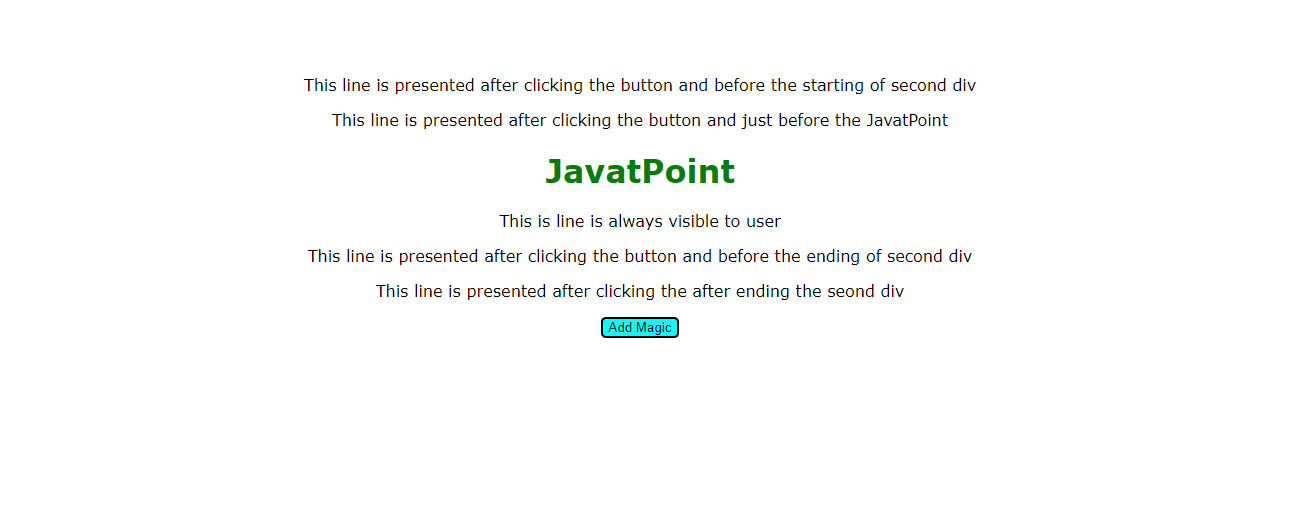
Explanation
- In the above code, we have one div with id as ‘first’, and it has a child div named as ‘second '.
- In the child div, we have one h1 tag and one p tag. We have one button which will run the function when it is clicked. We have used insertAdjacentHTML four times to try out different positions.
- The first time we applied it on div second and position is ‘beforebegin’ so it will append the HTML code before the beginning of div named second.
- In the second time, we applied it on the div second, but this time position is ‘beforeend’. So now it will append the HTML code just before ending the div ‘second’.
- The third time we applied it on the div second, and now this time position is ‘afterbegin’, which means we can append the HTML code just after the starting of div ‘second’.
- The last time we applied it on div second, and now the position is ‘afterend’ which means we will be able to append the HTML code just after the ending of div ‘second.’