
×

Html <center> Tag

The term HTML refers to Hyper Text Markup Language. The most widely used markup language for making web pages is HTML. A structure of web page is described in HTML. There are numerous unique elements in HTML. One of the HTML elements is the center tag which is the crucial for moving any paragraph from its current position to the center. It differs from padding and margin.

What is HTML Center Tag?

In HTML, the <centre> tag is used to align text in the middle of a page. HTML5 does not support this tag.

This tag has been replaced in HTML 4 and XHTML 1 by the CSS text-align property, which can be used to align both entire div element and single p element. To center blocks, you can use the CSS margin-left and margin-right attributes with the auto setting.

Syntax

<center>Write here</center> 

Example-1

<!DOCTYPE html>  
<html>  
<head>  
    <title>Center tag</title>  
 </head>  
 <body>  
    <h2>Example of center tag</h2>  
    <center>The HTML element "center" is a block-level element that centers the con-tents of its contained element horizontally, whether they are block-level or inline. Typ-ically, but not always, the container is the body> tag.
</center>  
  </body>  
</html>  

Output:

Html Center Tag

The above example shows that the paragraph is shifted to center by center tag.

Example- 2

<!DOCTYPE html>  
<html>  
<head>  
    <title>Center tag</title>  
    <style >  
        h2{  
         text-align: center;}  
    </style>  
 </head>  
 <body>  
      <h2>Example of center tag</h2>  
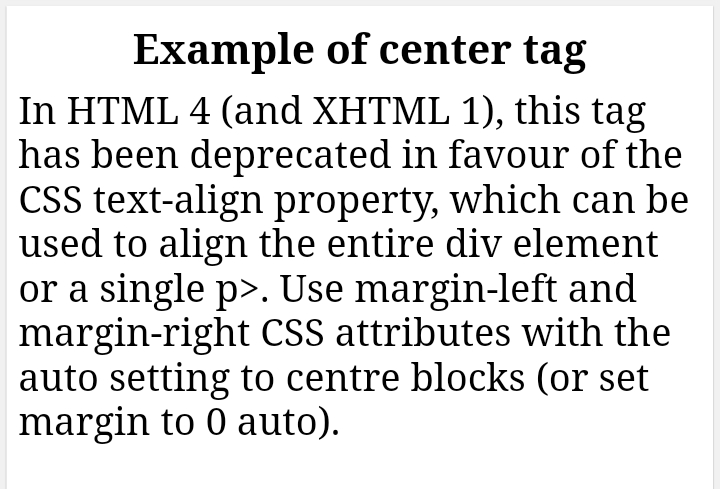
      <p>In HTML 4 (and XHTML 1), this tag has been deprecated in favor of the CSS text-align property, which can be used to align the entire div element or a single p>. Use margin-left and margin-right CSS attributes with the auto setting to center blocks (or set margin to 0 auto).
</p>  
  </body>  
</html>  

Output :
Html Center Tag

In this example, we used CSS text-align property in h2 tag.

Some CSS Property

  • CSS - Font Style:
    You can use this property to add some styling in your font like Times New Roman, Calibri etc.
  • CSS Font Family:
    The CSS font-family property defines a prioritized list of one or more font family names and generic family names for the selected element.
  • CSS- Font Style:
    The CSS font-size property controls the font size of any paragraph or text.
  • CSS- Font Weight:
    The CSS font-weight property determines the font's boldness or thickness.
  • CSS text-transform:
    The CSS text-transform property controls the case and capitalization of text.
    Text decoration is described by the CSS text-decoration property, which is also known as text-decoration-line, text-decoration-color, and text-decoration-style.
  • CSS Color Property: The CSS colour property describes the text content and text decorations colors.
  • CSS background-color Property: The background color of an element is set by the CSS background-color property.
  • You can add the first line of a text block indentation by CSS text-indent property.
  • CSS text-overflow: This CSS property shows overflowed content to the user.
  • CSS white-space property: The word-break location is specified by the CSS property.
  • Shadow is added to the text by the CSS text-shadow property.
  • The CSS text-align-last: This property controls how the final line of text is aligned.
  •  CSS line-height: This property describes a line's height.
  • CSS letter-spacing property: The spaces between letters and characters in a text are determined by this CSS element.
  • CSS word-spacing property: This property determines how far apart words should be.

Attributes

The global attributes are those attributes that apply to the <center> tag. The <center> tag doesn't have any particular attribute.

However, some claim that this tag also accepts event attributes.

Browser Compatibility

Chrome

Safari

Opera

Firefox

Conclusion

 Mainly the work of Centre tag is that it shifts the current position of the paragraph to the centre and attracts the user's attention. It differs from padding and margin. It is supported in many browsers like Chrome, Opera Safari etc. It is only supported by global attribute. This tag has been replaced in HTML 4 and XHTML 1 by the CSS text-align property, which can be used to align both entire div element and single p element.


Related Topics

CSS Clearfix

CSS Clearfix: A clearfix (or clear float) in CSS is for a component to clear or fix the child component, so we don’t need to insert additional markup. The clear...

4 minutes read.

HTML <strong> tag

The strong element in HTML is used to display the real significant information in bold so that the user or reader will understand it easily. Syntax: <p> <strong>………… </strong> </p> Example Here, we will demonstrate how to...

2 minutes read.

HTML Canvas

HTML Canvas: Using JavaScript, the < canvas > tag in HTML is used for drawing graphics on web page. It can be used to draw routes, boxes, text, gradient, and...

3 minutes read.

Responsive HTML5 and CSS3 Tutorial

Introduction to HTML5 Tutorial HTML5 is the latest and upgraded version of HTML. HTML is a hypertext markup language. Technically, it is not a programming language. It is a markup language. HTML...

17 minutes read.

Design a tribute page using HTML and CSS

A tribute page is a webpage based on a person who inspired us in our life. In this article, we will create a webpage of Mahatma Gandhi. We are going...

5 minutes read.

Font tag in HTML

HTML stands for Hypertext Mark-up Language and is used to create web pages and other information that can be later displayed in a web browser. It also consists of a...

4 minutes read.

HTML Video

HTML VIDEO: HTML5 has introduced the <video> tag to embed video into the webpage directly without using the plug-ins.   Syntax: <video attributes >     <source src="address" type="video/mp4">     Your browser does not support the video tag.   </video> <video width="320" height="240" controls>     <source src="mountain.mp4" type="video/mp4">     Your browser does not support the video tag.   </video> Output: ← Prev ...

1 minute read.

HTML Text Format

Introduction HTML may format text in two different ways. The HTML tags define a text property to make it appear one way or another. A text element may also be formatted...

7 minutes read.

What is a Container tag?

In HTML, there are different types of tags or say instructions which make the developer specify various elements in the document and make the browsers understand what to display. Tags in...

5 minutes read.

HTML Nested Table

HTML nested table refers to a table that is created inside another table. The table is in the form of rows and columns. From left to right are called horizontal rows,...

5 minutes read.

HTML References

BASIC HTML TAGS TAGS DESCRIPTION <!DOCTYPE> Defines Document Type <html> Defines Html document <head> Defines Header of document <title> Defines Title of document <body> Describe all the content of document <h1> to <h6> Defines Html Heading <p> Write Paragraph in this tag <br> Line break <!--...--> Comment in Html FORMATTING TAGS TAGS DESCRIPTION <abbr> Defines...

3 minutes read.

HTML Layouts

HTML Layouts HTML templates provide a way for well-managed, well-structured responsive web pages to be organized. We could say that the HTML layout specifies how web pages can be set up....

4 minutes read.

HTML Font Size

The HTML <font> tag uses the size attribute to specify the size of the text. We can set the size attribute’s value from 1 to 7. The default size of...

4 minutes read.

How to Create a Portfolio Gallery using HTML and CSS?

First, before starting this, the user should know some of the basics of HTML and CSS to create a portfolio gallery. To add more functionality to the website, we can also...

7 minutes read.

HTML Paragraphs

In html, there are some elements which starts with new line and one of them is paragraph. Which is said to be a block of text. In html <p> tag...

4 minutes read.

HTML &lt;body> alink Attribute

HTML <body> alink Attribute What is HTML? The HTML or HyperText Markup Language is used to design web pages. The file extension name for HTML file is ".html". It was released in...

2 minutes read.

How to append HTML code to a div using JavaScript?

In HTML, we have a div tag which is used to create a box where we can put a lot of other tags. So it works like a container. So,...

4 minutes read.

Html &lt;center> Tag

The term HTML refers to Hyper Text Markup Language. The most widely used markup language for making web pages is HTML. A structure of web page is described in HTML....

3 minutes read.

How to add JavaScript to HTML

JavaScript is one of the most important languages today. It is a high-level, interpreted, lightweight programming language that makes web pages more interactive. It is a language of the web....

5 minutes read.

Html &lt;dd> Tag

In an HTML description list, an item's definition or description is indicated using the definition description ("dd" tag). A <dd> tag can contain paragraphs, line breaks, images, links, and lists. It...

4 minutes read.