
×

HTML Button Disabled

The HTML <button> element has many attributes, one of them is the disabled attribute. The button on which you apply the disabled attribute will not work, or we can say that button becomes an unclickable button.

The disabled attribute is either true or false, which means it is a Boolean attribute. You cannot provide any value to the disabled attribute. You can add the disabled attribute inside the button element without assigning any value to it.

The button element will become a non-clickable or unusable element.

Syntax:

<button type="button" disabled> Click here </button>

Examples of HTML Button Disabled

Example 1:

This example shows the use of the disabled attribute. We will apply the disabled attribute to the login button element to make it unusable.

<!DOCTYPE html>   
<html>   
<head>  
<meta name="viewport" content="width=device-width, initial-scale=1">  
    <title>
        Example 1 of HTML Font Size
    </title>
    <style>
        .container{
            width: 250px;
            height: 160px;
            border: 2px solid brown;
            padding: 20px;
            background-color: rgb(138, 81, 81);
            color: white;
            text-align: center;
        }
    </style>   
</head>    
<body bgcolor="BurlyWood">    
 <h1> Login Form </h1>
    <form>  
        <div class="container">   
            <label> Username : </label>   
            <input type="text" placeholder="Enter Username" name="Username" required> <br> <br>  
            <label> Password : </label>   
            <input type="Password" placeholder="Enter Password" name="Password" required> <br> <br> 
            <input type="checkbox" checked> Remember me
            <button type="Submit" disabled> Login </button>    
            <button type="Button" class="cancelbutton"> Cancel </button> <br> <br>
            Forgot <a href="#"> Password? </a>   
        </div>   
    </form>     
</body>     
</html>

Output:

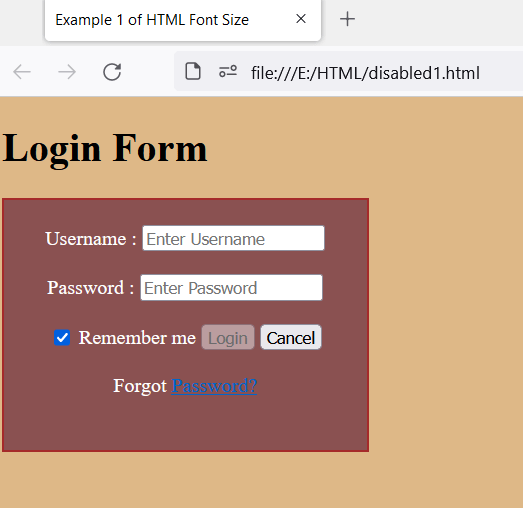
The output shows a login form with a disabled login button. As you can see, the disabled login button color becomes grey after adding the disabled attribute inside the button element. When you click the login button, it will not work.
HTML Button Disabled

Example 2:

We are creating a responsive registration form using HTML and JavaScript in this example. A form consists of input fields: first name, middle name, last name, email, a radio button to specify the gender, and a submit button. We will use the disabled attribute inside the submit button to disable the button element.

<!DOCTYPE html>  
<html>  
<head>  
<meta name="viewport" content="width=device-width, initial-scale=1">  
<title>  
Example 2 of HTML Button Disabled  
</title>  
<style>  


body {  
font-family: 'Segoe UI', Tahoma, Geneva, Verdana, sans-serif, Helvetica;  
background-color: rgb(129, 58, 70);  
}    
.container {  
padding: 40px;  
background-color: rgb(67, 188, 228);  
}  
  
input[type=text] {  
  width: 100%;  
  margin: 6px 0 20px 0; 
  padding: 16px;  
  border: none; 
  background: #fff3f3;  
  display: inline-block;  
} 


input[type=text]:focus {  
background-color: rgb(227, 250, 216);  
outline: none;  
}  
 div {  
            padding: 10px 0;  
        }   
  
button {  
  color: red;  
  padding: 16px 20px;    
  margin: 8px 0;  
  border: none;  
  cursor: pointer;  
  width: 100%;  
  
  opacity: 0.9;  
}  
</style>  
</head>  
<body>  
<form>  
<div class="container">  
<center>    
<h1> Registration Form </h1>   
</center>  
<label> Firstname: </label>   
<input type="text" name="first name" placeholder= "Enter your Firstname" size="15" required />   
<label> Middlename: </label>   
<input type="text" name="middle name" placeholder="Enter your Middlename" size="15" />   
<label> Lastname: </label>    
<input type="text" name="last name" placeholder="Enter your Lastname" size="16"required />   
<div>  
<label>   
Gender :  
</label><br>  
<input type="radio" value="Male" name="gender" checked > Male   
<input type="radio" value="Female" name="gender"> Female   
<input type="radio" value="Other" name="gender"> Other  
</div>  
<label for="email"> Email: <label>  
<input type="text" placeholder="Enter Email ID" name="email-id" required>  
In this example, we will use the disabled attribute inside the submit button and disable the submit button. When you click on submit button after filling out the form, the form will not submit.
<button type="submit form" value="submit form" disabled> Submit Form </button>  
</form>  
</body>  
</html>

Output:

The output shows a registration form containing various input fields and types of buttons. The submit button is shown as disabled in the below result. The color of the button fades automatically when the disabled attribute is applied. We cannot submit the form after filling the details.

HTML Button Disabled

Browser Support:

It supports the following browsers:

  • Microsoft Edge
  • Mozilla Firefox
  • Google Chrome
  • Internet Explorer
  • Safari
  • Opera

Related Topics

HTML Frames

Frames in Html is used to divide the browser into different sections where each section can load different Html documents. Collection of frame is known as Frameset. Creating frames:We use frameset...

2 minutes read.

HTML Paragraphs

In html, there are some elements which starts with new line and one of them is paragraph. Which is said to be a block of text. In html <p> tag...

4 minutes read.

Most Commonly used Tags in HTML

In this tutorial, we'll look at the most popular HTML tags. We know HTML is a fundamental requirement for creating a website. As a result, it is essential to remember...

9 minutes read.

HTML <table> tag

The Table element If we want to show the data and information in a two-dimensional table with rows and columns, then we can achieve this by using the HTML element <table>. Syntax: <body> <table> <thead> <tr> <thcolspan="#">………….</th> </tr> </thead> <tbody> <tr> <td>……….</td> <td>……….</td> </tr> </tbody> </table> </body> Example: <!DOCTYPE...

9 minutes read.

HTML Images

HTML has <img> tag to display image on the web pages or web application. This tag is an empty tag i.e. we don't have to close this tag while using. SYNTAX: <img src="source address" attributes="alt, height, width"> Example: <html>   <body>   <center>Image tag Example</center>   <img src="https://www.tutorialandexample.com/resources/images/favicon.png"    alt="tutorialandexample"/>   </body>   </html> Output: Image...

1 minute read.

HTML Nested Table

HTML nested table refers to a table that is created inside another table. The table is in the form of rows and columns. From left to right are called horizontal rows,...

5 minutes read.

HTML <samp> tag

The Samp tag in HTML is used for defining the sample output from the computer program. This tag is a phrase type tag and a container tag that means the...

2 minutes read.

HTML Ordered List

We use <ol> tag to make an ordered list in html. An ordered list is made to make a list of items in ordered form, ordered list can be either...

3 minutes read.

HTML <sup> Tag

The HTML sup element is used to describe one or more superscript contents. The sup tag shows a text which is presented above the regular line and half the length...

2 minutes read.

Html <colgroup> Tag

A HTML table's column group is specified by the "colgroup" tag. If you want to apply various properties to one or more <col> elements in an HTML table, then you...

4 minutes read.

HTML Background Image

Inserting image in HTML An image (technically digital image) in HTML or even in general technical aspects, is a binary representation of visual information. By visual information we mean, in the...

8 minutes read.

HTML Date

The input element in HTML has several attributes. One of its attributes is the type attribute which creates a calendar in an order that a user can select a date...

5 minutes read.

HTML Canvas

HTML Canvas: Using JavaScript, the < canvas > tag in HTML is used for drawing graphics on web page. It can be used to draw routes, boxes, text, gradient, and...

3 minutes read.

HTML Basic Tags

Heading Tags: This tag represents the document header. It is said to be a good practice if every document starts with Heading. Heading tags ranges from H1 to H6 i.e....

3 minutes read.

HTML <u> tag

Underline Element/Tag: The u tag in html is used to specify the important text or phrase by underline. In earlier HTML versions, this element was known as the "Underline" element, and...

5 minutes read.

HTML <span> tag

The span tag in HTML is used as an inline container element to mark up a specific or special chunk of a text or a section of a page. If you...

2 minutes read.

HTML Attributes

HTML Attributes provide the additional information about HTML elements. Attributes are always specified in the start tag. Attributes usually comes in pairs. lang Attribute This attribute helps in declaring the language...

2 minutes read.

HTML Reset Button

The HTML reset button is used to reset all values in the form. It clears all input fields. Reset is the value of the type attribute of the button element. The...

6 minutes read.

HTML <body> tag

HTML means Hyper Text Markup Language, which is most preferred for making Web pages. It explains how a Web page is put together. There are many different elements in HTML,...

3 minutes read.

HTML Youtube

<object> element: It embed the object within the HTML documents and embed plug-ins such as Java applets, PDF readers, Flash Players etc in web pages. Example: <object width="100" height="100" data="bookmark.swf"></object> <embed> element: It defines an embedded...

1 minute read.