
×

HTML <body> alink Attribute

HTML <body> alink Attribute

What is HTML?

The HTML or HyperText Markup Language is used to design web pages. The file extension name for HTML file is ".html". It was released in 1993. A attractive web page is created with the help of CSS and JavaScript along with the HTML. HTML describes the webpage's structure, basically how the page is created or the skeleton body of the webpage. The codes are written in the form of an element. These elements are also called HTML tags. The tags use the markups of HTML.

The golden rule of HTML is that all the major tags must be opened with <tags> and closed with </tags>. When we have multiple tags, each tag must be closed in the sequence of first open last closed. 

<body> alink Attribute

The <body> alink attribute is used to colour the active link for a page. When a link is activated or clicked, the colour change of the clicked link shows that it is activated. This coloured link is called an active link in case of alink. The <body> alink attribute is not supported by HTML5. 

Syntax

<body alink="color_name|hex_number|rgb_number">

Explanation

color_link:- This attribute shows the color of the active link in the code.

hex_number:- This attribute shows the color of the active link in terms of hex code. ( Hex code means the six-element color upto three element color.)

rgb_number:- This attribute shows the color of the active link in terms of RGB value.

HTML code

<!DOCTYPE html>
<html>


<head>
<title>
 HTML body alink Attribute
</title>
</head>
<body alink="red" link="blue">
<center>
 <h1 style="color:green;">
 javaTpoint
 </h1>
 	
 <h2>HTML <body> alink Attribute</h2>
 
 <a href="#">
 A computer science portal made by javaTpoint
 </a>
</center>
</body>
</html> 

Output
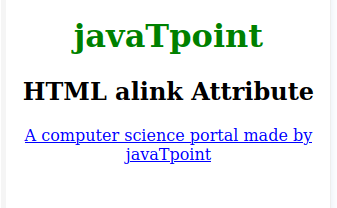
HTML <body> alink Attribute

Supported Browser-

  • Google Chrome
  • Microsoft Edge
  • Firefox
  • Opera
  • Safari

Related Topics

HTML Form Input Types

HTML Form Input Types An important element of the HTML form is < input type= "> in HTML. The type attribute of the input element can be of different types, which...

8 minutes read.

What is a Container tag?

In HTML, there are different types of tags or say instructions which make the developer specify various elements in the document and make the browsers understand what to display. Tags in...

5 minutes read.

HTML Search Box

The HTML search box is also known as the search bar. It is an input text field that is used to search the content. If the users want to explore...

7 minutes read.

HTML <strong> tag

The strong element in HTML is used to display the real significant information in bold so that the user or reader will understand it easily. Syntax: <p> <strong>………… </strong> </p> Example Here, we will demonstrate how to...

2 minutes read.

HTML Tutorial

Introduction This HTML tutorial helps beginners and professionals to learn HTML easily. HTML is a widely used web technology for website development. It stands for Hyper Text Markup Language. It is mainly used to...

7 minutes read.

HTML Links

It consist of anchor element which is used to create a link between a source anchor and destination anchor. The anchor tag can be embedded between text, image, video or...

2 minutes read.

How to change font in HTML

To give style to the content of your website, you may change the font of the text and make your website look attractive to the user. There are several methods which...

4 minutes read.

HTML Font Size

The HTML <font> tag uses the size attribute to specify the size of the text. We can set the size attribute’s value from 1 to 7. The default size of...

4 minutes read.

What does HTML stand for?

HTML stands for Hyper Text Markup Language. We use this markup language to design a web page. Web browsers use this language to showcase text, videos, images, audio and other...

6 minutes read.

HTML Data Tag

HTML Data Tag: The HTML < data > tag is used to transmit its content to a machine-readable version. The data are presented in a particular format. It is useful...

3 minutes read.

Html &lt;dd> Tag

In an HTML description list, an item's definition or description is indicated using the definition description ("dd" tag). A <dd> tag can contain paragraphs, line breaks, images, links, and lists. It...

4 minutes read.

HTML Video

HTML VIDEO: HTML5 has introduced the <video> tag to embed video into the webpage directly without using the plug-ins.   Syntax: <video attributes >     <source src="address" type="video/mp4">     Your browser does not support the video tag.   </video> <video width="320" height="240" controls>     <source src="mountain.mp4" type="video/mp4">     Your browser does not support the video tag.   </video> Output: ← Prev ...

1 minute read.

How to add JavaScript to HTML

JavaScript is one of the most important languages today. It is a high-level, interpreted, lightweight programming language that makes web pages more interactive. It is a language of the web....

5 minutes read.

Html &lt;Col> Tag

You can write the col tag inside the table tag after the thead, tbody, foot, and tr tags. You can also apply it after the caption tag (in which the...

4 minutes read.

HTML Button Disabled

The HTML <button> element has many attributes, one of them is the disabled attribute. The button on which you apply the disabled attribute will not work, or we can say...

4 minutes read.

HTML <section> tag

The section element in HTML is used to define sections in a document. Syntax of Section Tag: <body> <h1>……….</h1> <section> <h2>……….</h2> <p> …………………………</p> </section> <section> <h2>………..</h2> <p>…………………………. <p> </section> </body> Examples of Section Tag Example 1: In this example, we use the HTML "section" element...

3 minutes read.

HTML <script> Tag

For embedding a client -side script, we use script tag in html tag. This <script> tag can be used for containing scripting statements. It can also point another external script file...

2 minutes read.

HTML Paragraphs

In html, there are some elements which starts with new line and one of them is paragraph. Which is said to be a block of text. In html <p> tag...

4 minutes read.

HTML Reset Button

The HTML reset button is used to reset all values in the form. It clears all input fields. Reset is the value of the type attribute of the button element. The...

6 minutes read.

HTML Basic Tags

Heading Tags: This tag represents the document header. It is said to be a good practice if every document starts with Heading. Heading tags ranges from H1 to H6 i.e....

3 minutes read.