
×

tcount command in AutoCAD

You can now automatically keep track of the number of blocks and other objects you have in your AutoCAD drawing file thanks to a new feature in AutoCAD 2022 and other AutoCAD versions. You may use the new Count command at the command line, or you can start it by selecting an item, using the right-click shortcut screen menu, and choosing Count toward the bottom of the screen menu.

tcount command in AutoCAD tcount command in AutoCAD

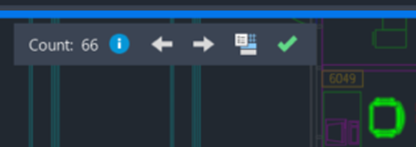
When you do this, all of the same objects—like a block—will be highlighted and the Count Bar (a blue rectangular border around the drawing area) will be seen at the top, indicating that you are presently in a count selection.

The total number of items is displayed in the Count Bar.

Depending on the condition of the chosen objects, the icon adjacent to it will either appear as a blue circle or a yellow triangle, but clicking either one will open the Count Palette.

tcount command in AutoCAD tcount command in AutoCAD

You may cycle between each of the things on the screen separately using the arrows.

tcount command in AutoCAD

The current count will be created as a text field when you click the Insert Count Field icon, and it will update the value whenever it is modified or regenerated.

tcount command in AutoCAD

The count bar will close and the selection will be cleared when the green checkmark is selected there.

tcount command in AutoCAD

If you decide to utilize the command line, you can then either just click enter or choose the object you want and press enter.

Command: COUNT

Choose [List all blocks] or the specified objects: [enter]

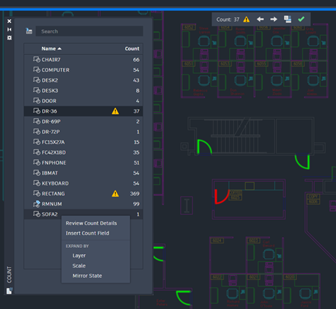
Along with the overall count number, warnings, and the count palette, it will also list every block that is now present in the drawing by name. Blocks that are stacked, duplicated, on top of one another, or ones that have been "exploded" are some examples of items that cause warnings to appear as a yellow triangle and alert you to.

When you choose a name from the list, all of the regular named blocks are highlighted in green and all of the ones with warnings are highlighted in red.
tcount command in AutoCAD

When I click on the yellow triangle, a message describing the fault appears, and it directs me to the spot in the file where the problem is occuring.

By checking the boxes next to Match Layer, Match Scale, and Match Mirror State, I may narrow my search. Alternately, right-click on a name to get a shortcut menu.

tcount command in AutoCAD

One of the latest comments on The CAD Geek had a request for assistance with a script to consecutively number text. It could be simpler than one imagines to get the answer. In fact, chances are good that you already have access to such a tool. Automatic Text Numbering, or TCOUNT for command line gurus, is a command found in the notorious Express Tools.

There are many undiscovered mysteries in the TCOUNT command. It is capable of counting 1, 2, 3, 4, 5,..., but what about 2, 4, 6, and 8? The fact that the TCOUNT command can really achieve this will be appreciated by those who use AutoCAD to write cheers.

Text with Sequential Numbering

  • TCOUNT may be run from the "Express > Text > Automatic Text Numbering" menu or the command line.
  • Although you may window select text with the TCOUNT command, I normally suggest picking each piece of text separately.
tcount command in AutoCAD
  • The command "Sort chosen items by" will then be shown to you. The X or Y option could be useful if you have content that is well organized. However, the Select-order often gives me more mileage because this circumstance occurs more frequently on my website with material dispersed throughout.
tcount command in AutoCAD
  • I'll then be invited to provide a starting number and an increment of 1,1>. By default, one is introduced one at a time. My first paragraph will thus be numbered 1, my second paragraph will be numbered 2, etc. You might easily alter the increment to 2, in which case the first sentence would be numbered 1, the second would be 3, the third would be 5, etc.
tcount command in AutoCAD
  • The last question is about where to put numbers in text. Although I may have the command precede or suffix my text with the appropriate number, in this situation I want to replace my text with the appropriate number.
tcount command in AutoCAD
  • The end of that. I now have a text collection with my preferred SMS numbers in order.
tcount command in AutoCAD

Related Topics

AutoCAD Tutorial

In 1982, a group of programmers led by John Walker constructed the initial version of AutoCAD, which Michael Riddle, another member of the team, had previously designed. The popularity of...

5 minutes read.

Chamfer Command in AutoCAD

Introduction AutoCAD is a computer-aided 2D and 3D design programme that is used by many designers. This application has a number of commands that will assist us in completing our objective.The...

4 minutes read.

Hatch command in AutoCAD

In AutoCAD, the Hatch command is used to fill patterns inside an enclosed region. Hatched, gradient, and solid fill designs are available. A gradient pattern is a seamless transition between two...

5 minutes read.

Attedit command in AutoCAD

At the Command prompt, modify a block's attribute data. You may filter the properties that need to be changed based on the attribute tag, the current value, or the selected...

4 minutes read.

Point Command in AutoCAD

Points in AutoCAD 2D may provide excellent reference points for additional drawings. In this post, we'll demonstrate how to construct single and multiple points in AutoCAD 2D, along with the...

1 minute read.

Join Command in AutoCAD

In AutoCAD, the Join command is used to join the objects end to end to form a single entity. Depending on the requirements, the objects might be curved or straight. It...

3 minutes read.

Most Useful AutoCAD Commands

In a nutshell, AutoCAD Without CAD software, it's difficult to envision the architectural and technical marvels of recent memory. These days, CAD software is utilized to build nearly anything, and one...

9 minutes read.

Lisp command in AutoCAD

Can have AutoCAD automatically load LISP routines Issue: how to have AutoCAD automatically load AutoLISP functions. The program's files must be manually reloaded each time it is run. Solution: You may either utilize the...

4 minutes read.

Annotation command in AutoCAD

When the project's author is not there, AutoCAD annotation gives the project all of its meaning and its purpose to the eyes of someone viewing it. Additionally, annotations can assist...

3 minutes read.

AutoCAD Tree Blocks

AutoCAD is widely used for landscaping, garden design, and architecture in general. Plant and tree design in AutoCAD may be rather time-consuming. Designing plants that complement the artwork requires time...

5 minutes read.

Xref command in AutoCAD

Since its inception, AutoCAD has led the CAD market with outstanding features and breakthroughs. The "xref" function is one such feature that we'll be investigating today. The abbreviation "xref" in AutoCAD...

5 minutes read.

AutoCAD Electrical software

AutoCAD Electrical report may be a powerful tool however, most CAD users square measure unaware of the way to modify the method of generating reports victimization it AutoCAD Electrical style package...

8 minutes read.

Zoom Command in AutoCAD

You may also use the keyboard to access the Zoom command by typing its alias, Z. The Zoom command has numerous possibilities, but the most frequent are Extents, which was...

4 minutes read.

Snap Command in AutoCAD

The Object Snap feature allows you to designate a specific place on the objects. It depicts the objects' midpoints, center points, quadrant points, insertion points, endpoints, and other locations that aid...

9 minutes read.

Donut Command in AutoCAD

A donut is formed by joining two arc polylines end to end to form a circular shape. The selected interior and outer diameters define the width of the polylines. When...

4 minutes read.

Ellipse command in AutoCAD

Two focal points are encircled by a curve, which is known as the Ellipse. Two of the ellipse's axes, which specify its length and breadth, determine its form. The Ellipse command on...

4 minutes read.

Script Command in AutoCAD

What exactly is AutoCAD scripting? Scripting is another means of automating processes in AutoCAD that does not need the use of programming languages such as VBA or Auto LISP. Script files...

3 minutes read.

Array Command in AutoCAD

AutoCAD's Array Command From the command line, creates duplicates of anything in a pattern. Creates nonassociative, 2D rectangular or polar arrays using historical command line behavior. The copies may take a long...

3 minutes read.

Polygon Command in AutoCAD

POLYGON (Command) To make an equilateral closed polyline, use the Polygon Command. The Polygon command is not shown. The Polygon command may be found by entering it into the information center...

4 minutes read.

Erase Command in Autocad

In AutoCAD, use the Erase command. In AutoCAD, the Erase command is a highly significant and a valued tool. This command is found in the Modify panel of the home...

3 minutes read.