
Bootstrap Contact Us page
What is a “Contact Us” page?
A “Contact Us” page is a web page available on the websites of various companies, organisations etc., for its users to contact the organisation or the particular individual.
It can help the users to seek more information about the organisation, send feedbacks or file complaints.
This page is a form that asks for the user's name, email ID or contact number and a message.
Example 1:
This example demonstrates a basic contact form asking for user’s first name, last name, email Id, age group and a message.
<!DOCTYPE html>
<html lang="en">
<head>
    <meta charset="UTF-8">
    <meta http-equiv="X-UA-Compatible" content="IE=edge">
    <meta name="viewport" content="width=device-width, initial-scale=1.0">
    <script src="https://code.jquery.com/jquery-3.2.1.slim.min.js" integrity="sha384-KJ3o2DKtIkvYIK3UENzmM7KCkRr/rE9/Qpg6aAZGJwFDMVNA/GpGFF93hXpG5KkN" crossorigin="anonymous"></script>
    <script src="https://cdnjs.cloudflare.com/ajax/libs/popper.js/1.12.9/umd/popper.min.js" integrity="sha384-ApNbgh9B+Y1QKtv3Rn7W3mgPxhU9K/ScQsAP7hUibX39j7fakFPskvXusvfa0b4Q" crossorigin="anonymous"></script>
    <script src="https://maxcdn.bootstrapcdn.com/bootstrap/4.0.0/js/bootstrap.min.js" integrity="sha384-JZR6Spejh4U02d8jOt6vLEHfe/JQGiRRSQQxSfFWpi1MquVdAyjUar5+76PVCmYl" crossorigin="anonymous"></script>
    <link rel="stylesheet" href="https://maxcdn.bootstrapcdn.com/bootstrap/4.0.0/css/bootstrap.min.css" integrity="sha384-Gn5384xqQ1aoWXA+058RXPxPg6fy4IWvTNh0E263XmFcJlSAwiGgFAW/dAiS6JXm" crossorigin="anonymous">   <title>Document</title>
    <style>
body {
    font-family: 'Lato', sans-serif;
    background-color: bisque;
}
h1 {
    margin-bottom: 40px
}
label {
    color: #333
}
.btn-send-message {
    font-weight: 300;
    text-transform: uppercase;
    letter-spacing: 0.2em;
    font-family: 'Segoe UI', Tahoma, Geneva, Verdana, sans-serif;
    font-weight: bolder;
    width: 80%;
    margin-left: 3px;
}
.help-block.with-errors {
    color: #ff5050;
    margin-top: 5px
}
.card {
    margin-left: 10px;
    margin-right: 10px
}
    </style>
</head>
<body>
<div class="container">
    <div class=" text-center mt-5 ">
        <h3>Feel free to contact us.</h3>
    </div>
    <div class="row">
        <div class="col-lg-7 mx-auto">
            <div class="card mt-2 mx-auto p-4 bg-light">
                <div class="card-body bg-light">
                    <div class="container">
                        <form id="contact-form" role="form">
                            <div class="controls">
                                <div class="row">
                                    <div class="col-md-6">
                                        <div class="form-group"> <label for="form_name">Firstname *</label> <input id="form_name" type="text" name="name" class="form-control" placeholder="John" required="required" data-error="Firstname is required."> </div>
                                    </div>
                                    <div class="col-md-6">
                                        <div class="form-group"> <label for="form_lastname">Lastname *</label> <input id="form_lastname" type="text" name="surname" class="form-control" placeholder="Smith" required="required" data-error="Lastname is required."> </div>
                                    </div>
                                </div>
                                <div class="row">
                                    <div class="col-md-6">
                                        <div class="form-group"> <label for="form_email">Email *</label> <input id="form_email" type="email" name="email" class="form-control" placeholder="johnsmith@abc.com" required="required" data-error="Valid email is required."> </div>
                                    </div>
                                    <div class="col-md-6">
                                        <div class="form-group"> <label for="form_need">Please specify your age group*</label> <select id="form_need" name="need" class="form-control" required="required" data-error="Please specify your age group.">
                                                <option value="" selected disabled>--Select Your Age Group--</option>
                                                <option>Less than 18</option>
                                                <option>Between 18 and 30</option>
                                                <option>Between 30 and 45</option>
                                                <option>Between 45 and 60</option>
                                                <option>Older than 60</option>
                                            </select> </div>
                                    </div>
                                </div>
                                <div class="row">
                                    <div class="col-md-12">
                                        <div class="form-group"> <label for="form_message">Write your message here*</label> <textarea id="form_message" name="message" class="form-control" placeholder="Write your message here." rows="4" required="required" data-error="Please, leave us a message."></textarea> </div>
                                    </div>
                                    <div class="col-md-12"> <input type="submit" class="btn btn-warning btn-send-message pt-2 btn-block " value="Send Message"> </div>
                                </div>
                            </div>
                        </form>
                    </div>
                </div>
            </div>
        </div>
    </div>
</div>
</body>
</html>
Output:

We can use the dropdown here to choose the suitable age group,

Example 2:
We can add google maps to the contact forms, as shown in the example below.
Along with the map, this example demonstrates a basic contact form asking for the user's first name, last name, age group and a message.
<!DOCTYPE html>
<html lang="en">
<head>
    <meta charset="UTF-8">
    <meta http-equiv="X-UA-Compatible" content="IE=edge">
    <meta name="viewport" content="width=device-width, initial-scale=1.0">
    <script src="https://code.jquery.com/jquery-3.2.1.slim.min.js" integrity="sha384-KJ3o2DKtIkvYIK3UENzmM7KCkRr/rE9/Qpg6aAZGJwFDMVNA/GpGFF93hXpG5KkN" crossorigin="anonymous"></script>
    <script src="https://cdnjs.cloudflare.com/ajax/libs/popper.js/1.12.9/umd/popper.min.js" integrity="sha384-ApNbgh9B+Y1QKtv3Rn7W3mgPxhU9K/ScQsAP7hUibX39j7fakFPskvXusvfa0b4Q" crossorigin="anonymous"></script>
    <script src="https://maxcdn.bootstrapcdn.com/bootstrap/4.0.0/js/bootstrap.min.js" integrity="sha384-JZR6Spejh4U02d8jOt6vLEHfe/JQGiRRSQQxSfFWpi1MquVdAyjUar5+76PVCmYl" crossorigin="anonymous"></script>
    <link rel="stylesheet" href="https://maxcdn.bootstrapcdn.com/bootstrap/4.0.0/css/bootstrap.min.css" integrity="sha384-Gn5384xqQ1aoWXA+058RXPxPg6fy4IWvTNh0E263XmFcJlSAwiGgFAW/dAiS6JXm" crossorigin="anonymous">   <title>Document</title>
    <style>
* {
  box-sizing: border-box;
  font-family: 'Segoe UI', Tahoma, Geneva, Verdana, sans-serif;
  color: #ccc;
}


/* Style inputs */
input[type=text], select, textarea {
  width: 100%;
  padding: 12px;
  border: 1px solid #ccc;
  margin-top: 6px;
  margin-bottom: 16px;
  resize: vertical;
}


input[type=submit] {
  background-color: #04AA6D;
  color: white;
  padding: 12px 20px;
  border: none;
  cursor: pointer;
}


input[type=submit]:hover {
  background-color: #45a049;
}
body {
  border-radius: 5px;
  background-color: #000000;
  padding: 10px;
}
.map-container{
overflow:hidden;
padding-bottom:56.25%;
position:relative;
height:0;
}
.map-container iframe{
left:0;
top:0;
height:100%;
width:100%;
position:absolute;
}
.col {
  float: left;
  width: 50%;
  margin-top: 6px;
  padding: 20px;
}
.row:after {
  content: "";
  display: table;
  clear: both;
}
</style>
</head>
<body>
      <div class="container">
            <div class="row"></div>
            <div style="text-align:center">
              <h3>Feel free to contact us.</h3>
            </div>
              <div class="col">
                <div id="map-container-google-1" class="z-depth-1-half map-container" style="height: 470px ; width: 500px;">
                    <iframe src="https://maps.google.com/maps?q=manhatan&t=&z=13&ie=UTF8&iwloc=&output=embed" frameborder="0"
                      style="border:0" allowfullscreen></iframe>
                  </div>
              </div>
              <div class="col">
                <form action="/action_page.php">
                  <label for="fname">First Name</label>
                  <input type="text" id="fname" name="firstname" placeholder="John">
                  <label for="lname">Last Name</label>
                  <input type="text" id="lname" name="lastname" placeholder="Smith">
                  <label for="age">Age</label>
                  <select id="age" name="age" style="color: gray">
                    <option value="minor" style="color: grey;">Under 18</option>
                    <option value="working" style="color: grey;">Between 18 and 60</option>
                    <option value="retired" style="color: grey;">Above 60</option>
                  </select>
                  <label for="subject">Message</label>
                  <textarea id="subject" name="subject" placeholder="Type your Message here." style="height:80px"></textarea>
                  <button type="button" class="btn btn-info">Send Message</button>
                </form>
              </div>
            </div>
</body>
</html>
Output:
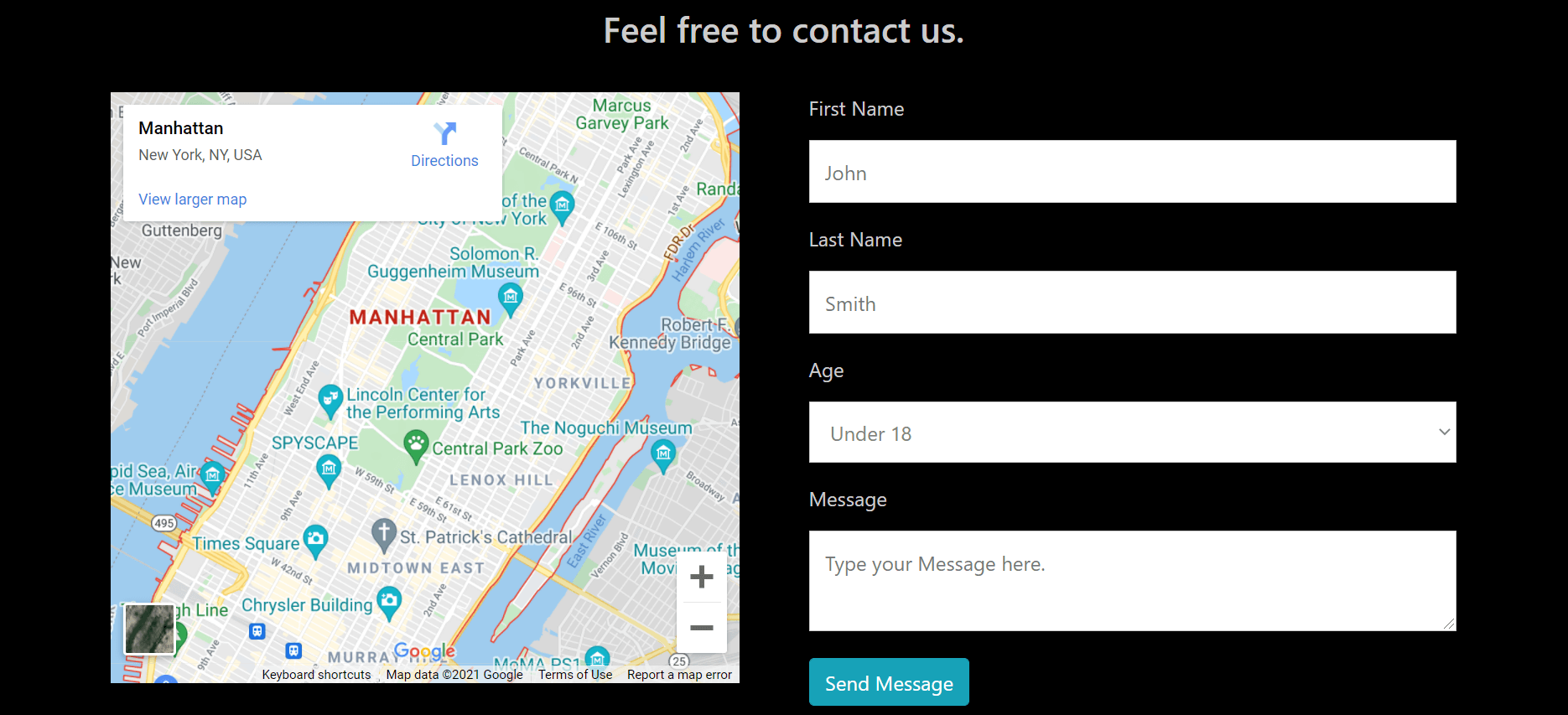
We can use the dropdown here to choose the suitable age group,
