
CakePHP Layouts & Elements
A layout includes a presentation code that can be wrapped out in your view. It means that what you want to see in your view should be well-positioned in layout. When you create a layout file, then you have to tell CakePHP where you can place the data of your view code, which can be rendered by the controller, and CakePHP's default layout is located at src/Template/Layout/default.ctp. While creating a layout for your application, you have to make sure that it includes this syntax “$this->fetch('content');” for fetching the content.
<?=
$this->fetch('content')?>
//it displays the content from the current rendered //view file of .ctp
Or
You can also define php syntax like this:
<?php echo $this->fetch('content'); ?>
If you have used this syntax "<?= ?>" for printing any text, then you don’t need to write php as well echo; it considered by default in php.
The default file loaded all the content of the template’s action file that can be rendered on the browser. The dafault.ctp file contains the default page layout for the CakePHP application, and if you want to modify the page, then you can change by going to Layout/default.ctp
<div class="container clearfix">
         <?= $this->fetch('content') ?>
</div>
The above function exists in default.ctp file for fetching the content in controller.php file with the use of fetch(‘content’) function.
Now we are going to create a program using the layout in the controller file. For this, we have to require three files.
- SecondController.php file
- fun3.ctp file
- And the last fun3layout.ctp file
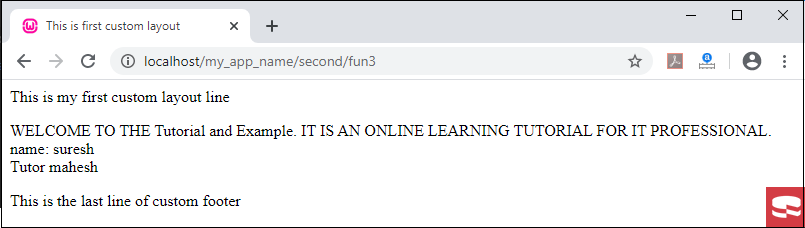
This is the fun3layout.ctp (default file) which loads all the content of controller.php file.
 <!DOCTYPE html>
 <html>
 <head>
    <title><?php echo $title;  ?> </title>
    </head>
 <body>
     <header>This is my first custom layout line </header>
                <div class="container clearfix">
         <?= $this->fetch('content') ?> // This is a method function which fetch all the content of layout in web.
     </div>
     <footer>This is the last line of custom footer
     </footer>
 </body>
 </html>
For loading the layout function in a controller, we have to create a constructor and pass the fun3layout.ctp file in the layout function of the Controller, or you can modify the default.ctp file according to your need, which is defined in layout/default.ctp and then calls it at the controller.
Here, we have created the SecondController.php file in the Controller folder.
<?php
                namespace App\Controller;
                use App\Controller\AppController;
                class SecondController extends AppController
                                {
                         public function initialize()
                      {        // we have created a constructor for loading the layout in controller.
                      parent:: initialize();
                    $this-> viewBuilder()-> layout(‘fun3layout’);
                }
                                public function fun3()
                                               {
                               $this->set('name','suresh')
                             $this->set("tutor", "mahesh" );
                                  $this->set('title' , 'This is first custom layout');
                            }
                }
 ?>
Now we have to create fun3.ctp file in Second folder of Template folder and write the given below program in your fun3.ctp file.
<p> WELCOME TO THE Tutorial and Example. IT IS AN ONLINE LEARNING TUTORIAL
 FOR IT PROFESSIONAL.
 <br/>
   name: <?php  echo $name; ?>
 <br/>
 Tutor <?php  echo $tutor; ?>
 </p>
Output
View Elements
Elements are the small block of layout code, that can be re-used in any page by calling in default.ctp or layout.ctp file to avoid re-writing code.
- It is like ad boxes, sliders, navigation, etc.
- It can be considered as mini-view.
<?php
            echo $this->element('navbar');    // we can pass the view file by use of element function
?>
Here, we have created the SecondController.php file in the Controller folder.
 <?php
                namespace App\Controller;
                use App\Controller\AppController;
                class SecondController extends AppController
                                {
                         public function initialize()
                      {        // we have created a constructor for loading the layout in controller.
                      parent:: initialize();
                    $this-> viewBuilder()-> layout(‘fun3layout’);
                }
                                public function fun3()
                                               {
                               $this->set('name','suresh')
                             $this->set("tutor", "mahesh" );
                                  $this->set('title' , 'This is first custom layout');
                            }
                }
 ?>
This is the file of fun3layout.ctp at src\Template\Layout\fun3layout.ctp file.
 <!DOCTYPE html>
 <html>
 <head>
    <title><?php echo $title; ?> </title>
    </head>
 <body>
      <?= $this->element("headerElement") ?>   //element method which is used for passing element file to headerElement file
             <div class="container clearfix">
           <?= $this->fetch('content') ?>
          </div>
         <?= $this->element("footerElement")  ?>
 </body>
 </html>
Now we have to create headerElement.ctp file for setting the header in web application.
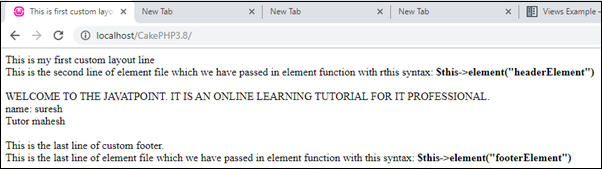
 <header>This is my first custom layout line
 <br/>This is the second line of element file which we have passed in element function with this syntax:
  <b> $this->element("headerElement") </b>
 </header> <br/>
Similary, we have created “footerElement.ctp” file for set the footer in web page.
 <footer>This is the last line of custom footer.
  <br/> This is the last line of element file which we have passed in element function
 with this syntax:   <b> $this->element("footerElement") </b> </footer><br/>
Output
View Events
Here we have described several callbacks/events that can be used in a view. In CakePHP, event controllers are helpful in performing multiple tasks before or after an action. CakePHP contains a list of viewing events as follows.
Events Function and Description
- Helper::beforeRender(Events $event, $viewFile)
The beforeRender function will be called after the Controller’index, but before the controller renders view and layout. This function will render the file as an argument.
- Helper::beforeRenderFile(Event $event, $viewFile)
The function will call before each view file is rendered. This function will include elements, view, parent view, and layouts.
- Helper::afterRenderFile(Event $event, $viewFile, $content)
The method will call after each View file is rendered. This function includes elements, views, parent views, and layouts. A callback/events can be modified and return the $content for representing the content in the browser.
- Helper::afterRender(Event $event, $viewFile)
This method will be called after the view file is rendered, but before the layout rendering method start.
- Helper::beforeLayout(Event $event, $layoutFile)
This method will be provided before the layout starts and get the filename as an argument.
- Helper::afterLayout(Event $event, $layoutFile)
The view helper function will be called after the layout render is complete and get the filename as an argument.