
×

How to Update Table in SQL?

How to Update Table in SQL

Introduction

  • UPDATE query is used to update a record in a table.
  • UPDATE is a DML command, which operates on the data of the table and not on the structure of the table.
  • Using UPDATE Query, one can update all the records as well as update specific records within a table.
  • To update specific records within a table, UPDATE Query is used with the WHERE Clause.
  1. UPDATE Query to change a single record in a table

We can use an UPDATE query with the WHERE clause to change one particular column value of an entire record.

Syntax:

UPDATE TABLE_NAME SET column_name = value WHERE[condition];

Example:

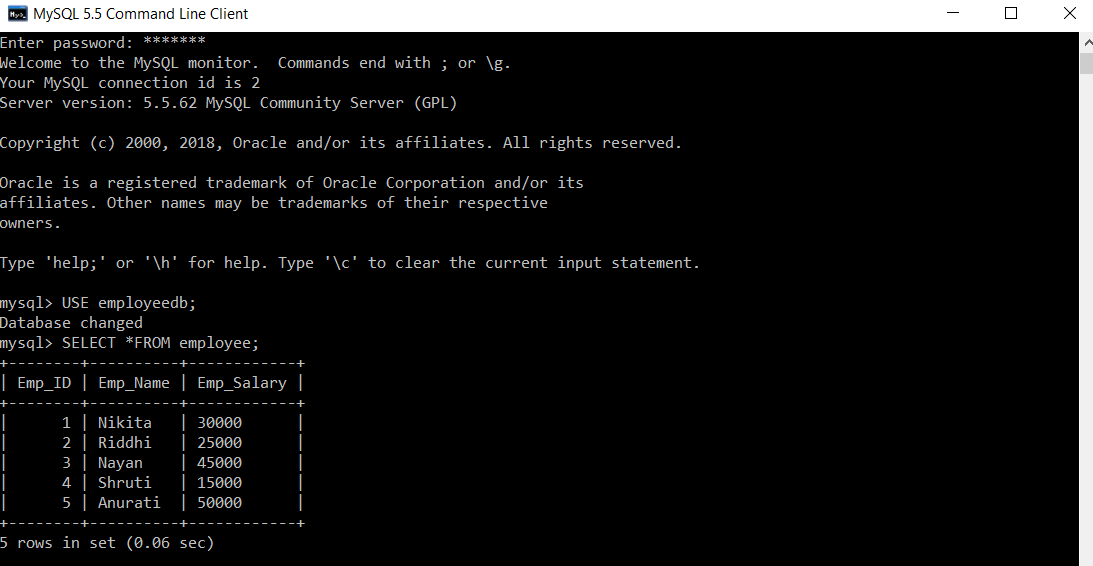
First we will create a database with name “employeedb”. Then in that database we will create a table “employee” and insert records into the table. We will consider this table and database for all the subsequent examples.

 mysql> USE employeedb;
 Database changed
 mysql> SELECT *FROM employee;
 +--------+----------+------------+
 | Emp_ID | Emp_Name | Emp_Salary |
 +--------+----------+------------+
 |      1 | Nikita   | 30000      |
 |      2 | Riddhi   | 25000      |
 |      3 | Nayan    | 45000      |
 |      4 | Shruti   | 15000      |
 |      5 | Anurati  | 50000      |
 +--------+----------+------------+
 5 rows in set (0.06 sec) 
Update Table in SQL

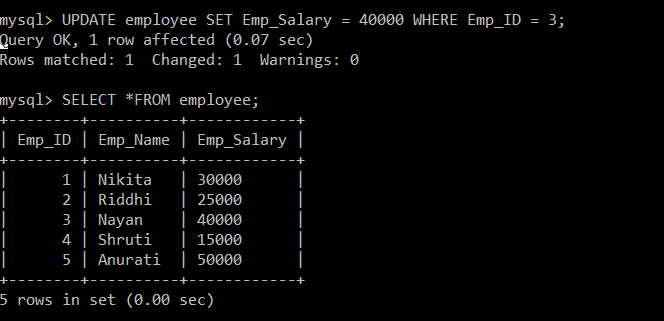
We will update the employee (Emp_ID = 3) with a new salary.

 mysql> UPDATE employee SET Emp_Salary = 40000 WHERE Emp_ID = 3;
 Query OK, 1 row affected (0.07 sec)
 Rows matched: 1  Changed: 1  Warnings: 0
 mysql> SELECT *FROM employee;
 +--------+----------+------------+
 | Emp_ID | Emp_Name | Emp_Salary |
 +--------+----------+------------+
 |      1 | Nikita   | 30000      |
 |      2 | Riddhi   | 25000      |
 |      3 | Nayan    | 40000      |
 |      4 | Shruti   | 15000      |
 |      5 | Anurati  | 50000      |
 +--------+----------+------------+
 5 rows in set (0.00 sec) 
Update Table in SQL

The salary of an employee (Emp_ID=3) is now changed to 40,000 from 45,000.

  • UPDATE Query to change multiple records in a table

We can use an UPDATE query with the WHERE clause to change multiple column values of a particular record.

Syntax:

UPDATE TABLE_NAME SET column_name1 = value1, column_name2 = value2...., column_nameN = valueN WHERE [condition];

Example:

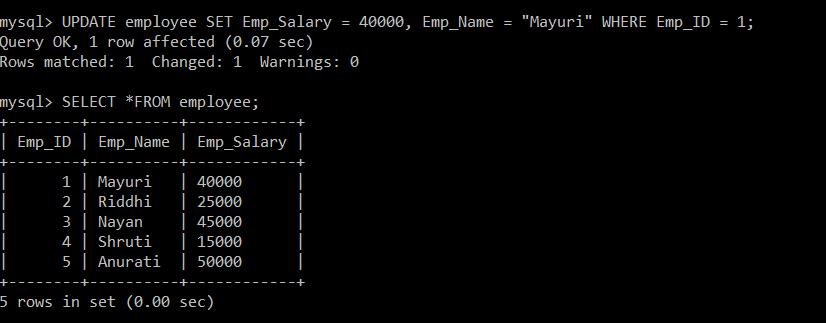
We will update the employee (Emp_ID = 1) with a new salary and name.

 mysql> UPDATE employee SET Emp_Salary = 40000, Emp_Name = "Mayuri" WHERE Emp_ID = 1;
 Query OK, 1 row affected (0.07 sec)
 Rows matched: 1  Changed: 1  Warnings: 0
 mysql> SELECT *FROM employee;
 +--------+----------+------------+
 | Emp_ID | Emp_Name | Emp_Salary |
 +--------+----------+------------+
 |      1 | Mayuri   | 40000      |
 |      2 | Riddhi   | 25000      |
 |      3 | Nayan    | 45000      |
 |      4 | Shruti   | 15000      |
 |      5 | Anurati  | 50000      |
 +--------+----------+------------+
 5 rows in set (0.00 sec) 
Update Table in SQL

The salary and name of an employee (Emp_ID=1) is now changed to “40,000” and “Mayuri” respectively.

  • UPDATE Query to change all records in a table

We can use an UPDATE query omitting the WHERE clause to change one or more than one column values for all the records within a table.

Syntax:

UPDATE TABLE_NAME SET column_name1 = value1, [column_name2 = value2...., column_nameN = valueN];

Example:

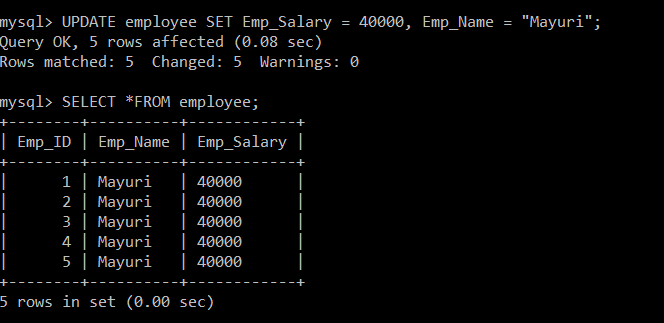
We will update all the employees with a new salary and name.

 mysql> UPDATE employee SET Emp_Salary = 40000, Emp_Name = "Mayuri";
 Query OK, 5 rows affected (0.08 sec)
 Rows matched: 5  Changed: 5  Warnings: 0
 mysql> SELECT *FROM employee;
 +--------+----------+------------+
 | Emp_ID | Emp_Name | Emp_Salary |
 +--------+----------+------------+
 |      1 | Mayuri   | 40000      |
 |      2 | Mayuri   | 40000      |
 |      3 | Mayuri   | 40000      |
 |      4 | Mayuri   | 40000      |
 |      5 | Mayuri   | 40000      |
 +--------+----------+------------+
 5 rows in set (0.00 sec) 
Update Table in SQL

Since, we have not specified the condition in the query on the basis of which records are to be updated so, our query will change the column values of all the records present in a table. The salary and name of all the employees is now changed to “40,000” and “Mayuri” respectively.


Related Topics

SQL Tutorial for Beginners

SQL tutorial provides basic and advanced concepts of Structured Query Language and how you deploy SQL to work with a relational database system. Our SQL tutorial is designed for beginners...

3 minutes read.

SQL Syntax

In this tutorial, we will help you understand about the different SQL Syntax concepts with the help of an example. Every Structured Query Language starts with Keywords like select, insert, update,...

5 minutes read.

Pattern Matching in SQL

The LIKE in the Structured Query Language is a Logical Operator. The SQL LIKE is used within the WHERE clause in the SQL. This Like Operator is used with the...

5 minutes read.

SQL Insert multiple rows

This article will deal with a new insertion method in SQL which inserts multiple rows at a time. Multiple records can be inserted at a time into a specific table with...

4 minutes read.

SQL CROSS Join

In this tutorial, we will help you understand the concept of the SQL CROSS Join clause with the few examples. The SQL CROSS Join query is used to join one or...

5 minutes read.

GROUP BY vs ORDER BY

The GROUP BY clause and ORDER BY clause in SQL are used to arrange data obtained by SQL queries. The important difference between the GROUP BY clause and ORDER BY...

4 minutes read.

SQL Cast Operator

While writing SQL queries, we can see many values which are to be converted into another datatype for accessing them. In SQL this conversion is generally done by CAST function. CAST...

4 minutes read.

SQL Commands

SQL commands are classified into four groups on the basis of their nature. DDL (Data Definition Language) DML (Data Manipulation Language) DCL (Data Control Language) DQL (Data Query Language) NOTE: This...

1 minute read.

How to drop a column in SQL?

How to drop a column in SQL Introduction To delete a column from an already created table, one needs to use the ALTER command along with the DROP COLUMN clause. Syntax: ALTER TABLE tablename...

4 minutes read.

SQL Cloning Tables

Cloning a Table: To create a copy of the table. To perform the operations, without affecting the actual table. Steps for creating a Cloning Table: Step 1: Empty Table Creation The syntax for Creating...

3 minutes read.

How to Update Table in SQL?

How to Update Table in SQL Introduction UPDATE query is used to update a record in a table. UPDATE is a DML command, which operates on the data of the table and not...

4 minutes read.

SQL Create Database

This tutorial will help us understand how to CREATE a Database in SQL with a few examples. The first step for storing structured records in the database is creating the databases. We...

4 minutes read.

SQL SELECT Statement

The SQL SELECT statement is used to retrieve the data from the tables. We can also retrieve the selected records from the table using the query condition. The SQL SELECT...

5 minutes read.

SQL Injection

SQL injection is a technique, this may destroy the database. It is one type of hacking technique. SQL IN WEB PAGES: Injection occurs when we ask for input like an id or...

3 minutes read.

SQL ORDER BY

SQL ORDER BY The SQL ORDER BY clause is used to sort the data stored in tables in the database. The sorting can be done in an ascending way, descending way,...

5 minutes read.

SQL Scalar Functions

TEACHER Table LCASE() Function The LCASE() function is used to return lower case values of specified column. Syntax: Select Lcase(column_name) from table_name; Example: Select Lcase(teacher_name) from teacher; Syntax: Select Lcase(column_name) from table_name [where condition]; Example: Select Lcase(teacher_name) from teacher where teacher_id=1; UCASE() Function The UCASE()...

1 minute read.

How to use LIKE in SQL

In this SQL article, we will learn and understand how to use LIKE to the columns in the SQL tables. What is Like? Like is an operator in the SQL. It is...

7 minutes read.

How to use GROUP BY clause in SQL

In this SQL article, we will learn about the GROUP BY clause and how to use it in SQL. We will also discuss using the GROUP BY clause with the...

6 minutes read.

SQL Comparision Operator

The Comparison Operator compares different data of the Structured Query Language table and checks whether the data are the same, less than, greater than, less than, or greater than equal....

14 minutes read.

SQL Select Distinct

The SQL DISTINCT query is used to fetch unique values from the tables using the SELECT statement in the SQL. There may be a situation that arises when you want to...

4 minutes read.