2D Shearing

We can denote shearing with ‘SHxand ‘SHy.’ These ‘SHxand ‘SHyare called “Shearing factor.”

We can perform shearing on the object in two ways-

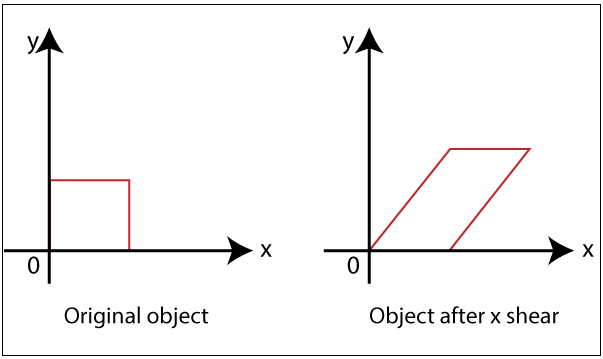
  • Shearing along x-axis: In this, we can store the y coordinate and only change the x coordinate. It is also called “Horizontal Shearing.”

We can represent Horizontal Shearing by the following equation-

X1 = X0 + SHx. Y0

Y1 = Y0

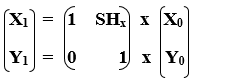
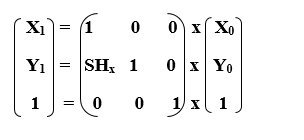
We can represent Horizontal shearing in the form of matrix-
2D Shearing

Homogeneous Coordinate Representation: The 3 x 3 matrix for Horizontal Shearing is given below-
2D Shearing 2D Shearing
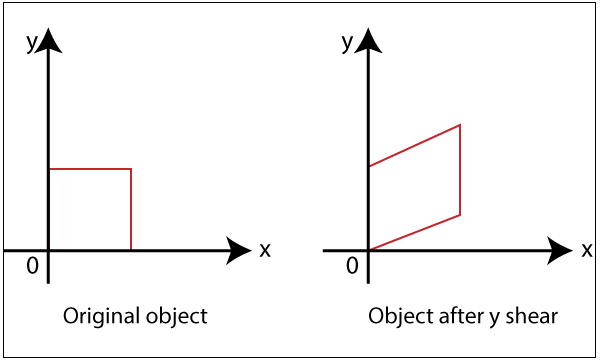
  • Shearing along y-axis: In this, we can store the x coordinate and only change the y coordinate. It is also called “Vertical Shearing.”

We can represent Vertical Shearing by the following equation-

X1 = X0

Y1 = Y0 + SHy. X0

We can represent Vertical Shearing in the form of matrix-
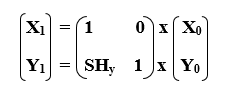
2D Shearing

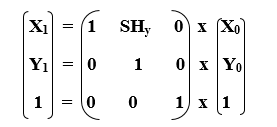
Homogeneous Coordinate Representation: The 3x3 matrix for Vertical Shearing is given below-
2D Shearing 2D Shearing

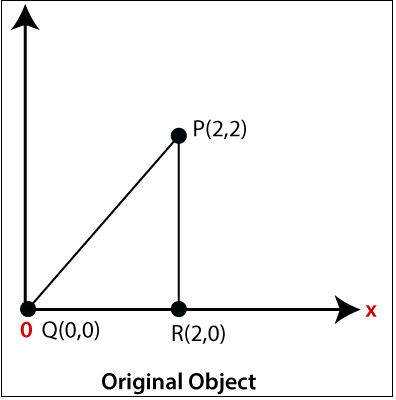
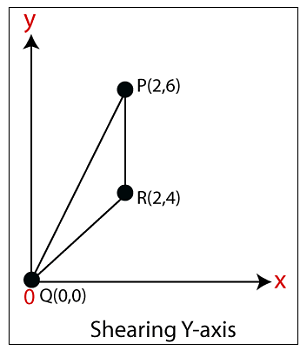
Example: A Triangle with (2, 2), (0, 0) and (2, 0). Apply Shearing factor 2 on X-axis and 2 on Y-axis. Find out the new coordinates of the triangle?     

Solution: We have,

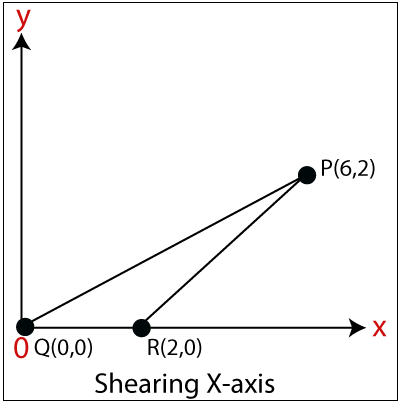
The coordinates of triangle = P (2, 2), Q (0, 0), R (2, 0)

Shearing Factor for X-axis = 2

Shearing Factor for Y-axis = 2

Now, apply the equation to find the new coordinates.

Shearing for X-axis:

For Coordinate P (2, 2)-

Let the new coordinate for P = (X1, Y1)

X1 = X0 + SHx. Y0 = 2 + 2 x 2 = 6

Y1 = Y0 = 2

The New Coordinates = (6, 2)

For Coordinate Q (0, 0)-

Let the new coordinate for Q = (X1, Y1)

X1 = X0 + SHx. Y0 = 0 + 2 x 0 = 0

Y1 = Y0 = 0

The New Coordinates = (0, 0)

For Coordinate R (2, 0)-

Let the new coordinate for R = (X1, Y1)

X1 = X­0 + SHx. Y0 = 2 + 2 x 0 = 2

Y1 = Y0 = 0

The New Coordinates = (2, 0)

The New coordinates of triangle for x-axis = (6, 2), (0, 0), (2, 0)
2D Shearing 2D Shearing

Shearing for y-axis: 

For Coordinate P (2, 2)-

Let the new coordinate for P = (X1, Y1)

X1 = X0 = 2

Y1 = Y0 + Shy.X0 = 2 + 2 x 2 = 6

The New Coordinates = (2, 6)

For Coordinate Q (0, 0)-

Let the new coordinate for Q = (X1, Y1)

X1 = X0 = 0

Y1 = Y0 +Shy. X0 = 0 + 2 x 0 =0

The New Coordinates = (0, 0)

For Coordinate R (2, 0)-

Let the new coordinate for R = (X1, Y1)

X1 = X0 = 2

Y1 = Y0 + Shy. X0 = 0 +2 x 2 = 4

The New Coordinates = (2, 4)

The New coordinates of triangle for y-axis = (2, 6), (0, 0), (2, 4)
2D Shearing

Related Topics

Scan Conversion of an Ellipse Computer Graphics

Scan Conversion of an Ellipse: An ellipse can be defined as a closed plane curve, which is a collection of points. It is the cause of the intersection of a...

8 minutes read.

Filled Area Primitives Computer Graphics

Filled Area Primitives: Area filling is a method or process that helps us to fill an object, area, or image. We can easily fill the polygon. The polygon filling is...

4 minutes read.

2D Transformation in Computer Graphics

Some visuals are transformed into some other graphics by implementing several of the principles known as transformation. There are multiple kinds of transformation, including translation, scaling, rotation, shearing, etc. Whenever...

2 minutes read.

Color Models in Computer Graphics

"Color model is a 3D color coordinate system to produce all range of color through the primary color set." There are millions of colors used in computer graphics. The light...

3 minutes read.

Scan Conversion of a Circle Computer Graphics

A circle is an eight-way symmetric shape. All quadrants of a circle are the same. There are two octants in each quadrant of a circle. If we know the value of any...

3 minutes read.

3d Scaling

The 2D and 3D scaling are similar, but the key difference is that the 3D plane also includes the z-axis along with the x and y-axis. In scaling, we can expend...

2 minutes read.

Point Clipping

“Point clipping is a process which is used to define the point position.” The point is either inside the view pane (window) or outside the view pane. In computer graphics, the computer...

2 minutes read.

2D Reflection

The Reflection is a mirror image of the original object. In the Reflection process, the size of the object does not change. We can represent Reflection by using four ways- Reflection along...

2 minutes read.

Image Representation in Computer Graphics

Image Representation: In computer science, we can represent an image in various forms. Most of the time, it refers to the way that brings information, such as color is coded digitally, and...

4 minutes read.

Text Clipping

“Text Clipping is a process in which we remove those part (portion) of string that is outside the view pane (window).” Various methods and techniques can do the text clipping. These techniques depend...

2 minutes read.

3D Shearing

We can denote shearing with ‘SHx,’ ‘SHy,’ and ‘SHz.’ These ‘SHx,’ ‘SHy,’ ‘SHz’ are called “Shearing factor.” The basic difference between 2D and 3D Shearing is that the 3D plane also...

1 minute read.

Zooming

In computer graphics, the term “Zoom is referred as a function, focuses on a particular portion or part of an image and also enlarging the image’s size for greater details.” In windows...

2 minutes read.

3D Translation

A 3D Translation process contains the x-axis, y-axis, and z-axis. We can move any object from one place to another without changing the shape of the object. For Example-Translation of a...

1 minute read.

Computer Graphics Window

“The process of selecting and viewing an image with different views, called windowing.” All the objects in the real world have a size. We can measure the size and location of...

4 minutes read.

Polygon Clipping in Computer Graphics

“A Polygon can be described as the enclosed collection or group of the lines.” In a polygon, all lines are connected. Lines can be a combination of edges and vertices,...

4 minutes read.

Clipping in Computer Graphics

“The Clipping is a type of transformation used in computer graphics to remove lines, objects, and segments of lines that are outside the computer screen or viewing pane.” The clipping is a...

2 minutes read.

Pointing and Positioning Technique Computer Graphics

Pointing and Positioning Technique: The pointing and positioning are interactions used in computer graphics. A pointing device is also called a Pointing tool. A pointing tool is a hardware component,...

4 minutes read.

Animation in Computer Graphics

The word Animation is extracted from a Latin language, "Anima," which means "Soul." TheAnimation is a technology that allows any image object, an entity to walk, talk, or do some...

3 minutes read.

Rendering in Computer Graphics

Rendering in Computer Graphics Rendering is the operation, by virtue of a software system, of creating a picture from a template. In a specifically defined term or information structures, the model is a...

9 minutes read.

Line Clipping in Computer Graphics

The line clipping is a process in which we can cut the part of the line, which lies outside the view pane. Only those lines are visible, which lie inside the view pane....

13 minutes read.