Mid-Point Line Drawing Algorithm in Computer Graphics

The Mid-point Subdivision algorithm is the extension of the Cyrus-Beck algorithm. The Mid-Point line plotting algorithm was introduced by “Pitway and Van Aken.” It is an incremental line drawing algorithm. In this algorithm, we perform incremental calculations. The calculations are based on the previous step to find the value of the next point. We perform the same process for each step. By using the mid-point subdivision algorithm, we can draw a line with close approximation between two points. The mid-point subdivision line drawing algorithm subdivides the line at its midpoints continuously.

The Mid-point Subdivision algorithm helps to compute or calculate the visible areas of lines that appear in the window. This line plotting algorithm follows the bisection method to divide the line into equal partitions.
Mid-Point Line Drawing Algorithm

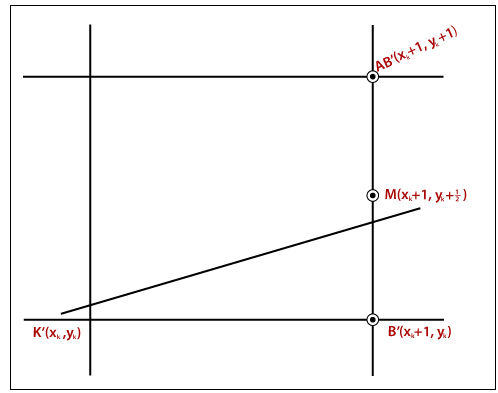
                                             Figure:1

In figure 1, we have a previous point K (xk,yk), and there are two next points; the lower point B (xk + 1,yk) and the above point AB (xk + 1,yk + 1). If the midpoint m is below the line, then we select point AB.

Let us assume, we have two points of the line = (x1, x2) and (y1, y2).

Here, it is (x1< x2)    

The Linear equation of a line is:

(x, y) = ax + by +c = 0 …………… (1)

dx =x2 - x1

dy =y2 - y1

As we know, the equation of simple line is:

y = mx +B

Here, m = dy/dx, we can write it as y = (dy/dx) x +B

Put the value of y in above equation, we get

(x, y) = dy (x) - (dx) y +B. dx = 0…………… (2)

By comparing equation (1) and (2)

a = dy

b = -dx

c = B. dx
Mid-Point Line Drawing Algorithm
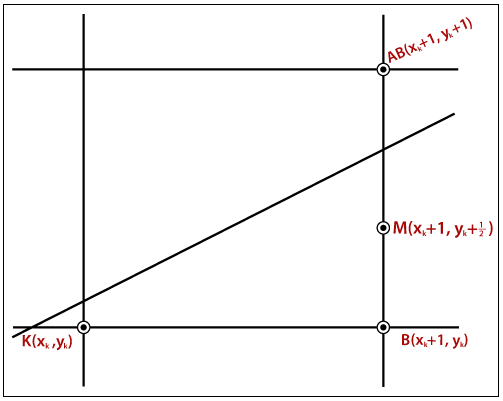
Figure: 2

There are some conditions given-

Condition 1: If all the points are on the line, then (x, y) = 0

Condition 2: If all the points are on the line, then (x, y) = Negative Number

Condition 3: If all the points are on the line, then (x, y) = positive Number

Now, m = (xk +1, yk + ­1/2)

   d = m = (xk +1, yk + 1/2)

Now, we calculate the distance value (d). Here, we discuss two cases:

Case 1: If

                    We select the lower point B

            Then  

                      The value of d is negative (d < 0)

We calculate the new and old value of d-  

 dn = (xk +2, yk + ­1/2)                 {The value of x coordinate is incremented by 1}

Place the value of (x, y) in equation (1) andwe got the value of do

dn = a (xk +2) + b (yk + ­1/2) + c                               {New Value of d}

do = a (xk +1) + b (yk + ­1/2) + c                                {Old Value of d}

Thus,

?d = dn do

           = a (xk+2) + b (yk +1/2) + c – a (xk+1) – b (yk +1/2) - c

       = a        

?d = dn do

?d = do + a

?d = do +dy                                              {a = dy}

Case 2: If

                    We select the upper point AB

            Then  

                      The value of d is positive (d > 0)

We calculate the new and old value of d- 

 dn = (xk +2, yk + ­3/2)        {The value of x and y coordinate is incremented by 1}

We put the value of (x, y) in equation (1) andwe got the value of do

dn = a (xk +2) + b (yk + ­3/2) + c                               {New Value of d}

do = a (xk +1) + b (yk + ­1/2) + c                                {Old Value of d}

Thus,

?d = dn do

           = a (xk+2) + b (yk +3/2) + c – a (xk+1) – b (yk +1/2) - c

       = a + b        

?d = dn do

?d = do + a +b

?d = do +dy – dx                                                  {a + (-b) = dy- dx}

Now, we calculate the initial decision parameter (di)

di =(x1 +1, y1+ 1/2)

Put the value of di in equation (1)                                                                                                           

di = a (x1 +1) + b (y1 + ­1/2) + c

    = ax1 +a + by1 + ­b/2 + c

    = (x1, y2) + a + ­b/2

    = 0 + a + ­b/2

di = dy – dx/2

Algorithm of Mid-Point Subdivision Line Drawing

Step 1:  Start.

Step 2: Consider the starting point as (x1, y1) and endingpointas (x2, y2).

Step 3: Now, we will calculate ?d.

              ?d = 2 (?y -?x)

Step 4: Now, we will calculate the decision parameter di with the following formula.

                      di = 2?y - ?x            

Step 5: The increment of x or y coordinate depends on the following two cases-

Case 1:  If

                         di < 0

              Then

                          xk+1 =xk +1

                          yk+1 = yk

                                             dn = di + 2?y

Case 2:  If

                         di >= 0

              Then

                          xk+1 =xk +1

                          yk+1 =yk +1

                          dn = di +?d

Step 6: We will repeat step 5 until we found the ending point of the line.   

Step 7: Stop.

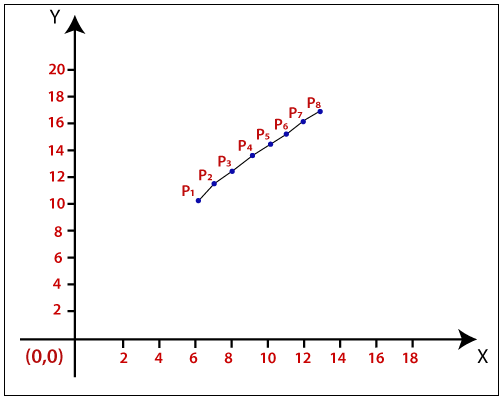
Example: A line has a starting point (6,10) and ending point (13,17). Apply the Mid-point Line Drawing algorithm to draw a line.

Solution: We have two coordinates,

Starting Point = (x1, y1) = (6,10)

Ending Point = (x2, y2) = (13,17)

Step 1: First, we calculate ?x, ?y.

           ?x = x2 – x1 = 13-6 = 7

            ?y = y2 – y1 = 17-10 = 7

Step 2: Now, we are going to calculate the ?d.

   ?d= 2(?y-?x)        

                    = 2 (7 – 7) = 0

             The value of ?d= 0

Step 3: Now, we will calculate the decision parameter di with following formula.

                      di = 2?y - ?x            

                  = 2 x 7 – 7 = 7

Step 4: The value of di >= 0. Case 2 is satisfied. Then

                        xk+1 =xk +1 = 6 +1 = 7

                          yk+1 =yk +1 = 10 + 1 = 11

                          dn = di +?d = 7 + 0 = 7

          di          dn          xk+1           yk+1
6 10
7 7 7 11
7 7 8 12
7 7 9 13
7 7 10 14
7 7 11 15
7 7 12 16
7 7 13 17         

Step 5: Stop.

Mid-Point Line Drawing Algorithm

The Coordinates of drawn lines are-

P1 = (6, 10)

P2 = (7, 11)

P3 = (8, 12)

P4 = (9, 13)

P5 = (10, 14)

P6 = (11, 15)

P7 = (12, 16)

P8 = (13, 17)

Advantages of Mid-point Subdivision Line Drawing Algorithm

  • It is very easy to implement.
  • It is a less time-consuming algorithm.
  • This algorithm uses basic arithmetic operations.
  • It only requires integer data. 
  • The drawn line is smooth than other line drawing algorithms.

Disadvantages of Mid-point Subdivision Algorithm

  • Sometimes this algorithm is not suitable due to critical images and graphics.
  • The points have less accuracy. There are improvements needed.

Related Topics

Illumination Model in Computer Graphics

Illumination Model in Computer Graphics The series of methods used to depict light in computer graphics scenarios is computer graphics illumination. Although lighting strategies provide versatility in the degree of detail...

8 minutes read.

Types of Computer Graphics

Types of Computer Graphics The computer graphics contains two types. They are- Raster (Bitmap) graphicsVector graphics Many individuals are likely to consider pictures on computers (or phones, tablets, or some other electronic gadget...

5 minutes read.

3d Scaling

The 2D and 3D scaling are similar, but the key difference is that the 3D plane also includes the z-axis along with the x and y-axis. In scaling, we can expend...

2 minutes read.

Pointing and Positioning Technique Computer Graphics

Pointing and Positioning Technique: The pointing and positioning are interactions used in computer graphics. A pointing device is also called a Pointing tool. A pointing tool is a hardware component,...

4 minutes read.

Zooming

In computer graphics, the term “Zoom is referred as a function, focuses on a particular portion or part of an image and also enlarging the image’s size for greater details.” In windows...

2 minutes read.

Line Clipping in Computer Graphics

The line clipping is a process in which we can cut the part of the line, which lies outside the view pane. Only those lines are visible, which lie inside the view pane....

13 minutes read.

Anti-aliasing in Computer Graphics

Anti-aliasing in Computer Graphics “Anti-aliasing is a method for eliminating the aliasing effect used in computer graphics. In a 2-dimensional object, the ambient occlusion impact is the existence of sharp edges...

7 minutes read.

2D Transformation in Computer Graphics

Some visuals are transformed into some other graphics by implementing several of the principles known as transformation. There are multiple kinds of transformation, including translation, scaling, rotation, shearing, etc. Whenever...

2 minutes read.

Computer Graphics Window

“The process of selecting and viewing an image with different views, called windowing.” All the objects in the real world have a size. We can measure the size and location of...

4 minutes read.

2D Translation

We can move any object from one to another place without changing the shape of the object. For Example- Translation of a Point:If we want to translate a point from P (x0,...

1 minute read.

Input Devices in Computer Graphics

An Input device is the piece of computer hardware equipment used to give input to the computer. The input can be in the form of graphics, text, sound, audio, video,...

7 minutes read.

Output Devices in Computer Graphics

Computer Graphics Output Devices An output device is a component of hardware or the main physical part of a computer that can be touched and seen. An output device is an electromechanical device. “The...

5 minutes read.

Homogenous Coordinates in Computer Graphics

Homogenous Coordinates in Computer Graphics The orbit of a point, a line graph or the whole picture on the computer, a point besides the origin, is accomplished by first shifting the...

7 minutes read.

History of Computer Graphics

History of Computer Graphics Computer Graphics (CG) was first developed as a visualization tool. Computer graphics were basically introduced for scientists and engineers in government and corporate research centers, i.e., Bell Labs and Boeing...

4 minutes read.

Clipping in Computer Graphics

“The Clipping is a type of transformation used in computer graphics to remove lines, objects, and segments of lines that are outside the computer screen or viewing pane.” The clipping is a...

2 minutes read.

3D Reflection

The Reflection is a mirror image of the original object. We can differentiate 2D and 3D reflection by adding Z-axis. The Z-axis shows the depth of the surface. In the...

1 minute read.

Projection in Computer Graphics

Projection Introduction: The technique projection was invented by the Swiss mathematician, engineer, and astronomer "Leonhard Euler Around" in 1756. The "Episcope" was the first projection system. “Projection is a technique or process which...

4 minutes read.

2D Rotation

The Rotation of any object depends upon the two points. Rotation Point: It is also called the Pivot point. Rotation Angle: It is denoted by Theta (). We can rotate an object in...

1 minute read.

Transformation

Introduction The term Transformation is generally referred to as converting a graphic into another graphic by applying some rules or algorithms. Sometimes an image or picture can be a combination of lines, rectangle,...

2 minutes read.

2D Reflection

The Reflection is a mirror image of the original object. In the Reflection process, the size of the object does not change. We can represent Reflection by using four ways- Reflection along...

2 minutes read.