
Bootstrap Time Picker Example
What is a Bootstrap Time picker?
It is used to display the time in hours, minutes and seconds from a dropdown menu. In this section, we will create an example to see how time pickers are used in bootstrap. The time can be displayed in various formats, and the most frequently used format is “HH:MM:SS”.
HH:
- Refers to the hours.
- Can lie from 1 to 12(for 12-hour clock).
MM:
- Refers to the minutes.
- Lies between 00 to 59.
SS:
- Refers to the seconds.
- Lies between 00 to 59
How to implement Time Picker?
First, include all the necessary CDNs in the <head> tag: The bootstrap CDN, the CSS CDN and JQuery CDN. The following CDNs must be included:
<script src = "https://cdnjs.cloudflare.com/ajax/libs/jquery/1.12.4/jquery.min.js"></script>
<script src = "https://cdnjs.cloudflare.com/ajax/libs/moment.js/2.15.1/moment.min.js"></script>
<script src = "https://cdnjs.cloudflare.com/ajax/libs/twitter-bootstrap/3.3.7/js/bootstrap.min.js"></script>
Next, include the datetimepicker CDN in the <head> tag.
<script src = "https://cdnjs.cloudflare.com/ajax/libs/bootstrap-datetimepicker/4.7.14/js/bootstrap-datetimepicker.min.js"></script>Now, include any Internal CSS you want to include in the <style> tag. For example,
<style>
.
.
.
</style>
Next, write the main code in the <body> tag, include the time picker component here,
<body>
<div class ="container">
    <div class ="row">
  .
.
</div>
</div>
</body>
At the end, we can include the JavaScript required for the timepicker in the <script> tag using the .datetimepicker function ,
 <script type = "text/javascript">
          $(function () {
              $('#timepicker').datetimepicker({
                  format: 'LT'
              });
          });
</script>
Note: Some methods can also be used in JavaScript in the .datetimepicker function like show, update, remove and hide.
Example 1:
<!DOCTYPE html>
<html>
<head>
<script src = "https://cdnjs.cloudflare.com/ajax/libs/jquery/1.12.4/jquery.min.js"></script>
<script src = "https://cdnjs.cloudflare.com/ajax/libs/moment.js/2.15.1/moment.min.js"></script>
<script src = "https://cdnjs.cloudflare.com/ajax/libs/twitter-bootstrap/3.3.7/js/bootstrap.min.js"></script>
<script src = "https://cdnjs.cloudflare.com/ajax/libs/bootstrap-datetimepicker/4.7.14/js/bootstrap-datetimepicker.min.js"></script>
<title>Bootstrap TimePicker Example</title>


<script>
$(function() {
  $('#datetimepicker1').datetimepicker();
});
</script>
<link rel = "stylesheet" href = "https://cdnjs.cloudflare.com/ajax/libs/twitter-bootstrap/3.3.7/css/bootstrap.min.css">
<link rel = "stylesheet" href = "https://cdnjs.cloudflare.com/ajax/libs/bootstrap-datetimepicker/4.7.14/css/bootstrap-datetimepicker.min.css">
<style>
    body{
      background-color: beige;
      font-family: 'Segoe UI', Tahoma, Geneva, Verdana, sans-serif;
    }
    .container {
        margin-top : 80px;
        width : 800px;
    }
</style>
</head>
<body>
</br>
<div class ="container">
    <div class ="row">
       <div class ='col-sm-12 my-auto'>
          <div class ="form-group">
            <p>Following is an example to demonstrate timepicker in Bootstrap.</p><br>
             <div class = 'input-group date' id='timepicker'>
                <input type = 'text' class="form-control" />
                <span class = "input-group-addon">
                <span class = "glyphicon glyphicon-time"></span>
                </span>
             </div>
          </div>
       </div>
       <script type = "text/javascript">
          $(function () {
              $('#timepicker').datetimepicker({
                  format: 'LT'
              });
          });
       </script>
    </div>
 </div>
</body>
</html>
Output:

We can click on the “clock” icon to set the time from the dropdown as shown,

Example 2:
The following example shows the time in the format “hh:mm:ss”.
<!DOCTYPE html>
<html>
<head>
    <link href= "https://maxcdn.bootstrapcdn.com/bootstrap/3.3.6/css/bootstrap.min.css" rel="stylesheet">
    <script src= "https://ajax.googleapis.com/ajax/libs/jquery/1.9.1/jquery.js"></script>
    <script src= "https://maxcdn.bootstrapcdn.com/bootstrap/3.3.6/js/bootstrap.min.js"></script>
    <script type="text/javascript" src= "https://cdnjs.cloudflare.com/ajax/libs/moment.js/2.9.0/moment.min.js"></script>
    <link href= "https://cdnjs.cloudflare.com/ajax/libs/bootstrap-datetimepicker/4.17.37/css/bootstrap-datetimepicker.min.css" rel="stylesheet">
    <script src= "https://cdnjs.cloudflare.com/ajax/libs/bootstrap-datetimepicker/4.17.37/js/bootstrap-datetimepicker.min.js"></script>
    <title>Bootstrap TimePicker Example</title>
</head>
<style>
    body{
      background-color: black;
      font-family: 'Segoe UI', Tahoma, Geneva, Verdana, sans-serif;
    }
    .para{
        color: white;
    }
    .container {
        margin-top : 80px;
        width : 800px;
    }
    .content{
        position: relative;
    }
</style>
<body>
<div class="container">
    <div class="row">
        <p class="para">Following is an example to demonstrate the TimePicker Example using Bootstrap.</p>
        <div class ='col-sm-12 my-auto'>
<div class="content">
<input class="form-control" type="text" id="datetimepicker" />
</div>
        </div>
</div>
</div>
<script>
    $('#datetimepicker').datetimepicker({
        format: 'hh:mm:ss a'
    });
</script>
</body>
</html>
Output:

We can change the time from the dropdown as shown below,
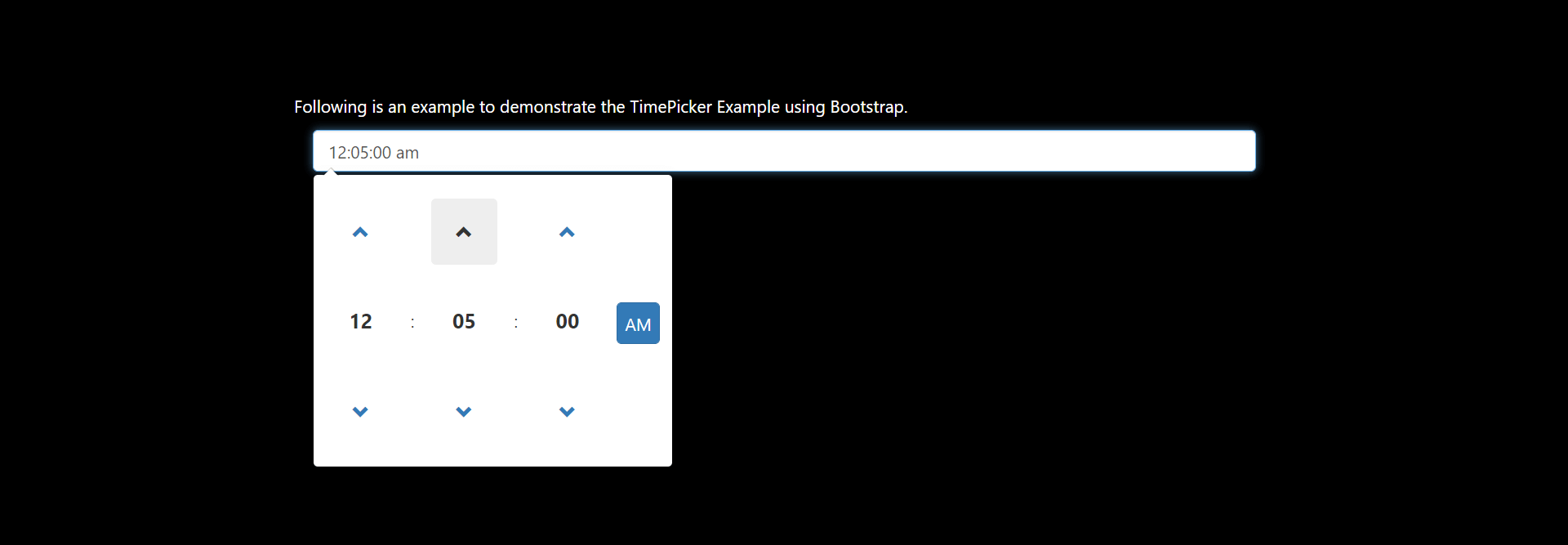
We can even choose a particular value from all the options available,
