DBMS Architecture
This is the first step when creating a database management system. The architecture of a database management system plays an important role in determining the actual design and layout of the database. The architecture of the DBMS determines the functionality of the database. In contrast, its architecture is dependent on the number of users and the method of connection of those users and the database.
To understand the DBMS architecture, you must have a clear idea about the client and server. The client is the user requesting service, in this case, access to the data stored in the database. The server side is the side that answers the request of the client.
The architecture can be divided into the following three categories based on the layers between the server and client layer.
- 1 tier Architecture
- 2 tier Architecture
- 3 tier Architecture
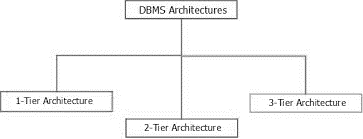
We can determine the DBMS architecture based on the number of clients and its usage.
Let us discuss all these architectures individually to better understand the working of each architecture.
1 Tier Architecture
In this architecture, the user directly interacts with the database itself, which means that it is accessible to the user to create, alter or delete the data.
The user directly sits on the database, and there is no layer between the user and the database. Therefore, there is no data abstraction; the whole data is available.
There is no interactive user interface.
This architecture is only preferred when the user aims to prepare a local application as there is no real security is in this architecture.
This method provides a quick response to the user.
2 Tier Architecture
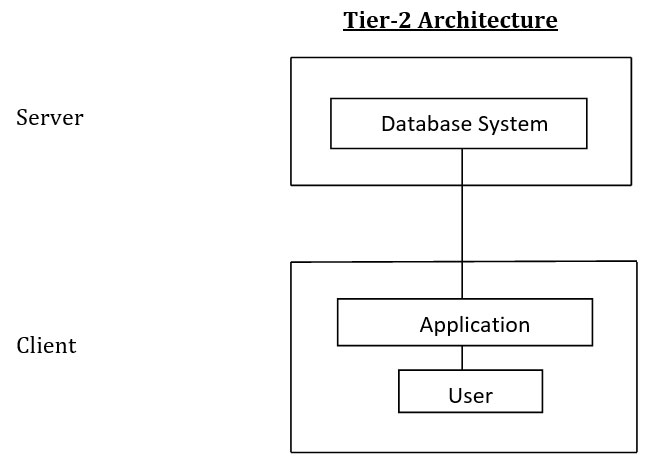
This architecture is rather the simplest version of a server-client application.
It provides an application layer that works as an isolating layer between the client and the database server. But this application layer is only available on the user side.
This application layer is only available at the client end. This application layer provides a certain level of data abstraction.
The user interfaces and application program provide different views to the different users run on the user-side. In contrast, the server-side provides various functionalities such as translating and performing queries.
The user can only communicate using the application layer at the client-side, and the server end application interacts with the database.
3 Tier Architecture
This architecture is similar to 2 Tier architecture as it also provides an intermediate layer between the client and the database server. The only difference is that it adds one more application layer as an intermediate, and now the application layer is available at both the client and the server sides.
In this architecture, the user connects through the user application, and that user application interacts with the application server that communicates with the databases.
This provides ample layer to abstract the data.
Any modification in the data done by the user does not directly affect the database itself. The changes are first performed on the application layer. There is no real connection between the database and the user.
The query processing and other functionalities of the database management system are performed at the server-side application.
It allows the DBA to manage the access of the various users. It also enables concurrent transactions on the database.
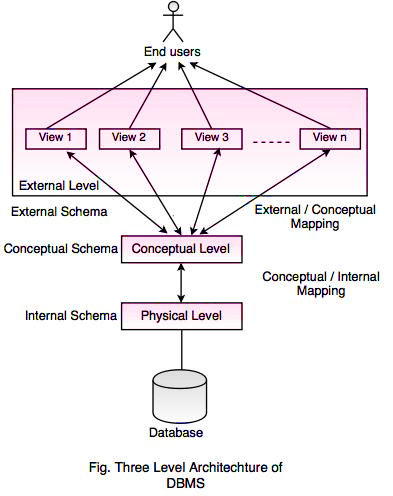
3 Schema Architecture
It describes the architecture of the database at various levels.
There are three layers of schema that separates the physical, logical and application part of the database. Physical Schema, Logical Schema and the External Schema are mapped together.
There are two levels of mapping between various levels.
At the external-conceptual level and the conceptual-internal level, the request and response are transformed to communicate between these two layers.
They interact with each other to perform the operations on the database. A schema represents all the database entities and the relationship between those entities.
Internal Level
It defines the physical structure of the database. It defines the format in which the data will be stored or, say, the structure in which the data will be stored. It is also known as the Physical Schema. It describes the complex low-level data structures of the database. At this level of schema, the database administrator determines the definition of the database by using data definition language. The user does not have access to this level, requiring special rights. Initially, only the data administrator can alter any change into it.
Conceptual Level
At this level, we describe the design of the database. It describes what data will be stored in the database. This is called the logical schema; the end-user does not have access to this layer. The programmers and database administrators are the only ones with access to this level. At this level, we store the data in the data structures described at the physical level. However, the details of the implementation of the physical level are kept hidden at this level.
External Level
It describes the various views of the database. This level is also called the view level. There can be different views for different users depending on the needs of the end-users.
At this level, the end-user interacts with the database, and the details of both physical and logical schemas are kept hidden from the user.
The hiding of details of one level from other and only showing the necessary information is called abstraction.