
×

Priority Scheduling in OS

Priority Scheduling is a type of CPU Scheduling algorithm which is used for process scheduling. In Priority Scheduling, we assign some priorities to each process. The process which has higher priority among all the processes is assigned with the CPU first.

The priority scheduling is of two types:

  1. Preemptive Priority Scheduling.
  2. Non-Preemptive Priority Scheduling.

The priority number, which is assigned to each process, can be different. If the number of priorities which is assigned to each process does not change itself, then such type of priority is known as static priority.

But if the number of priorities is changing itself, then this type of priority is known as Dynamic priority.

Advantages of Priority Scheduling

The advantages of Priority Scheduling are:

  1. Priority scheduling is simple to understand.
  2. Priority scheduling is a user-friendly algorithm.
  3. Based on priority, processes are executed. So, the process which has the highest priority does not need to wait for more time
  4. Priorities in the Priority scheduling are chosen on the basis of time requirements, memory requirements, and user preferences.

Disadvantages of Priority Scheduling

The disadvantages of Priority Scheduling are:

  1. When the multiple processes have the same priorities, then we have to apply another scheduling algorithm.
  2. In priority scheduling, if the system is crashed, then all low-priority processes that are not yet completed will also get lost.
  3. Another disadvantage of Priority Scheduling is starvation. The problem of starvation is a situation that arises when a process does not get the required resources like CPU because another process is holding the resources, and it waits for a long time for the CPU. ‘Aging’ is a technique that is used to remove the problem of starvation. In aging, the system automatically increases the priorities of the processes, waiting for a long time to complete its execution.

Non-Preemptive Priority Scheduling

In this, the processes are scheduled on the priority basis. Each process is assigned a priority. If the process is scheduled, then it will not leave the CPU until it completes the execution.

In Non-Preemptive Priority Scheduling, the process which has the highest priority is scheduled first, and if the processes have the same priority number, then it will be executed according to the First-Come-First-Serve manner. Priorities are assigned based on the resource requirements, time requirements, and Memory requirements.

Example of Non-Preemptive Priority Scheduling

In the following example, we have 7 processes with process ID P1, P2, P3, P4, P5, P6, and P7. The arrival time and burst time of the processes are given in the following table:

Process ID Priority Arrival Time Burst Time Completion time Turnaround time Waiting time Response time
P1 1 0 4 4 4 0 0
P2 5 3 6 23 20 14 17
P3 2 2 5 9 7 2 4
P4 4 5 3 17 12 9 14
P5 6 7 10 33 26 16 23
P6 3 6 5 14 8 3 9
P7 9 8 11 44 36 25 33

The waiting time and turnaround time are calculated with the help of the following formula:

         Waiting Time = Turnaround time – Burst Time

          Turnaround Time = Completion time – Arrival time 

Process waiting time

P1=4-4=0

P2=20-3=17

P3=7-5=2

P4=12-3=9

P5=26-10=16

P6=8-5=3

P7=36-11=25

Average Waiting Time= 0+17+2+9+16+3+25/7

                                        =72/7

                                        =10.28

Process Turnaround Time

P1=4-0=4

P2=23-3=20

P3=9-2=7

P4=17-5=12

P5=33-7=26

P6=14-6=8

P7=44-8=36

Average Turnaround Time= 4+20+7+12+26+8+36/7

                                              =113/7

                                               = 16.14
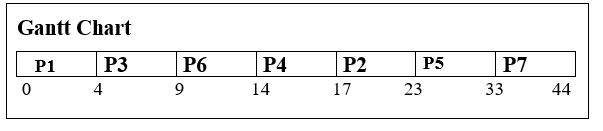
Priority Scheduling in OS

Preemptive Priority Scheduling

Preemptive Priority Scheduling is a scheduling algorithm that is used when a process enters the ready queue first. We compare the priority of the process with other processes, present in the ready queue and, which the CPU is executing at that point of time. The process which has the highest priority among all other processes will be assigned with the CPU first.

In preemptive priority scheduling, if a new process enters into the ready queue, having a higher priority than the currently running process. In such a case, the CPU is preempted to the newly arrived process, i.e., the current process processing gets stopped, and the new incoming process begins its execution.

Example of Preemptive Priority Scheduling

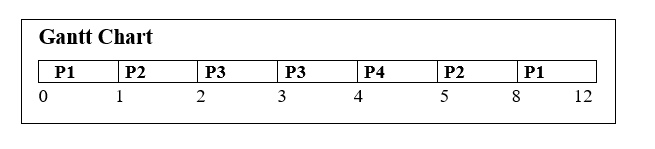
In the following example, we have 4 processes with process ID P1, P2, P3, and P4. The arrival time and burst time of the processes are given in the following table. (In this example, we assume that higher the number, higher the priority).

Process ID Priority Arrival Time Burst Time Completion Time Turnaround Time Waiting Time
P1 11 0 5 12 12 7
P2 22 1 4 8 7 3
P3 33 2 2 4 2 0
P4 44 4 1 5 1 0

The waiting time and turnaround time are calculated with the help of the following formula.

         Waiting Time = Turnaround time – Burst Time

          Turnaround Time = Completion time – Arrival time 
Priority Scheduling in OS

At time 0, the process P1 arrived with burst time 5 and started its execution. But when the process P2 came with the priority higher than the P1 process. So, process P1 got preempted with P2. P2 began its execution then. This process continued until all the process finished their execution. In preemptive priority scheduling, CPU executes the process only for a single interval of time so that the higher priority process can never skip.

Process Turnaround Time

P1=12-0=12

P2=8-1=7

P3=4-2=2

P4=5-4=1

Average Turnaround Time= 12+7+2+1/4

                                               =22/4

                                               =5.5

Process Waiting Time

P1=12-5=7

P2=7-4=3

P3=2-2=0

P4=1-1=0

Average Waiting Time=7+3+0+0/4

                                       =10/4

                                        =2.5


Related Topics

Linux Operating System

What is Linux? The Linux operating system is used on various devices, including cellphones, automobiles, supercomputers, household gadgets, personal computers, and business servers. You can find Linux on your phones, thermostats, vehicles,...

8 minutes read.

DOS Operating System

What is DOS Operating System? An operating system that runs from a hard disk drive is known as the DOS (Disk Operating System).In other words, DOS (Disk Operating System) is defined...

7 minutes read.

Ubuntu Operating System

Ubuntu Operating System Ubuntu is an open-source and a Linux based operating system. Ubuntu is developed for the Network Servers, Computers, and Smartphones. The Ubuntu operating system was developed by Canonical...

3 minutes read.

Deadlock Detection and Recovery

Deadlock Detection and Recovery In deadlock detection and recovery, to avoid or prevent a deadlock, the operating system uses various methods. For checking deadlock, an operating system continuously monitors the system. Then also,...

2 minutes read.

Partitioning Algorithms

Partitioning Algorithms There are various types of Partitioning Algorithm: First-Fit AlgorithmNext-Fit AlgorithmBest-Fit AlgorithmWorst-Fit AlgorithmQuick-Fit Algorithm 1. First-Fit Algorithm: - In the First-Fit Partitioning algorithm, first, the linked list is scan, and when it...

3 minutes read.

Round-Robin Scheduling Algorithm in OS

Round-Robin is a Preemptive Scheduling Algorithm and is the most commonly used algorithm in CPU Scheduling.In this, each Process is assigned with a fix time interval to execute, which is...

5 minutes read.

FCFS (First-Come-First-Serve) Disk Scheduling Algorithm

FCFS Disk Scheduling Algorithm FCFS (First-Come-First-Serve) is the easiest disk scheduling algorithm among all the scheduling algorithms. In the FCFS disk scheduling algorithm, each input/output request is served in the order...

4 minutes read.

Functions of Operating System

The functions of Operating System are: Process Management Memory Management File Management Device Management Secondary storage Management Security Coordination between other software and users Networking Job Accounting Error detecting aids 1. Process Management Process Management support operating system to create and delete...

3 minutes read.

Deadlock Prevention in Operating System

Deadlock Prevention The conditions which we used for deadlock prevention are: Mutual ExclusionHold and WaitNo PreemptionCircular Wait 1. Mutual Exclusion: - From the resource point of view, the mutual exclusion means that simultaneously more...

4 minutes read.

Trap vs Interrupt in Operating System

What is Trap in Operating System? A trap is a synchronous interrupt used to perform functionality when an error occurs in a user process. A trap in an operating system can...

4 minutes read.

How to implement Monitors using Semaphores

Monitors Monitor is a type of synchronization device designed to solve difficulties caused by semaphores, such as timing errors. Monitors are the type of data types that are abstract by nature...

2 minutes read.

Difference between Process and Program in the Operating System

What is a process in the Operating System? A process is a program that is going through the execution. It also helps us to execute all the lines of code in...

4 minutes read.

SJF Scheduling in OS

Shortest Job First (SJF) Scheduling in OS Shortest Job First is a Preemptive or Non-Preemptive algorithm. In the shortest job first algorithm, the job having shortest or less burst time will...

4 minutes read.

Resource Allocation Graph in Operating System

Resource Allocation Graph in OS We use the resource allocation graph for the pictographic representation of the state of a system. The resource allocation graph contains all the information related to the processes that...

5 minutes read.

Types of Operating System

There are various types of operating system: Simple Batch Operating SystemMultiprogramming batch Operating SystemTime-sharing Operating SystemMultiprocessor Operating SystemDistributed Operating SystemNetwork Operating SystemReal-time Operating SystemMobile Operating System Simple Batch operating system In the simple batch operating system, there is no direct communication between...

6 minutes read.

File Access Methods in Operating System

File Access Methods in OS There are various types of file access methods in the operating system: Sequential Access MethodDirect Access MethodIndex Sequential Access Method Sequential Access Method: - Sequential Access Method is...

3 minutes read.

Inter Process Communication in Operating System

Inter-Process Communication or IPC refers to the methods and techniques that allow processes (programs or tasks) to communicate with each other within a computer system. This is typically done through...

3 minutes read.

MS-DOS Operating System

It is also referred to occasionally as "DOS", an abbreviation for disc operating systems. Operating systems with a graphical user interface (GUI) in different iterations of the graphical Microsoft Windows...

5 minutes read.

FCFS Scheduling in OS

FCFS: First Come First Serve Scheduling in OS FCFS is a non-preemptive and preemptive scheduling algorithm that is easy to understand and use. In this, the process which reaches first is...

3 minutes read.

What is Deadlock in OS?

Deadlock in Operating System In an Operating System, a process uses various resources, and the resources are used in the following manner: Request the ResourceUse the ResourceRelease the Resource In the Operating System, Deadlock is a condition...

4 minutes read.