×

Process Management in OS

A Program will not do anything unless a CPU executes its instructions. An executing program is called a process. The Process requires computer resources to complete its task. More than one process can exist in the system, which needs the same resources at the same time. So, the operating system handles all the resources and processes effectively.

There may be situations where many resources may need to be executed at the same time by one process so that consistency is maintained; otherwise, the system may become inconsistent, and there may be chances of deadlock.  

The operating system performs the following tasks for process management:

  • Suspending and restarting the process.
  • Offering mechanisms for process communication.
  • Offering mechanisms for process synchronization.
  • Process scheduling and threads on the CPU.
  • Create and delete system and user processes.

Process: - A process is defined as a program in execution.

Types of Processes

There are two types of Processes:

  1. I/O-Bound Process
  2. CPU-Bound Process
  1. I/O-Bound Process: - It is a type of process in which the process execution time is calculated with the help of the amount of time a process spends to complete the input/output operations.
  2. CPU-Bound Process: - CPU-Bound Process is another type of process in which the process execution time is calculated with the help of the CPU speed. If we use a faster processor, then the CPU-Bound Process may execute faster.

Components of Process

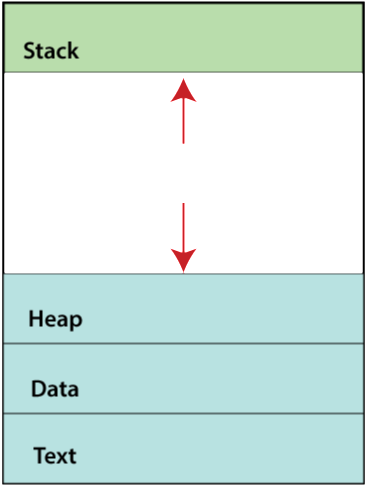
There are four components of the process:

  1. Text
  2. Data
  3. Stack
  4. Heap
Process Management
  1. Text: - Text consists of the value of the program counter and the processor’s registers content that is represented by the current activity.
  2. Data: - Data contains both static as well as global variables.
  3. Stack: - Stack contains temporary data like local variables, return addresses, and method/function.
  4. Heap: - Heap is a dynamic memory which is allocated during the run time of a process.

Attributes of Process

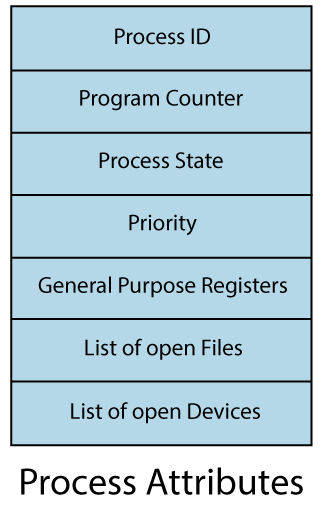
The attributes of a process are also called the context of the process. These attributes design the Process Control Block (PCB).

The attributes used to store Process Control Block (PCB) are:

  1. Process ID
  2. Program Counter
  3. Process State
  4. Priority
  5. General Purpose Registers
  6. List of open Files
  7. List of open Devices
Process Management

Process ID: - Process ID is a unique ID that is assigned to the process at that time when the process was created.

Program counter: - The Program counter holds the address of the last instruction of the process.

Process State: - The process state may be one of the following states, i.e., running, ready, waiting, terminate, etc.

Priority: - Some priority is assigned to every process in the memory. The process that has the highest priority between the processes gets the CPU first.

General Purpose Registers: - These registers are used to store the data which is generated at the time of process execution.

List of Open Files: - A list of open files contains some files that require to be present in the main memory when the process is executing

List of Open Devices: - List of open devices contains the list of devices that are used when the process is executing.


Related Topics

SCAN Disk Scheduling Algorithm

SCAN Disk Scheduling Algorithm The SCAN disk scheduling algorithm is another type of disk scheduling algorithm. In this algorithm, we move the disk arm into a specific direction (direction can be moved towards...

4 minutes read.

Test Set Lock Mechanism | Operating System

Modification in the Assembly Code The problem in the lock variable is that, in some cases, the process reads the previous or old value of the lock variable and enters into the critical...

4 minutes read.

What is Deadlock in OS?

Deadlock in Operating System In an Operating System, a process uses various resources, and the resources are used in the following manner: Request the ResourceUse the ResourceRelease the Resource In the Operating System, Deadlock is a condition...

4 minutes read.

DOS Operating System

What is DOS Operating System? An operating system that runs from a hard disk drive is known as the DOS (Disk Operating System).In other words, DOS (Disk Operating System) is defined...

7 minutes read.

Directory Structure in Operating System

Directory Structure in Operating System What is a Directory A Directory is the collection of the correlated files on the disk. In simple words, a directory is like a container which contains...

8 minutes read.

Operating System Services

The Operating System provides various types of services:   I/O operationProgram executionFile system manipulationCommunicationError HandlingResource allocationAccountingProtection 1. I/O Operation: - To execute a program, needs I/O, which consists of a file, or I/O device. Due to the protection...

3 minutes read.

Multi-user Operating Systems

Introduction Since only one user may interact with the computer at any given time, the operating system we use on our personal computers, laptops, tablets, and phones is sometimes referred to...

8 minutes read.

What is Scheduling on OS

Scheduling is the process which is used to share the computing resources such as memory, processor time, and bandwidth to the different processes, data flows, threads, and applications which need them. Scheduling is...

5 minutes read.

Lock Variable Mechanism | Operating System

Lock Variable Mechanism The Lock variable mechanism is a synchronization mechanism that is implemented in a user mode. It is a software procedure. Lock variable is a solution for busy waiting that can be...

3 minutes read.

CPU Scheduling in OS

What is Scheduling? Scheduling is the process that is used to share the computing resources such as memory, processor time, and bandwidth to the different processes, data flows, threads, and applications that need...

5 minutes read.

Components of Operating System

Components of Operating System: An operating system is a complex and vast system. We can only create the operating system by dividing it into small parts. Each part must be...

5 minutes read.

HRRN Scheduling in OS

Highest Response Ratio Next (HRRN) Scheduling in OS Highest Response Ratio Next Scheduling is a Non-Preemptive Scheduling algorithm. This algorithm provides the benefits of the shortest job first scheduling algorithm and also removes...

6 minutes read.

Advantages of UNIX Operating System

What is UNIX OS? UNIX is a family of multitasking, multiuser operating systems that are used on a wide variety of computer platforms. It was developed in the late 1960s and...

4 minutes read.

Process State in OS

The Process passes from different states, from its formation to completion. The following are the states of the Process. NewReadyRunningBlock or WaitTerminated or CompletedSuspend readySuspend wait or suspend blocked 1. New: - The state in which a process...

2 minutes read.

How to implement Monitors using Semaphores

Monitors Monitor is a type of synchronization device designed to solve difficulties caused by semaphores, such as timing errors. Monitors are the type of data types that are abstract by nature...

2 minutes read.

Multitasking Operating Systems

An operating system is the fundamental piece of software that enables a computer system to function and execute a command as intended. The user interface, hardware, and every other piece...

7 minutes read.

Advantages of Operating System

What is an Operating System?   An operating system is an interface that helps to communicate with the user and the computer hardware. Operating systems are used for file management, memory...

3 minutes read.

Ubuntu Operating System

Ubuntu Operating System Ubuntu is an open-source and a Linux based operating system. Ubuntu is developed for the Network Servers, Computers, and Smartphones. The Ubuntu operating system was developed by Canonical...

3 minutes read.

Process Management in OS

A Program will not do anything unless a CPU executes its instructions. An executing program is called a process. The Process requires computer resources to complete its task. More than...

3 minutes read.

Difference between C-LOOK and C-SCAN Disk Scheduling Algorithm

Disk scheduling is used by operating systems to arrange the arrival of I/O requests to the disc. I/O scheduling is another name for disc scheduling. Disk scheduling is necessary because...

4 minutes read.