
Process Synchronization | Operating System
Process Synchronization
Process Synchronization means managing the process in such a manner so that no two processes have access to share similar data and resources.
We can use Process Synchronization in a Multi-Process System in which the number of processes are executed collectively and where more processes want to use similar resources at the same time.
Due to this, shared data can become inconsistent. Thus, the changes done in one process should not affect another process when another process needs to access similar shared data or resources. To stop this kind of data incoherence, the processes must be synchronized with each other.
Based on synchronization, processes are classified into two types:
- Independent Process
- Cooperative Process
Independent Process: - If due to any process execution, another process is getting affects, then this type of process is called as Independent Process.
Cooperative Process: - If due to any process execution, another process does not affect then this type of process is called as Cooperative Process.
The issue of Process Synchronization is occurring in the cooperative process, and the reason is resources are shared in a Cooperative process.
Rare Condition
Rare Condition is the situation which may arise when multiple processes wants to access and manipulates similar data concurrently. The output of the processes depends on the specific order in which the process access the data.
Critical Section Problem
If more than one process wants to access the similar code segment, then that segment is called the Critical Section. There are shared variables present in the critical section, which helps in synchronization so that the data variables consistency is maintained.
In other words, the Critical Section is a collection of instructions/statements or a region of code, which is executed atomically like accessing a resource file, global data, input port, output port, etc.
In Critical Section, only one process can be executed, the rest of the other processes wait in the critical section for their execution and need to wait until the current process finish its execution.
- With the help of the wait() function, the entry to the critical section is managed. It is represented by P().
- With the help of the signal() function, the exit from the critical section is managed, and it is represented by V().
Sections of a Program in a Critical Section
There are four sections of a Program in a Critical Section
- Entry Section
- Critical Section
- Exit Section
- Remainder Section
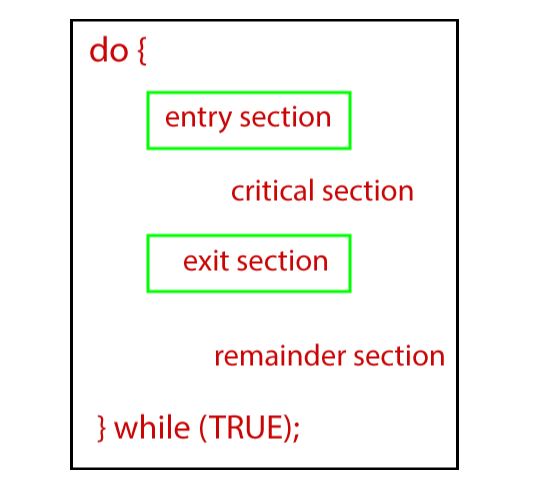
Entry Section: - Entry Section is that portion of the process that takes a decision in the context of the entry of a specific process.
Critical Section: - Critical Section is that section of a program which permits a process to enter and alter the shared variable.
Exit Section: - Exit section permits the processes which are waiting in the entry section to enter into the critical section. Exit Section also contains the information related to the process which has finished its execution and then removes that process from the Exit Section.
Remainder Section: - The part which is not present in any section, i.e., Critical, Exit, and Entry Section, is known as the Remainder Section.
Rules for Critical Section
The rules for the Critical Section are:
- Mutual Exclusion
- Progress
- Bound Waiting
Mutual Exclusion: - In mutual exclusion, if there is a process which is running in a critical section, then no other process is allowed to enter into the critical section.
Progress: - In Progress, if a process does not want to run into the critical section, then it should not deter other processes to enter into the critical section.
Bounded Waiting: This rule says that every process is allotted with a time limit so that they do not need to wait for more time.
Solutions to the Critical Section
There are various methods used to solve the Critical Section Problem:
- Peterson Solution
- Synchronization Hardware
- Mutex Locks
- Semaphore Solution
Peterson Solution: - Peterson Solution is one of the methods which is used to solve the problem of the critical section. It was developed by a scientist named ‘Peterson’. That’s why the solution was named ‘Peterson Solution.’
In Peterson’s solution, if a process is running inside the critical section, then another process performs the task of executing the remaining code and vice versa. In this, at one time, only a single process can execute inside the critical section.
Synchronization Hardware
The problem of the Critical Section can be solved with the help of hardware. Most of the OS provides the facility of lock functionality in which if a process wants to enter into the critical section, it needs to acquire a lock and can release the lock if it wants to leave the critical section.
So, if some other process wants to enter into the critical section when it is already acquired by a process, then due to the locked process, it will not be able to enter into the critical section. It can only enter into the critical section if it is free by obtaining the lock itself.
Mutex Locks
Synchronization Hardware method is not easy. That’s why another method Mutex Lock was introduced.
In Mutex Lock method, a LOCK over the resources of the critical section is used within the critical section. It is acquired by the entry section of code. In the section of exit, it releases the LOCK.
Semaphore Solution
Semaphore is another method or a solution which is used to solve the problem of critical section. Semaphore Solution is just like a non-negative variable which is shared among the threads.
Semaphore is a type of signaling method in which a thread which is waiting on the semaphore can give a signal with the help of another thread.
In semaphore, two atomic operations are performed:
- Wait
- Signal for the Process Synchronization.