
×

SCAN Disk Scheduling Algorithm

SCAN Disk Scheduling Algorithm

The SCAN disk scheduling algorithm is another type of disk scheduling algorithm. In this algorithm, we move the disk arm into a specific direction (direction can be moved towards large value or the smallest value). Each request is addressed that comes in its path, and when it comes into the end of the disk, then the disk arm will move reverse, and all the requests are addressed that are arriving in its path. Scan disk scheduling algorithm is also called an elevator algorithm because its working is like an elevator.

Advantages of SCAN Disk Scheduling Algorithm

The advantages of SCAN disk scheduling algorithm are:

  1. In SCAN disk scheduling, there is a low variance of response time.
  2. In this algorithm, throughput is high.
  3. Response time is average.
  4. In SCAN disk scheduling, there is no starvation.

Disadvantages of SCAN Disk Scheduling Algorithm

The disadvantages of SCAN disk scheduling algorithm are:

  1. SCAN disk scheduling algorithm takes long waiting time for the cylinders, just visited by the head.
  2. In SCAN disk scheduling, we have to move the disk head to the end of the disk even when we don’t have any request to service.

Example of SCAN Disk Scheduling Algorithm

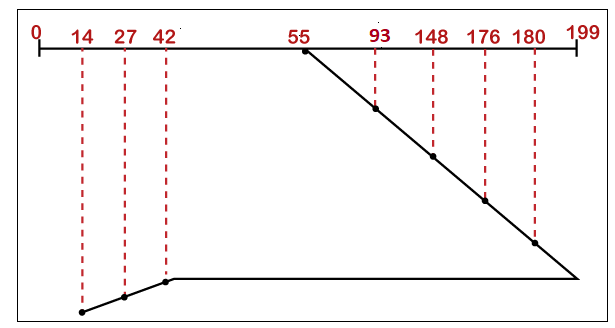
Consider a disk containing 200 tracks (0-199) and the request queue includes the track number 93, 176, 42, 148, 27, 14, 180, respectively. The current position of read//write head is 55, and direction is towards the larger value. Calculate the total number of cylinders moved by the head using SCAN disk scheduling.

Solution

As mentioned in the following example, the disk contains 200 tracks. So, we take a track line between 0 to 199.

The current position of the read/write head is 55. So, we start at 55, then move the read/write head. When all the requests are addressed, then we calculate a total number of cylinders moved by the head.
SCAN Disk Scheduling Algorithm
Figure: SCAN Disk Scheduling

Total Number of cylinders moved by head = (199-50) + (199-14)

                                                                      = 329

C-SCAN Disk Scheduling Algorithm

C-SCAN stands for Circular-SCAN.  C-SCAN is an enhanced version of SCAN disk scheduling. In the C-SCAN disk scheduling algorithm, the disk head starts to move at one end of the disk and moves towards the other end and service the requests that come in its path and reach another end. After doing this, the direction of the head is reversed. The head reaches the first end without satisfying any request and then it goes back and services the requests which are remaining.

Advantages of C-SCAN Disk Scheduling Algorithm

The advantages of the C-SCAN disk scheduling algorithm are:

  1. C-SCAN offers better uniform waiting time.
  2. It offers a better response time.

 Disadvantages of C-SCAN Disk Scheduling Algorithm

  1. In C-SCAN disk scheduling, there are more seek movements as compared to SCAN disk scheduling.
  2. In C-SCAN disk scheduling, we have to move the disk head to the end of the disk even when we don’t have any request to service.

 Example of C-SCAN Disk Scheduling Algorithm

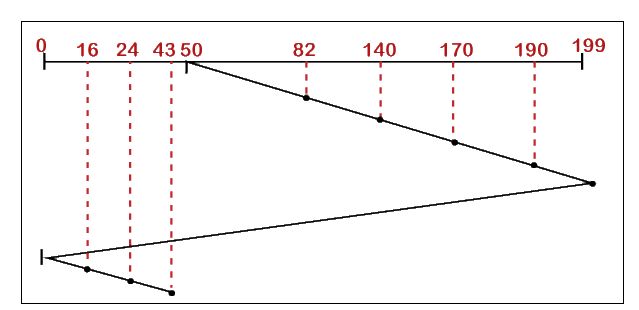
Consider, a disk contains 200 tracks (0-199) and the request queue contains track number 82, 170, 43, 140, 24, 16,190, respectively.  The current position of R/W head is 50, and the direction is towards the larger value. Calculate the total number of cylinders moved by head using C-SCAN disk scheduling.

Solution

As mentioned in the following example, the disk contains 200 tracks. So, we take a track line between 0 to 199.

The current position of the read/write head is 50. So we start at 50, then move the read/write head based on the direction. Here, we move towards the larger value as given in the question. When all the requests are addressed, then we calculate a total number of cylinders moved by the head.
SCAN Disk Scheduling Algorithm
Figure: C-SCAN Disk Scheduling

                             Total Number of cylinders moved by head = (199-50) + (199-0) + (43-0)

                                                                                                   = 149+199+43

                                                                                                   = 391


Related Topics

Feedback Queue in Operating System

In a computer or a laptop, there is a processor which do all the tasks. The processor cannot do all the tasks at a time. So, the tasks will be...

3 minutes read.

Page Table in Operating System

What is a Page Table? A page table is a data structure used by an operating system (OS) to store information about the physical location of the pages in a computer's...

6 minutes read.

FCFS (First-Come-First-Serve) Disk Scheduling Algorithm

FCFS Disk Scheduling Algorithm FCFS (First-Come-First-Serve) is the easiest disk scheduling algorithm among all the scheduling algorithms. In the FCFS disk scheduling algorithm, each input/output request is served in the order...

4 minutes read.

MS-DOS Operating System

It is also referred to occasionally as "DOS", an abbreviation for disc operating systems. Operating systems with a graphical user interface (GUI) in different iterations of the graphical Microsoft Windows...

5 minutes read.

Operating System Services

The Operating System provides various types of services:   I/O operationProgram executionFile system manipulationCommunicationError HandlingResource allocationAccountingProtection 1. I/O Operation: - To execute a program, needs I/O, which consists of a file, or I/O device. Due to the protection...

3 minutes read.

What is Demand Paging?

Demand Paging is defined as a process in which the pages are loaded into the memory (when the page fault occurs) or on-demand. It consists of the following steps: If there is...

4 minutes read.

Priority Scheduling in OS

Priority Scheduling is a type of CPU Scheduling algorithm which is used for process scheduling. In Priority Scheduling, we assign some priorities to each process. The process which has higher priority among all...

5 minutes read.

Inter Process Communication in Operating System

Inter-Process Communication or IPC refers to the methods and techniques that allow processes (programs or tasks) to communicate with each other within a computer system. This is typically done through...

3 minutes read.

Producer-Consumer Problem in OS

What is Producer-Consumer Problem? The Producer-Consumer problem is a classical problem. The Producer-Consumer problem is used for multi-process synchronization, which means synchronization between more than one processes. In this problem, we have one producer...

4 minutes read.

Virtual Memory in Operating System

What is Virtual Memory Virtual Memory is a storage scheme in which the users have an illusion that users have a significant amount of Main Memory. We can perform this by taking a...

3 minutes read.

Operating System Tutorial

What is an Operating System? An Operating System is a System Software that handles the resources of a computer such as computer hardware and software and offers frequent services to the...

7 minutes read.

Strategies for Handling Deadlock

Strategies for Handling Deadlock The Strategies for handling Deadlock are: Deadlock IgnoranceDeadlock PreventionDeadlock AvoidanceDeadlock Detection and Recovery Deadlock Ignorance Deadlock Ignorance is the most popular deadlock handling strategy. We can use this in the various operating systems for...

2 minutes read.

Process Management in OS

A Program will not do anything unless a CPU executes its instructions. An executing program is called a process. The Process requires computer resources to complete its task. More than...

3 minutes read.

Difference between C-LOOK and C-SCAN Disk Scheduling Algorithm

Disk scheduling is used by operating systems to arrange the arrival of I/O requests to the disc. I/O scheduling is another name for disc scheduling. Disk scheduling is necessary because...

4 minutes read.

What is Context Switching

Context Switching is the switching of CPU from one process to another process. Context switching means storing the process state so that we can reload the process when needed, and the execution...

3 minutes read.

Unix Operating System

Unix Operating System Unix Operating System is a multiuser, portable, time-sharing, and multitasking operating system that was developed in 1969. Unix operating system was developed by a group of AT &...

3 minutes read.

5 Goals of Operating System

An Operating System (OS) is system software that acts as an interface or bridge between the hardware of a computer and the end user. Operating System reduces the communication barrier between the...

4 minutes read.

Kernel in OS

What is Kernel in OS? The kernel is the core component in the operating system. The job of the kernel is to handle the communication between the hardware and the software. ...

2 minutes read.

Free Space Management in Operating System

What is Free Space Management? The system always keeps the records of the free disks blocks for allocating space to files when they are created. To use the space free from...

4 minutes read.

Deadlock Detection and Recovery

Deadlock Detection and Recovery In deadlock detection and recovery, to avoid or prevent a deadlock, the operating system uses various methods. For checking deadlock, an operating system continuously monitors the system. Then also,...

2 minutes read.