×

Process State in OS

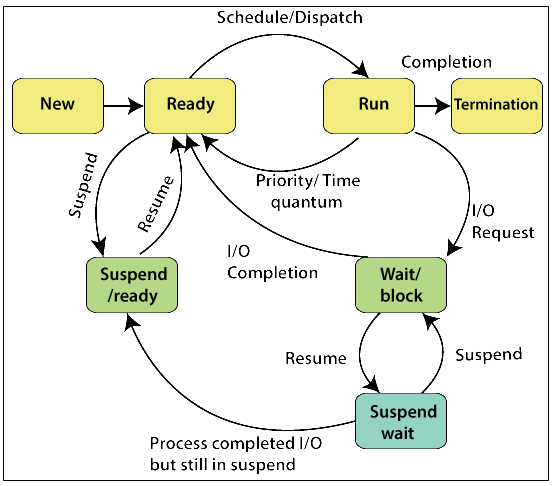
The Process passes from different states, from its formation to completion.

The following are the states of the Process.

  1. New
  2. Ready
  3. Running
  4. Block or Wait
  5. Terminated or Completed
  6. Suspend ready
  7. Suspend wait or suspend blocked
Process State in OS

1. New: - The state in which a process is created. The New state is the newly created program which is stored in the secondary storage, and taken by the operating system at the time of process creation.

2. Ready: - After a process has been created, it enters into the ready state means the process is loaded into the memory. In this, the process is set to run and wait for its execution time to get the CPU. Processes that are ready for CPU execution are placed in a queue for a ready process.

3. Run: - In a run state, the CPU selects the process for execution and executes the instructions within the process.

4. Blocked or Wait: - If the process is in run state and the process needs some resources for execution, but the resource is held by some other process than the process enters into the blocked or waiting state.

5. Terminated or Completed: - If the execution of the process is completed, then the process enters into the terminated or completed state.

6. Suspend ready: - Sometimes, due to the minimum number of resources, some process which is in ready state transfer or moves to secondary storage from the primary storage, and this type of process that move in the ready state are called suspend ready.

7. Suspend wait or suspend blocked: - Suspend-wait is like suspend blocked and uses the process which is performing input/output operation and due to minimum amount of main memory move them into secondary storage. It may go to suspend ready when work is finished.

Operations on the Process

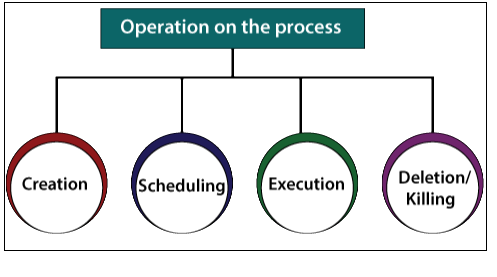
There are various operations which are performed on the Process:

  • Creation
  • Scheduling
  • Execution
  • Deletion/Killing
Operations on the Process

Creation: - If the process is created, then it will be ready to enter the ready queue and ready to run.

Scheduling: - There are so many processes which are present in the ready queue, the operating system selects one process from various processes and start to execute the process. The selection of process in a sequence for execution is called scheduling. 

Execution: -After the scheduling is done on the process then the process starts executing. Sometimes there may be a situation that arises when the process enters into a blocked or wait state during the execution, then in such a case, the processor starts to execute another process.

Deletion/Killing: - When the objective of the process completes, the operating system kills the process. The process control block of the process is also deleted, and the operating system terminates the process.


Related Topics

Deadlock Detection and Recovery

Deadlock Detection and Recovery In deadlock detection and recovery, to avoid or prevent a deadlock, the operating system uses various methods. For checking deadlock, an operating system continuously monitors the system. Then also,...

2 minutes read.

Process Scheduling in Operating System

Process Scheduling is an essential component of a Multiprogramming Operating System. So now let’s understand how it works by taking a real-life example. Suppose that you want to call someone...

6 minutes read.

Why is it critical for the Scheduler to distinguish between I/O-bound and CPU-bound programs

A CPU-bound process is one that spends most of its time executing instructions on the processor. A process that is I/O-bound spends most of its time waiting for input and...

2 minutes read.

Difference between Seek Time and Disk Access Time in Disk Scheduling

Seek Time The time taken for the hard disk controller to detect a specific piece of recorded data is known as the seek time. The amount of time it takes to...

4 minutes read.

Difference between Protection and Security in Operating System

Some operating system mechanisms facilitate us to stop tampering with logical and physical resources. Some of these methods are security and protection. Protection and security are distinct concepts, despite the...

3 minutes read.

Thrashing in Operating System

A virtual memory system's poor performance when the same pages are loaded repeatedly due to a lack of main memory to store them in secondary memory is referred to as...

3 minutes read.

Single-User Operating System

An operating system designed and intended to be used on a computer or device with a single user at a time is known as a single-user operating system. Devices like...

8 minutes read.

Difference between C-LOOK and C-SCAN Disk Scheduling Algorithm

Disk scheduling is used by operating systems to arrange the arrival of I/O requests to the disc. I/O scheduling is another name for disc scheduling. Disk scheduling is necessary because...

4 minutes read.

Ubuntu Operating System

Ubuntu Operating System Ubuntu is an open-source and a Linux based operating system. Ubuntu is developed for the Network Servers, Computers, and Smartphones. The Ubuntu operating system was developed by Canonical...

3 minutes read.

Feedback Queue in Operating System

In a computer or a laptop, there is a processor which do all the tasks. The processor cannot do all the tasks at a time. So, the tasks will be...

3 minutes read.

Semaphore in Operating System

What is Semaphore in Operating System Semaphore is defined as an integer variable which is used to solve the problem of the critical section in process synchronization. In semaphore, we use...

3 minutes read.

Simple Structure in Operating System

An operating system is a piece of software that lets the user applications talk to the hardware of the system. Because it is such a complicated structure, the operating system...

3 minutes read.

What is Context Switching

Context Switching is the switching of CPU from one process to another process. Context switching means storing the process state so that we can reload the process when needed, and the execution...

3 minutes read.

Paging and Segmentation in OS

What is Paging in OS? Paging is a storage technique used for memory management. In paging, the (OS) Operating System retrieves the processes from the secondary memory into the main memory,...

6 minutes read.

Components of Operating System

Components of Operating System: An operating system is a complex and vast system. We can only create the operating system by dividing it into small parts. Each part must be...

5 minutes read.

Dining Philosophers Problem in Operating System

Edsger Wybe Dijkstra was a well-known Dutch scientist. He was the first person ever to present the Dining Philosophers Problem in the stream of Computer Science. The dining philosophers problem...

5 minutes read.

Evolution of Operating System

Evolution of Operating System The evolution of various types of operating systems can be briefly described as follows: Serial Processing Since 1950, the operating system started to be in use. Before 1950, there...

5 minutes read.

Process Management in OS

A Program will not do anything unless a CPU executes its instructions. An executing program is called a process. The Process requires computer resources to complete its task. More than...

3 minutes read.

What is Demand Paging?

Demand Paging is defined as a process in which the pages are loaded into the memory (when the page fault occurs) or on-demand. It consists of the following steps: If there is...

4 minutes read.

Disk Scheduling Algorithms

Disk Scheduling Algorithms Disk scheduling algorithms are the algorithms that are used for scheduling a disk. Generally, the scheduling refers to a time-table for completing any task or a job. With the help...

2 minutes read.