
×

Resource Allocation Graph in Operating System

Resource Allocation Graph in OS

We use the resource allocation graph for the pictographic representation of the state of a system. The resource allocation graph contains all the information related to the processes that are holding some resources and also waiting for some more resources.

Resource allocation graph consists of all the information which is related to all the instances of the resources means the information about available resources and the resources which the process is being using.

In the Resource Allocation Graph, we use a circle to represent the process and rectangle to represent the resource.

Components of RAG (Resource Allocation Graph)

There are two components of the resource allocation graph:

  1. Vertices
  2. Edges
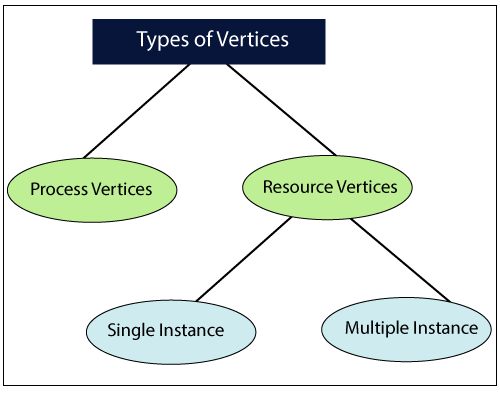
  1. Vertices: - In the resource allocation graph, we use two kinds of vertices:
Resource Allocation Graph
  • Process Vertices
  • Resource Vertices

Process Vertices: - To represent a process, we use process vertices. We draw the process vertices by using a circle, and inside the circle, we mention the name of the process.

Resource Vertices: - To represent a resource, we use resource vertices. We draw the resource vertices by using a rectangle, and we use dots inside the circle to mention the number of instances of that resource.

According to the number of instances that may exist in the system, there are two types of resource vertices, i.e., single instance and multiple instances.

 Single instance resource type: - In single instance resource type, we use only a single dot inside the box. The single dot indicates that there is one instance of the resource.

Multiple instance resource type: - In multiple instance resource type, we use multiple dots inside the box. Multiple dots indicate that there are various instances of the resources.

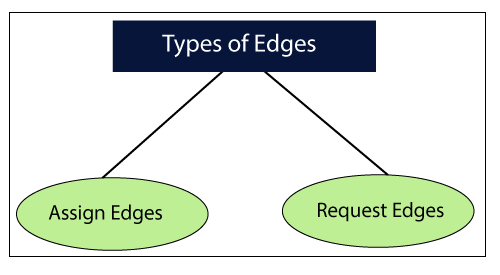
2. Edges: - There are two types of edges we use in the resource allocation graph:
Resource Allocation Graph
  • Assign Edges
  • Request Edges

Assign Edges: - We use an assign edge to represent the allocation of resources to the process. We draw assign edges with the help of arrow in which the arrow head points the process, and the process tail points the instance of the resource.

Request Edges: - We use request edge to signify the waiting state of the process. Just like in assign edge, an arrow is used to draw arrow edge. Here, the arrow head points the instance of a resource, and tail of the process points to the process. For example, if a process needs ‘n’ instances of resource type, then we will draw ‘n’ assign edges.

Example of (RAG) Resource Allocation Graph

Example of Single Instance Resource Type

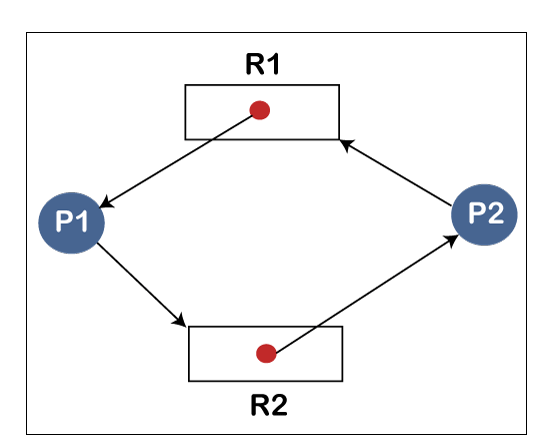
In the following example, we have two processes P1, and P2 and two resources which are R1, and R2. This example is a kind of single instance resource type, and it contain a cycle, so there is a deadlock in the system.
Resource Allocation Graph
          Allocation        Request
       R1     R2      R1     R2
Process P1       1       0        0       1
Process P2       0       1        1       0

                              Available = [R1 R2] = [0 0]

We can see in the following table, there is no instance of resource available, and to execute the process we need a resource. So, no process will be executed, and both the processes keep waiting for a long time. So, we can say that there is a deadlock in the system.

  1. Example of Multiple Instance Resource Type

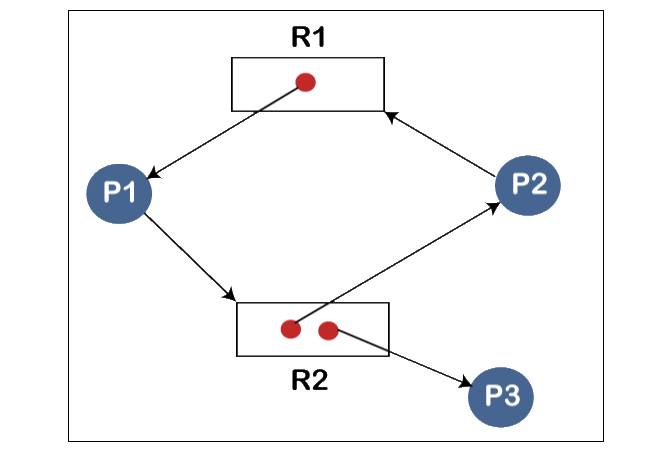
The term multiple instances means the resources are having more instances. In the following example, we have three processes, which are P1, P2, and, P3 and three resources, which are R1, and R2.                 
Resource Allocation Graph
       Allocation        Request
      R1     R2       R1    R2
 Process P1      1     0        0      1
 Process P2       0     1        1      0
 Process P3       0      1        0       0

Now we check the current Availability = [R1 R2] = [0 0]

Now by using this availability, we check whether we can fulfill the request of any of the processes or not.

We can fulfill the demand or request of P3 because P3 is demanding nothing. So, when the process P3 gets successfully executed, we terminate the process P3.

Then we calculate availability,

             Availability = [0 0] + [0 1]

                                 = [ 0 1]

Now, based on the current availability, we can fulfill the requirement of the P1 process. So, we assign the requested resource to the process P1. When the process P1 executes successfully, then we terminate the process P1.

Now we again calculate availability

           Availablity = [0 1] [1 0]

                              = [1 1]

Now, again based on the current availability we fulfill the requirement of process P2 because the P2 process satisfies the requirement. So, we allocate the requested resource to the Process P2. When the process P2 executes successfully, then it terminates, and we again calculate the availability.

           Availability = [1 1] + [0 1]

                               = [1 2]

So, in this example, there is a safe sequence P3, P1, P2, and all the processes are executed successfully. So, we can say that system is in a safe state, and there is no deadlock in the system.


Related Topics

Look Disk Scheduling

Look Disk Scheduling Look disk scheduling is another type of disk scheduling algorithm. Look scheduling is an enhanced version of SCAN disk scheduling. Look disk scheduling is the same as SCAN disk scheduling,...

4 minutes read.

Producer-Consumer Problem in OS

What is Producer-Consumer Problem? The Producer-Consumer problem is a classical problem. The Producer-Consumer problem is used for multi-process synchronization, which means synchronization between more than one processes. In this problem, we have one producer...

4 minutes read.

Deadlock Avoidance

Deadlock Avoidance In an operating system, for deadlock avoidance, we perform the following: We only grant the request of the resources if the resulting state of the system will not cause any deadlock in the...

3 minutes read.

DOS Operating System

What is DOS Operating System? An operating system that runs from a hard disk drive is known as the DOS (Disk Operating System).In other words, DOS (Disk Operating System) is defined...

7 minutes read.

Strategies for Handling Deadlock

Strategies for Handling Deadlock The Strategies for handling Deadlock are: Deadlock IgnoranceDeadlock PreventionDeadlock AvoidanceDeadlock Detection and Recovery Deadlock Ignorance Deadlock Ignorance is the most popular deadlock handling strategy. We can use this in the various operating systems for...

2 minutes read.

Virtual Memory in Operating System

What is Virtual Memory Virtual Memory is a storage scheme in which the users have an illusion that users have a significant amount of Main Memory. We can perform this by taking a...

3 minutes read.

Real-time Operating System

In this essay, we will thoroughly understand the real-time operating system. Real-Time Operating System: What do you mean? For any task to be completed, a real-time operating system (RTOS), a special-purpose operating...

5 minutes read.

Non-Contiguous Memory Allocation in Operating System

Memory is nothing but a storage space where various data are stored. We can store data in temporary and permanent memory as per our future requirements for data. We can...

9 minutes read.

Types of Operating System

There are various types of operating system: Simple Batch Operating SystemMultiprogramming batch Operating SystemTime-sharing Operating SystemMultiprocessor Operating SystemDistributed Operating SystemNetwork Operating SystemReal-time Operating SystemMobile Operating System Simple Batch operating system In the simple batch operating system, there is no direct communication between...

6 minutes read.

Difference between Process and Program in the Operating System

What is a process in the Operating System? A process is a program that is going through the execution. It also helps us to execute all the lines of code in...

4 minutes read.

Operating System Services

The Operating System provides various types of services:   I/O operationProgram executionFile system manipulationCommunicationError HandlingResource allocationAccountingProtection 1. I/O Operation: - To execute a program, needs I/O, which consists of a file, or I/O device. Due to the protection...

3 minutes read.

Fixed Partitioning in Operating System

Fixed Partitioning in OS Fixed Partitioning is also known as Contiguous memory allocation. Fixed Partitioning is the easiest method, which is used to load more than one process into the main memory. In Fixed...

5 minutes read.

Functions of Operating System

The functions of Operating System are: Process Management Memory Management File Management Device Management Secondary storage Management Security Coordination between other software and users Networking Job Accounting Error detecting aids 1. Process Management Process Management support operating system to create and delete...

3 minutes read.

Semaphore in Operating System

What is Semaphore in Operating System Semaphore is defined as an integer variable which is used to solve the problem of the critical section in process synchronization. In semaphore, we use...

3 minutes read.

Paging and Segmentation in OS

What is Paging in OS? Paging is a storage technique used for memory management. In paging, the (OS) Operating System retrieves the processes from the secondary memory into the main memory,...

6 minutes read.

Contiguous Memory Allocation in Operating System

Memory is a place where data, facts, figures, and information are stored for temporary or permanent access the data in future, which is also considered as the storage place. Allocation of...

4 minutes read.

Advantages of UNIX Operating System

What is UNIX OS? UNIX is a family of multitasking, multiuser operating systems that are used on a wide variety of computer platforms. It was developed in the late 1960s and...

4 minutes read.

Round-Robin Scheduling Algorithm in OS

Round-Robin is a Preemptive Scheduling Algorithm and is the most commonly used algorithm in CPU Scheduling.In this, each Process is assigned with a fix time interval to execute, which is...

5 minutes read.

5 Goals of Operating System

An Operating System (OS) is system software that acts as an interface or bridge between the hardware of a computer and the end user. Operating System reduces the communication barrier between the...

4 minutes read.

Difference between C-LOOK and C-SCAN Disk Scheduling Algorithm

Disk scheduling is used by operating systems to arrange the arrival of I/O requests to the disc. I/O scheduling is another name for disc scheduling. Disk scheduling is necessary because...

4 minutes read.