
×

Test Set Lock Mechanism | Operating System

Modification in the Assembly Code

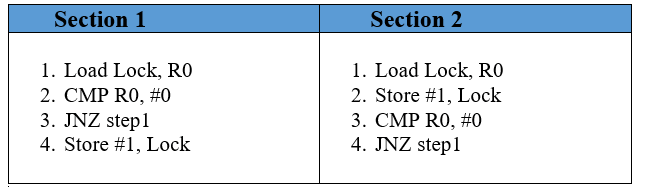
The problem in the lock variable is that, in some cases, the process reads the previous or old value of the lock variable and enters into the critical section. Because of this, sometimes, more than one process can enter into the critical section. Instead of this, the code given in the first section can be simply replaced with another code that is already present in the section. By doing this, the algorithm will not affect, but with the help of this, we can handle to offer mutual exclusion to a little bit but not entirely.

We can easily see that in the updated version of code. First, the lock variable value is loaded into the R0 register, which is the local register, and after loading the value, we set the value of the lock variable to 1.

In the 3rd step, we compared the value of the previous lock variable with 0. And then, we checked the value of the lock variable if the value is 0, then the process gets to enter into the critical section, but if the value is not 0. Then we have to wait for the process execution endlessly in the loop.

The advantage of setting the value of lock variable as 1, instantly with the help of process, is that if the process wants to enter into the critical section, then the process also holds the updated value of the lock variable, which is 1.

In the case, if the process is preempted and wants to schedule further, then in this case, the process will not enter into the critical section because the process already knows the current value of the lock variable means the updated value of the lock variable.   
Test Set Lock Mechanism

TSL Instruction

The solution discussed in the above sections offers the facility of mutual exclusions but not completely, and there may be a chance that more than one process can enter into the critical section.

What will happen when the process is preempted after executing the instruction, which is mentioned in the first step of section 2 written in assembly code?  In that situation, there may be a possibility that a process brings the previous lock variable value, and without knowing the current value of the lock variable, the process enters into the critical section. Due to this, there may be a chance that at the same time, more than two processes enter the critical section.

To remove such type of problems, we take care of one thing that is ‘no preemption’ takes place after loading the earlier lock variable value, and before setting the value of lock variable to 1. We can solve this problem by combining the first two instructions, which are mentioned in the above two sections.

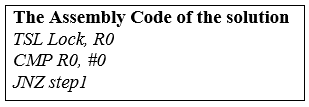
To solve this type of problem, some special instructions are given by the operating system named Test Set Lock (TSL) instruction. With the help of Test Set Lock (TSL) instruction at the same time, we can easily load the lock variable value into the local register R0,  and after loading the value into the register, we set the value of lock variable to 1. And the process that first executes the Test Set Lock(TSL) instruction always enters into the critical section first, and the other processes are not allowed to enter into the critical section until the first process, which is already present in the critical section will come out. If there is a preemption in the process first, then, in this case, the process also cannot execute in the critical section.                       
Test Set Lock Mechanism

Now, based on the four conditions, we discuss TSL:

  1. Mutual Exclusion: - TSL (Test Set Lock) Mechanism provides mutual exclusion because, in TSL, there occurs no preemption before we set the value of the lock variable. In this at a specific time, only a single process can see the value of the lock variable that is 0. That’s why the TSL mechanism offers mutual exclusion.
  2. Progress: - Based on Progress definition, if there is a process which doesn’t want to enter into the critical section then due to such process, other process doesn’t allow to enter into the critical section. In the TSL mechanism, a process executes TSL instruction in case, if any process needs to enter into the critical section. If there is no process to enter into the critical section, then the value of the lock variable will be 0 always. That’s why the TSL mechanism offers Progress.
  3. Bounded Waiting: - In TSL Mechanism, sometimes, there may be a chance that a process waits for a long time to enter into the critical section, and there is no guarantee that a process will get a chance to enter into a critical section. That’s the reason that the TSL mechanism does not offer bounded waiting.
  4. Architectural Neutrality: - TSL (Test Set Lock) mechanism depends on the Hardware Platform, and the instruction of TSL is offered with the help of the Operating System. That’s why the TSL (Test Case Lock) mechanism does not offer Architectural Neutrality.

Related Topics

N-Step-SCAN Disk Scheduling

Before you study about N-Step-SCAN Disk Scheduling, it requires prerequisite of what is Disk Scheduling Algorithms: Operating systems use disc scheduling to schedule I/O requests that arrive at the disc....

4 minutes read.

Ubuntu Operating System

Ubuntu Operating System Ubuntu is an open-source and a Linux based operating system. Ubuntu is developed for the Network Servers, Computers, and Smartphones. The Ubuntu operating system was developed by Canonical...

3 minutes read.

Process Management in OS

A Program will not do anything unless a CPU executes its instructions. An executing program is called a process. The Process requires computer resources to complete its task. More than...

3 minutes read.

Strategies for Handling Deadlock

Strategies for Handling Deadlock The Strategies for handling Deadlock are: Deadlock IgnoranceDeadlock PreventionDeadlock AvoidanceDeadlock Detection and Recovery Deadlock Ignorance Deadlock Ignorance is the most popular deadlock handling strategy. We can use this in the various operating systems for...

2 minutes read.

Advantages of Operating System

What is an Operating System?   An operating system is an interface that helps to communicate with the user and the computer hardware. Operating systems are used for file management, memory...

3 minutes read.

Operating System Tutorial

What is an Operating System? An Operating System is a System Software that handles the resources of a computer such as computer hardware and software and offers frequent services to the...

7 minutes read.

FCFS Scheduling in OS

FCFS: First Come First Serve Scheduling in OS FCFS is a non-preemptive and preemptive scheduling algorithm that is easy to understand and use. In this, the process which reaches first is...

3 minutes read.

Contiguous Memory Allocation in Operating System

Memory is a place where data, facts, figures, and information are stored for temporary or permanent access the data in future, which is also considered as the storage place. Allocation of...

4 minutes read.

Semaphore in Operating System

What is Semaphore in Operating System Semaphore is defined as an integer variable which is used to solve the problem of the critical section in process synchronization. In semaphore, we use...

3 minutes read.

Distributed Shared Memory

Distributed Shared Memory is a process of managing memory over more than one node and makes inter-process communication which transfers to end users. It is a mechanism that allows user...

2 minutes read.

Multi-user Operating Systems

Introduction Since only one user may interact with the computer at any given time, the operating system we use on our personal computers, laptops, tablets, and phones is sometimes referred to...

8 minutes read.

Single-User Operating System

An operating system designed and intended to be used on a computer or device with a single user at a time is known as a single-user operating system. Devices like...

8 minutes read.

Commercial Mobile Operating Systems

Introduction to Commercial Mobile Operating Systems A computer program's common services are managed by an operating system (OS), which also handles computer hardware and software resources. The user can communicate with...

7 minutes read.

Free Space Management in Operating System

What is Free Space Management? The system always keeps the records of the free disks blocks for allocating space to files when they are created. To use the space free from...

4 minutes read.

What is Thread and Types of Thread

What is Thread A thread means a lightweight process. Thread is the basic unit of CPU execution, which consists of thread ID, Program counter, set of registers to hold the information of current...

7 minutes read.

Types of Operating System

There are various types of operating system: Simple Batch Operating SystemMultiprogramming batch Operating SystemTime-sharing Operating SystemMultiprocessor Operating SystemDistributed Operating SystemNetwork Operating SystemReal-time Operating SystemMobile Operating System Simple Batch operating system In the simple batch operating system, there is no direct communication between...

6 minutes read.

Page Table in Operating System

What is a Page Table? A page table is a data structure used by an operating system (OS) to store information about the physical location of the pages in a computer's...

6 minutes read.

Process State in OS

The Process passes from different states, from its formation to completion. The following are the states of the Process. NewReadyRunningBlock or WaitTerminated or CompletedSuspend readySuspend wait or suspend blocked 1. New: - The state in which a process...

2 minutes read.

CPU Scheduling in OS

What is Scheduling? Scheduling is the process that is used to share the computing resources such as memory, processor time, and bandwidth to the different processes, data flows, threads, and applications that need...

5 minutes read.

What is Scheduling on OS

Scheduling is the process which is used to share the computing resources such as memory, processor time, and bandwidth to the different processes, data flows, threads, and applications which need them. Scheduling is...

5 minutes read.