
Fixed Partitioning in Operating System
Fixed Partitioning in OS
Fixed Partitioning is also known as Contiguous memory allocation. Fixed Partitioning is the easiest method, which is used to load more than one process into the main memory.
In Fixed Partitioning, we divide the main memory into partitions, and the size of partitions can be different or equal. In the first partition, the operating system is present, and the remaining partitions are used to store the user processes. In a contiguous way, we allocate the memory to the processes.
In the fixed Partitioning:
- There is no overlapping of partitions.
- For the process execution, the process should be present contiguously.
Disadvantages of Fixed Partitioning
The disadvantages of Fixed Partitioning are:
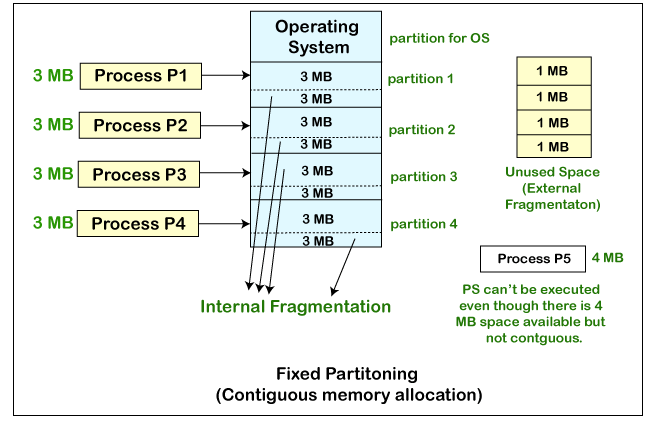
- Internal Fragmentation: - In fixed partitioning, the partitions will be wasted and remain unused if the process size is lesser than the total size of the partition. In this way, memory gets wasted, and this is called Internal fragmentation.
We can see in the fixed partitioning diagram that for loading a process of 3 MB, we use the partition of 4 MB, and in this way, 1 MB is getting wasted. Thus, this is the drawback of fixed partitioning.
- External Fragmentation: - We cannot use the total amount of unused space of different partitions to put the process even in the situation when we have some space available, but not in contiguous form. We can see in the fixed partitioning diagram, that we cannot use the 1 MB remaining space of each of the partition to store the process of 4 MB. Instead of that, we have a space available to load the process, but we cannot load the process. Such type of fragmentation is known as External Fragmentation.
- Limitation on the Size of the Process: - Sometimes, when the size of the process is larger than the maximum partition size, then we cannot load that process into the memory. So, this is the main disadvantage of the fixed partition.
- Degree of Multiprogramming is Less: - We can understand from the degree of multiprogramming that it means at the same time, the maximum number of processes we can load into the memory. In Fixed Partitioning, the size of the partition is fixed, and we cannot vary it according to the process size; therefore, in fixed partitioning, the degree of multiprogramming is less and fixed.
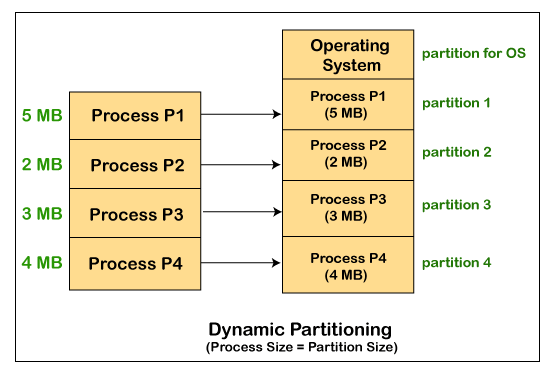
Dynamic Partitioning: - Dynamic Partitioning is another technique for memory management that is invented to remove the problems that arises in the Fixed Partitioning technique. In dynamic partitioning, we do not declare the size of the partition in the starting. Instead, we declare the size of partition at the time of its loading.
In this, the operating system, reserves the first partition. The rest of the other space is divided into different sections. The size of the partition and the size of the process remain equal. In dynamic partitioning, we can avoid the problem of internal fragmentation by varying the size of partition based on the needs of the process.
Advantages of Dynamic Partitioning over Fixed Partitioning
The advantages of dynamic partitioning over fixed partitioning are:
- No Limitation on the size of the process: - In fixed partitioning, if the size of the process is larger than the size of the partition, we cannot put or load the process into the memory. But if we talk about dynamic partitioning, the size of the process cannot be fixed, and we can change the size of partition according to the size of the process.
- The Degree of Multiprogramming is dynamic: -In Dynamic Partition, there is no internal fragmentation, so there is no unused space that is present in the partition. So at the same time, we can load more number of processes in the memory.
- No Internal Fragmentation: - In Dynamic Partitioning, the partitions are created dynamically as per the need for the process. So, in dynamic partitioning, internal fragmentation is not present, and the reason behind is that in dynamic partition, there is no space in the partition which remains unused.
Disadvantages of dynamic partitioning
The disadvantages of dynamic partitioning are:
- Complex Memory Allocation: - In the case of fixed Partitioning, if once we create the list of partitions, we cannot modify it again. But in the case of dynamic partition, the task of allocation and deallocation is tough because the size of the partition varies whenever the partition is allocated to the new process. The operating system has to keep track of each of the partitions.
So, due to the difficulty of allocation and deallocation in the dynamic memory allocation, and every time we have to change the size of the partition; therefore, it is tough for the operating system to handle everything.
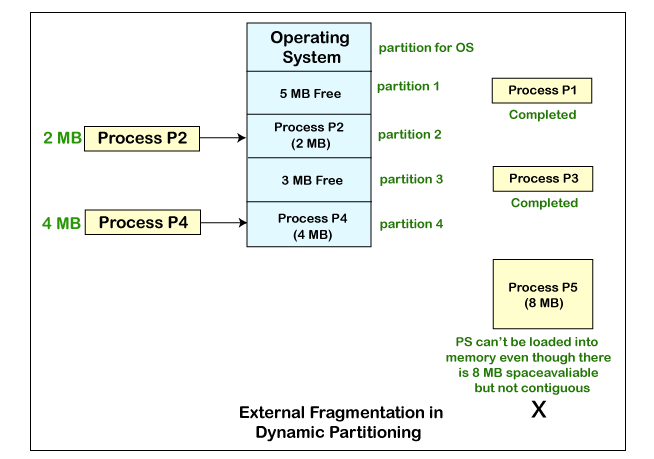
- External Fragmentation: - One of the main disadvantages of dynamic partitioning is external fragmentation.
Suppose we have three processes P1 (1MB), P2 (3MB), and P3 (1MB), and we want to load the processes in the various partitions of the main memory.
Now the processes P1 and P3 are completed, and space that is assigned to the process P1 and P3 is freed. Now we have partitions of 1 MB each, which are unused and present in the main memory, but we cannot use this space to load the process of 2 MB in the memory because space is not contiguous.
The rule says that we can load the process into the memory only when it is contiguously residing in the main memory. So, if we want to avoid external fragmentation, then we have to change this rule.
What is Compaction
Compaction is also known as Defragmentation. In dynamic Partitioning, there is a problem of external fragmentation, and due to external fragmentation, some critical problems can happen.
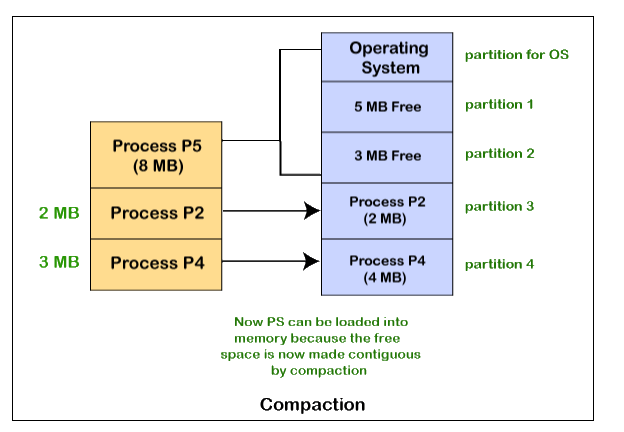
If we want to remove the problem of compaction, we have to change the rule that says, in memory, we cannot store the process in different places. Compaction is also used to reduce the possibility of external fragmentation. In this, the partitions which are free are made contiguous, and all the partitions which are loaded are carried together.
With the help of compaction, we can easily store the processes in the memory that are bigger in size.
In this, free partitions are merged and then used. These merged partitions are allocated to other processes according to their need.
We can see in the below figure, there is process P5 which we cannot load into the memory because we don’t have space in a contiguous manner. But with the help of the compaction technique, we can load the process P5 in the memory because, by the compaction technique, we made the free partitions contiguous.
Problem with Compaction
Due to compaction, the system efficiency is decreased because we need to move all the free spaces from one place to other.
In this way, the more amount of time is wasted, and the CPU remains ideal all the time. Instead of that, with the help of compaction, we can avoid external fragmentation, but this will make the system inefficient.
Related Posts:
- Evolution of Operating System
- File in Operating System
- Components of Operating System
- Semaphore in Operating System
- File Access Methods in Operating System
- Directory Structure in Operating System
- File Allocation Methods in Operating System
- Banker’s Algorithm in Operating System
- Producer-Consumer Problem in OS
- Virtual Memory in Operating System
- Resource Allocation Graph in Operating System
- FCFS (First-Come-First-Serve) Disk Scheduling Algorithm