
×

CSS Selector: ID in Selenium IDE

CSS Selector: ID

The id attribute is used to identify the web element uniquely in the web pages.

Syntax of ID Attribute: 

[HTML tag][#][Value of ID attribute]

The hash sign (#): it is mandatory while using the ID attribute to create a CSS Selector.

Always remember that the prefix with ‘css=’ is usedto specify a CSS Selector in the target text box of Selenium IDE.

We will take an example of Email text box present in login form at facbook.com

  • The email text box has an id attribute whose value defined as an id=email.
  • ID attribute and value can be used to create a CSS Selector to access the email textbox.
  • Launch the Firefox browser.
  • And type https://www.facebook.com in Google search box; it will redirect you to the Facebook login page.
  • When we are inspecting the web element of an email text box, and its html tag value is input, and the value of id attribute is email.
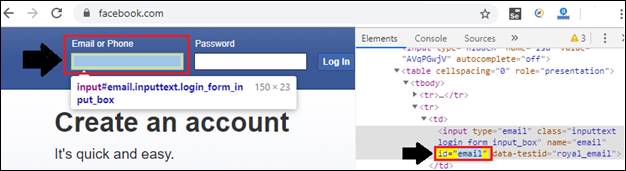
CSS Selector ID

To verify the locator:

  • Open the Test Script Editor Box in Selenium –IDE and click on the command text box.
  • And write command as:

Command =verify element present

Value = css=input#Email
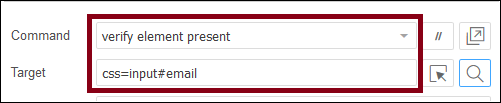
CSS Selector ID 1
  •  Click on the Find button.
  • To verify that the value of a locator is correct or not, you can also check in the browser that the Email Text box is highlighted or not.
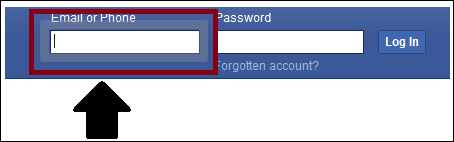
CSS Selector ID 2

Related Topics

WebDriver-Class Name Locator

WebDriver-Class Name Locator In this tutorial, we will learn about the Class name locator of selenium WebDriver. The Class Name locator is used to identify any element in UI based on the...

4 minutes read.

Name Locator in Selenium IDE

NAME LOCATOR: It is used to find the name in the web element. If we have multiple web elements of the same name, then the first matched element would be returned. Open the...

3 minutes read.

CSS Selector: Inner text in Selenium IDE

CSS Selector: Inner text The inner text is used to identify and create a CSS Selector using a string pattern of the HTML tag which is displayed on the web page. Syntax...

1 minute read.

Data-Capture Controls Methods in Selenium WebDriver

Data-Capture Controls Methods: The data-capture controls are used to determine the text, size, location, and the CSS value of the web element, etc. Some of the most commonly used data-capture controls are...

7 minutes read.

WebDriver-Id Locator

WebDriver-Id Locator: The Id Locator is used to identify any web element in UI with the help of the ID attribute. The First preference is always goes to ID locator while inspecting...

4 minutes read.

Link Text Locator in Selenium IDE

LINK TEXT Link textlocator is used to identify only the weblink element based on the name of the link. Whenever multiple links are there, it will not work; it will work only...

1 minute read.

Advantages and Disadvantages of Selenium-IDE

Advantages and Disadvantages of Selenium-IDE Advantages of Selenium IDE: UI based record and playback tool. Easy to understand & developed a test script. Selenium-IDE test script export into web driver code & Selenium–RC It is...

1 minute read.

Selenium WebDriver - Navigation Controls Commands

Navigation Controls Commands in Selenium WebDriver WebDriver is used to hold the browser history and perform browser navigation operations like, back, forward, and refresh. Whenever a WebDriver launches a browser, all...

5 minutes read.

Selenium WebDriver-Alert Popup

Selenium WebDriver-Alert Popup  An alert popup is one of the small message boxes, which used to give some information to the user that displays on the browser. The Alert popup will be...

6 minutes read.

Selenium WebDriver Tutorial

Seleniun WebDriver Introduction Selenium WebDriver is the essential tool of Selenium Tool Suite because it can directly communicate the browser without any server.  Selenium WebDriver is a browser automation framework that accepts...

3 minutes read.

Selenium WebDriver-CSS Selector: Substring Matching

CSS Selector: Substring Matching Selenium WebDriver In this tutorial, we will learn how to identify the web element using the substring method. A Sub-string contains three methods for identifying the web element...

9 minutes read.

Selenium-IDE Locators

Selenium-IDE Locators: Before we start learning about Selenium –IDE Locators, firstly we have to learn about UI elements. UI Elements -UI elements are the elements which are displayed on the web application....

1 minute read.

Selenium WebDriver- Radio button handling

Selenium WebDriver- Radio button handling In this tutorial, we will be learning about handling the radio button in selenium WebDriver. Let us take one example to give you a better understanding of...

3 minutes read.

Selenium-IDE Installation in Chrome

Selenium-IDE Installation Since Selenium IDE is designed only for Firefox and Chrome plug-in, we are assuming that you have already installed the Google Chrome browser in your system. However, you can...

1 minute read.

CSS Selector: Sub String in Selenium IDE

CSS Selector: Sub String CSS Selector Sub-string is used to match a partial string to locate a particular web element. There are three ways to match a substring using a CSS Selector. Match...

2 minutes read.

Selenium Wait

In this tutorial, we will understand how we can avoid synchronization issues while executing the test script in a selenium WebDriver. Before going further in this tutorial, first, we will understand that...

10 minutes read.

WebDriver-Link Text locator

WebDriver-Link Text locator The Link text locator is used to identify only web link elements based on the value of the link. The Link text locators cannot be used for other than...

4 minutes read.

WebDriver-Name Locator:

WebDriver-Name Locator: The name locator is used to identify any element in UI with the help of the name backend attribute. The Syntax of the name attribute is as below: driver.findElement(By.name(“value of the...

4 minutes read.

Selenium WebDriver Commands

Selenium WebDriver Commands: As we learn previously in the Selenium-IDE tutorial, Selenium commands are the set of commands that are used to run a Selenium test script. But whereas, Selenium WebDriver had...

2 minutes read.

Drawback or Limitations of Selenium

Drawback or Limitations of Selenium Followings are the Drawback or limitations of Selenium:- Drawback /LimitationsDescriptionDesktop applications cannot be automated by Selenium.To test the desktop application, we have tools like Test Complete, Winnium, and...

2 minutes read.