
×

Link Text Locator in Selenium IDE

LINK TEXT

Link textlocator is used to identify only the weblink element based on the name of the link.

Whenever multiple links are there, it will not work; it will work only for one link (current page HTML Document).

  •  For other than link element, link text is not valid.
  •  When duplicate present in UI link text locator is not correct.

For our testing purpose, we are locating the business link present in the Google search page

  • Open the Firefox browser
  • Click on the Selenium icon, and it will open the Selenium IDE interface.
  • Click on the star recording button, and enter the base URL is https:/ /www.google.com/.

Link text locator
  • Click on the command text box and write the first command as:-

Command: o pen

Target: https://www.google.com/
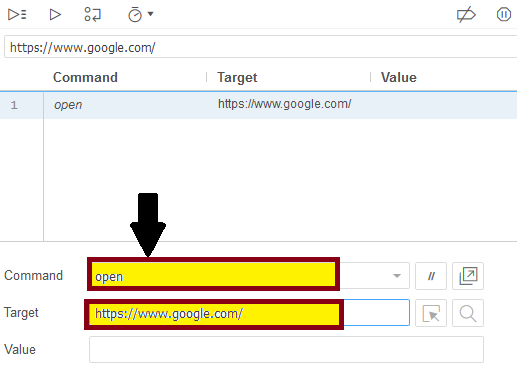
linktext open command
  • This command loads the Google page on the Firefox browser.
  • After that right-click on the insert new command in selenium IDE interface and write the next command as:
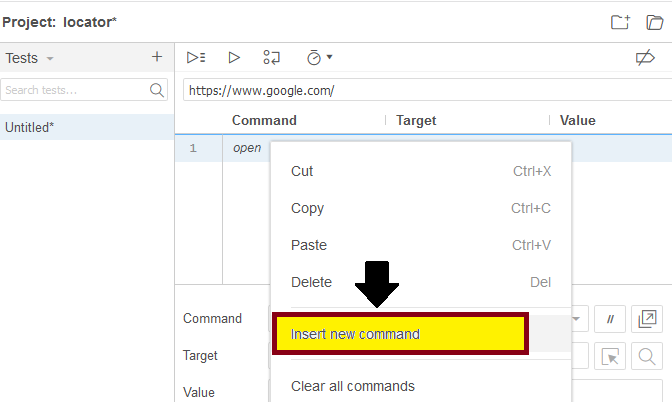
Project locator

Command: verify element present

Target: linkText=Business
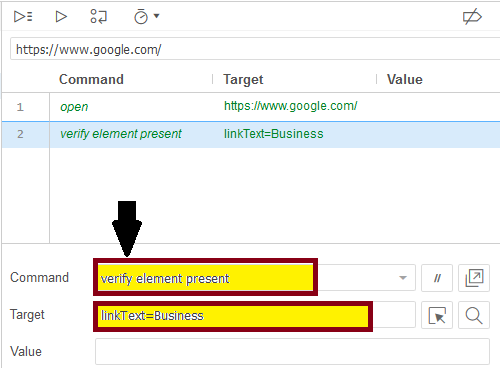
Command verify element present
  • Now, click on the stop recording button.
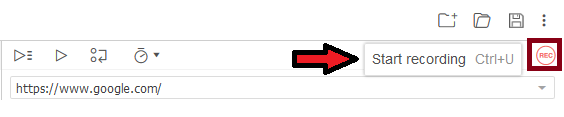
click on the stop recording button.

       And click on the Run Current Test button.

  • It will execute all of your inserted commands on the browser.
  • The Log pane is displaying the overall summary of the executed test scripts.
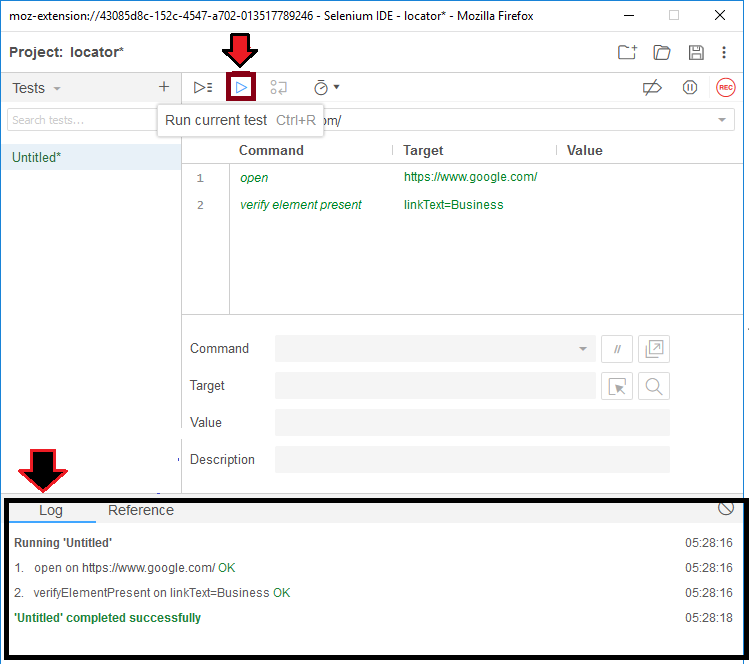
click on the Run Current Test button.
  • After that, click on the Find button to verify that the link is highlighted in the browser or not.
  • And you can see the results in the Brower as well.
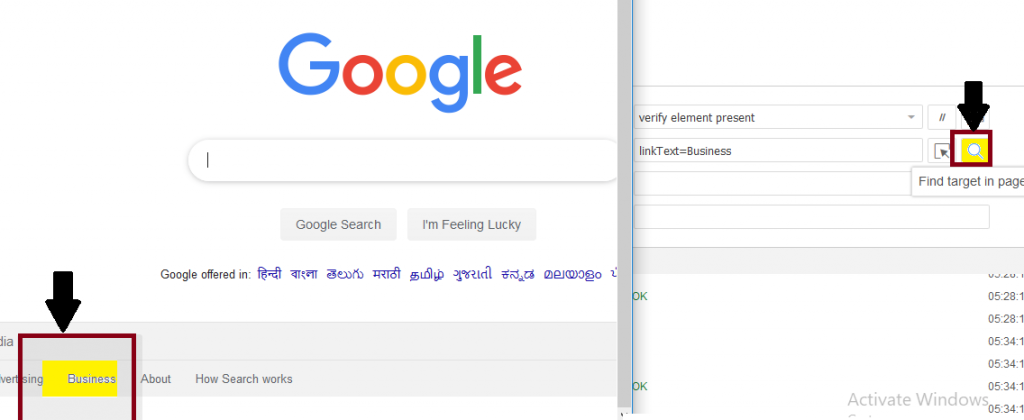
click on the Find button to verify that the link is highlighted in the browser

Related Topics

Selenium Assertion

Selenium Assertion: In this section, we will learn about the Assertion in Selenium WebDriver. An Assertion is a feature available in TestNG, which is used to verify the expected result of...

7 minutes read.

Selenium WebDriver-Locators

Selenium WebDriver-Locators The WebDriver uses the same set of locating strategies like selenium -IDE for specifying the location of the web element. Each locating strategy has its command in Java to locate...

1 minute read.

Xpath locator in Selenium IDE

X PATH LOCATOR: Xpath is used to identify the element using any attribute or visible test. Syntax for X PATH:- //html tag [@attribute=’value’] e.g. - //div [@class=’label’]                    OR //html tag [text () =’Visible Text’] e.g.-//div [text...

2 minutes read.

Name Locator in Selenium IDE

NAME LOCATOR: It is used to find the name in the web element. If we have multiple web elements of the same name, then the first matched element would be returned. Open the...

3 minutes read.

XPath Axes Selenium WebDriver

XPath Axes XPath axes are those axes that are used to search for the multiple nodes in the XML document from the current node context. These methods are mainly used when the...

14 minutes read.

Selenium WebDriver-XPath Locator

Selenium WebDriver-XPath Locator The locators can make the object identification of all the selenium tools. There are eight locators available in selenium web driver, but most of the time we go for...

14 minutes read.

Selenium IDE Tutorial for Beginners

Selenium IDE Introduction Selenium IDE stands for Integrated Development Environment. Selenium-IDE is released in 2006 and developed by SHINYA [JAPAN] THOUGHTWORK Company. Selenium IDE implemented as a Firefox plug-in, and concedes the record, edit, and debug tests....

2 minutes read.

Selenium IDE Commands

Selenium –IDE Commands (SELENESE): Selenese commands are the set of commands used in Selenium IDE. Selenese command has two parameters target and value. Selenese command tests the existence of UI elements based on their HTML tags,...

3 minutes read.

Link Text Locator in Selenium IDE

LINK TEXT Link textlocator is used to identify only the weblink element based on the name of the link. Whenever multiple links are there, it will not work; it will work only...

1 minute read.

Selenium WebDriver Commands

Selenium WebDriver Commands: As we learn previously in the Selenium-IDE tutorial, Selenium commands are the set of commands that are used to run a Selenium test script. But whereas, Selenium WebDriver had...

2 minutes read.

Selenium Tool Suite

The selenium tool suite is a combination of multiple software tools, and the entire tools having a different approach to support automation testing. Selenium test tool suites are as follows- Selenium...

2 minutes read.

Selenium WebDriver-CSS Selector: Tag Class and Attribute

Selenium WebDriver-CSS Selector: Tag, Class, and Attribute We will locate the web element with the help of Tag, class, and attribute CSS selector locator in this section of the tutorial. Where Tag,...

5 minutes read.

Advantages and Disadvantages of Selenium-IDE

Advantages and Disadvantages of Selenium-IDE Advantages of Selenium IDE: UI based record and playback tool. Easy to understand & developed a test script. Selenium-IDE test script export into web driver code & Selenium–RC It is...

1 minute read.

Selenium WebDriver-CSS Selector locator

Selenium WebDriver-CSS Selector locator A CSS selector is used to identify the web element based on their “# id” and “. Class”, Html tags, and attributes. A CSS stands for Cascading Style...

1 minute read.

Selenium WebDriver- Radio button handling

Selenium WebDriver- Radio button handling In this tutorial, we will be learning about handling the radio button in selenium WebDriver. Let us take one example to give you a better understanding of...

3 minutes read.

Selenium-IDE Installation in Chrome

Selenium-IDE Installation Since Selenium IDE is designed only for Firefox and Chrome plug-in, we are assuming that you have already installed the Google Chrome browser in your system. However, you can...

1 minute read.

Selenium WebDriver - Browser Controls Commands

Selenium WebDriver - Browser Controls Commands WebDriver includes operations like opening a browser, fetch the title, and closing the browser, etc. Some of the most commonly used Browser controls commands for Selenium WebDriver...

6 minutes read.

Selenium WebDriver-CSS Selector: Tag and ID

Selenium WebDriver-CSS Selector: Tag and ID We will locate the web element with the help of tag and id CSS selector in this section of the tutorials Where Tag and id are...

4 minutes read.

CSS Selector: ID in Selenium IDE

CSS Selector: ID The id attribute is used to identify the web element uniquely in the web pages. Syntax of ID Attribute:  [HTML tag][#][Value of ID attribute] The hash sign (#): it is mandatory while using the...

1 minute read.

Selenium Tutorial

What is Selenium? Selenium is a functional testing tool and compatible with the non-functional testing tools also. Selenium is free and does not require any licensing. Functional tests script executed by...

6 minutes read.