
×

Selenium WebDriver-CSS Selector locator

Selenium WebDriver-CSS Selector locator

A CSS selector is used to identify the web element based on their “# id” and “. Class”, Html tags, and attributes.

A CSS stands for Cascading Style Sheets, which is used to display the document written in Html or xml languages.

A CSS selector is faster as compared to the XPath.

To Learn CSS in brief, you can refer to the given link: https://www.tutorialandexample.com/css-tutorial

A CSS selector has many different strategies to locate the webelements in selenium WebDriver.

Here, we see the most commonly used strategies to identify the web elements:
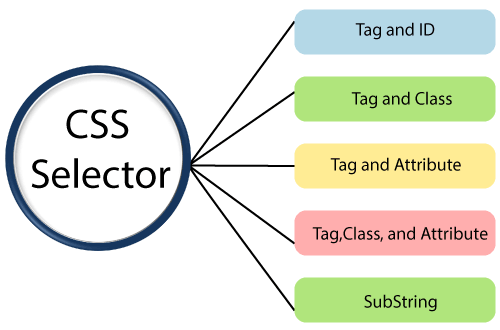
Selenium web driver-CSS Selector locator


Related Topics

Selenium WebDriver-CSS Selector: Tag Class and Attribute

Selenium WebDriver-CSS Selector: Tag, Class, and Attribute We will locate the web element with the help of Tag, class, and attribute CSS selector locator in this section of the tutorial. Where Tag,...

5 minutes read.

WebDriver-Partial Link Text locator

WebDriver-Partial Link Text locator In selenium WebDriver, there is an additional way to find a web link element with the help of partial link text locator. The partial link text is used...

4 minutes read.

CSS Selector Locator in Selenium IDE

It used to identify the web element based on HTML tag, id, class, and attributes. To describe the look and formatting of a document written in the markup language are known...

1 minute read.

Selenium WebDriver-CSS Selector: Tag and ID

Selenium WebDriver-CSS Selector: Tag and ID We will locate the web element with the help of tag and id CSS selector in this section of the tutorials Where Tag and id are...

4 minutes read.

Selenium WebDriver-Locators

Selenium WebDriver-Locators The WebDriver uses the same set of locating strategies like selenium -IDE for specifying the location of the web element. Each locating strategy has its command in Java to locate...

1 minute read.

Selenium WebDriver - Google Chrome Browser

Selenium WebDriver - Google Chrome Browser In this tutorial, we will learn how to run our Selenium Test Scripts in the Google Chrome Browser. To implement the WebDriver protocol with the help...

3 minutes read.

CSS Selector: ID in Selenium IDE

CSS Selector: ID The id attribute is used to identify the web element uniquely in the web pages. Syntax of ID Attribute:  [HTML tag][#][Value of ID attribute] The hash sign (#): it is mandatory while using the...

1 minute read.

WebDriver Interface | Class Diagram

WebDriver interface/class diagram: The interface of WebDriver includes the following stages, which is as follows: Search Context Web driver Remote web driver Driver class Search Context  The first interface of the web driver class is search Context,...

2 minutes read.

Xpath locator in Selenium IDE

X PATH LOCATOR: Xpath is used to identify the element using any attribute or visible test. Syntax for X PATH:- //html tag [@attribute=’value’] e.g. - //div [@class=’label’]                    OR //html tag [text () =’Visible Text’] e.g.-//div [text...

2 minutes read.

Selenium WebDriver-CSS Selector: Tag and Class

Selenium WebDriver-CSS Selector: Tag and Class We will locate the web element with the help of tag and class CSS selector in this section of the tutorials Where Tag and class are...

4 minutes read.

First test case of Selenium-IDE

First Test Case of Selenium-IDE: In this part, we are discussing how to create a basic test case in Selenium-IDE: The entire test script execution process in Selenium -IDE can be divided...

4 minutes read.

CSS Selector: Attribute in Selenium IDE

CSS Selector: Attribute Locating the attribute of a CSS selector, we would access the Password textbox, which is present in the login form of Facebook. The Password textbox has a type attribute...

1 minute read.

CSS Selector: ID/Class and Attribute in Selenium IDE

CSS SELECTOR: ID/Class and Attribute The Id, class, and attribute of CSS selector are used to identify the web element to access the web pages.  Syntax for Id/Class and Attribute: css= <./#> {[attribute=Value of...

2 minutes read.

Selenium WebDriver &ndash; Window handling

Selenium WebDriver – Window handling In this tutorial, we will understand how we can handle the window, multiple windows, and pop-ups in selenium WebDriver. We have different types of window, and pop-ups...

7 minutes read.

Verification Controls Methods in Selenium WebDriver

Verification Controls Methods  The verification controls methods are used to check whether the web element is displayed, enabled, and selected. Some of the most commonly used verification controls are as follow: Verification controls Description Return...

4 minutes read.

Selenium WebDriver-Alert Popup

Selenium WebDriver-Alert Popup  An alert popup is one of the small message boxes, which used to give some information to the user that displays on the browser. The Alert popup will be...

6 minutes read.

Drag and Drop Event Handling

Drag and Drop Event Handling: In this tutorial, we will learn how to handle the drag and drop event in selenium WebDriver using the action class. Before going further in this tutorial...

6 minutes read.

Selenium WebDriver - Navigation Controls Commands

Navigation Controls Commands in Selenium WebDriver WebDriver is used to hold the browser history and perform browser navigation operations like, back, forward, and refresh. Whenever a WebDriver launches a browser, all...

5 minutes read.

Drawback or Limitations of Selenium

Drawback or Limitations of Selenium Followings are the Drawback or limitations of Selenium:- Drawback /LimitationsDescriptionDesktop applications cannot be automated by Selenium.To test the desktop application, we have tools like Test Complete, Winnium, and...

2 minutes read.

WebDriver-Name Locator:

WebDriver-Name Locator: The name locator is used to identify any element in UI with the help of the name backend attribute. The Syntax of the name attribute is as below: driver.findElement(By.name(“value of the...

4 minutes read.