×

Address Mapping

Address Mapping: Internet is made of a combination of physical networks connected together by internetworking devices such as routers. A logical address is an internetwork address. A physical address is a local address. It is usually implemented in hardware (but not always), so it is called a physical address. The physical address and the logical address are two different identifiers. This address information can be achieved through static and dynamic mapping.

Static mapping: In static mapping, it creates a table that contains a logical address with a physical address.

Dynamic mapping: When a machine knows one of two addresses (logical or physical) through dynamic mapping, it may use this protocol to find the other one address. There are designed two protocols for done dynamic mapping.

  • Address Resolution Protocol (ARP)
  • Reverse Address Resolution Protocol (RARP)

Address Resolution Protocol (ARP)

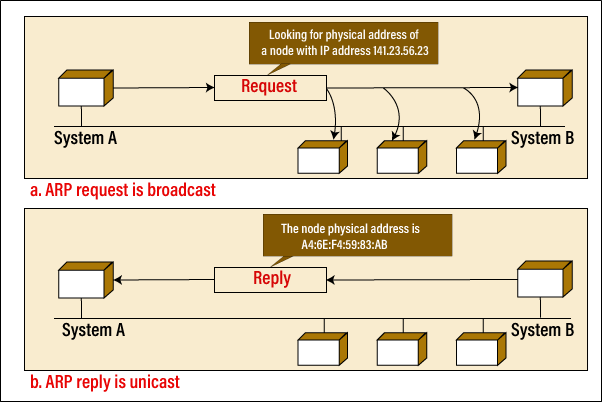
It is a dynamic mapping protocol that is used to find out the physical address associated with the logical address and then sent it to the data link layer. The working of ARP is shown below in the figure.
Address Mapping
  • Firstly, the client broadcasts the ARP request packet to all the hosts in the network.
  • In this ARP request packet, stores the logical address and physical address of the client and the IP address of the receiver.
  • Each host receives this ARP request packet, but only the one who is the authorized host completes the ARP service.
  • Finally, the authorized host sends the ARP response packet to the client in which its physical address is stored.

Note: ARP request is broadcast, and ARP response is unicast.

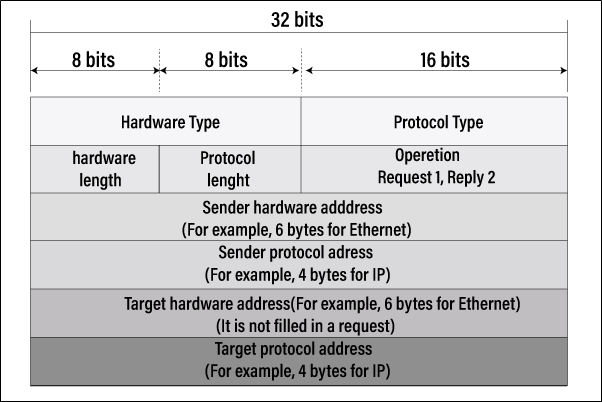
ARP Packet Format
Address Mapping

Reverse Address Resolution Protocol (RARP)

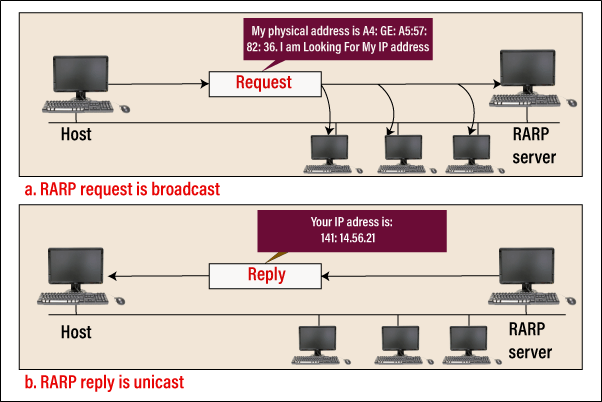
It is a dynamic mapping protocol that is the opposite of ARP. It is used to find out the logical address of the machine associated with the physical address. The working of RARP is shown below in the figure.
Address Mapping
  • Firstly, the client broadcasts the RARP request packet to all the hosts in the network.
  • The physical address of the client is stored in this RARP request packet.
  • Each host receives this RARP request packet, but only the one who is the authorized host completes the RARP service. This authorized host is called the RARP server.
  • RARP server sends the RARP response packet to the client in which its logical address is stored.

RARP is not used nowadays, it was replaced by BOOTP (Bootstrap protocol), and now BOOTP has been replaced by DHCP (dynamic host configuration protocol).

BOOTP

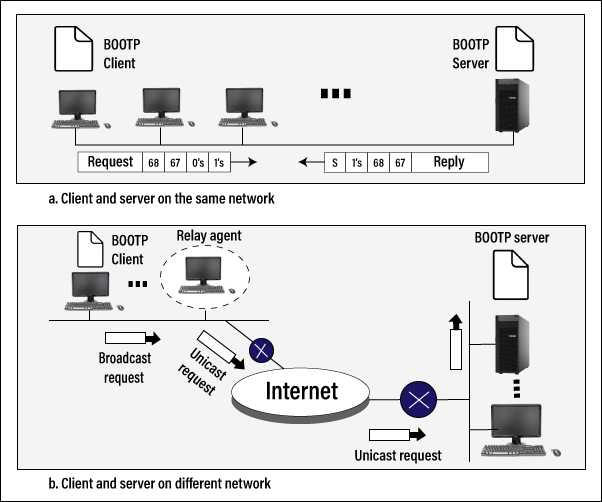
BOOTP stands for Bootstrap Protocol. It is a computer networking protocol that is used to assign IP addresses to network devices in a network. In other words, it is an internet protocol that is used by the client to obtain the IP address from the server. It was defined in RFC 951 and 1084. It was designed to replace RARP (resource address resolution protocol).
Address Mapping

Working of BOOTP

When the Bootstrap protocol started by the client, it does not have an IP address. Therefore, it broadcasts a message in the network, and Its MAC address is inside this message. This message is called "BOOTP request," and takes this request by the BOOTP server. The server then provides the following information in reply to the client.

  • It provides the IP address, subnet mask, and gateway address of the client.
  • It also provides the IP address and hostname of the server.

When the client receives the BOOTP server information, it configures and initializes the TCP/IP protocol stack and then connects to the server that has the boot image. The client loads this boot image and starts the operating system.

DHCP

DHCP stands for Dynamic Host Configuration Protocol. It is designed to provide the static and dynamic address allocation that can be done manual or automatic. It was designed to replace the BOOTP (Bootstrap Protocol).

ICMP

ICMP stands for Internet Control Message Protocol. It is designed to overcome the following two problems in the IP protocol.

  • No error reporting and correcting mechanism
  • Lacks a mechanism for queries

ICMP messages are not sent directly to the intended data-link layer. Instead, messages are first explained within the IP datagram before moving to the lower layer.

Type of Message

The messages of ICMP are divided into two categories: error-reporting messages and query messages.

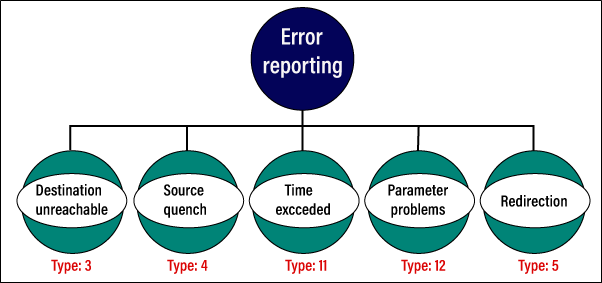
Error-Reporting Messages: Error-reporting messages report problems that can occur while transmitting an IP packet with a router or host (destination).

Type of Error-Reporting Messages
Address Mapping

Query Messages: It helps to important or specific information from a route or network manager.

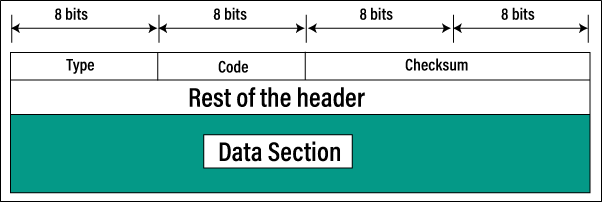
General Message Format  
Address Mapping

IGMP

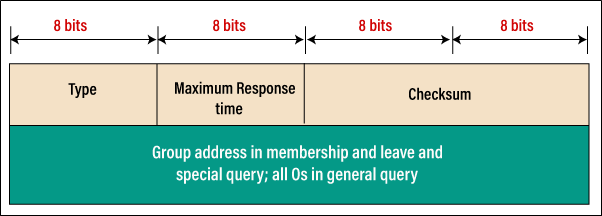
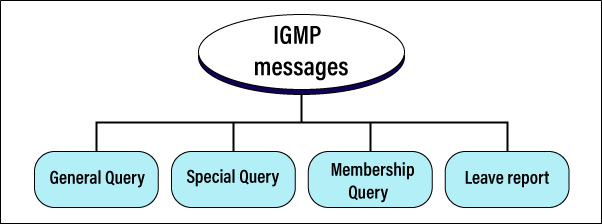
IGMP stands for Internet Group Management Protocol. This protocol is used for multicast, which is connected to the one-to-many communication channel. The best example of this protocol is online gaming and video streaming. Types of IGMP message is shown below.
Address Mapping


IGMP Message Format

Address Mapping

Related Topics

Basic Networking Devices

Introduction Physical components, or network devices, allow hardware on a computer network to link and convey with one another. Network equipment such as switches, routers, gateways, hubs, repeaters, bridges, and routers...

6 minutes read.

Data Link Control

Data Link Control Data-link control is the main function of the data link layer. It deals with the configuration and coordination for connection between two neighboring nodes: node-to-node communication. The task...

10 minutes read.

Cyclic Redundancy Check Example

What is Cyclic Redundancy Check? A cyclic redundancy check (CRC) is a type of error-detecting code commonly used in digital networks and storage devices to detect accidental changes to raw data....

5 minutes read.

Difference between Transport and Network Layer

When it comes to the Internet, it is essential to understand the different layers that make up the network. The two most important layers are Transport Layer and Network Layer....

7 minutes read.

IPv4 vs IPv6

What is an IP? The process or protocol used to transmit data from one computer to another over the internet is known as Internet Protocol (IP). Every computer connected to the...

5 minutes read.

Two Port Network in Computer Networks

A Two Port Network is a four-terminal electric network or circuit with 2 terminals on both sides, each connecting with more circuits or devices. Two terminals together make a port, one...

5 minutes read.

Advantages and Disadvantages of LAN

Before we move to advantages and disadvantages of LAN, first we discuss about what is LAN. Local area network is referred to by its abbreviation, LAN. A system that connects PCs...

3 minutes read.

OSI Model

OSI Model: OSI stands for Open Systems Interconnection. The ISO (International Standards Organization) was introduced the OSI model in 1983. The OSI model is a standard reference model for communication between...

6 minutes read.

TCP vs UDP

Transmission Control Protocol (TCP) and User Datagram Protocol are the two most popular Internet protocols (IPs). TCP is a connection-oriented protocol, which means that once a connection has been made,...

4 minutes read.

Fiber Optics and its Types

Fiber Optics is a type of technology that is used to transfer data through the cable with the speed of light. The metal wire is preferred for the transmission of...

3 minutes read.

APIPA: Automatic Private IP Addressing

What is APIPA? APIPA stands for Automatic Private IP Addressing. It is a word used by Microsoft to describe address auto configuration, which enables a Local Area Network (LAN) computer to...

3 minutes read.

Address Mapping

Address Mapping: Internet is made of a combination of physical networks connected together by internetworking devices such as routers. A logical address is an internetwork address. A physical address is...

4 minutes read.

Session Layer and Presentation Layer

Session Layer and Presentation Layer Session Layer The fifth layer is the Session layer in the OSI model, which controls connections between many computers. It manages, establishes, and terminates the session connection...

2 minutes read.

Computer Network Architecture

Computer network architecture is a design in which all the computers are organized in a computer network. The architecture defines how computers must communicate with each other to obtain maximum...

4 minutes read.

Stream Control Transmission Protocol

Stream Control Transmission Protocol: SCTP stands for Stream Control Transmission Protocol. SCTP was developed by the Internet Engineering Task Force (IETF). It is a reliable message-oriented protocol of the transport...

3 minutes read.

Classes of Routing Protocols

In this tutorial, we will discuss about the classes of the routing protocols. Routing: What is it? Routing in computer networks is a procedure in which the layer 3 or network layer...

7 minutes read.

Computer Network Tutorial

What is Data Communication and Computer Network? Data Communication is the process of exchanging digital data between two or more computers that act as source and receiver through wireless media or...

7 minutes read.

What is Framing in a Computer Network?

In the stream of bits, the data is stored by transmitting the bit by the connection of two devices through cable. This type of connection for data transmission is called...

6 minutes read.

Ring Topology in Computer Network

Ring topology is a topology that was invented by IBM in 1984 by the Institute of Electrical and Electronics Engineers. It is defined as a type of network topology where...

4 minutes read.

Star Topology in Computer Networks

Star topology comes from or is a part of the network topology which was invented by Dr.Howard Frank. It is also to be known as star network because of its...

4 minutes read.