
Network Layer: Logical Address
Network Layer - Logical Address
The IP address is a 32 bit long, and it provides us a maximum of 232 addresses. These addresses are known as IPv4 addresses.
The IP address is a 128 bit long, and it provides us a maximum of 2128 addresses. These addresses are known as IPv6 addresses.
IPv4 Addresses (Internet Protocol version 4)
IPv4 address is a 32 bit long. IPv4 is a connectionless protocol that is used in packet-switch layer networks, such as the internet. These addresses are specific and universal. In other words, every address defines one and only one device on the internet. In IPv4, two devices cannot have the same address at the same time.
Important table of IPv4
| Class | Range | Network bits | Host bits | Default mask | Private range | No. of private N/W | No of blocks |
| Class A | 0-127 | 8 | 24 | 255.0.0.0 | 10.0.0.0 to 10.255.255.255.255 | 1 | 128 |
| Class B | 128-191 | 16 | 16 | 255.255.0.0 | 172.16.0.0 to 172.31.255.255 | 16 | 16384 |
| Class C | 192-223 | 24 | 8 | 255.255.255.0 | 192.168.0.0 to 192.168.255.255 | 256 | 2097152 |
| Class D | 224-239 | --- | --- | --- | --- | ---- | 1 |
| Class E | 239-255 | --- | --- | ---- | --- | ---- | 1 |
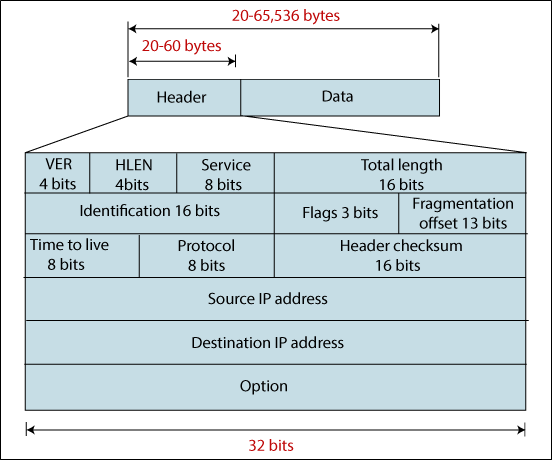
IPv4 Datagram Format
Address Space
The address space is the overall number of addresses used by the protocol. If N bits are used in the protocol, that means the number of addresses is 2N.
For example, 32 bits are used in the IPv4 address. Which means the address space of IPv4 is 232 or 4,294,967,296.
Notation of IPv4
There are two types of common notation: binary notation and dotted-decimal notation, as shown in the figure below.
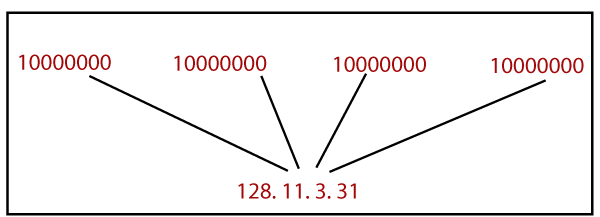
Note: Each byte is 8 bits, and each byte range is 0 to 255 in the dotted decimal notation.
Let take an example to better understand binary notation and dotted decimal notation.
Example 1. Change from the binary notation to dotted-decimal notation the following IPv4 addresses.
- 10000011 00010011 00001011 10000000
- 10001110 10000001 11000011 10000001
Solution
- 131.19.11.128
- 142.129.195.129
Example 2. Change from the dotted-decimal notation to binary notation the following IPv4 addresses.
- 128.12.12.248
- 192.128.1.250
Solution
- 10000000 00001100 00001100 00000111
- 11000000 10000000 00000001 11111010
Example 3. Find the mistakes in the following IPv4 addresses.
- 124.201.3.1.52
- 01.200.128.123
- 300.142.210.64
- 10110011.32.16.8
- -31.12.210.128
Solution
- No more than four numbers can be given.
- No leading zero is needed in the address (01).
- Each number must be equivalent to or below 255.
- The combination of binary notation and dotted-decimal notation is not permitted.
- Each number must be greater than 0.
Classful Addressing
The address space is split into five classes in the classful addressing: A, B, C, D, and E. If the address is given in the binary notation, the first few bits describe the class. If the address is given in the dotted-decimal notation, the first byte describes the class. Both notation figures are shown below.
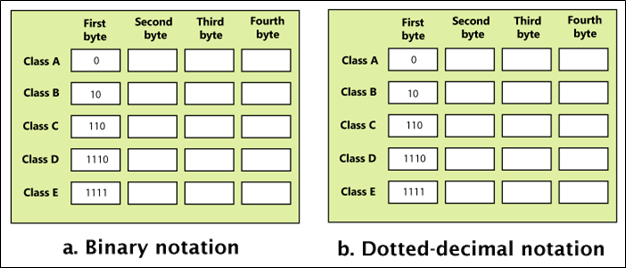
Let take an example to better understand
Example 1. Find the class of the following IPv4 addresses.
- 00001010 00110011 11001100 10101000
- 11101010 11000100 01010001 10101110
- 135.21.201.12
- 193.12.12.200
Solution
- This is the class A address because the first bit is 0.
- This is the class D address because of the first four bits are 1110.
- This is the class B address because the first byte is 135.
- This is the class C address because the first byte is 193.
Classless Addresses
Classless addresses were designed to prevent wastage of IP addresses. The block of IPv4 addresses can be defined as a.b.c.d/n. where a.b.c.d represents the address, and n represents the mask, such as 128.12.12.39/27.
Some important points
- In the block, addresses must be continuous.
- In the block, the number of addresses must be a power of 2 (1,2,4,8,16...n).
- The first address must be divisible by the number of addresses.
There are some important rules to find the first, last, and number of addresses in a block. Those rules are given below.
- You can find the first address of the block by setting 0's to the rightmost 32-n bits.
- You can find the last address of the block by setting 1's to the rightmost 32-n bits.
- You can find the number of addresses in the block by using the formula 232-n.
Example 1. Find the first address
- 195.16.17.30/28
- 128.12.11.68/26
Solution 1.
The binary representation of the given address is 11000011 00010000 00010001 00011110.
The rightmost 32 - 28 bits to 0's, get 11000011 00010000 00010001 00010000 or 195.16.17.16.
Solution 2.
The binary representation of the given address is 10000000 00001100 00001011 01000100.
The rightmost 32 - 26 bits to 0's, get 10000000 00001100 00001011 01000000 or 128.12.11.64.
Example 2. Find the last address
- 192.20.20.28/24
- 128.145.15.10/30
Solution 1.
The binary representation of the given address is 11000000 00010100 00010100 00011100.
The rightmost 32 - 24 bits to 1's, get 11000000 00010100 00010100 11111111 or 192.20.20.255.
Solution 2.
The binary representation of the given address is 10000000 10010001 00001111 00001010.
The rightmost 32 - 30 bits to 1's, get 10000000 10010001 00001111 00001011 or 128.145.15.11.
Example 3. Find the number of addresses
- 192.20.20.28/24
- 128.145.15.10/30
Solution 1.
The value of n is 24
The number of addresses of this block is 232-24 or 28 or 256.
Solution 2.
The value of n is 30
The number of addresses of this block is 232-30 or 22 or 4.
Example 4. Find the first address, last address, and the number of addresses. The block address is 11000011 00010000 00010001 00011110, and the mask is 11111111 11111111 11111111 11110000.
Solution.
The first address can be found by the AND operation apply in the given address with the mask.
Address 11000011 00010000 00010001 00011110
Mask 11111111 11111111 11111111 11110000
First address 11000011 00010000 00010001 00010000
The last address can be found by the or operation apply in the given address with the mask.
Address 11000011 00010000 00010001 00011110
Mask 00000000 00000000 00000000 00001111
Last address 11000011 00010000 00010001 00011111
You can find the number of addresses by complement the mask and adding 1’s this complement.
Mask complement is 00000000 00000000 00000000 00001111.
= 15 + 1 = 16.
Datagram
In the IPv4, packets are called datagrams. Datagram format is shown below.
IPv6 (Internet Protocol version 6)
It is the latest version of IPv4 and has better and enhanced functionality. IPv6 was developed by the IETF (Internet-Engineering-Task-Force) in 1999. It is 128 bits long, which has 2^128 address space, which is much more than IPv4. IPv6 is unique and universally similar to the IPv4. In other words, every address defines only one device on the internet.
Notation of IPv6
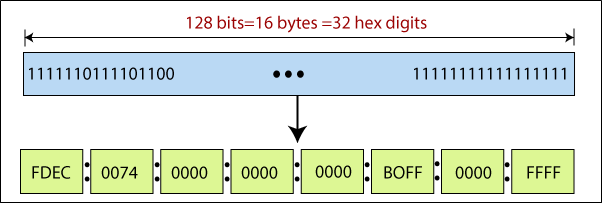
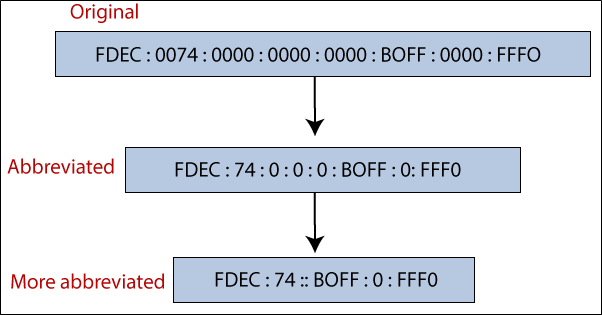
IPv6 defines the hexadecimal colon notation, which 128 bits long. These bits are divided into eight sections, which are shown below in the figure.
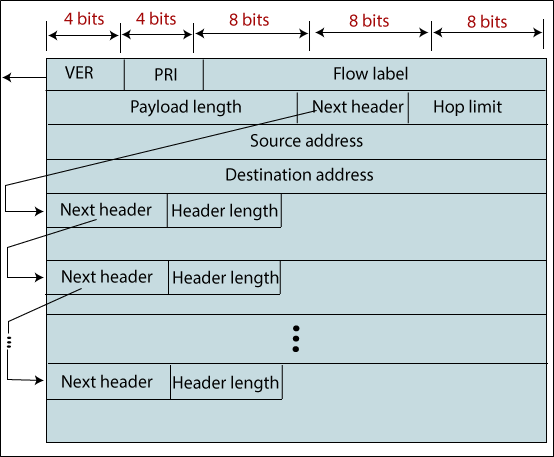
IPv6 Datagram Format
Difference between the IPv4 and IPv6?
| IPv4 | IPv6 | |
| Address length | IPv4 is 32 bits long. | IPv6 is 128 bits long. |
| Developed | It was developed in 1981. | It was developed in 1991. |
| Header field | The number of the header field is 12. | The number of the header field is 8. |
| Fragmentation | It is done by sender and routers. | It is done by sender only. |
| Represents | IPv4 addresses are a binary number that is displayed in decimal. | IPv6 addresses are a binary number that is displayed in hexadecimal. |