
×

CSS Sticky

CSS Sticky

The position property in CSS is applied to set an element’s position. This property is also applied to position an element behind the other element. It is useful for any scripted animation consequence. The property “position: sticky” can be employed for positioning an element according to the user’s scroll position.

This property of CSS allows an element to be stuck if the scroll grasps any specific point. Any sticky element switches in between relative and fixed using this scroll position. The elements are positioned relative as far as any offset’s specified position is met inside the viewport. Similarly, the elements are stick over one place using the fixed position property.

Let’s understand this property with the help of an example:

Example:

<!DOCTYPE html>
<html>
<head>
<style>
body
{
 text-align: center;
}
.stick
{
 position: sticky;
 top: 50px;
 padding: 10px;
 font-size: 20px;
 font-weight: bold;
 background-color: lightgreen;
 border: 1px solid black;
}
</style>
</head>
<body>
<h1> Scroll the page to feel the effect! </h1>
<div class= "stick"> Sticky Element! </div>
<div style= "padding-bottom: 2000px">
<h2> Hello World! </h2>
<h2> Welcome to this Page </h2>
</div>
</body>
</html>

Output:
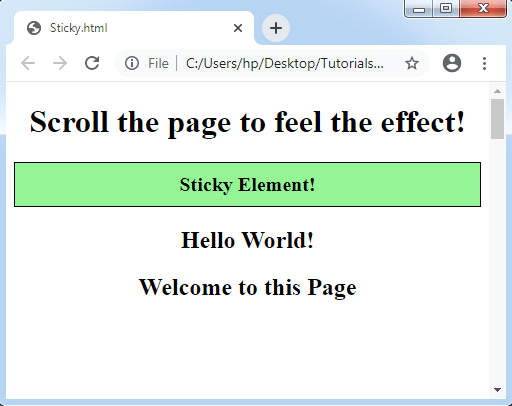
CSS Sticky

Related Topics

CSS Word-spacing

Word-spacing The work-spacing property of CSS is applied to manage the space among the words. We can decrease or increase the space among the words by the use of this property. It...

3 minutes read.

How to resize an image in CSS

How to resize an image in CSS? The resize image attribute is used in responsive web design to resize images to fit within the div container automatically. The resize image attribute...

3 minutes read.

How to use google fonts in CSS

Fonts: - Fonts are used to make our website look more beautiful. Choosing appropriate font according to the web design or layout is also important. Many typefaces are accessible in...

4 minutes read.

Css Text Orientation

Introduction: The text-orientation property of CSS is used to specify the orientation of the text characters in the line of content. This property applies only with the vertical writing-mode and not...

4 minutes read.

CSS Loader

CSS Loader The loader is the animation that can alert a visitor regarding the loading of the page. We need to wait for some time. It will be helpful if any...

4 minutes read.

Divi in CSS

Divi is popular WordPress themes due to its versatility and user-friendly interface. It includes a built-in page builder for sophisticated design options and an assortment of customization features to help...

9 minutes read.

Hover condition for a:before and a:after in CSS

In CSS, :after and :before are used to add content after and before the element. The CSS pseudo-class is used to add some styling effect to the webpage. We can change...

4 minutes read.

Radial-gradient() CSS function

Radial-gradient() CSS function It defines a CSS in-built function, which produces a smooth transition among multiple colors. It is used to set any radial-gradient that is same as a background-image. This...

4 minutes read.

CSS Box-shadow

CSS Box-shadow This property is referred to include effects as shadow-like around an element’s frame. Syntax box-shadow: h-offset v-offset blur spread color |inset|inherit|none; Property values Following are the various property values which can be used...

3 minutes read.

CSS Clip

CSS Clip The Clip property in CSS describes the element’s visible area. It applies over the elements which are absolutely positioned (position: absolute ;). Generally, it is used when an image...

2 minutes read.

CSS Lists

CSS Lists: Several properties are available in CSS that are used to manage the lists. Lists are distributed as ordered and unordered kind of lists. The ordered lists provide the...

7 minutes read.

CSS Position

CSS Position: The position property in CSS is applied to set the position of the elements. It can be used to position the backside of an element. It is also...

3 minutes read.

CSS Links

CSS Link is used to create styled link. There are various ways to implement it. Styling Links Link can be styled with CSS properties like color, font-family, background etc. Example: <!DOCTYPE html>   <html>   <head>   <style>   a {       color: red;   }   </style>   </head>   <body>   <p><b><a href="https://www.tutorialandexample.com"    target="_blank">This is a link</a></b></p>   </body>   </html> Try Now There are four...

2 minutes read.

Difference between HTML and CSS

HTML HTML stands for HyperText Markup Language and is used to create web pages and websites and web applications, which means we can create static web pages. Html is a scripting...

3 minutes read.

CSS Display

CSS Display: The CSS Display property is one of an essential property among all other properties of CSS. The display property specifies how the HTML elements should be displayed on...

4 minutes read.

What is CSS used for

What is CSS used for? CSS stands for Cascading Style Sheet. CSS is a stylesheet language for web pages. It specifies how a document created in a markup language looks and...

4 minutes read.

CSS Background Color

It is one of the CSS properties to apply styling to html elements.This property is used to apply the background color to any HTML element.The background of an element includes...

2 minutes read.

CSS Pseudo-elements

Pseudo-elements The pseudo-classes in CSS can be represented as any keyword which is connected to the selector that represents any selected element’s unique state. On the other hand, pseudo-elements can be...

6 minutes read.

CSS z-index Property

CSS z-index: CSS z-index permits us to represent any visual hierarchy over a 3D plane that is the z-axis. This index can be applied to describe the positioned element’s stacking...

2 minutes read.

CSS Counters

CSS Counters: The CSS counter property is similar to the variables. CSS counters are controlled via CSS, and its values are incremented via rules of CSS to record how much...

4 minutes read.