CSS Pseudo-elements
Pseudo-elements
The pseudo-classes in CSS can be represented as any keyword which is connected to the selector that represents any selected element’s unique state. On the other hand, pseudo-elements can be used for styling the particular part of the element, although a pseudo-class is used for styling any element.
For example, the pseudo-elements are used to design any first line or any first letter of the element. Also, these elements can include the text before or after an element.
Syntax:
selector::pseudo-element
{
property: value;
}
We have described the double colon in the above syntax. It is a substitute for the pseudo-elements.
It can be represented as a distinction between the pseudo-classes and pseudo-elements. Rather than the use of one color notation, it is suggested to apply the double color notation (like ::pseudo-element).
Some of the essential pseudo-elements in CSS are described in the table as below:
| Pseudo-element | Description |
| ::first-letter (:first-letter) | This element is used to choose the first character of the content. |
| ::first-line (:first-line) | This element is used to choose the content’s first line. |
| ::before (:before) | This pseudo-element includes something before any content of an element. |
| ::after (:after) | This pseudo-element includes something after any content of an element. |
| ::selection | It chooses an element’s area, i.e., chosen by a user. |
Let’s explain the above elements with a demonstration.
Pseudo-element- ::first-letter
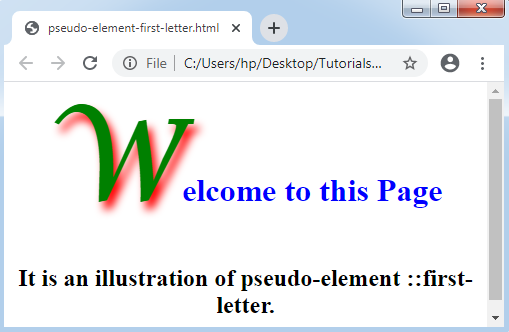
As its name suggested, it will affect the text’s first letter. It may be used to the block-level elements only. Rather than supporting every property of CSS, it can support only few properties of CSS. These properties are listed and discussed below:
- Color-properties (like color)
- Font-properties (like font-color, font-size, font-family, font-style, and many others)
- Margin-properties (like margin left, margin-right, margin-top, and margin-bottom)
- Border properties (like border-width, border-color, border left, border-bottom, border-right, border-top, and many others)
- Padding properties (like padding-left, padding-right, padding-top, and padding-bottom)
- Background properties (like background-position, background-image, background-repeat, and background-color)
- Text related properties (like text-decoration, text-transform, and text-shadow)
- Another property is vertical-align (if float value is ‘none’ only) line-spacing, line-height, and word-spacing
Let’s consider an example.
Example:
<html>
<head>
<style>
body
{
text-align: center;
}
h1::first-letter
{
font-family: Lucida Calligraphy;
font-size: 3cm;
color: green;
text-shadow: 5px 8px 9px red;
}
h1
{
color: blue;
}
</style>
</head>
<body>
<h1> Welcome to this Page </h1>
<h2> It is an illustration of pseudo-element ::first-letter. </h2>
</body>
</html>
Output:
Pseudo-element- ::first-line
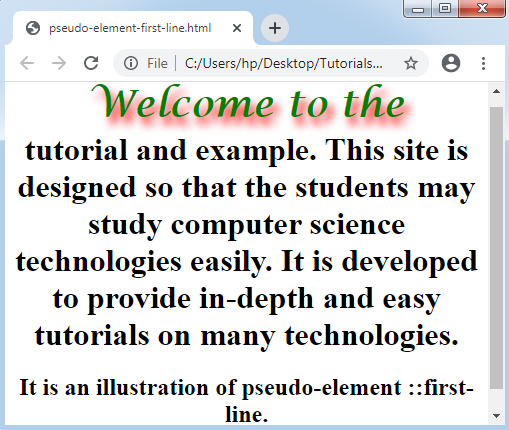
This element is the same as the pseudo-element ::first-letter, although it can affect the whole line. It can insert a unique effect to any text’s first line. The following properties of CSS will be supported by this pseudo-element:
- Color properties (like color)
- Font-properties (like font-color, font-size, font-family, font-style, and many others)
- Background properties (like background-position, background-image, background-repeat, and background-color)
- Another CSS property: text-decoration, text-transform, vertical-align, line-height, letter-spacing, and word-spacing.
Consider the below example:
Example:
<html>
<head>
<style>
body
{
text-align: center;
}
h1::first-line
{
font-family: Lucida Calligraphy;
font-size: 1cm;
color: green;
text-shadow: 5px 8px 9px red;
}
</style>
</head>
<body>
<h1> Welcome to the tutorial and example. This site is designed so that the students may study computer science technologies easily. It is developed to provide in-depth and easy tutorials on many technologies.</h1>
<h2> It is an illustration of pseudo-element ::first-line. </h2>
</body>
</html>
Output:
Pseudo-element- ::before
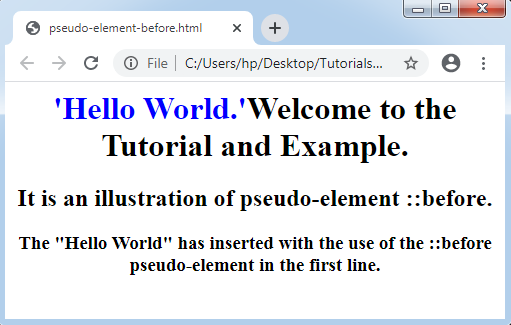
It permits us to include anything before the content of an element. It is applied to insert anything before any element’s specific part. It is applied with the CSS content property, generally.
Also, we can include the images or regular strings before any content with the use of pseudo-element ::before.
Consider the below example:
Example:
<html>
<head>
<style>
body
{
text-align: center;
}
h1::before
{
content: "'Hello World.'";
color: blue;
}
</style>
</head>
<body>
<h1>Welcome to the Tutorial and Example. </h1>
<h2> It is an illustration of pseudo-element ::before. </h2>
<h3> The "Hello World" has inserted with the use of the ::before pseudo-element in the first line. </h3>
</body>
</html>
Output:
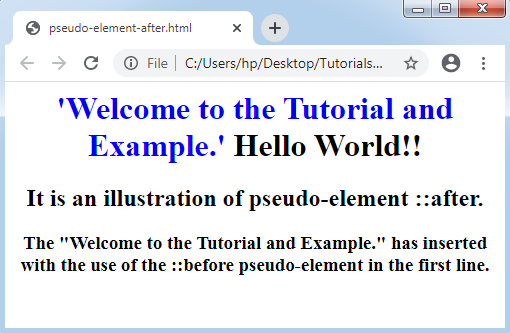
Pseudo-element- ::after
It executes similarly as the pseudo-element ::before, although it can include any text after the element’s text. It is applied to insert anything after any element’s specific part. It is applied with the CSS content property, generally.
Also, we can include the images or regular strings after any content with the use of pseudo-element ::after.
Consider the below example:
Example:
<html>
<head>
<style>
body
{
text-align: center;
}
h1::before
{
content: "'Welcome to the Tutorial and Example.'";
color: blue;
}
</style>
</head>
<body>
<h1> Hello World!! </h1>
<h2> It is an illustration of pseudo-element ::after. </h2>
<h3> The "Welcome to the Tutorial and Example." has inserted with the use of the ::before pseudo-element in the first line. </h3>
</body>
</html>
Output:
Pseudo-element- ::selection
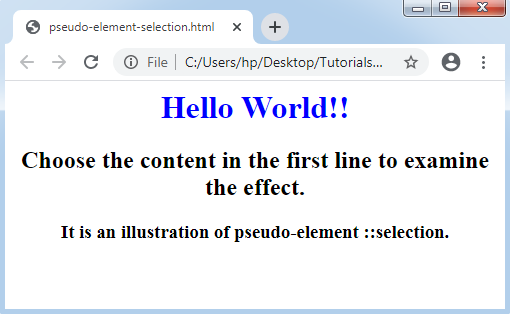
It is applied to design the element’s part that is chosen by a user. We may apply the CSS properties listed below:
- color
- background-color
- Another property includes outline, cursor, etc.
Consider the below example:
Example:
<html>
<head>
<style>
body
{
text-align: center;
}
h1::selection
{
color: blue;
}
</style>
</head>
<body>
<h1> Hello World!! </h1>
<h2> Choose the content in the first line to examine the effect. </h2>
<h3> It is an illustration of pseudo-element ::selection. </h3>
</body>
</html>
Output:
CSS pseudo-element and Classes
The pseudo-elements in CSS are combined with the classes of CSS to design any specific element containing that class. To combine the CSS classes with CSS pseudo-elements, we can apply the following syntax:
Syntax:
selector.class::pseudo-element
 {
property: value
}
Consider the below example:
Example:
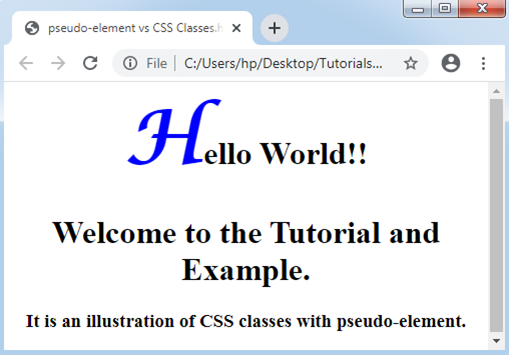
The below example will influence the <h1> element’s first letter that contain class= “example” instead of influencing every <h1> element.
<html>
<head>
<style>
body
{
text-align: center;
}
h1.example::first-letter
{
color: blue;
font-size: 2cm;
font-family: Lucida Calligraphy;
}
</style>
</head>
<body>
<h1 class= "example"> Hello World!! </h1>
<h1> Welcome to the Tutorial and Example. </h1>
<h3> It is an illustration of CSS classes with pseudo-element. </h3>
</body>
</html>
Output: