CSS Text-align
Text-align
The text-align property of CSS sets the table-cell box’s horizontal alignment or any block element. The text-align property is the same as the CSS property vertical-align but towards any horizontal direction.
Syntax:
text-align: justify | center | right | left | initial | inherit;
Property Values
justify: Generally, it is used in magazines and newspapers. It can stretch any content of an element to show a similar width of all the lines.
center: Any inline text can be centered using this value.
right: This value aligns the content towards the right side.
left: This value aligns the content towards the left side.
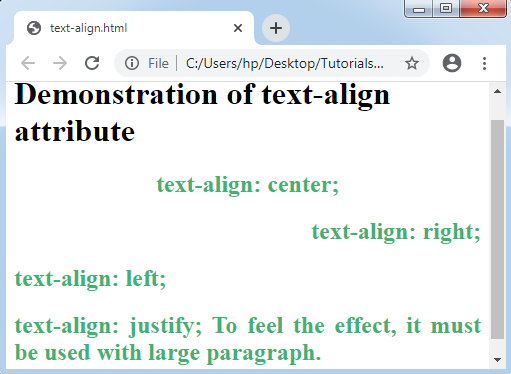
Let’s consider a demonstration of this CSS property.
Example:
<!DOCTYPE html>
<html>
<head>
</head>
<style>
h2
{
 color: mediumseagreen;
}
</style>
<body>
<h1> Demonstration of text-align attribute </h1>
<h2 style= "text-align: center;">
text-align: center;
</h2>
<h2 style= "text-align: right;">
text-align: right;
</h2>
<h2 style= "text-align: left;">
text-align: left;
</h2>
<h2 style= "text-align: justify;">
text-align: justify; To feel the effect, it must be used with large paragraph.
</h2>
</body>
</html>
Output: