
×

CSS Text-stroke

Text-stroke

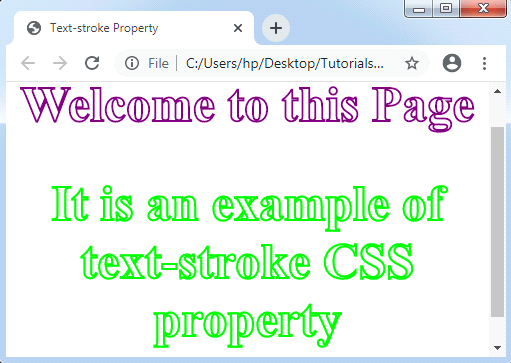
Text-stroke CSS property inserts the stroke to any text and gives a decoration option to them also. It describes the stroke’s width and color for various text characters.

It is shorthand for the following properties:

text-stroke-width: This property specifies the stroke’s thickness effect and holds the value of the unit.

text-stroke-color: This property holds the color value.

Text-stroke property is only applied with a -webkit- prefix.

Example:

<!DOCTYPE html>
<html>
<head>
<title> Text-stroke Property </title>
<style>
body
{
 text-align: center;
}
.exp
{
 color: white;
 font-size: 50px;
 -webkit-text-stroke-width: 2px;
 -webkit-text-stroke-color: purple;
}
</style>
</head>
<body>
<h1 class= "exp"> Welcome to this Page </h1>
<h2 class= "exp" style= "-webkit-text-stroke-color: lime;"> It is an example of text-stroke CSS property </h2>
</body>
</html>

Output:                  
Text-stroke

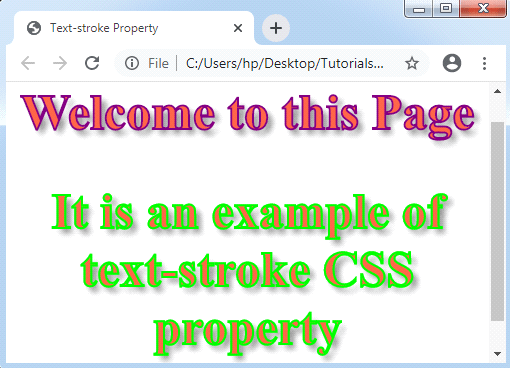
Let’s take another illustration of text-stroke CSS property.

Example:

<!DOCTYPE html>
<html>
<head>
<title> Text-stroke Property </title>
<style>
body
{
 text-align: center;
}
.exp
{
 font-size: 50px;
 -webkit-text-stroke-width: 2px;
 -webkit-text-stroke-color: purple;
 -webkit-text-fill-color: tomato;
 text-shadow: 5px 5px 6px gray;
}
</style>
</head>
<body>
<h1 class= "exp"> Welcome to this Page </h1>
<h2 class= "exp" style= "-webkit-text-stroke-color: lime;"> It is an example of text-stroke CSS property </h2>
</body>
</html>

Output:
Text-stroke

Related Topics

How to make smooth bounce animation using CSS

The smooth bouncing animation project is done with the help of HTML and CSS. This project gives so much fun and excitement to the users. What is HTML? The HTML or HyperText...

2 minutes read.

CSS z-index Property

CSS z-index: CSS z-index permits us to represent any visual hierarchy over a 3D plane that is the z-axis. This index can be applied to describe the positioned element’s stacking...

2 minutes read.

CSS Functions

CSS functions are used for different CSS properties. Every front-end developer should have knowledge of all CSS functions. It makes the coding easier. FunctionsExplanationattr().It returns the value of an attribute of...

5 minutes read.

What is a CSS File?

What is a CSS File and How to use it in Html? CSS: - CSS stands for Cascading Style Sheet. CSS is a file of style sheets that describe the presentation of...

4 minutes read.

CSS Animation

CSS Animation: The animation property of CSS is applied to make animation over any webpage. It is used as the animation replacement made by JavaScript and Flash. Rules of CSS3 @keyframes The...

3 minutes read.

CSS Flex-Box

Introduction The flex-box property of CSS stands for Flexible Box Layout Module. It is specifically used to design a flexible responsive layout. Flex-box is a one dimensional layout model, i.e. it works...

6 minutes read.

What is CSS used for

What is CSS used for? CSS stands for Cascading Style Sheet. CSS is a stylesheet language for web pages. It specifies how a document created in a markup language looks and...

4 minutes read.

CSS Text-Overflow

Introduction: The text-overflow property of CSS is used to format the text which is overflowing the boundaries of the container. This property helps user to clip the text, to display the...

5 minutes read.

CSS Font

CSS Font: CSS has font property, which makes the text more attractive. We can alter the entire look by changing font color, font size, font style, and much more. In...

5 minutes read.

Grid Vs Flexbox in CSS

Grid: - CSS Grid Layout is a 2D grid-based matrix-based layout method with columns and rows that simplifies web pages created by eliminating the need for floats and placement. A grid layout, like...

4 minutes read.

CSS Pseudo-class

Pseudo-class The pseudo-class may be depicted as the keyword which can be mixed to any selector that specifies the elected element’s unique state. It can be included to a selector to...

6 minutes read.

How to include CSS

How to include CSS CSS is included in HTML pages for formatting the documents based on the information inside a style sheet. We can add CSS in HTML documents in the following three ways: Inline...

5 minutes read.

CSS Gradient

CSS Gradient: The CSS gradient property is applied to show the smooth transition inside two specified colors or more than two specified colors. Need of CSS Gradient The following are a few...

4 minutes read.

CSS Page-break-inside Attribute

Page-break-inside Attribute As its name implies, the page-break-before property is applied to include page break inside any element, at the time of printing any document. It adds the page break before...

3 minutes read.

CSS Hover

CSS Hover: CSS :hover is used to select the various elements whenever we point the mouse on these elements. We can also use this selector on all the HTML elements,...

3 minutes read.

CSS Pagination

CSS Pagination The pagination in CSS is an advantageous approach for indexing of a website’s distinct pages over the homepage. When our site contains multiple pages, we must insert a few...

13 minutes read.

CSS Float

CSS Float: The float property of CSS is the positioning property. This property is applied to elements to push them either to left or right. It permits for wrapping facility...

4 minutes read.

How to Set Space between the Flexbox

For managing layout on the Web, CSS Flexbox and CSS Grid are two excellent tools. Flexbox handles one-dimensional layouts quite well, whereas CSS Grid manages two-dimensional layouts with columns and...

4 minutes read.

CSS Background

CSS Background The properties of CSS background are applied to describe the effects of background on the element. Here are five properties of background that affects various elements of HTML: Background-colorBackground-imageBackground-repeatBackground-attachment Background-position Background-color The color of the background...

7 minutes read.

Hover condition for a:before and a:after in CSS

In CSS, :after and :before are used to add content after and before the element. The CSS pseudo-class is used to add some styling effect to the webpage. We can change...

4 minutes read.