CSS Background-blend-mode
Background-blend-mode
The background-blend-mode property sets a blend mode of the component’s every background layer (color/image). It illustrates how the element background image blends well with the element background color. We can use this property to blend images in the background together or blend them with the background color.
The Edge/Internet Explorer does not provide its support to this property.
Syntax:
background-blend-mode: normal | multiply | screen | color-dodge | difference | darken | lighten | saturation | luminosity | overlay | hard-light | soft-light | exclusion | hue | color-burn | color;
This CSS attribute has a huge number of property values, which are discussed and explained below.
normal: This value is a default value. It sets the mode of the property to normal.
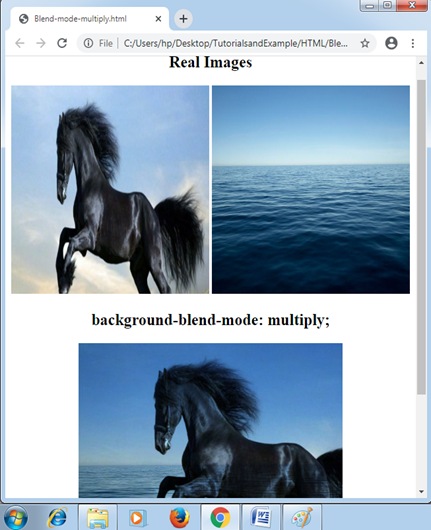
multiply: It can multiply the background image and background color and manage the darker image as compared to before. It sets the mode of blending to multiply.
Example:
<!DOCTYPE html>
<html>
<head>
<style>
#div1 img{
width: 300px;
height: 300px;
}
#example{
  width: 400px;
  height: 400px;
  background-repeat: no-repeat;
  background-image: url("Horse.png"), url("Water.jpg");
  background-blend-mode: multiply;
}
</style>
</head>
<body>
<center>
<div id = "div1">
<h2> Real Images </h2>
<img src = "Horse.png">
<img src = "Water.jpg">
</div>
<h2> background-blend-mode: multiply; </h2>
<div id="example"></div>
</center>
</body>
</html>
Output:
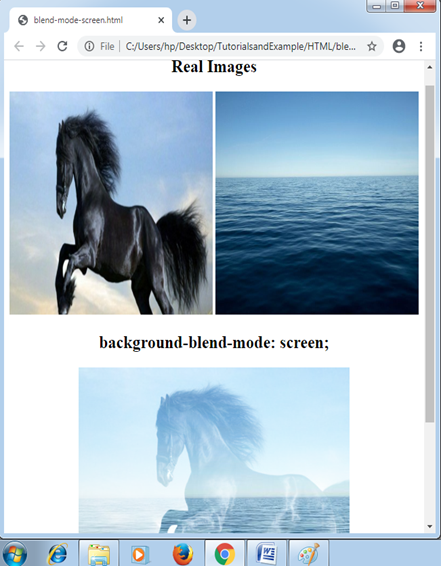
Screen: It sets the mode of blending to screen and change both color and image. Its effect is similar as displaying two images over any projection screen.
Example:
<!DOCTYPE html>
<html>
<head>
<style>
#div1 img
{
 width: 300px;
 height: 300px;
}
#example
{
 width: 400px;
 height: 400px;
 background-repeat: no-repeat;
 background-image: url("Horse.png"), url("Water.jpg");
 background-blend-mode: screen;
}
</style>
</head>
<body>
<center>
<div id= "div1">
<h2> Real Images </h2>
<img src= "Horse.png">
<img src= "Water.jpg">
</div>
<h2> background-blend-mode: screen; </h2>
<div id= "example"></div>
</center>
</body>
</html>
Output:
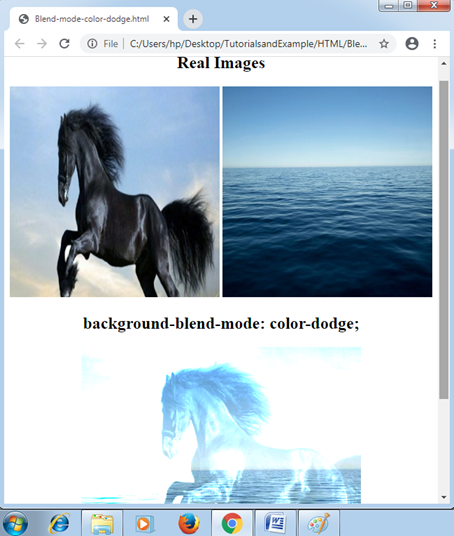
color-dodge: The screen mode is quite similar to this property value. It sets the mode of blending to color-dodge. This mode will produce the outcome by dividing the color of background by transposing the image in the background.
Example:
<!DOCTYPE html>
<html>
<head>
<style>
#div1 img
{
 width: 300px;
 height: 300px;
}
#example
{
 width: 400px;
 height: 400px;
 background-repeat: no-repeat;
 background-image: url("Horse.png"), url("Water.jpg");
 background-blend-mode: color-dodge;
}
</style>
</head>
<body>
<center>
<div id= "div1">
<h2> Real Images </h2>
<img src= "Horse.png">
<img src= "Water.jpg">
</div>
<h2> background-blend-mode: color-dodge; </h2>
<div id= "example"></div>
</center>
</body>
</html>
Output:
difference: It sets the mode of blending to difference. This mode will produce the outcome by subtracting any dark color from any lightest one.
Example:
<!DOCTYPE html>
<html>
<head>
<style>
#div1 img
{
 width: 300px;
 height: 300px;
}
#example
{
 width: 400px;
 height: 400px;
 background-repeat: no-repeat;
 background-image: url("Horse.png"), url("Water.jpg");
 background-blend-mode: difference;
}
</style>
</head>
<body>
<center>
<div id= "div1">
<h2> Real Images </h2>
<img src= "Horse.png">
<img src= "Water.jpg">
</div>
<h2> background-blend-mode: difference; </h2>
<div id= "example"></div>
</center>
</body>
</html>
Output:
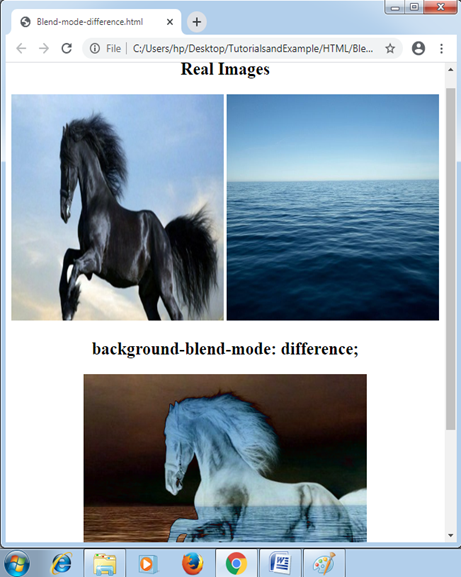
darken: It sets the mode of blending to darken.
Example:
<!DOCTYPE html>
<html>
<head>
<style>
#div1 img
{
 width: 300px;
 height: 300px;
}
#example
{
 width: 400px;
 height: 400px;
 background-repeat: no-repeat;
 background-image: url("Horse.png"), url("Water.jpg");
 background-blend-mode: darken;
}
</style>
</head>
<body>
<center>
<div id= "div1">
<h2> Real Images </h2>
<img src= "Horse.png">
<img src= "Water.jpg">
</div>
<h2> background-blend-mode: darken; </h2>
<div id= "example"></div>
</center>
</body>
</html>
Output:
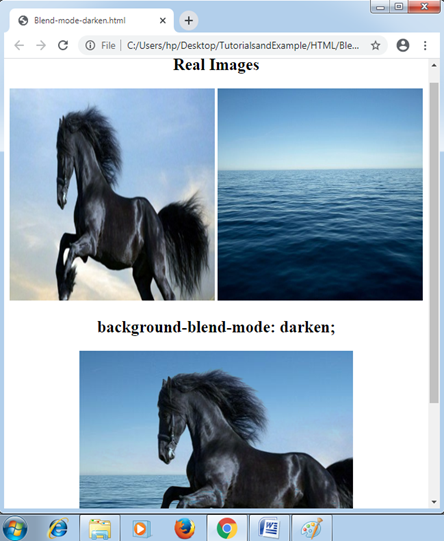
lighten: It sets the mode of blending to lighten.
Example:
<!DOCTYPE html>
<html>
<head>
<style>
#div1 img
{
 width: 300px;
 height: 300px;
}
#example
{
 width: 400px;
 height: 400px;
 background-repeat: no-repeat;
 background-image: url("Horse.png"), url("Water.jpg");
 background-blend-mode: lighten;
}
</style>
</head>
<body>
<center>
<div id= "div1">
<h2> Real Images </h2>
<img src= "Horse.png">
<img src= "Water.jpg">
</div>
<h2> background-blend-mode: lighten; </h2>
<div id= "example"></div>
</center>
</body>
</html>
Output:
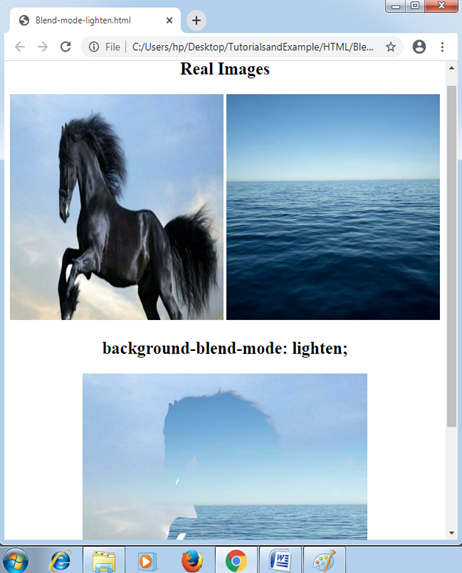
saturation: Its ultimate result will be the color of top saturation, while with the use of luminosity and hue of the color of bottom.
Example:
<!DOCTYPE html>
<html>
<head>
<style>
#div1 img
{
 width: 300px;
 height: 300px;
}
#example
{
 width: 400px;
 height: 400px;
 background-repeat: no-repeat;
 background-image: url("Horse.png"), url("Water.jpg");
 background-blend-mode: saturation;
}
</style>
</head>
<body>
<center>
<div id= "div1">
<h2> Real Images </h2>
<img src= "Horse.png">
<img src= "Water.jpg">
</div>
<h2> background-blend-mode: saturation; </h2>
<div id= "example"></div>
</center>
</body>
</html>
Output:
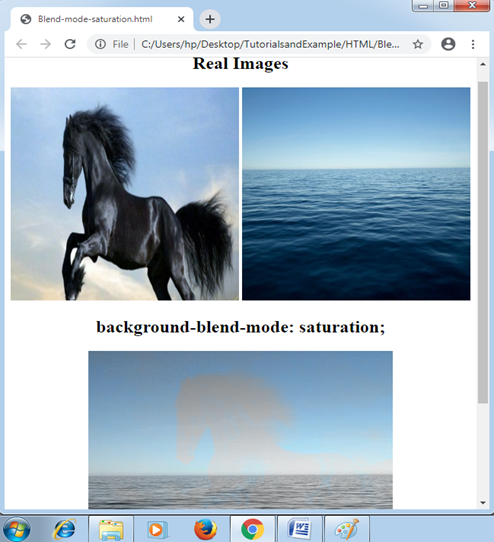
luminosity: This value sets the mode of blending to luminosity. Its ultimate result will be the color of top luminosity, while with the use of saturation and hue of the color of bottom.
Example:
<!DOCTYPE html>
<html>
<head>
<style>
#div1 img
{
 width: 300px;
 height: 300px;
}
#example
{
 width: 400px;
 height: 400px;
 background-repeat: no-repeat;
 background-image: url("Horse.png"), url("Water.jpg");
 background-blend-mode: luminosity;
}
</style>
</head>
<body>
<center>
<div id= "div1">
<h2> Real Images </h2>
<img src= "Horse.png">
<img src= "Water.jpg">
</div>
<h2> background-blend-mode: luminosity; </h2>
<div id= "example"></div>
</center>
</body>
</html>
Output:
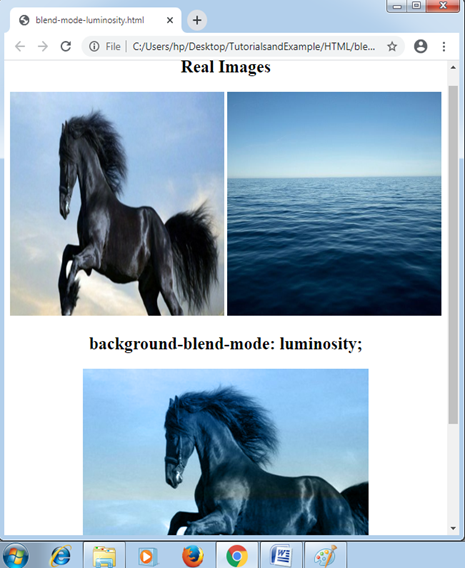
overlay: This property value sets the mode of blending to overlay.
Example:
<!DOCTYPE html>
<html>
<head>
<style>
#div1 img
{
 width: 300px;
 height: 300px;
}
#example
{
 width: 400px;
 height: 400px;
 background-repeat: no-repeat;
 background-image: url("Horse.png"), url("Water.jpg");
 background-blend-mode: overlay;
}
</style>
</head>
<body>
<center>
<div id= "div1">
<h2> Real Images </h2>
<img src= "Horse.png">
<img src= "Water.jpg">
</div>
<h2> background-blend-mode: overlay; </h2>
<div id= "example"></div>
</center>
</body>
</html>
Output:
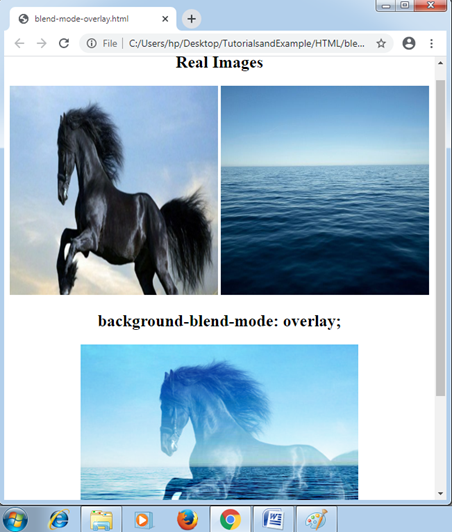
hard-light: This value sets the mode of blending to the hard-light.
Example:
<!DOCTYPE html>
<html>
<head>
<style>
#div1 img
{
 width: 300px;
 height: 300px;
}
#example
{
 width: 400px;
 height: 400px;
 background-repeat: no-repeat;
 background-image: url("Horse.png"), url("Water.jpg");
 background-blend-mode: hard-light;
}
</style>
</head>
<body>
<center>
<div id= "div1">
<h2> Real Images </h2>
<img src= "Horse.png">
<img src= "Water.jpg">
</div>
<h2> background-blend-mode: hard-light; </h2>
<div id= "example"></div>
</center>
</body>
</html>
Output:
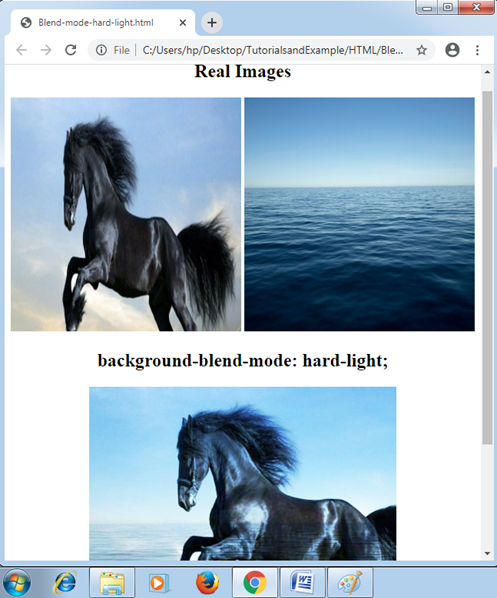
soft-light: This value sets the mode of blending to the soft-light.
Example:
<!DOCTYPE html>
<html>
<head>
<style>
#div1 img
{
 width: 300px;
 height: 300px;
}
#example
{
 width: 400px;
 height: 400px;
 background-repeat: no-repeat;
 background-image: url("Horse.png"), url("Water.jpg");
 background-blend-mode: soft-light;
}
</style>
</head>
<body>
<center>
<div id= "div1">
<h2> Real Images </h2>
<img src= "Horse.png">
<img src= "Water.jpg">
</div>
<h2> background-blend-mode: soft-light; </h2>
<div id= "example"></div>
</center>
</body>
</html>
Output:
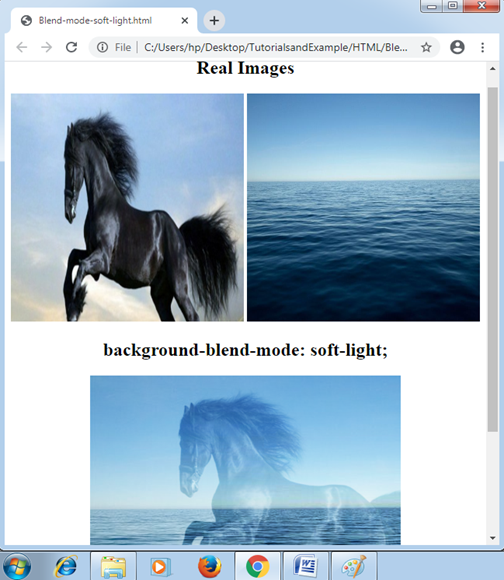
exclusion: It sets the mode of blending to exclusion.
Example:
<!DOCTYPE html>
<html>
<head>
<style>
#div1 img
{
 width: 300px;
 height: 300px;
}
#example
{
 width: 400px;
 height: 400px;
 background-repeat: no-repeat;
 background-image: url("Horse.png"), url("Water.jpg");
 background-blend-mode: exclusion;
}
</style>
</head>
<body>
<center>
<div id= "div1">
<h2> Real Images </h2>
<img src= "Horse.png">
<img src= "Water.jpg">
</div>
<h2> background-blend-mode: exclusion; </h2>
<div id= "example"></div>
</center>
</body>
</html>
Output:
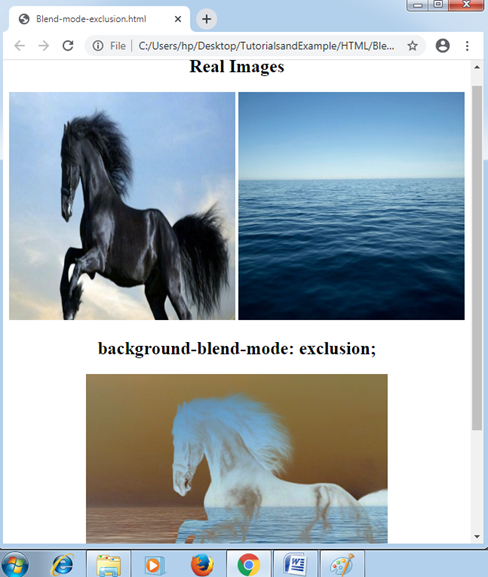
hue: Its outcome is the hue’s background-image combination along with the saturation and luminosity of any background-color.
Example:
<!DOCTYPE html>
<html>
<head>
<style>
#div1 img
{
 width: 300px;
 height: 300px;
}
#example
{
 width: 400px;
 height: 400px;
 background-repeat: no-repeat;
 background-image: url("Horse.png"), url("Water.jpg");
 background-blend-mode: hue;
}
</style>
</head>
<body>
<center>
<div id= "div1">
<h2> Real Images </h2>
<img src= "Horse.png">
<img src= "Water.jpg">
</div>
<h2> background-blend-mode: hue; </h2>
<div id= "example"></div>
</center>
</body>
</html>
Output:
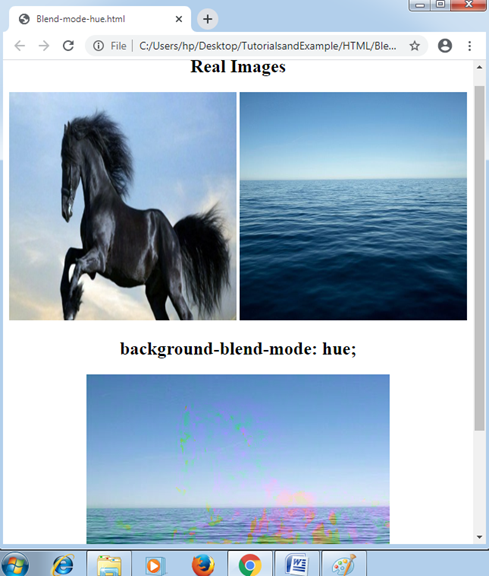
color-burn: It sets the mode of blending to color-burn.
Example:
<!DOCTYPE html>
<html>
<head>
<style>
#div1 img
{
 width: 300px;
 height: 300px;
}
#example
{
 width: 400px;
 height: 400px;
 background-repeat: no-repeat;
 background-image: url("Horse.png"), url("Water.jpg");
 background-blend-mode: color-burn;
}
</style>
</head>
<body>
<center>
<div id= "div1">
<h2> Real Images </h2>
<img src= "Horse.png">
<img src= "Water.jpg">
</div>
<h2> background-blend-mode: color-burn; </h2>
<div id= "example"></div>
</center>
</body>
</html>
Output:
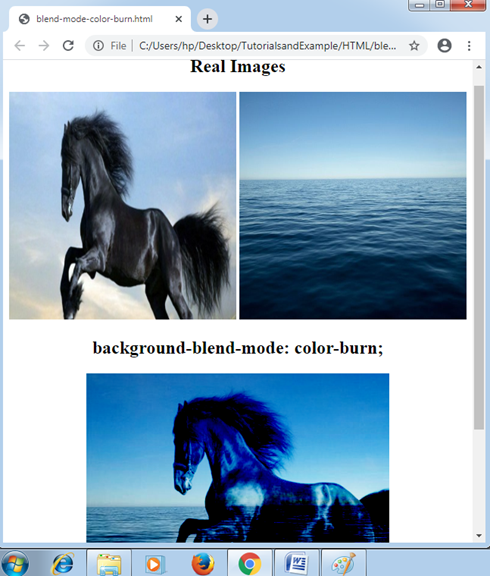
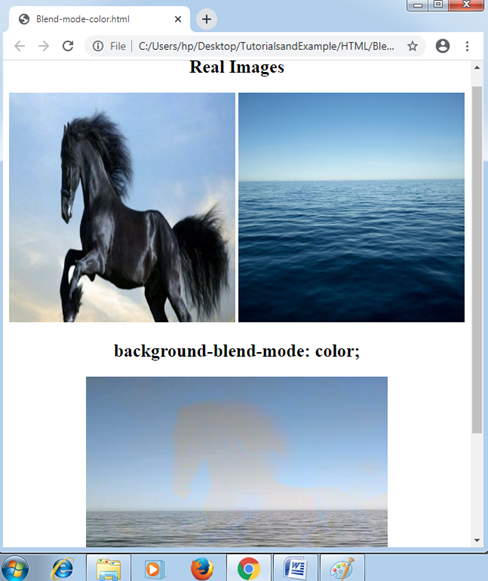
Color: It can set the mode of blending to color. It carries the saturation and hue of any background-image and any background-color’s luminosity.
Example:
<!DOCTYPE html>
<html>
<head>
<style>
#div1 img
{
 width: 300px;
 height: 300px;
}
#example
{
 width: 400px;
 height: 400px;
 background-repeat: no-repeat;
 background-image: url("Horse.png"), url("Water.jpg");
 background-blend-mode: color;
}
</style>
</head>
<body>
<center>
<div id= "div1">
<h2> Real Images </h2>
<img src= "Horse.png">
<img src= "Water.jpg">
</div>
<h2> background-blend-mode: color; </h2>
<div id= "example"></div>
</center>
</body>
</html>
Output: