CSS Text Effects
Text Effects in CSS
We can use distinct text effects used inside the HTML document. Few attributes can be applied to insert the text effects.
We can also style various web documents that will affect distinct text with the help of CSS. The text effect properties support us in designing the text clear and attractive. We are listing some essential CSS text effect properties below:
- word-wrap
- word-break
- text-overflow
- writing-mode
Let’s explain the above properties one by one, along with an example.
word-wrap
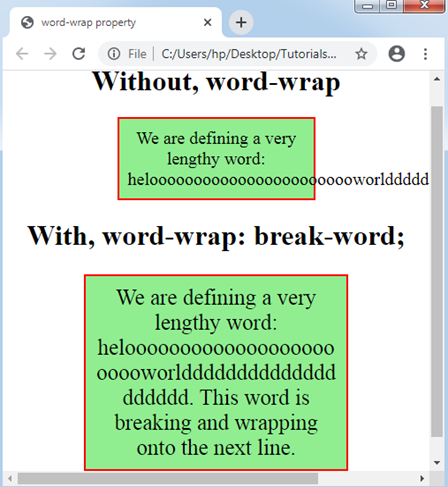
It is applied for breaking any lengthy word and, after that, wrap towards any next line. The word-wrap attribute can be used to avoid the overflow if any unbreakable word is too lengthy to fit within any containing box.
Syntax:
word-wrap: normal| break-word| inherit ;
Property Values
normal: It is applied to break the words at permitted breakpoints only.
break-word: This property of CSS is applied to break distinct unbreakable words.
initial: It sets this attribute to the default value.
inherit: It is used to acquire this attribute by its parent component.
Example:
<!DOCTYPE html>
<html>
<head>
<title> word-wrap property </title>
<style>
.exp
{
 width: 200px;
 border: 2px solid red;
 padding: 10px;
 font-size: 20px;
 background-color: lightgreen;
}
.exp1
{
 width: 11em;
 border: 2px solid red;
 padding: 10px;
 word-wrap: break-word;
 font-size: 25px;
 background-color: lightgreen;
}
</style>
</head>
<center>
<body>
<h1> Without, word-wrap </h1>
<p class= "exp"> We are defining a very lengthy word:
heloooooooooooooooooooooooworldddddddddddddddddddd.
</p>
<h1> With, word-wrap: break-word; </h1>
<p class= "exp1"> We are defining a very lengthy word:
heloooooooooooooooooooooooworldddddddddddddddddddd. This word is breaking and wrapping onto the next line.
</p>
</body>
</center>
</html>
Output:
word-break
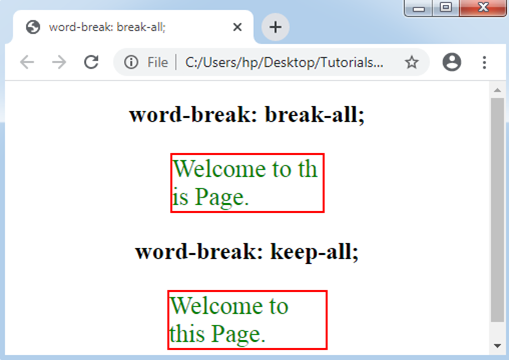
This CSS property describes how words must break at any line’s end. The rules of line break can be defined using this property.
Syntax:
word-break: normal |keep-all | break-all | inherit ;
Note: The normal value is its default value. Thus, it will automatically apply when we do not define the value.
Property Values
keep-all: This value is used to break any word to its default style.
break-all: This property value adds any word break among many characters to avoid any kind of word overflow.
Example:
<!DOCTYPE html>
<html>
<head>
<title> word-break: break-all; </title>
<style>
.exp
{
 width: 150px;
 border: 2px solid red;
 word-break: break-all;
 text-align: left;
 font-size: 25px;
 color: green;
}
.exp1
{
 width: 156px;
 border: 2px solid red;
 word-break: keep-all;
 text-align: left;
 font-size: 25px;
 color: green;
}
</style>
</head>
<center>
<body>
<h2> word-break: break-all; </h2>
<p class= "exp">
 Welcome to this Page.
</p>
<h2> word-break: keep-all; </h2>
<p class= "exp1">
 Welcome to this Page.
</p>
</body>
</center>
</html>
Output:
text-overflow
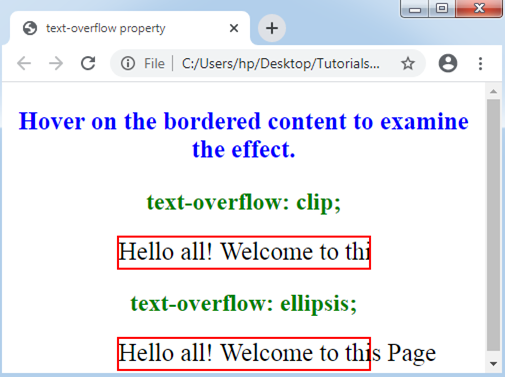
It describes the illustration of overflowed content, which is invisible to any user. This CSS property indicates the user regarding the text that is invisible. It supports us to determine whether the content must be cut or display few dots (ellipsis).
Note: It does not apply by its own. We need to apply overflow: hidden; and white-space: nowrap; along with this attribute.
Syntax:
text-overflow: clip | ellipsis;
Property Values
clip: This value is a default value. It is sued to clip the overflowed content.
ellipsis: It shows three dots (…) or ellipsis to display the clipped content. This value is shown inside the area, reducing the txt amount.
Example:
<!DOCTYPE html>
<html>
<head>
<title> text-overflow property </title>
<style>
.exp
{
 white-space: nowrap;
 height: 30px;
 width: 250px;
 overflow: hidden;
 border: 2px solid red;
 font-size: 25px;
 text-overflow: clip;
}
.exp1
{
 white-space: nowrap;
 height: 30px;
 width: 250px;
 overflow: hidden;
 border: 2px solid red;
 font-size: 25px;
 text-overflow: ellipsis;
}
h2
{
 color: green;
}
div:hover
{
 overflow: visible;
}
p
{
 font-size: 25px;
 font-weight: bold;
 color: blue;
}
</style>
</head>
<center>
<body>
<p> Hover on the bordered content to examine the effect. </p>
<h2> text-overflow: clip; </h2>
<div class= "exp"> Hello all! Welcome to this Page </div>
<h2> text-overflow: ellipsis; </h2>
<div class= "exp1"> Hello all! Welcome to this Page </div>
</body>
</center>
</html>
Output:
writing-mode
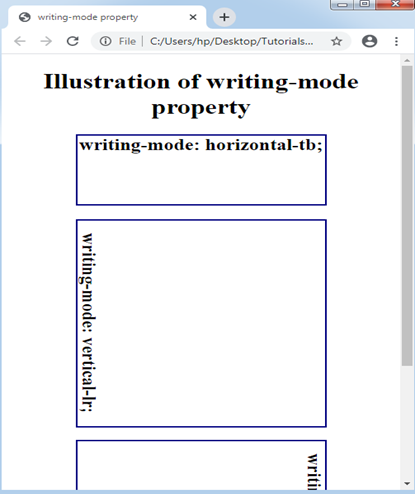
This property describes that the content will be specified either in vertical or horizontal direction. If the specified direction is horizontal, then it will be from right to left (vertical-rl) or from left to right (vertical-lr).
Syntax:
writing-mode: horizontal-tb | vertical-lr | vertical-rl | inherit ;
Property Values
horizontal-tb: This property value is used as default value for this property, where the content will be in the horizontal direction. It will be consider from top to bottom and left to right.
vertical-rl: This value is used to show the content in vertical direction. The content will be consider from top to bottom and right to left.
vertical-lr: This value is same as the vertical-rl, although the content will be consider from the left side to the right side.
Example:
<!DOCTYPE html>
<html>
<head>
<title> writing-mode property </title>
<style>
h2
{
 border: 2px solid navy;
 width: 300px;
 height: 100px;
}
#tb
{
writing-mode: horizontal-tb;
}
#lr
{
writing-mode: vertical-lr;
}
#rl
{
writing-mode: vertical-rl;
}
</style>
</head>
<center>
<body>
<h1> Illustration of writing-mode property </h1>
<h2 id= "tb"> writing-mode: horizontal-tb; </h2>
<h2 id= "lr" style= "height: 300px;"> writing-mode: vertical-lr; </h2><br>
<h2 id= "rl" style= "height: 300px;"> writing-mode: vertical-rl; </h2>
</body>
</center>
</html>
Output: