
×

CSS z-index Property

CSS z-index: CSS z-index permits us to represent any visual hierarchy over a 3D plane that is the z-axis. This index can be applied to describe the positioned element’s stacking order (these are the elements whose value of the position is sticky, relative, absolute, or fixed). The order of the stacking means that any place of a component over the z-axis, perpendicular to a screen.

It will depict the order of an element when they overlap with each other.

Syntax:

z-index: number|auto|inherit|initial;  

Property Values

number: This property value defines the stack level of an element, which will help to set any given value. It permits the use of negative values.

auto: This property value defines the stack’s order is equal to its parent, that is the default value.

Let’s try to examine this concept using the following illustrations.

Example:

<!DOCTYPE html>  
<html>  
<head>  
<style>  
div
{ 
position:fixed; 
width:550px; 
height:300px; 
z-index:20; 
background-color: violet; 
} 
img
{ 
position:relative; 
z-index:22; 
} 
h1
{ 
position:relative; 
z-index:28; 
color:purple; 
} 
</style>  
</head>  
<body> 
<div></div> 
<img src="Flower1.jpg"></img> 
<h1> Welcome to the Tutorial and Example </h1> 
</body>  
</html> 

Output:
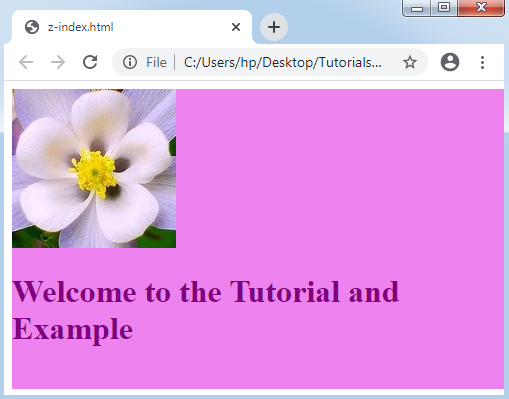
CSS z index Property

Related Topics

CSS Image Gallery

Image galleries are used to display and store collections of images. Example Let’s discuss an example. CSS was used to create the following image gallery: Code is as follows: <html> <head> <style> div.gallery {   margin: 6px;   border: 1px...

5 minutes read.

CSS Counters

CSS Counters: The CSS counter property is similar to the variables. CSS counters are controlled via CSS, and its values are incremented via rules of CSS to record how much...

4 minutes read.

CSS 2d Transform

Transform property in CSS is used mainly for enhancing the effects and to animate the elements. Transform is an effect that changes the shape, size and position of an element. It helps...

6 minutes read.

Untitled Reusable Block

  ...

1 minute read.

How to change the font in CSS

How to change the font in CSS? Professionals can't deny typefaces — how users organize and style text — if we want to completely customize the website's design. One may wish...

4 minutes read.

CSS Text Effects

Text Effects in CSS We can use distinct text effects used inside the HTML document. Few attributes can be applied to insert the text effects. We can also style various web documents...

5 minutes read.

CSS Tutorial

CSS refers to the Cascading Style Sheet. CSS is a form of a programming language. In other words, CSS is a language of the style sheet that is utilised for...

9 minutes read.

CSS Line Height

CSS Line Height: This property in CSS can be used to describe the line box’s minimal height inside the element. It sets-up the distinction among two lines in our content. It...

3 minutes read.

CSS Margin

CSS Margin: The CSS margin property is employed to describe the space throughout the elements. It clears the range throughout the element. These properties do not have a background color...

2 minutes read.

CSS Transition

CSS Transition The transitions in CSS are influenced, included to modify the component from one design to another, without the use of the JavaScript or Flash. We should describe two of the...

2 minutes read.

CSS Form

You can create attractive HTML form by using CSS. Style input Fields The Input Field width properties are used to determine the width of the input field. Let us see an example of CSS style...

2 minutes read.

CSS Sticky

CSS Sticky The position property in CSS is applied to set an element’s position. This property is also applied to position an element behind the other element. It is useful for...

1 minute read.

What is Bootstrap CSS?

Bootstrap: - Bootstrap is a CSS framework that is free to use and is used for the front-end development of the website in a faster and easier way. Bootstrap was released as...

3 minutes read.

CSS Inline

What is CSS? CSS is an acronym for Cascading Style Sheets. CSS is the language that we use to style an HTML document. It specifies how HTML components should appear. CSS...

4 minutes read.

CSS Vertical Align

Vertical Align The vertical align CSS property describes the cell box of the table and an inline alignment vertically. This property is a self-explanatory and an essential property in CSS. But,...

2 minutes read.

CSS Superscript and Subscript

Superscript and Subscript To specify the superscript and the subscript text, HTML provides us two tags that are <sup> and <sub>. The superscript content looks in the shorter font and half...

2 minutes read.

CSS Visibility

Visibility in CSS: This visibility property in CSS is employed to describe whether the components are visible or not. Note: An invisible component also grabs the space over the page. If...

2 minutes read.

Css Box Model

Introduction The Box Model property of CSS is used for design and layout of an html page. In CSS, all the elements has a rectangular box around it, you have to...

5 minutes read.

CSS Table

CSS table provides better look and feel. There are various properties of CSS table that are given below. border border-collapse padding width height text-align color background-color CSS Table Border You can set...

4 minutes read.

CSS Introduction

CSS stands for Cascading Style Sheet. It is a design language which is used to design the web pages. It was developed by Håkon Wium Lie on October 10, 1994. It provides...

1 minute read.